Introduction
The MEINIAO A2 Karaoke Microphone is a versatile, handheld portable Bluetooth microphone designed for various audio activities including karaoke, music playback, and recording. Featuring a digital screen for easy operation and wide compatibility with iOS, Android, and PC devices, this microphone enhances your audio experience with multiple sound effects and convenient connectivity.

Image: The MEINIAO A2 Karaoke Microphone, showcasing its sleek design and digital display.
Setup
Unboxing and Initial Charge
Upon receiving your MEINIAO A2 Karaoke Microphone, please verify all components are present and charge the device fully before first use.
- Open the package and remove the microphone and accessories.
- Connect the provided USB charging cable to the microphone's USB charging port (10) and a suitable USB power adapter.
- Allow the microphone to charge until the battery indicator on the digital screen shows a full charge.

Image: The complete package contents, including the microphone, portable canvas bag, adapter cable, power cable, and instruction manual.
Bluetooth Pairing
The MEINIAO A2 microphone utilizes Bluetooth 5.0 for stable wireless connection to your devices.
- Ensure the microphone is charged and powered on by pressing the ON/OFF/Listen button (8).
- Activate Bluetooth on your smartphone, tablet, or PC.
- Search for available Bluetooth devices. The microphone will appear as "MEINIAO A2" or similar.
- Select the microphone from the list to pair. A confirmation sound or message on the digital screen (2) will indicate successful pairing.
- Once paired, you can play music from your device through the microphone's built-in speakers.

Image: The microphone demonstrating its wide compatibility with Bluetooth 5.0, supporting iOS, Android, HarmonyOS, and popular music/karaoke applications like Spotify, TikTok, YouTube, WeSing, Smule, and StarMaker.
Operating Instructions
Controls Overview
Familiarize yourself with the microphone's control buttons for optimal use.
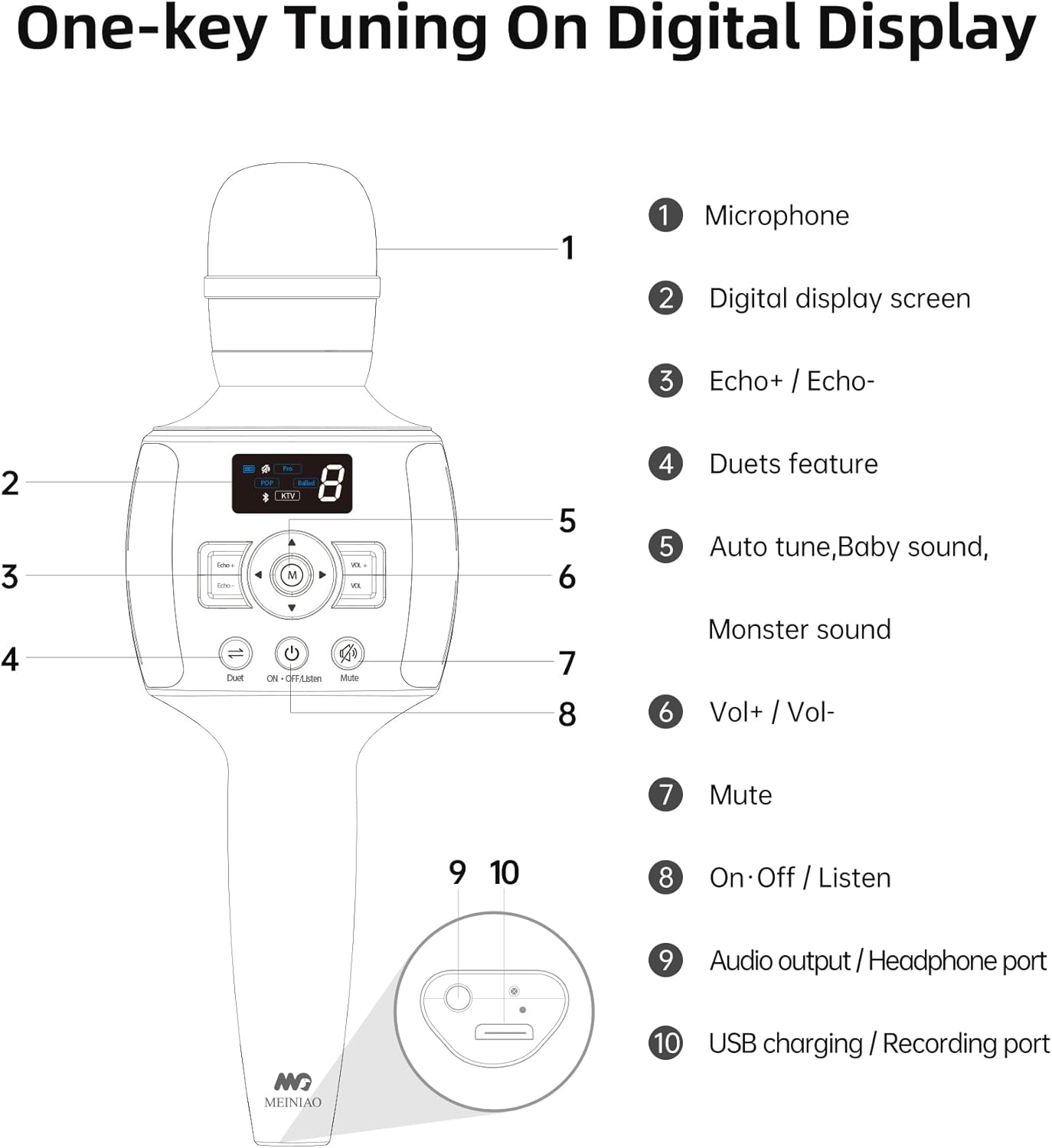
Image: A detailed diagram labeling the microphone's components and controls: (1) Microphone, (2) Digital display screen, (3) Echo+ / Echo-, (4) Duets feature, (5) Auto tune, Baby sound, Monster sound, (6) Vol+ / Vol-, (7) Mute, (8) On/Off/Listen, (9) Audio output/Headphone port, (10) USB charging/Recording port.
- ON/OFF/Listen Button (8): Press and hold to power on/off. Short press to switch between listening modes.
- Digital Display Screen (2): Shows current mode, battery level, and volume.
- Echo+ / Echo- Buttons (3): Adjust the echo effect level.
- Vol+ / Vol- Buttons (6): Adjust the microphone's vocal volume.
- Mute Button (7): Mutes the microphone input.
- Duets Feature Button (4): Activates duet mode for connecting two microphones.
- Mode Button (M): Cycles through various sound effects like Pro, POP, Ballad, KTV, Auto tune, Baby sound, and Monster sound.
Sound Modes and Effects
The MEINIAO A2 offers 7 distinct sound modes and various effects to customize your audio experience.
- Press the Mode (M) button to cycle through:
- Pro: Professional vocal mode.
- POP: Pop music vocal mode.
- Ballad: Ballad vocal mode.
- KTV: Karaoke room simulation mode.
- Auto tune: Automatically corrects pitch.
- Baby sound: Transforms voice to a higher pitch.
- Monster sound: Transforms voice to a lower pitch.
- Use the Echo+ / Echo- buttons to fine-tune the reverb effect to your preference.
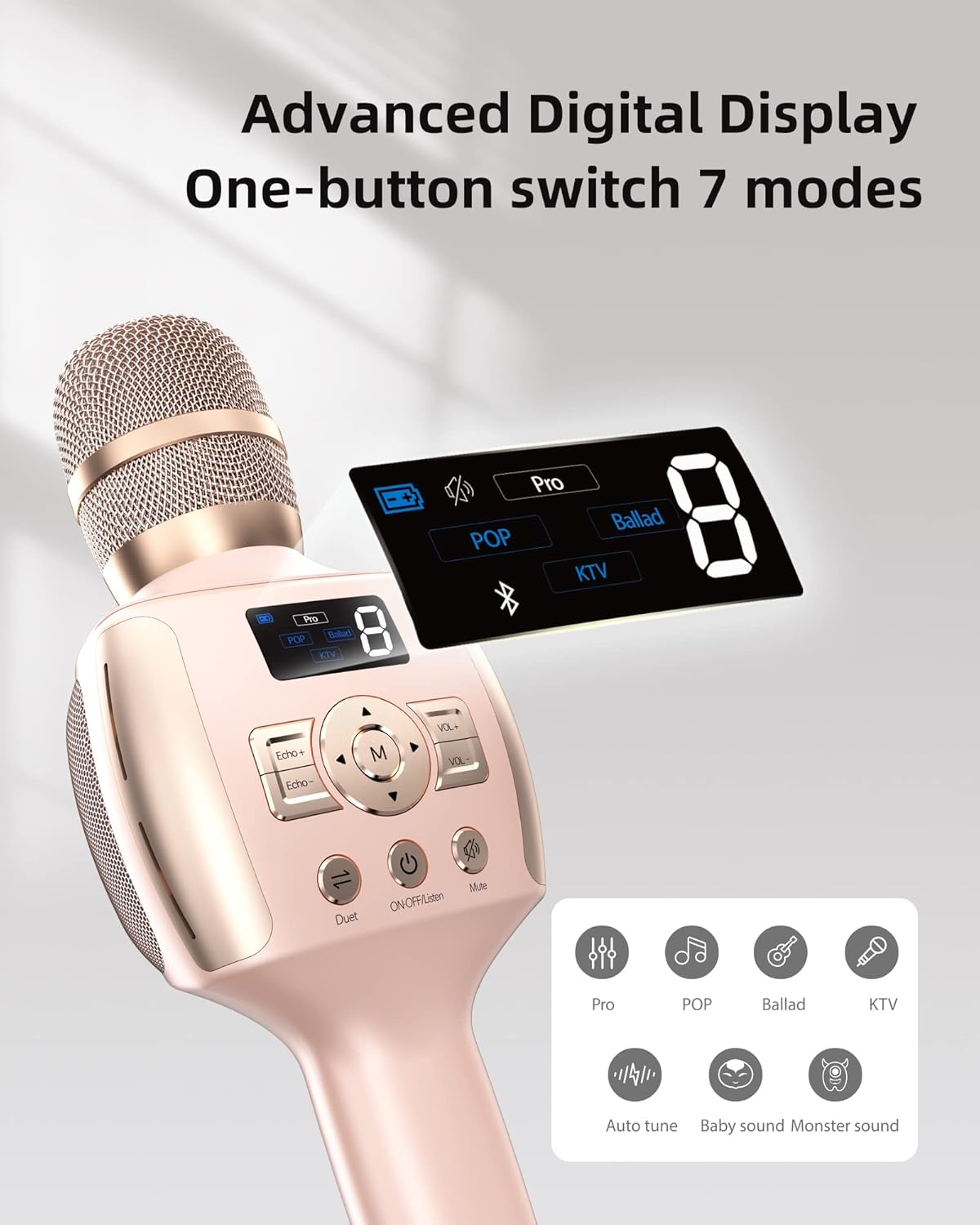
Image: The microphone's digital display highlighting the different sound modes available, including Pro, POP, Ballad, and KTV, along with icons for Auto tune, Baby sound, and Monster sound.
Duet Mode
For an enhanced karaoke experience, two MEINIAO A2 microphones can be paired together for duet performances.
- Ensure both microphones are powered on and not connected to any other Bluetooth devices.
- On one microphone, short press the Duets feature button (4). The digital screen will indicate it's searching for another microphone.
- On the second microphone, short press the Duets feature button (4).
- The two microphones will automatically pair with each other. A confirmation sound will indicate successful pairing.
- Once paired, connect one of the microphones to your Bluetooth device (smartphone, tablet, etc.) as usual. Both microphones will now output audio from the connected device and their respective vocal inputs.

Image: Two MEINIAO A2 microphones, one pink and one blue, illustrating the one-click pairing connection for duet mode, allowing two users to sing together.
Recording Function
The microphone supports recording your performances directly to a connected device.
- Connect the microphone to your recording device (smartphone, PC) using the provided USB recording 3.5mm cable via the USB charging/Recording port (10).
- Open your preferred recording application on your device.
- Ensure the microphone is selected as the audio input source within the recording application settings.
- Begin recording your vocals and music.
Maintenance
- Cleaning: Use a soft, dry cloth to wipe the microphone's surface. Do not use liquid cleaners or abrasive materials.
- Storage: Store the microphone in its portable canvas bag in a cool, dry place away from direct sunlight and extreme temperatures.
- Battery Care: To prolong battery life, avoid fully discharging the battery frequently. Charge the microphone regularly, even if not in use for extended periods.
- Handling: Avoid dropping the microphone or subjecting it to strong impacts, as this can damage internal components.
Troubleshooting
| Problem | Possible Cause | Solution |
|---|---|---|
| Microphone does not power on. | Low battery or power button not held long enough. | Charge the microphone fully. Press and hold the ON/OFF/Listen button for 3-5 seconds. |
| Cannot pair via Bluetooth. | Bluetooth not enabled on device, microphone not in pairing mode, or too far from device. | Ensure Bluetooth is on. Power cycle the microphone. Move closer to the device. Forget previous pairings on your device and try again. |
| No sound from microphone. | Microphone volume too low, muted, or incorrect mode selected. | Increase microphone volume (Vol+). Check if the Mute button is active. Cycle through sound modes (M button). |
| Music playback is distorted or low volume. | Device volume too low, or interference. | Adjust volume on your connected device. Ensure no obstacles between microphone and device. |
| Echo effect is always present, even when turned off. | Inherent characteristic of the microphone's sound processing. | While the echo level can be adjusted, a minimal echo may still be present due to the microphone's design for karaoke use. |
Specifications
| Feature | Detail |
|---|---|
| Model Name | A2 |
| Brand | MEINIAO |
| Connectivity Technology | Bluetooth 5.0, Auxiliary |
| Microphone Form Factor | Handheld |
| Power Source | Battery Powered (1 Lithium Ion battery included) |
| Battery Life (Karaoke) | Up to 6 hours |
| Battery Life (Music Playback) | Up to 8 hours |
| Audio Sensitivity | 52 dB |
| Signal-to-Noise Ratio | 83 dB |
| Frequency Range | Music: 20Hz - 20KHz, Vocal: 50Hz - 13.5KHz |
| Impedance | 4 Ohm |
| Material | Plastic |
| Item Weight | 12 Ounces |
| Special Feature | Digital screen display, 7 sound effects, Duet mode, Built-in sound card, Smart noise reduction |
| Compatible Devices | Laptop, PC, Smartphone (iOS, Android, HarmonyOS) |
Warranty and Support
MEINIAO products are designed for durability and performance. For specific warranty details, please refer to the warranty card included in your product packaging or contact MEINIAO customer support.
- User Guide (PDF): A comprehensive user guide in PDF format is available for download. You can access it via this link: MEINIAO A2 User Guide PDF.
- Customer Support: For technical assistance, troubleshooting, or warranty claims, please contact MEINIAO customer service through the contact information provided on the official MEINIAO website or your purchase platform.


