
1. Introduction
Welcome to the world of astronomy with your new Alkinshue 70mm Aperture 400mm Refractor Telescope. This manual provides essential information for assembling, operating, and maintaining your telescope to ensure optimal viewing experiences. Designed for astronomy beginners, this portable telescope offers powerful optical performance for observing celestial objects.

Figure 1: Alkinshue 70mm Refractor Telescope and included accessories.
2. Package Contents
Before assembly, please verify that all components listed below are present in your package:
- Telescope body
- Adjustable Aluminum Tripod
- H20mm Eyepiece (15X magnification)
- H6mm Eyepiece (50X magnification)
- 3X Barlow Lens (increases magnification up to 150X)
- 5x24 Finder Scope with mounting bracket
- Smartphone Adapter
- Wireless Camera Remote
- Microfiber Cleaning Cloth
- Instruction Manual
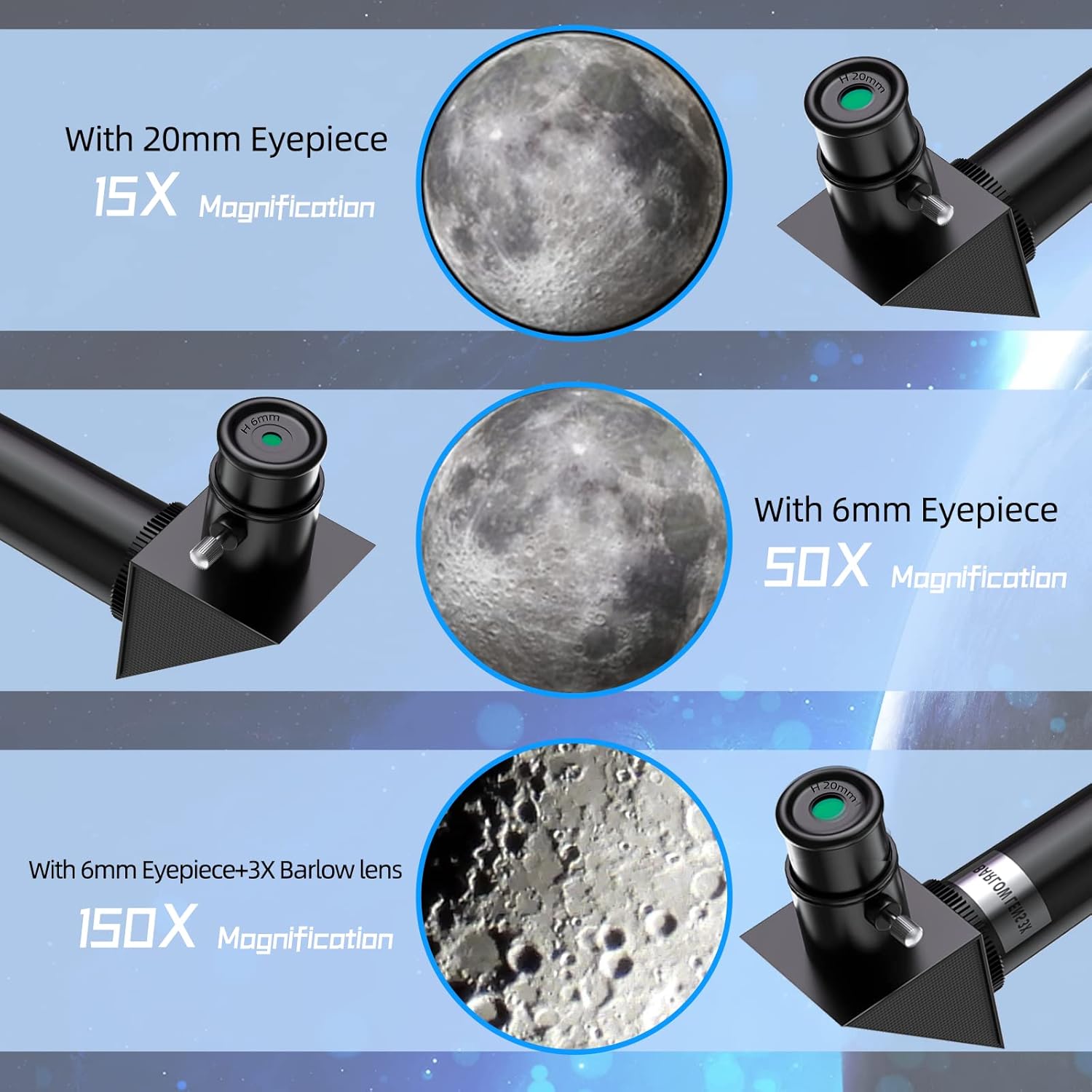
Figure 2: Included eyepieces and Barlow lens for varied magnification.
3. Setup and Assembly
Follow these steps to assemble your telescope:
- Unpack Components: Carefully remove all parts from the carrying case and packaging.
- Set Up the Tripod: Extend the tripod legs to your desired height and secure them using the leg locks. Ensure the tripod is stable on a flat surface.
- Attach the Telescope Tube: Mount the main telescope tube onto the tripod's mounting platform. Secure it firmly with the provided screws or clamps.
- Install the Finder Scope: Attach the 5x24 finder scope to its designated bracket on the main telescope tube.
- Insert the Eyepiece: Choose an eyepiece (start with the H20mm for wider views) and insert it into the diagonal prism at the end of the telescope tube. Secure it with the small screw.
- Attach Smartphone Adapter (Optional): If using the smartphone adapter, attach it to the eyepiece. Place your smartphone securely in the adapter.

Figure 3: Visual guide for attaching the smartphone adapter.
4. Operating the Telescope
4.1 Aligning the Finder Scope
The finder scope helps locate objects before viewing them through the main telescope. To align it:
- Point the main telescope at a distant, easily identifiable object (e.g., a tree or building) during daylight.
- Look through the main telescope's eyepiece and center the object in the field of view.
- Now, look through the finder scope. Adjust its alignment screws until the same object is centered in the finder scope's crosshairs.
4.2 Focusing and Magnification
To achieve a clear image:
- Start with the lowest magnification eyepiece (H20mm) for a wider field of view, making it easier to locate objects.
- Use the focus knob on the telescope tube to bring the image into sharp focus.
- Once the object is centered and focused, you can switch to a higher magnification eyepiece (H6mm) or use the 3X Barlow lens for a closer view. Re-adjust focus as needed.
Figure 4: Magnification examples with different eyepieces.
4.3 Adjusting Viewing Angle
The telescope features an adjustable handle for precise vertical and horizontal movements. Loosen the handle to adjust the angle, then tighten it to secure the telescope in position.

Figure 5: Telescope angle adjustment mechanism.
5. Maintenance
Proper care ensures the longevity and performance of your telescope:
- Lens Cleaning: Use the provided microfiber cleaning cloth to gently wipe dust or smudges from the lenses. Avoid using abrasive materials or harsh chemicals.
- Storage: When not in use, store the telescope and its accessories in the carrying case in a dry, dust-free environment. Keep lens caps on to protect the optics.
- Handling: Always handle the telescope with care to prevent accidental drops or impacts.
6. Troubleshooting
If you encounter issues, refer to these common solutions:
- Blurry Image: Adjust the focus knob slowly until the image is sharp. Ensure the correct eyepiece is securely inserted.
- Difficulty Locating Objects: Verify that the finder scope is properly aligned with the main telescope. Start with the lowest magnification eyepiece.
- No Image Visible: Ensure all lens caps are removed from both the main telescope and the eyepiece. Check for obstructions in the light path.
- Unstable View: Ensure the tripod legs are fully extended and locked, and the telescope is securely mounted.
7. Specifications
| Feature | Specification |
|---|---|
| Brand | Alkinshue |
| Model Name | RM (40070) |
| Optical Design | Refractor Telescope |
| Aperture Diameter | 70 Millimeters |
| Focal Length | 400mm |
| Magnification Range | 15X-150X (with included eyepieces and Barlow lens) |
| Eyepiece Lens Description | H20mm, H6mm, 3X Barlow |
| Finderscope | 5x24 Reflex |
| Telescope Mount Description | Altazimuth Mount |
| Focus Type | Manual Focus |
| Product Dimensions | 25.59 x 9.84 x 5.91 inches |
| Item Weight | 5.49 pounds |
| Power Source | Battery Powered (for wireless remote) |
8. Warranty and Support
Your Alkinshue telescope comes with a TWO-YEAR warranty. For any questions regarding your telescope or service, please contact Alkinshue customer support. Refer to the contact information provided in your product packaging or on the official Alkinshue website.