
CAMMHD F6-64GB
CAMMHD F6 4K Body Camera User Manual
Model: F6-64GB
Introduction
The CAMMHD F6 4K Body Camera is a robust and versatile recording device designed for various applications, including law enforcement, security, and personal use. It features 4K video recording, ultra night vision, long battery life, and durable waterproof construction. This manual provides detailed instructions for setup, operation, maintenance, and troubleshooting to ensure optimal performance of your device.

Front view of the CAMMHD F6 4K Body Camera, showcasing its compact design and lens array.
What's in the Box
Verify that all items listed below are included in your product package:
- 1x F6 Body Camera
- 1x USB Cable
- 1x Charger
- 1x Long Clip
- 1x Short Clip
- 1x User Manual

Image showing the CAMMHD F6 Body Camera and its included accessories: USB cable, charger, user manual, long clip, and short clip.
Product Overview and Features
The CAMMHD F6 Body Camera is engineered with advanced features to provide reliable and high-quality recording in demanding environments.
Key Features:
- 4K Video & 170° Wide Angle: Equipped with a Sony 335 sensor, supporting 4K HD video recording and a 170° super wide-angle lens for comprehensive coverage.
- Ultra Night Vision: Built-in 6 infrared lamps enable clear footage recording up to 15m/50ft in dark conditions.
- Extended Battery Life: A 3400mAh rechargeable battery provides 12-14 hours of continuous recording (1080P, night vision off).
- H.265 Video Encoding: Efficient video compression saves 50% storage space and reduces file transfer time by 30% compared to H.264.
- IP68 Waterproof & 3M Drop Resistant: Designed for durability, ensuring functionality in various weather conditions and resistance to drops up to 3 meters.
- Integrated 64GB Memory: Comes with a built-in 64GB memory card, eliminating the need for additional purchases.
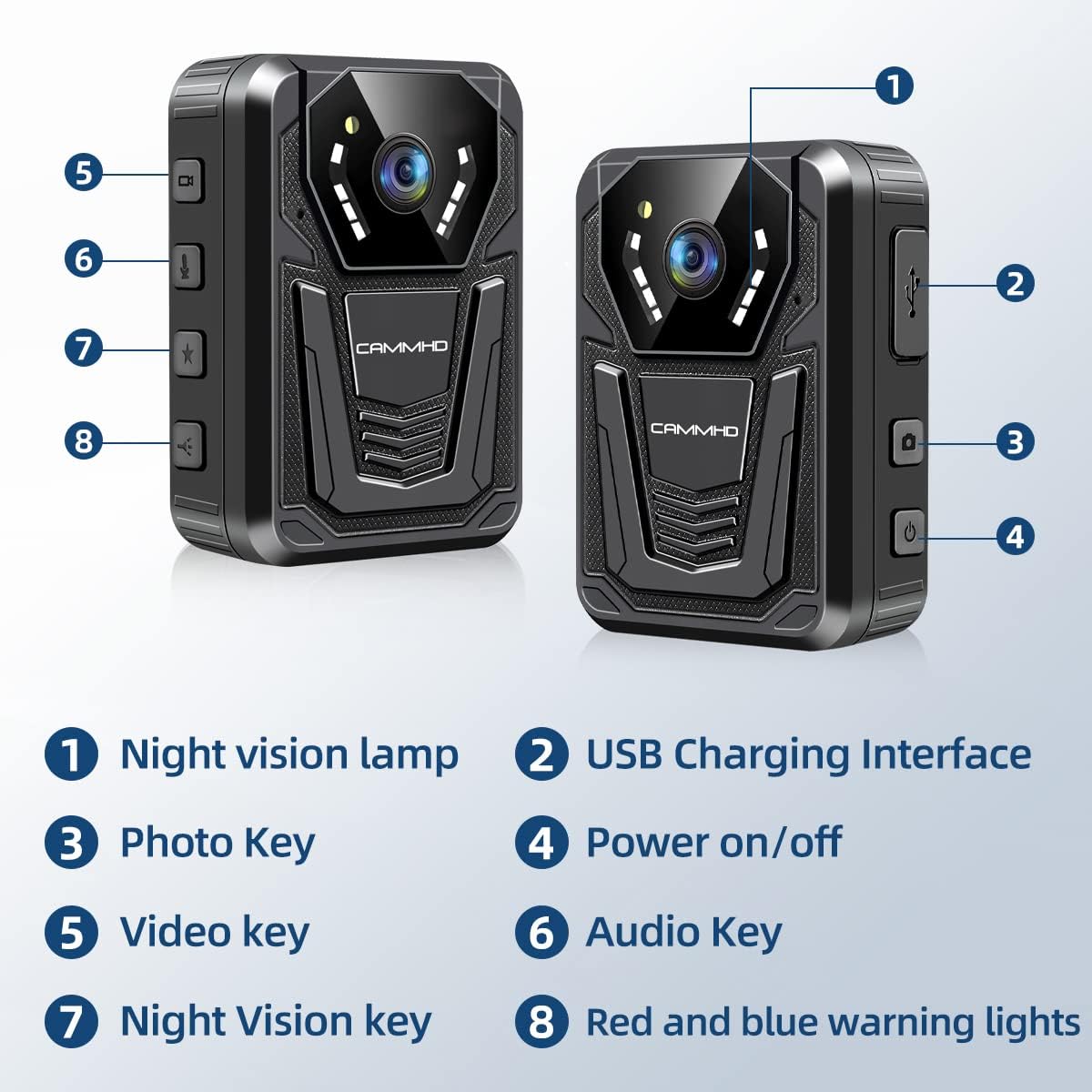
Diagram illustrating the key components and buttons of the CAMMHD F6 Body Camera, including the night vision lamp, USB charging interface, photo key, power on/off, video key, audio key, night vision key, and red and blue warning lights.

Visual representation of the CAMMHD F6 Body Camera's 4K video and 42MP photo capabilities, showing clear footage and high-resolution images.

Comparison image demonstrating the effectiveness of the CAMMHD F6's infrared night vision, showing a clear view in dark conditions versus a less clear view from other devices.
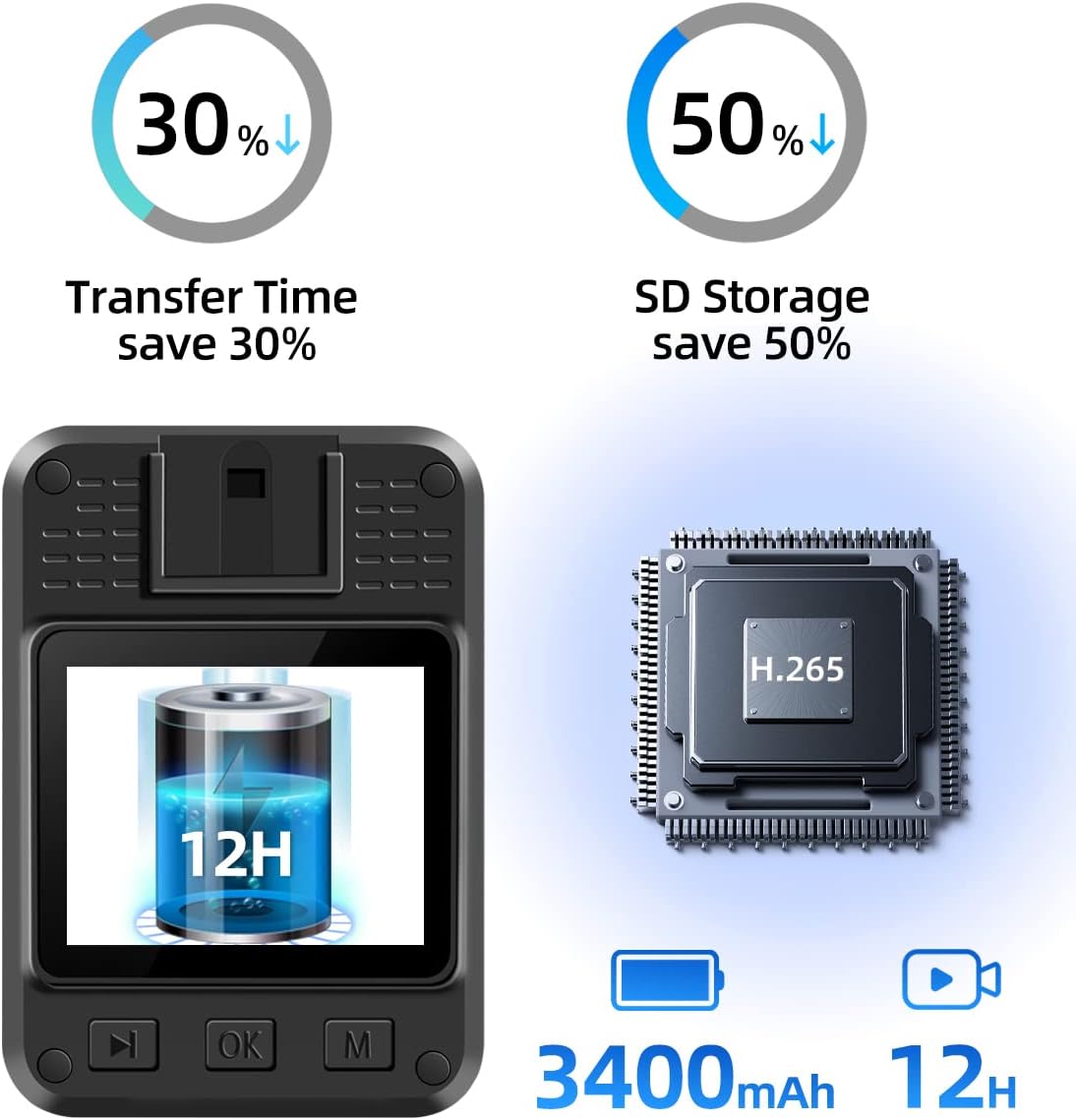
Infographic highlighting the CAMMHD F6's 3400mAh battery providing 12 hours of operation and the benefits of H.265 encoding, including 30% faster transfer time and 50% storage savings.
Setup
1. Charging the Device
Before initial use, fully charge your CAMMHD F6 Body Camera. Connect the provided USB cable to the camera's charging interface (located on the side, covered by a protective flap) and the other end to the charger. Plug the charger into a power outlet. The charging indicator light will show the charging status. A full charge typically takes up to 4 hours.
Video demonstrating the charging process and various features of the CAMMHD F6 Body Camera, including its ports and button functions.
2. Attaching Clips
The CAMMHD F6 comes with both a long clip and a short clip for versatile mounting options. To attach a clip, align the clip's base with the slot on the back of the camera and slide it in until it clicks securely into place. The clips can be rotated 360° for optimal positioning. To remove a clip, press the release tab and slide the clip off.
Video tutorial on how to attach and detach the long and short clips to the F6 Body Camera, demonstrating the 360° rotation feature for flexible mounting.
3. Powering On/Off
To power on the device, press and hold the Power button (usually marked with a power symbol) on the side of the camera until the screen illuminates. To power off, press and hold the Power button again until the device shuts down. Ensure all recordings are saved before powering off.
Operating Instructions
1. Video Recording
To start video recording, press the Video key (usually marked with a camera icon). The recording indicator light will illuminate, and a recording timer will appear on the screen. Press the Video key again to stop recording. Videos are saved automatically to the internal 64GB memory.
2. Audio Recording
To initiate audio-only recording, press the Audio key (marked with a microphone icon). The device will begin recording audio. Press the Audio key again to stop. Audio files are saved separately from video files.
3. Taking Photos
To capture a still image, press the Photo key (marked with a camera icon, distinct from the video key). The camera will take a high-resolution photo. Photos can be taken while recording video without interrupting the video stream.
4. Night Vision Mode
The F6 Body Camera features automatic and manual night vision modes. To manually activate or deactivate night vision, press the Night Vision key (marked with a star icon). The camera will switch between color and infrared (black and white) recording based on ambient light conditions or your manual selection.
5. Red and Blue Warning Lights
For signaling or alert purposes, the camera is equipped with red and blue warning lights. Press the dedicated Red and Blue Warning Lights key (marked with a speaker icon) to activate them. Press again to deactivate. Note that activating these lights may temporarily interrupt ongoing recordings on some firmware versions.
Official product video showcasing the CAMMHD F6 4K Body Camera's features, including its 4K recording, night vision, and red and blue light alarm function.
6. Reviewing Footage
You can review recorded videos and photos directly on the camera's screen. Navigate through files using the menu buttons. For detailed playback and management, connect the camera to a computer.
7. Data Transfer
To transfer files to a computer, connect the camera using the provided USB cable. The camera will appear as a removable storage device. You can then copy and paste files as needed. The device supports USB2.0 connectivity.
Maintenance
- Cleaning: Use a soft, dry cloth to clean the camera body and lens. Avoid abrasive materials or harsh chemicals.
- Storage: Store the camera in a cool, dry place away from direct sunlight and extreme temperatures.
- Battery Care: To prolong battery life, avoid fully discharging the battery frequently. Charge the device regularly, even if not in use, to maintain battery health.
- Firmware Updates: Check the official CAMMHD website periodically for any available firmware updates to ensure optimal performance and new features.
Troubleshooting
| Problem | Possible Cause | Solution |
|---|---|---|
| Device won't turn off. | Software glitch or temporary freeze. | Locate the reset hole (often a small pinhole next to the charging port) and gently press it with a paperclip for a few seconds to force a restart. |
| Cannot download recorded video. | Incorrect USB connection mode, driver issues, or corrupted files. | Ensure the camera is connected in data transfer mode. Try a different USB port or cable. If files are corrupted, they may not be recoverable. Ensure the camera is not in recording mode when connecting to PC. |
| Memory full. | Internal storage is at capacity. | Transfer important files to a computer and then delete unnecessary files from the camera to free up space. The camera supports loop recording, which overwrites older files when memory is full. |
| Poor night vision quality. | Infrared lamps obstructed or insufficient ambient light for optimal performance. | Ensure the infrared lamps are not covered. Verify that night vision mode is activated. For best results, ensure there is some minimal ambient light if possible. |
Specifications
| Feature | Detail |
|---|---|
| Model | F6 |
| Video Capture Resolution | 4K (2160 Pixels Effective) |
| Viewing Angle | 170 Degrees |
| Night Vision Range | 15 Meters |
| Battery Capacity | 3400 mAh |
| Work Time | 12-14 Hours (1080P, night vision off) |
| Video Encoding | H.264/H.265 |
| Flash Memory Installed Size | 64 GB |
| Water Resistance Level | IP68 Waterproof |
| Drop Resistance | Up to 3 Meters |
| Connectivity Protocol | USB2.0, Wi-Fi |
| Item Dimensions (L x W x H) | 1.24 x 2.27 x 3.17 inches |
| Item Weight | 5.2 ounces (148 Grams) |
Warranty and Support
The CAMMHD F6 Body Camera comes with a standard manufacturer's warranty. For specific warranty details, please refer to the warranty card included in your product packaging or visit the official CAMMHD website. For technical support, troubleshooting assistance, or any inquiries regarding your device, please contact CAMMHD customer service through their official channels. Contact information can typically be found on the product packaging or the brand's official website.
You can also visit the CAMMHD Store on Amazon for more information and support resources.
Related Documents - F6-64GB
 |
CAMMHD F6 Body Camera User Manual This user manual provides comprehensive instructions for the CAMMHD F6 4K Body Camera. Learn how to operate the device, configure settings like video resolution, recording modes, and night vision, and manage data transmission. Essential guide for law enforcement and security professionals. |
 |
CAMMHD Body Camera User Manual: Features, Operation, and Settings Comprehensive user manual for the CAMMHD body camera, detailing its features, quick usage guide, parameter settings, and data transmission. Learn how to operate your body camera for video recording, photography, and advanced functions. |
 |
CAMMHD Body Camera User Manual - Features, Settings, and Operation Comprehensive user manual for the CAMMHD C8 series body camera. Covers product features, performance specifications, quick start guide, detailed parameter settings, and data transmission instructions for models like C8, C8-64GB, C8-128G, and C8-256G. Includes information on recording, photography, night vision, motion detection, and system configuration. |
 |
CAMMHD DSJ-V8 Body Worn Camera Operation Manual This is the official operation manual for the CAMMHD DSJ-V8 Body Worn Camera. It provides detailed instructions on setup, features, functions, parameter settings, data transfer, and troubleshooting for law enforcement and security professionals. Learn how to maximize the capabilities of your DSJ-V8 device. |
 |
CAMMHD Body Camera User Manual: Features, Settings, and Operation Comprehensive user manual for the CAMMHD Body Camera, detailing its functions, parameter settings, quick usage guide, and data transmission. Learn how to operate your body camera effectively. |
 |
CAMMHD Body Camera User Manual: Features, Settings, and Operation Guide Comprehensive user manual for the CAMMHD Body Camera, detailing its features, performance specifications, parameter settings, quick usage guide, and data transmission methods. Learn how to operate and configure your body-worn camera for optimal performance. |
Ask a question about this manual
Ask about setup, troubleshooting, compatibility, parts, safety, or missing instructions. Manuals+ will review the question and use this page’s manual context to help answer it.