Introduction
This manual provides instructions for the Technical Precision Replacement for STONEX S8 Plus GNSS. This product is designed as a compatible replacement component for the STONEX S8 Plus GNSS device. Please note that this item is not manufactured by STONEX. Read these instructions carefully before installation and use to ensure proper function and safety.
Product Overview
The Technical Precision Replacement for STONEX S8 Plus GNSS is a high-quality component intended to replace a specific part within your STONEX S8 Plus GNSS unit. It is engineered to meet the functional requirements of the original part, ensuring continued performance of your device. This replacement component is designed for seamless integration and reliable operation.
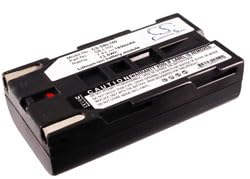
This image displays the replacement component for the STONEX S8 Plus GNSS device.
What's in the Box
- One (1) Technical Precision Replacement Part for STONEX S8 Plus GNSS
Specifications
| Feature | Detail |
|---|---|
| Brand | Technical Precision |
| Manufacturer | Technical Precision |
| Model Name | S8 PLUS GNSS |
| Item Model Number | S8 PLUS GNSS |
| ASIN | B0B37W5PHM |
| Unit Count | 1.0 Count |
| Voltage | 7 Volts |
| Reusability | Rechargeable |
| Date First Available | June 5, 2022 |
Setup (Installation)
This replacement component requires careful installation into the STONEX S8 Plus GNSS device. Due to the nature of electronic components, it is highly recommended that installation be performed by a qualified technician or an individual with experience in handling electronic devices. Improper installation may damage the component or the device.
General Installation Steps:
- Power Off: Ensure the STONEX S8 Plus GNSS device is completely powered off and disconnected from any power sources.
- Access Component: Carefully open the device or access the compartment where the original component is located. Refer to your STONEX S8 Plus GNSS device's original service manual for specific disassembly procedures.
- Remove Old Component: Disconnect and remove the old component, noting its orientation and connections.
- Insert New Component: Insert the Technical Precision replacement component, ensuring it is correctly seated and all connections are securely made. Do not force the component into place.
- Reassemble Device: Carefully reassemble the STONEX S8 Plus GNSS device, ensuring all screws and covers are properly secured.
- Power On: Reconnect the device to power and turn it on. Verify proper operation.
If this is a replacement battery, ensure it is fully charged before initial use according to your STONEX S8 Plus GNSS device's charging instructions.
Operating
Once correctly installed, the Technical Precision Replacement component operates automatically as part of your STONEX S8 Plus GNSS device. No specific user interaction is required for the replacement component itself, beyond the normal operation of your GNSS device. The component is designed to function seamlessly within the device's existing system.
Maintenance
To ensure the longevity and optimal performance of your replacement component:
- Cleanliness: Keep the component and the device in a clean, dry environment. Avoid exposure to dust, dirt, and moisture.
- Temperature: Avoid exposing the device and component to extreme temperatures (very hot or very cold), as this can affect performance and lifespan.
- Battery Care (if applicable): If this component is a battery, follow proper charging and discharging practices as outlined in your STONEX S8 Plus GNSS device manual to maximize battery life. Avoid overcharging or completely draining the battery frequently.
Troubleshooting
If your STONEX S8 Plus GNSS device does not function correctly after installing the Technical Precision replacement component, consider the following troubleshooting steps:
- Verify Installation: Double-check that the component is correctly seated and all connections are secure. A loose connection is a common cause of issues.
- Power Cycle: Turn off the STONEX S8 Plus GNSS device completely, wait for at least 30 seconds, and then turn it back on.
- Consult Device Manual: Refer to the original STONEX S8 Plus GNSS device manual for troubleshooting steps related to the specific function of the replaced part.
- Original Component Test: If possible, temporarily reinstall the original component (if not damaged) to determine if the issue lies with the new replacement part or another part of the device.
- Contact Support: If issues persist after performing these steps, contact Technical Precision customer support for further assistance.
Warranty and Support
This Technical Precision replacement component is covered by a manufacturer's warranty. For specific warranty details, technical support, or service inquiries, please contact Technical Precision directly.
- Manufacturer: Technical Precision
- Contact Information: Please refer to the official Technical Precision website or your purchase documentation for the most current contact details and support resources.