
1. Introduction
Thank you for choosing the Prologic Digital Car Stereo with Remote. This manual provides essential information for the proper installation, operation, and maintenance of your new car stereo. Please read this manual thoroughly before using the product to ensure optimal performance and safety.
2. Product Features
- Connectivity: Supports Bluetooth, Dual USB ports, and AUX input for versatile audio playback.
- Media Playback: Compatible with MP3 audio format from USB drives or SD cards (via TF slot).
- FM Radio: Built-in FM radio tuner with 18 preset memory stations.
- Remote Control: Wireless remote for convenient operation from any seat.
- Universal Fit: Single DIN design for easy installation in most vehicles.
- Fast Charging: Integrated 2.1 AMP USB port for rapid smartphone charging.
- Audio Control: Adjustable Bass and Treble settings, along with an Equalizer function.
3. Package Contents
Upon unpacking, please ensure all items are present:
- Prologic Digital Car Stereo Unit
- Wireless Remote Control
- Wiring Harness
- Mounting Frame and Keys
- Instruction Manual (this document)
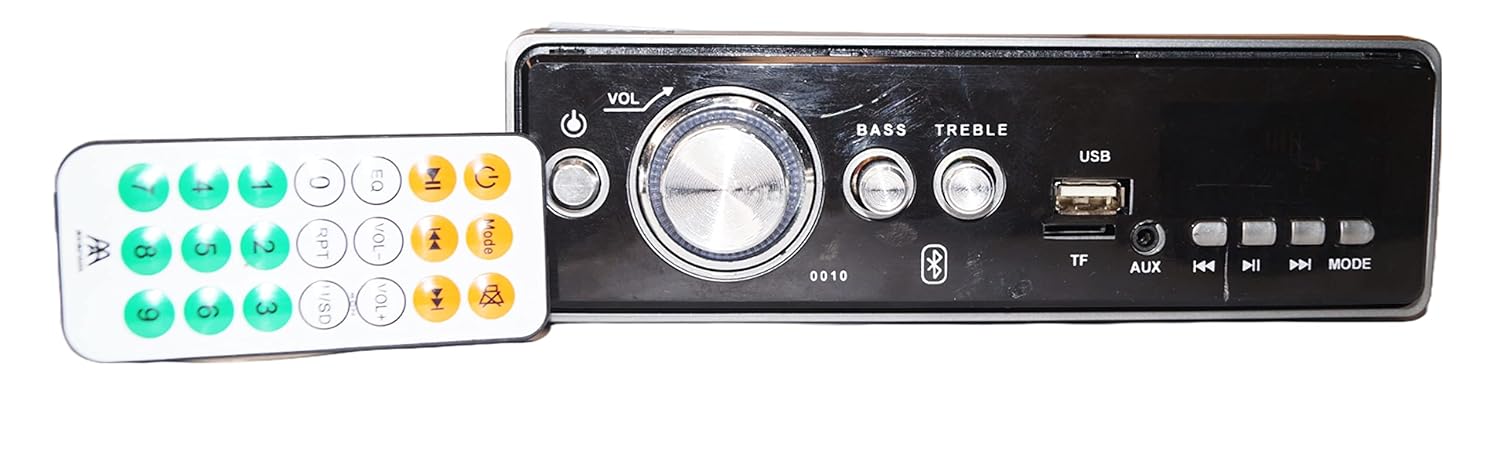
Image: The Prologic Digital Car Stereo unit shown alongside its wireless remote control. The stereo features a central volume knob, bass and treble controls, USB and TF card slots, AUX input, and various function buttons. The remote control has numerical buttons and media playback controls.
4. Safety Information
- Always consult a professional for installation if you are unsure about wiring or mounting.
- Do not operate the stereo in a way that distracts you from driving.
- Ensure all connections are secure to prevent short circuits or damage.
- Keep the unit away from water and excessive heat.
- Use only the specified voltage for power supply.
5. Setup and Installation
5.1. Mounting the Unit
The stereo is designed for a standard single DIN opening. Use the provided mounting frame and keys to secure the unit into your vehicle's dashboard.

Image: Side view of the Prologic Car Stereo unit, illustrating the metal mounting frame and screw holes for secure installation within a vehicle's dashboard.
5.2. Wiring Connections
Carefully connect the wiring harness to your vehicle's electrical system. Refer to the diagram below and your vehicle's wiring schematic for correct connections. Incorrect wiring can cause damage to the unit or your vehicle.
- Red Wire: ACC (Accessory Power)
- Yellow Wire: B+ (Constant 12V Power)
- Black Wire: GND (Ground)
- Speaker Wires: Connect to corresponding vehicle speakers (e.g., White/White-Black for Front Left, Grey/Grey-Black for Front Right, Green/Green-Black for Rear Left, Purple/Purple-Black for Rear Right).

Image: Rear view of the Prologic Car Stereo unit, displaying the multi-colored wiring harness for power and speaker connections, along with RCA output jacks for external amplifiers and an antenna input.
6. Operating Instructions
6.1. Front Panel Controls

Image: Detailed view of the Prologic Car Stereo's front panel. Key controls include a large central volume knob, power button, bass and treble adjustment knobs, USB port, TF (SD card) slot, AUX input, and buttons for track navigation, play/pause, and mode selection.
- Power Button (⏻): Press to turn the unit ON/OFF.
- VOL Knob: Rotate to adjust volume. Press to cycle through audio settings (Bass, Treble, Balance, Fader, EQ).
- BASS / TREBLE Knobs: Rotate to adjust bass and treble levels directly.
- USB Port: Insert USB drive for media playback or device charging.
- TF Slot: Insert TF (Micro SD) card for media playback.
- AUX Input: Connect external audio devices using a 3.5mm audio cable.
- ◀◀ / ▶▶ Buttons: Short press for previous/next track/station. Long press for fast rewind/forward or auto-scan in FM mode.
- ▶‖ Button: Play/Pause in media playback modes.
- MODE Button: Press to cycle through available sources: FM, USB, TF, AUX, Bluetooth.
6.2. FM Radio Operation
- Press the MODE button until "FM" is displayed.
- Short press ◀◀ or ▶▶ to manually tune to the previous or next station.
- Long press ◀◀ or ▶▶ to automatically scan for the next strong station.
- To auto-scan and save stations, long press the MODE button (or a dedicated scan button if available on remote). The unit will scan and store up to 18 stations in presets.
- Use the number buttons on the remote to select saved preset stations.
6.3. USB/TF Card Playback
- Insert a USB drive into the USB port or a TF card into the TF slot.
- The unit will automatically switch to USB/TF mode and begin playing MP3 files. If not, press the MODE button to select the correct source.
- Use ◀◀ / ▶▶ for track navigation and ▶‖ for play/pause.
6.4. AUX Input Operation
- Connect your external audio device (e.g., smartphone, MP3 player) to the AUX input jack using a 3.5mm audio cable.
- Press the MODE button until "AUX" is displayed.
- Control playback from your connected device.
6.5. Bluetooth Pairing and Operation
- Press the MODE button until "BT" (Bluetooth) is displayed. The unit will enter pairing mode.
- On your mobile device, enable Bluetooth and search for available devices.
- Select "Prologic Car Stereo" (or similar name) from the list. If prompted for a password, enter "0000".
- Once paired, you can play audio from your device through the car stereo.
- Use the stereo's controls (◀◀ / ▶▶, ▶‖) or your mobile device to control playback.
6.6. Remote Control Usage
The wireless remote control provides full functionality for the stereo. Point the remote towards the stereo's front panel. Ensure there are no obstructions between the remote and the unit.
- Power: Turn unit ON/OFF.
- VOL+/-: Adjust volume.
- EQ: Cycle through equalizer presets.
- MODE: Change source.
- Number Buttons (0-9): Select FM presets or tracks.
- Mute: Mute audio output.
- Play/Pause, Skip Tracks: Standard media controls.
7. Maintenance
- Cleaning: Use a soft, dry cloth to clean the front panel. Do not use abrasive cleaners or solvents.
- Dust: Regularly remove dust from the unit's vents to ensure proper cooling.
- Remote Control: Replace batteries in the remote control when its range decreases or it stops responding.
8. Troubleshooting
| Problem | Possible Cause | Solution |
|---|---|---|
| No power | Incorrect wiring; Blown fuse; Vehicle ignition off. | Check power and ground connections. Inspect vehicle fuse. Turn vehicle ignition ON. |
| No sound | Volume too low; Mute activated; Incorrect speaker wiring; Damaged speakers. | Increase volume. Deactivate mute. Check speaker connections. Test with different speakers if possible. |
| FM reception poor | Antenna not connected; Weak signal area; Damaged antenna. | Ensure antenna is securely connected. Try tuning in a different location. Check antenna for damage. |
| USB/TF not playing | Unsupported file format; Corrupt files; USB/TF card not inserted correctly; Card capacity too large. | Ensure files are MP3 format. Reinsert USB/TF card. Try a different USB/TF card. |
| Bluetooth not pairing | Bluetooth not enabled on device; Stereo not in pairing mode; Incorrect password. | Enable Bluetooth on your device. Ensure stereo is in BT mode. Enter "0000" if prompted for password. |
| Remote control not working | Dead battery; Obstruction; Remote not pointed correctly. | Replace remote battery. Remove obstructions. Point remote directly at the stereo. |
9. Specifications
| Feature | Detail |
|---|---|
| Brand | Prologic |
| Model | 0010 (Digital Car Stereo) |
| Connectivity Technology | Bluetooth, USB, AUX, TF (SD Card) |
| Tuner Technology | FM |
| Media Format | MP3 Audio |
| Audio Output Mode | Stereo |
| Speaker Surround Sound Channel Configuration | 2.1 |
| Number of Channels | 4 |
| Special Features | Equalizer, Fast Charging USB (2.1A) |
| Product Dimensions (LxWxH) | 27 x 10 x 22 cm |
| Item Weight | 800 g |
10. Warranty and Support
Prologic products are designed for reliability and performance. For warranty information or technical support, please refer to the contact details provided with your purchase documentation or visit the official Prologic website. Keep your proof of purchase for warranty claims.
For further assistance, please contact Prologic customer service.


