
1. Introduction
Thank you for choosing the WENGART WG08 WiFi Smart Thermostat. This device is designed to provide intelligent temperature control for radiant floor heating systems, offering convenience, energy efficiency, and smart home integration. This manual provides detailed instructions for installation, operation, programming, and troubleshooting to ensure optimal performance and user satisfaction.
2. Safety Information
Please read this section carefully before installation and operation to prevent personal injury or damage to the product.
- Installation must be performed by a qualified electrician in accordance with local electrical codes.
- Always disconnect power at the circuit breaker before installing or servicing the thermostat.
- Ensure the thermostat's voltage and current ratings are compatible with your heating system.
- Do not install the thermostat in areas with excessive moisture, direct sunlight, or extreme temperatures.
- Keep the device away from children.
3. Package Contents
Verify that all items are present in the package:
- WENGART WG08 WiFi Smart Thermostat
- Mounting Screws (2)
- User Manual (This document)
- External Floor Sensor (NTC 10k @25℃)
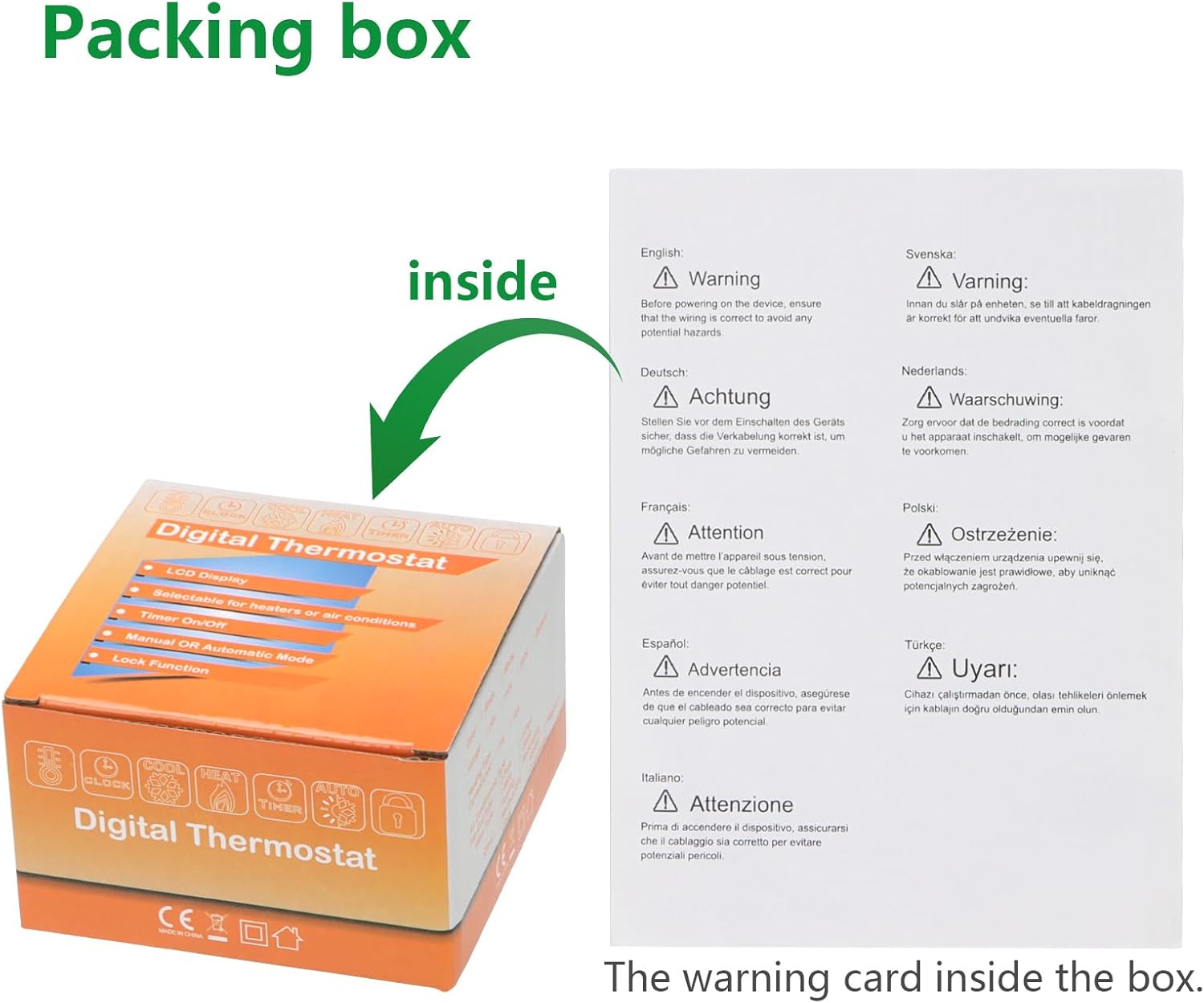
Image: The product packaging box, showing the thermostat and included accessories, along with a multilingual warning card.
4. Product Overview
The WENGART WG08 thermostat features a large LCD touchscreen display and intuitive touch buttons for easy control. It is designed for wall-mounted installation.

Image: Front view of the WENGART WG08 thermostat, displaying the current room temperature, time, and mode icons.
4.1 Display Elements

Image: Detailed breakdown of the thermostat's LCD screen, labeling icons for room temperature, set temperature, heating status, manual mode, weekly programming mode, timing switch, and boiler linkage.
- Room Temperature: Displays the current ambient temperature.
- Setting Temperature: Shows the desired temperature set by the user.
- Heating Indicator: Icon indicating when the heating system is active.
- Timing Switch: Indicates scheduled on/off times.
- Manual Mode: Icon for manual temperature control.
- Weekly Programming Mode: Icon for scheduled heating programs.
- Boiler Linkage: Indicates connection to the boiler.
- Wi-Fi Status: Icon showing Wi-Fi connectivity.
- Child Lock: Indicates if the keypad is locked.
4.2 Touch Buttons
- Power Button: Turns the thermostat on or off.
- Mode Button: Switches between Manual, Program, and Holiday modes.
- Clock/Settings Button: Accesses time settings and advanced parameters.
- Up Arrow: Increases temperature setting or navigates menu options.
- Down Arrow: Decreases temperature setting or navigates menu options.
5. Installation
Proper installation is crucial for the thermostat's functionality and safety. Ensure power is disconnected before proceeding.
5.1 Wiring Diagram
The thermostat is designed for AC90-240V systems and requires connection to an external NTC sensor for floor heating. Refer to the diagram below for correct wiring.
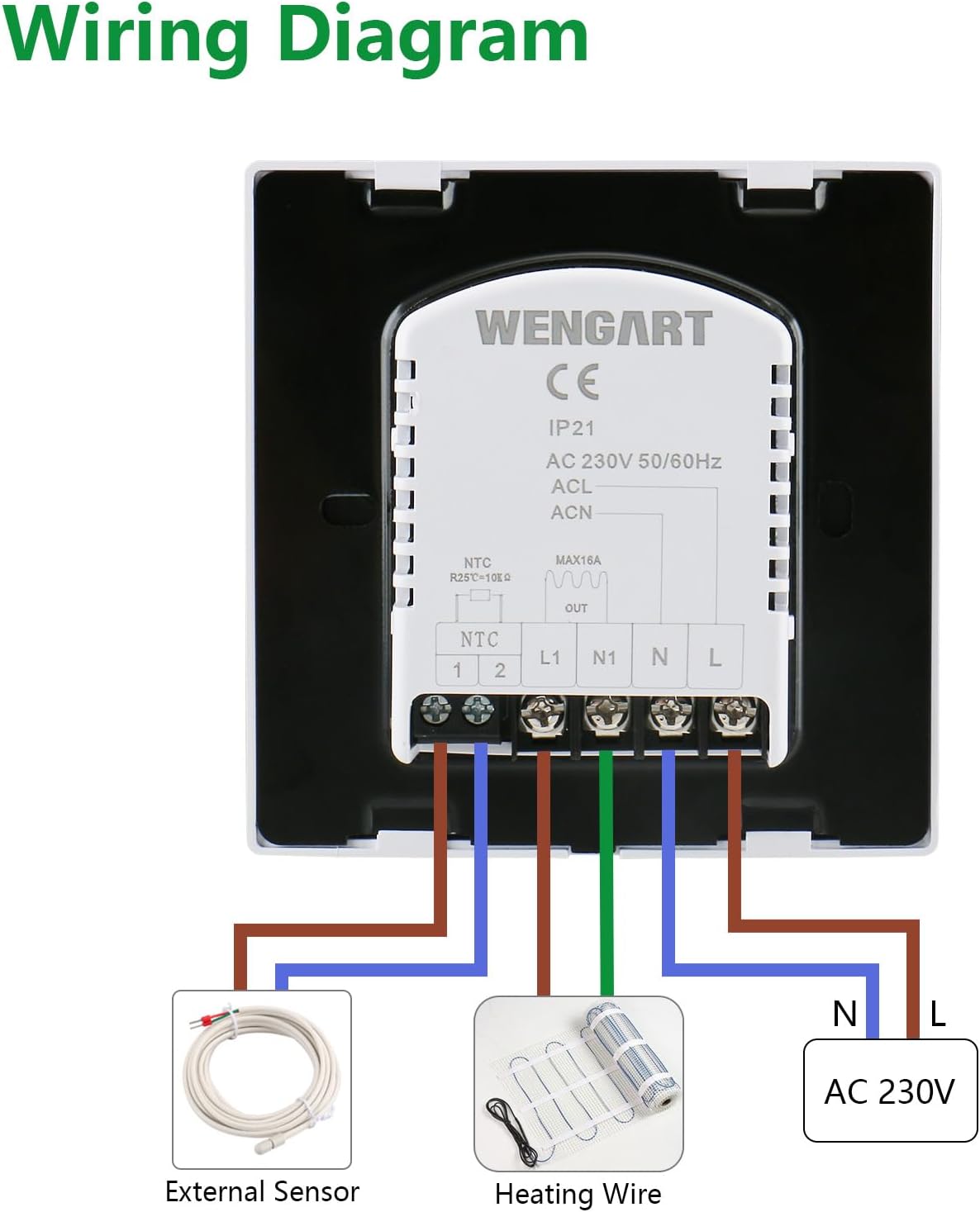
Image: A clear wiring diagram showing connections for AC 230V power (N, L), heating wire (N1, L1), and the external NTC sensor (1, 2) to the thermostat's back panel.
- Terminals 1 & 2: Connect to the external NTC floor temperature sensor.
- Terminals N & L: Connect to the AC 90-240V power supply.
- Terminals N1 & L1: Connect to the heating equipment (e.g., radiant floor heating wires).
5.2 Mounting
The thermostat fits standard 86x86mm or European 60mm round electrical boxes.
- Separate the front panel from the back plate of the thermostat.
- Secure the back plate to the wall electrical box using the provided screws.
- Connect the wires according to the wiring diagram (Section 5.1).
- Carefully attach the front panel to the back plate, ensuring all connections are secure.
- Restore power at the circuit breaker.
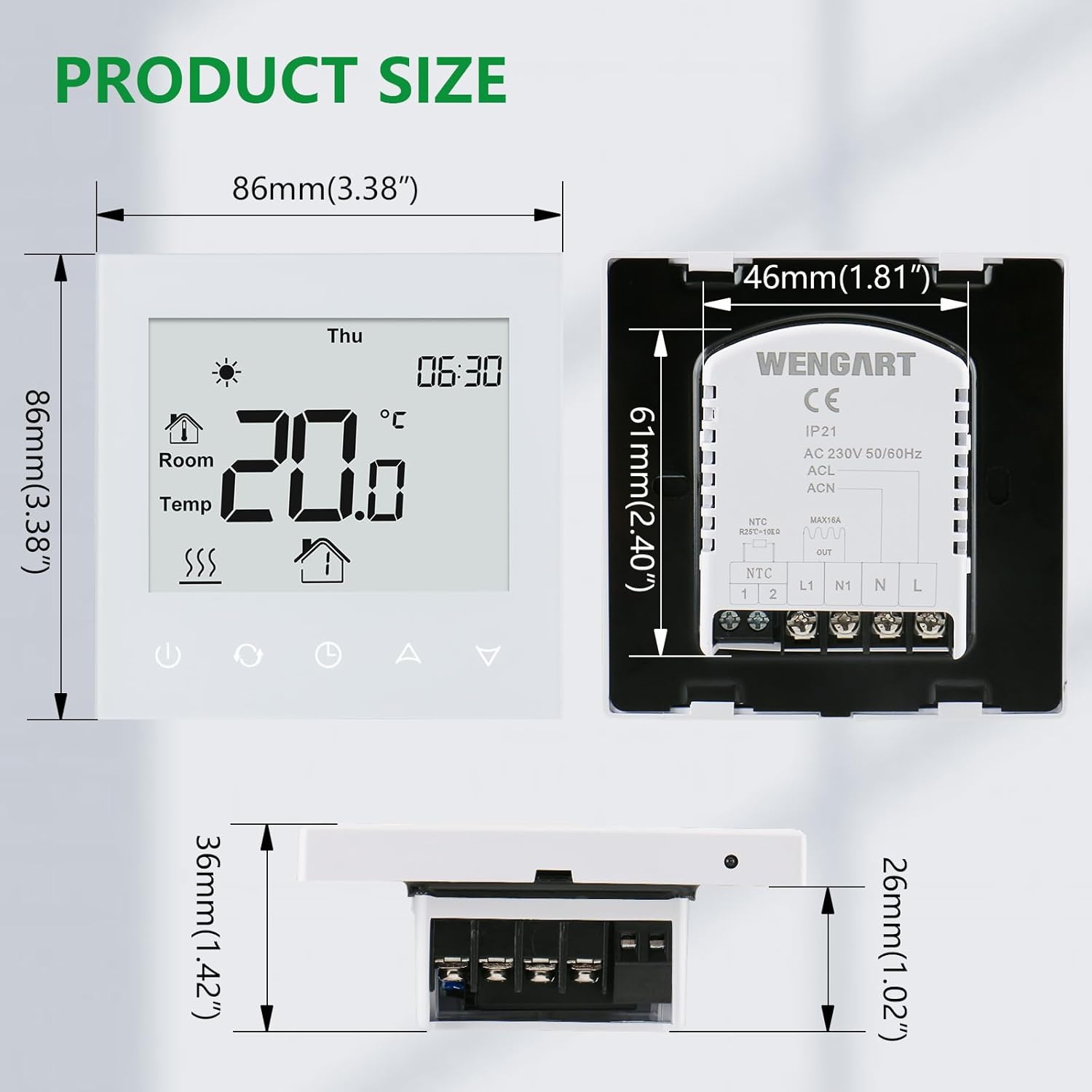
Image: Diagram showing the dimensions of the WENGART WG08 thermostat (86mm x 86mm x 11mm) and the back panel with wiring terminals, indicating compatibility with standard electrical boxes.
6. Operation
After successful installation and power-up, the thermostat will display the current room temperature and time.
6.1 Basic Temperature Adjustment
In Manual mode, press the Up or Down arrow buttons to adjust the desired temperature. The new setting will be displayed and saved automatically.
6.2 Mode Selection
Press the Mode button to cycle through the available operating modes:
- Manual Mode: Maintains a constant temperature set by the user.
- Program Mode: Follows the pre-set weekly schedule.
- Holiday Mode: Maintains a specific temperature for a set duration, overriding the program.
7. Programming
The WG08 thermostat offers flexible programming options to optimize comfort and energy savings.
7.1 Weekly Schedule
The thermostat supports 6+1 (weekdays/weekend), 5+2 (weekdays/weekend), and 7-day programmable schedules with 6 time periods per day. This allows for customized temperature settings throughout the week.
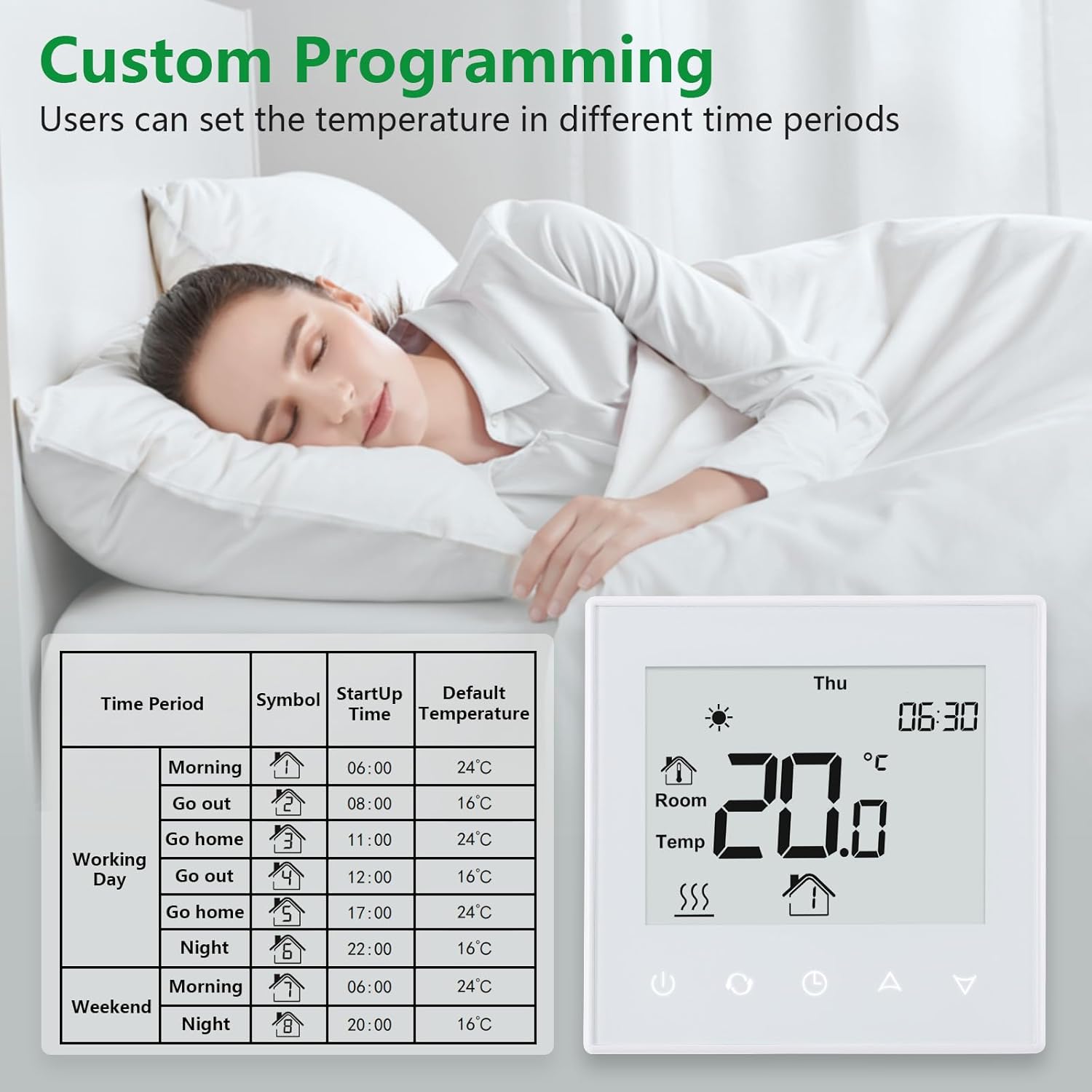
Image: An example of custom programming for the WENGART WG08 thermostat, showing different time periods (Morning, Go out, Go home, Night) and their corresponding default temperatures for weekdays and weekends.
To enter programming mode, press and hold the Clock/Settings button for 3 seconds. Use the Up and Down arrows to adjust time periods and temperatures. Press the Mode button to confirm and move to the next setting.
7.2 Child Lock
To prevent accidental changes, the thermostat features a child lock function. Press and hold the Up and Down arrow buttons simultaneously for 3 seconds to activate or deactivate the child lock. A lock icon will appear on the display when active.
8. App Control (TuyaSmart / Smart Life)
The WENGART WG08 thermostat can be controlled remotely via the TuyaSmart or Smart Life mobile application.
- Download the App: Search for "TuyaSmart" or "Smart Life" in your smartphone's app store (iOS or Android) and install it.
- Register/Log In: Create an account or log in to your existing account.
- Add Device: Follow the in-app instructions to add a new device. Ensure your phone is connected to a 2.4GHz Wi-Fi network. The thermostat only supports 2.4GHz Wi-Fi.
- Pairing Mode: On the thermostat, press and hold the Mode button until the Wi-Fi icon starts blinking rapidly, indicating pairing mode.
- Connect: Confirm the blinking indicator in the app and proceed with the connection process.
Once connected, you can remotely adjust temperature, change modes, set schedules, and monitor your heating system from anywhere.
9. Voice Control (Alexa / Google Home)
The WENGART WG08 thermostat is compatible with Amazon Alexa and Google Home for convenient voice control.
- Link Account: In your Alexa or Google Home app, enable the "TuyaSmart" or "Smart Life" skill/service and link your account.
- Discover Devices: Ask Alexa or Google to discover new devices.
- Voice Commands: You can now use voice commands such as:
- "Alexa, set [Thermostat Name] to 22 degrees."
- "Hey Google, what is the temperature in [Thermostat Name]?"
- "Alexa, turn on [Thermostat Name]."
10. Maintenance
The WENGART WG08 thermostat requires minimal maintenance.
- Clean the screen and casing with a soft, dry cloth. Do not use abrasive cleaners or solvents.
- Ensure the thermostat's vents (if any) are not obstructed to allow for accurate temperature sensing.
- Regularly check wiring connections for security, especially after any electrical work in the home.
11. Troubleshooting
If you encounter issues with your thermostat, refer to the following common problems and solutions:
| Problem | Possible Cause | Solution |
|---|---|---|
| Thermostat not powering on | No power supply; incorrect wiring | Check circuit breaker; verify wiring connections (Section 5.1). |
| Heating not turning on/off | Incorrect temperature setting; wiring issue; thermostat in wrong mode | Adjust set temperature; check wiring to heating equipment; ensure thermostat is in Manual or Program mode. |
| Wi-Fi connection failure | Incorrect Wi-Fi password; 5GHz network; thermostat not in pairing mode; router too far | Ensure 2.4GHz Wi-Fi; re-enter password; put thermostat in pairing mode (Section 8); move router closer or use extender. |
| Inaccurate temperature reading | Sensor issue; thermostat exposed to drafts/direct sunlight | Check external sensor connection; relocate thermostat if possible; calibrate temperature if needed (advanced settings). |
| Child lock engaged | Keypad locked | Press and hold Up and Down arrows for 3 seconds to unlock (Section 7.2). |
If the problem persists, please contact customer support.
12. Specifications
Detailed technical specifications for the WENGART WG08 WiFi Smart Thermostat:
| Feature | Specification |
|---|---|
| Working Voltage | AC90~240V 50/60Hz |
| Power Consumption | 2W |
| Setting Range | 5~70℃ (adjustable to 20-70℃) |
| Switch Differential | 0.5~5℃ adjustable (factory setting ±1℃) |
| Ambient Temperature | -5~50℃ |
| Ambient Temperature Display Accuracy | ±0.5℃ |
| Temperature Control Accuracy | ±0.5℃ |
| Measured Range | 1~70℃ |
| Button Type | Capacitive Touch Button |
| Inside Sensor | NTC 10k @25℃ |
| Protective Housing | IP20 |
| Housing Material | Anti-flammable PC |
| Wiring Terminal Capacity | 2*1.5mm² or 1*2.5mm² wire at most |
| Dimensions | 86mm × 86mm × 11mm |
| Output | Switch Relay |
| Weight | 234g (product), 245g (item) |
| Installation Hole Distance | 60mm |
| Installation Method | Wall-mounted |
| Connectivity Technology | Wi-Fi (2.4GHz only) |
| Special Features | Programmable, Temperature Display, Backlight, Child Lock, Memory Function |
13. Warranty and Support
WENGART products are manufactured to high-quality standards. For warranty information, please refer to the documentation provided with your purchase or contact your retailer. For technical support or further assistance, please reach out to WENGART customer service through the contact information provided on the product packaging or the official WENGART website.