1. Product Overview
The BTF-LIGHTING FCOB COB RGB LED Strip Light is a high-density, flexible lighting solution designed for indoor decorative and functional applications. Featuring FCOB (Flexible Chip On Board) technology, this strip provides uniform, bright, and color-changing illumination without visible dark spots. It is UL Listed for safety and offers extensive compatibility with various controllers for customizable lighting experiences.

Image 1.1: Key features of the FCOB PWM RGB LED Strip, highlighting its UL listing, RGB color changing capabilities, 3M adhesive, ultra-bright and uniform light, cuttable design, linear light output, and long lifespan.
Key Features:
- Ultra Bright and Uniform Illumination: 810 LEDs per meter provide high brightness and consistent light output with no dark spots, offering a softer glow than traditional SMD strips.
- UL Listed Safety: Ensures product safety and reliability. Features a double-layer copper PCB for superior conductivity and heat dissipation, contributing to a 65,000+ hour lifespan.
- Dynamic Color Changing: Supports 16 million colors and smooth dimming. Compatible with Wi-Fi, Bluetooth, Zigbee 3.0, Alexa, Google Home, and RF controllers (controller sold separately).
- Flexible and Customizable: The strip is flexible, cuttable at designated marks, and linkable using 4PIN male-female connectors. It has a 10mm width and is designed for indoor use (IP30 non-waterproof).
- Easy Installation: Equipped with strong 3M adhesive for tool-free mounting.
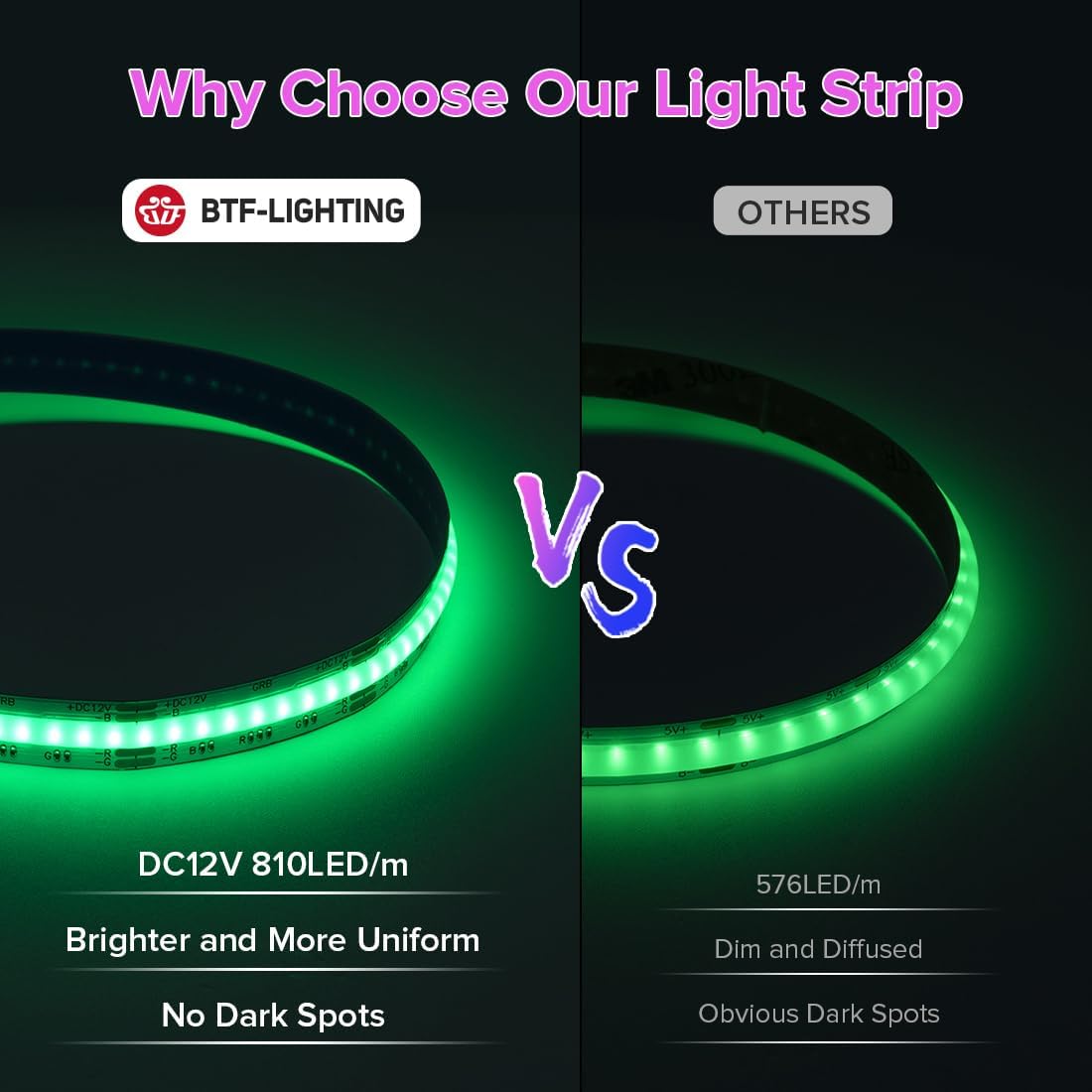
Image 1.2: Visual comparison demonstrating the superior brightness and uniformity of the BTF-LIGHTING 810LEDs/m FCOB strip compared to a lower density 576LED/m strip, highlighting the absence of dark spots.

Image 1.3: Illustration comparing the wider 180-degree beam angle of the FCOB LED Strip to the narrower 120-degree beam angle of traditional SMD LED strips, indicating more uniform light distribution.
2. Safety Information
This FCOB COB RGB LED Strip Light is UL Listed, ensuring it meets rigorous safety standards for electrical products. Please adhere to the following safety guidelines during installation and operation:
- Indoor Use Only: This product has an IP30 rating, meaning it is not waterproof. Do not install in wet or damp locations.
- Power Supply: A DC12V power supply is required (not included). Ensure the power supply's wattage rating is sufficient for the length of the LED strip being used.
- Correct Voltage: Only use with a DC12V power source. Using an incorrect voltage will damage the strip and may pose a fire hazard.
- Cutting: Only cut the LED strip at the designated cutting marks to avoid damaging the circuit.
- Heat Dissipation: While the double-layer copper PCB aids in heat dissipation, ensure the strip is not covered or installed in an enclosed space without adequate ventilation to prevent overheating.
- Adhesive: The 3M adhesive provides strong adhesion. Ensure the installation surface is clean, dry, and smooth for optimal adherence.
- Professional Installation: If you are unsure about any part of the installation process, consult a qualified electrician.

Image 2.1: Graphic illustrating the product's adherence to safety standards, featuring the UL Listed mark and a certificate of compliance.

Image 2.2: Detailed view of the LED strip, highlighting the permanent UL Listed mark and UL Recognized Component Mark, confirming its safety certification.

Image 2.3: Technical comparison showing the superior construction of BTF-LIGHTING strips with three-layer high-temperature resistant PI film and double-layer copper PCB for better protection and heat dissipation.
3. What's Included
The package for the BTF-LIGHTING FCOB COB RGB LED Strip Light includes the following components:
- 1x 16.4FT FCOB RGB LED Strip
- 2x 4PIN Clip Connectors
- 3x LED Strip Fixed Clips
- 1x 15cm 4-pin Wire Cable
Note: A power supply and controller are not included and must be purchased separately to operate the LED strip.
4. Setup & Installation
Follow these steps to properly set up and install your FCOB COB RGB LED Strip Light:
4.1 Preparation:
- Unpack: Carefully remove all components from the packaging.
- Inspect: Check the LED strip and connectors for any visible damage.
- Clean Surface: Ensure the installation surface is clean, dry, and free of dust or grease for optimal adhesion of the 3M tape.
- Plan Layout: Determine the desired path for your LED strip. The strip is flexible and can be bent, but avoid sharp 90-degree folds that could damage the internal circuitry.

Image 4.1: Overview of the LED strip's physical characteristics, including its flexibility, designated cutting points, integrated double-sided adhesive, and methods for securing and connecting the strip.
4.2 Cutting and Connecting:
The LED strip can be cut to your desired length at the marked cutting points. Use the included 4PIN clip connectors for linking sections or connecting to a controller.
- Cutting: Locate the copper pads with scissor icons on the strip. Use sharp scissors to cut precisely along these lines.
- Connecting: Open the 4PIN clip connector. Align the copper pads of the LED strip with the pins inside the connector. Ensure the +V, B, R, G markings on the strip match the corresponding pins on the connector. Close the clip firmly to secure the connection.
- Fixed Clips: Use the provided LED strip fixed clips to further secure the strip, especially around corners or if the adhesive needs reinforcement.
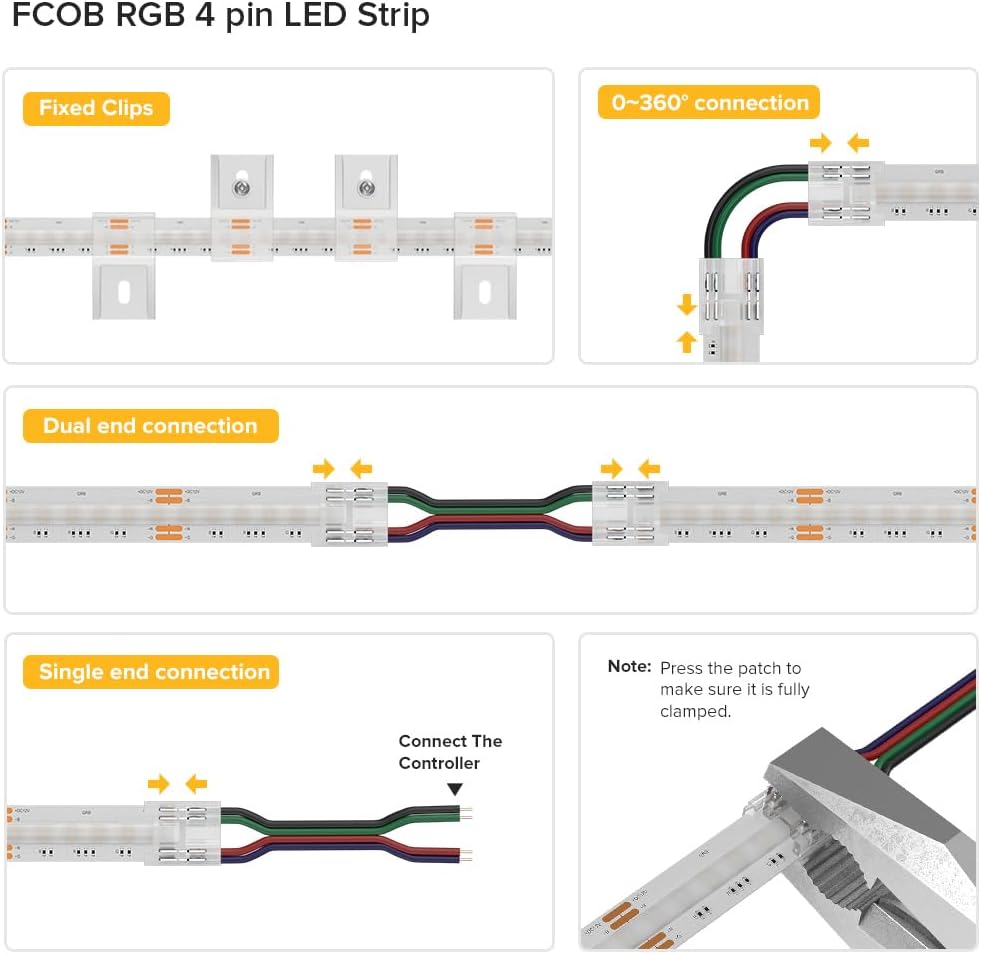
Image 4.2: Detailed instructions for connecting FCOB RGB 4-pin LED strips, showing how to use fixed clips, achieve 0-360 degree connections, and set up dual or single-end connections to a controller. Emphasizes proper clamping of connectors.
4.3 Wiring Configuration:
The LED strip requires a DC12V power supply and a compatible RGB controller (both sold separately). The 4-wire definition is +V (Positive), B (Blue), R (Red), G (Green).

Image 4.3: Wiring diagram illustrating how to connect the FCOB RGB LED Strip to a power supply and controller. Also displays various compatible controllers (RF, WiFi Alexa, Zigbee, Bluetooth Mesh) that need to be purchased separately.

Image 4.4: Diagram for Parallel Circuit Wiring Configuration, suitable for 12V strips. It shows how multiple FCOB PWM RGB LED strips can be connected to a single controller and power supply for consistent illumination.

Image 4.5: Diagram for Daisy-Chain/Series Circuit Wiring Configuration, also for 12V strips. This setup demonstrates how to connect multiple FCOB PWM RGB LED strips in series, potentially with additional power supplies for extended lengths.
4.4 Final Installation:
- Peel and Stick: Remove the backing from the 3M adhesive tape on the back of the LED strip.
- Apply: Carefully press the strip onto the prepared surface, ensuring firm contact along its entire length.
- Connect Power: Once the strip is securely installed and connected to the controller, plug in the DC12V power supply.
5. Operation
The operation of your FCOB COB RGB LED Strip Light is controlled by a separately purchased compatible controller. Refer to your controller's specific instruction manual for detailed usage.
5.1 Basic Functions (Controller Dependent):
- Power On/Off: Use the controller to turn the LED strip on or off.
- Color Selection: Choose from 16 million colors using the controller's interface (e.g., color wheel, preset buttons).
- Dimming: Adjust the brightness from 0% to 100% for desired ambiance.
- Mode Selection: Many controllers offer various dynamic modes such as flashing, fading, or chasing effects.
- Smart Home Integration: If using a Wi-Fi, Bluetooth, or Zigbee controller, integrate with smart home systems like Alexa or Google Home for voice control and automation.

Image 5.1: Visual representation of the LED strip's dimming capabilities, showing light intensity from 20% to 100% in a kitchen environment.
5.2 DIY LED Projects:
For advanced users, this LED strip is compatible with open-source software like WLED and DIY controllers based on ESP8266/ESP32, allowing for highly customized lighting effects.

Image 5.2: Illustration of a DIY LED project setup, demonstrating the use of open-source software (WLED), ESP8266/ESP32 DIY controllers, and a mobile application for creating custom lighting effects.
5.3 Application Examples:
The versatile design of the LED strip makes it suitable for various indoor applications:
- Bedroom ambient lighting
- Cabinet and shelf lighting
- Stairway accent lighting
- Kitchen under-cabinet lighting
- TV backlighting
- DIY decorative lighting projects

Image 5.3: A collage displaying diverse application scenarios for the LED strip, including living rooms, bedrooms, kitchens, and exterior accents, demonstrating its versatility in enhancing various spaces.

Image 5.4: Before and after images of a desk setup, illustrating the dramatic visual enhancement provided by the FCOB RGB LED Strip Light.

Image 5.5: A living room scene featuring the LED strip used for TV backlighting and general ambient lighting, creating a dynamic and inviting atmosphere.
Video 5.1: An overview of the FCOB RGB LED Strip Light, demonstrating its features and various color options in a home setting. This video highlights the product's flexibility and uniform light output.
Video 5.2: A short demonstration of the FCOB RGB LED strip, showing its unboxing, installation, and various color changes. This video provides a quick visual guide to the product's ease of use and vibrant lighting capabilities.
6. Maintenance
The FCOB COB RGB LED Strip Light requires minimal maintenance to ensure its longevity and performance.
- Cleaning: Gently wipe the surface of the LED strip with a soft, dry cloth to remove dust. Do not use harsh chemicals or abrasive cleaners. Ensure the strip is powered off before cleaning.
- Connection Check: Periodically inspect all connections (power, controller, and strip connectors) to ensure they are secure and free from corrosion.
- Adhesive Integrity: If the strip begins to peel, reinforce the adhesion with additional clips or appropriate adhesive suitable for the installation surface.
- Environmental Conditions: Ensure the strip remains in a dry, indoor environment as it is not waterproof (IP30). Avoid exposure to extreme temperatures.
7. Troubleshooting
If you encounter issues with your LED strip, refer to the following common troubleshooting steps:
| Problem | Possible Cause | Solution |
|---|---|---|
| LED strip does not light up. | No power, incorrect wiring, faulty power supply/controller. | Check power connection. Verify +V, B, R, G wiring. Test power supply/controller with another device if possible. |
| Incorrect colors displayed. | Incorrect wiring (e.g., R and G swapped), controller issue. | Recheck the B, R, G wire connections to ensure they match the controller output. Consult controller manual for calibration. |
| Section of strip not lighting up. | Damaged section, poor connection at a cut point. | Inspect the non-working section for physical damage. Re-secure or replace connectors at the nearest cut point. |
| Lights flicker or dim unexpectedly. | Insufficient power supply, loose connection, faulty controller. | Ensure power supply wattage is adequate. Check all connections for tightness. Test with a different controller if available. |
| Adhesive not holding. | Surface not clean/dry, heavy strip, unsuitable surface material. | Clean and dry surface thoroughly. Use additional fixed clips or a stronger adhesive if necessary. |
8. Specifications
| Feature | Detail |
|---|---|
| Model Number | FCOB-12V-810L-W-IP30 |
| Brand | BTF-LIGHTING |
| Light Type | FCOB COB RGB LED Strip Light |
| Voltage | DC12V |
| Wattage | 60 watts |
| LEDs per Meter | 810 LEDs/m |
| Total LEDs | 4050 (for 16.4FT / 5m) |
| Strip Length | 16.4FT (5 Meters) |
| Strip Width | 10mm |
| Water Resistance | IP30 (Non-waterproof, Indoor Use Only) |
| Color Options | RGB (16 million colors) |
| Connectivity | Compatible with Wi-Fi, Bluetooth, Zigbee 3.0, RF controllers (sold separately) |
| Lifespan | 65,000+ hours |
| Certifications | UL Listed |
| Material | Plastic, Double-layer Copper PCB, 3M Adhesive |
9. Warranty and Customer Support
BTF-LIGHTING is committed to providing high-quality products and customer satisfaction. For any inquiries, technical assistance, or warranty claims, please contact our dedicated customer support team.
9.1 Warranty Information:
Specific warranty details may vary. Please refer to the product packaging or contact BTF-LIGHTING customer service for the most up-to-date warranty policy.
9.2 Customer Support:
Our customer support team is available to assist with DIY design, installation help, troubleshooting, and after-sales service.

Image 9.1: Graphic representing the availability of DIY design assistance and professional customer support for the product.
For further assistance, please visit the BTF-LIGHTING Store on Amazon.