
1. Introduction
Thank you for choosing the sayrelances R20 PRO-2 Bone Conduction Headphones. These headphones are designed to provide an open-ear listening experience, allowing you to stay aware of your surroundings while enjoying audio. Featuring Bluetooth 5.3 connectivity, IPX8 waterproofing, and a built-in 32GB MP3 player, they are suitable for various activities, including swimming and sports. This manual provides detailed instructions for setup, operation, and maintenance.

Image 1.1: The sayrelances R20 PRO-2 Bone Conduction Headphones, shown partially submerged in water, highlighting their waterproof design. The headphones are black with gray accents, featuring the 'sayrelances' logo on the side.
2. Package Contents
Please verify that all items are present in your package:
- sayrelances R20 PRO-2 Bone Conduction Headphones
- Magnetic Charging Cable (USB-A to proprietary connector)
- Swimming Earplugs
- Storage Pouch
- User Manual

Image 2.1: The complete package contents for the sayrelances R20 PRO-2 headphones. This includes the headphones, two magnetic charging cables, a pair of yellow earplugs, a black drawstring pouch, and the operating manual, all presented neatly.
3. Product Diagram
Familiarize yourself with the components of your headphones:
- Bone Conduction Transducers: Deliver sound through your cheekbones.
- Control Buttons: Power, Volume Up/Down, Mode Switch.
- Magnetic Charging Port: For charging and data transfer.
- LED Indicator: Displays status (charging, pairing, power).
- Safety Lights: Located on the rear band for visibility.
4. Setup
4.1. Charging the Headphones
Before first use, fully charge the headphones. Use the provided magnetic charging cable.
- Connect the magnetic end of the cable to the charging port on the headphones.
- Connect the USB-A end of the cable to a standard USB power adapter (not included) or a computer USB port.
- The LED indicator will show charging status. A full charge takes approximately 1.5 hours.
4.2. Bluetooth Pairing
To connect your headphones to a Bluetooth-enabled device:
- Ensure the headphones are powered off.
- Press and hold the Power button until the LED indicator flashes red and blue, indicating pairing mode.
- On your device (smartphone, tablet, laptop), enable Bluetooth and search for new devices.
- Select "R20 PRO-2" from the list of available devices.
- Once connected, the LED indicator will turn solid blue or flash slowly.
4.3. Using the Built-in MP3 Player (32GB Memory)
The headphones feature 32GB of internal storage for MP3 playback, ideal for use where Bluetooth connectivity is not available or desired (e.g., swimming).
- Transferring Music: Connect the headphones to a computer using the magnetic charging cable. The headphones will appear as a removable drive. Drag and drop your audio files (FLAC, AAC, MP3, WAV formats supported) into the drive folder.
- Switching to MP3 Mode: While the headphones are on, press the Mode button to switch between Bluetooth and MP3 playback modes.
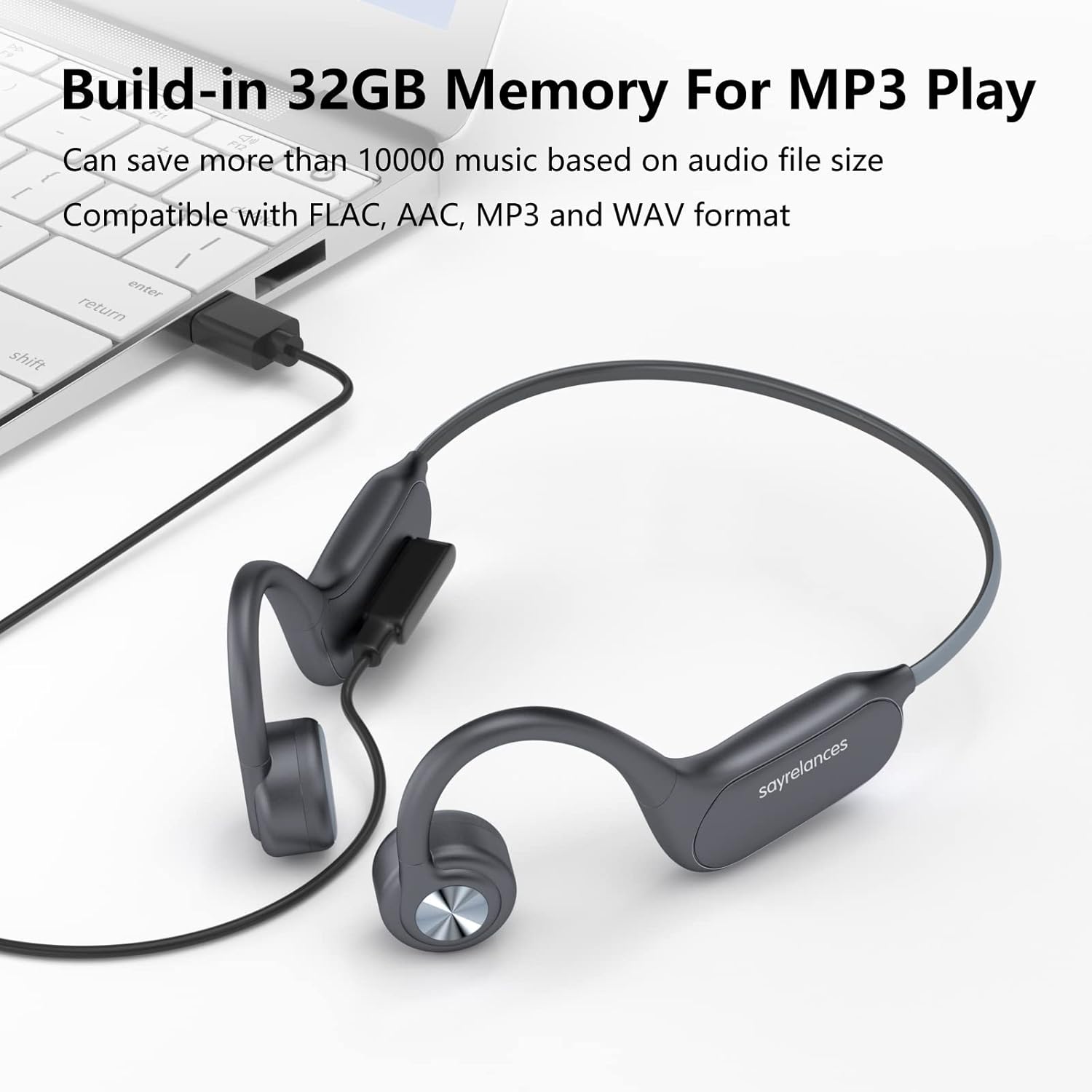
Image 4.1: The sayrelances R20 PRO-2 headphones connected to a laptop via their magnetic charging cable, illustrating the process of transferring music files to the built-in 32GB memory for MP3 playback. The screen shows file explorer, indicating compatibility with various audio formats.
5. Operating Instructions
5.1. Power On/Off
- Power On: Press and hold the Power button for 3 seconds.
- Power Off: Press and hold the Power button for 5 seconds.
5.2. Music Playback
- Play/Pause: Press the Power button once.
- Volume Up: Press the Volume Up button.
- Volume Down: Press the Volume Down button.
- Next Track: Press and hold the Volume Up button.
- Previous Track: Press and hold the Volume Down button.
5.3. Call Management
- Answer/End Call: Press the Power button once.
- Reject Call: Press and hold the Power button for 2 seconds.
5.4. Safety Lights Operation
The headphones feature integrated safety lights for enhanced visibility in low-light conditions.
- Press the dedicated Light button to cycle through 3 different lighting modes.
- These lights provide additional safety during outdoor activities in the dark.

Image 5.1: A person wearing the sayrelances R20 PRO-2 headphones from behind, with the integrated safety lights illuminated on the rear band. This image demonstrates the visibility feature for nighttime use, emphasizing safety and awareness.
6. Maintenance
6.1. Cleaning
Wipe the headphones with a soft, damp cloth. Do not use abrasive cleaners or immerse them in water for cleaning, despite their waterproof rating, to prevent damage to the charging port or internal components.
6.2. Storage
Store the headphones in the provided pouch in a cool, dry place away from direct sunlight and extreme temperatures.
6.3. Waterproof Rating (IPX8)
The R20 PRO-2 headphones are IPX8 rated, meaning they are protected against continuous immersion in water. This makes them suitable for swimming. Ensure the charging port is dry before charging.

Image 6.1: A swimmer wearing the sayrelances R20 PRO-2 headphones while swimming, with water splashing around. This image highlights the IPX8 waterproof capability, allowing users to enjoy music underwater by switching to MP3 mode.
7. Troubleshooting
| Issue | Possible Cause | Solution |
|---|---|---|
| Headphones not powering on | Low battery | Charge the headphones for 1.5 hours. |
| Cannot pair via Bluetooth | Not in pairing mode; device Bluetooth off; too far from device | Ensure headphones are in pairing mode (flashing red/blue LED). Turn device Bluetooth on/off. Move closer to device. |
| No sound | Volume too low; incorrect mode; audio source issue | Increase volume. Switch between Bluetooth/MP3 mode. Check audio on connected device. |
| Safety lights not working | Lights turned off; low battery | Press the Light button to activate. Charge the headphones. |
8. Specifications
- Model Name: R20 PRO-2
- Model Number: us-uk-AA0054
- Brand: sayrelances
- Connectivity: Bluetooth 5.3, Wireless
- Water Resistance: IPX8 (Waterproof)
- Internal Memory: 32GB (for MP3 playback)
- Supported Audio Formats: FLAC, AAC, MP3, WAV
- Battery Life: Up to 8 hours (music/calls, with safety lights off)
- Standby Time: Up to 200 hours
- Charging Time: Approximately 1.5 hours
- Battery Type: Lithium-ion (1 included)
- Special Features: Bone Conduction Technology, Safety Lights, Sweat Resistant
- Compatible Devices: iOS, Android, Laptops, iPad
- Material: Plastic
9. Warranty and Support
For warranty information or technical support, please refer to the documentation provided with your purchase or contact the manufacturer directly. Specific details regarding spare parts availability and software updates are not available at this time.