
1. Introduction
This manual provides detailed instructions for the assembly, operation, and maintenance of your FITUEYES TV Stand, model F02A2461A-JP. Please read this manual thoroughly before assembly and use to ensure safe and correct operation. Keep this manual for future reference.
2. Safety Information
- Ensure all parts are present and undamaged before assembly. Do not use if any parts are missing or defective.
- Do not exceed the maximum load capacity of 30kg for the TV rack and 8kg for the middle shelf, 25kg for the base shelf.
- Always assemble the stand on a soft, clean surface to prevent scratches.
- Securely fasten all screws and bolts. Periodically check for tightness.
- Keep children and pets away during assembly.
- The base is made of 8mm tempered glass. While designed to break into small, non-sharp fragments for safety, handle with care to prevent breakage.
- The base includes non-slip rubber pads to protect your floor and enhance stability.
3. Package Contents
Please verify that all components listed below are included in your package. If any parts are missing or damaged, please contact customer support.
- Main Stand Components (Steel frame, Tempered glass base, Plastic shelf)
- TV Mounting Screws (various sizes for VESA compatibility)
- Assembly Hardware (bolts, nuts, washers, etc.)
- Instruction Manual (multi-language, including English)
4. Assembly Instructions
Follow these steps carefully to assemble your FITUEYES TV Stand. A multi-language instruction manual is included in the package for detailed diagrams.
4.1. Prepare the Base
Place the tempered glass base on a clean, flat surface. Attach the main support column to the base using the provided hardware. Ensure it is securely tightened.

Image: Front view of the assembled FITUEYES TV Stand.
4.2. Attach the TV Mounting Bracket
Identify the correct VESA mounting screws for your television. Attach the TV mounting bracket to the rear of your TV. Then, secure the TV with the attached bracket to the main support column of the stand. Ensure the TV is centered and level.

Image: Illustration showing VESA compatibility (100x100mm to 600x400mm) and maximum load capacity of 30kg for the TV.
4.3. Install the Middle Shelf
The middle shelf can be adjusted to any desired height along the main support column. Slide the shelf onto the column and secure it at your preferred position. This shelf is suitable for media players, game consoles, or other accessories.
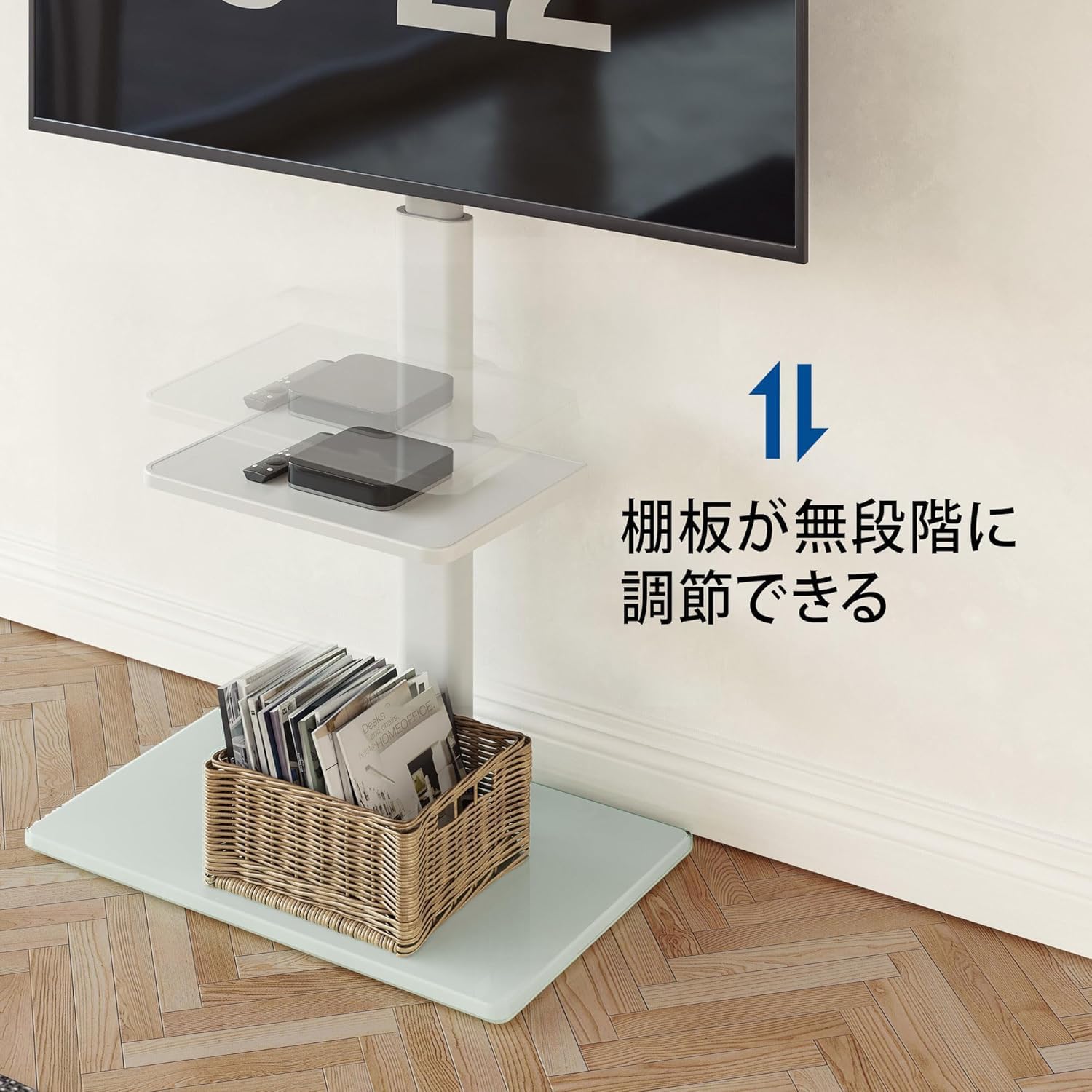
Image: The middle shelf can be adjusted steplessly along the main column.
5. Operating Instructions
5.1. Height Adjustment
The TV mounting bracket allows for 8 levels of height adjustment, ranging from 1060mm to 1240mm. Adjust the height to achieve an optimal viewing experience for users of different heights. Refer to the assembly manual for specific adjustment points.

Image: Illustration demonstrating the 8-level height adjustment feature of the TV stand, showing minimum (866mm) and maximum (986mm) TV center heights.
5.2. Swivel Function
The TV can be swiveled ±35 degrees horizontally. This allows you to adjust the viewing angle for comfort and convenience from various positions in the room.

Image: The TV stand allows for ±35° swivel, enabling optimal viewing angles.
5.3. Cable Management
The main support column features an integrated cable management system. Route your TV and device cables through the column to keep them organized and out of sight, contributing to a tidy living space.
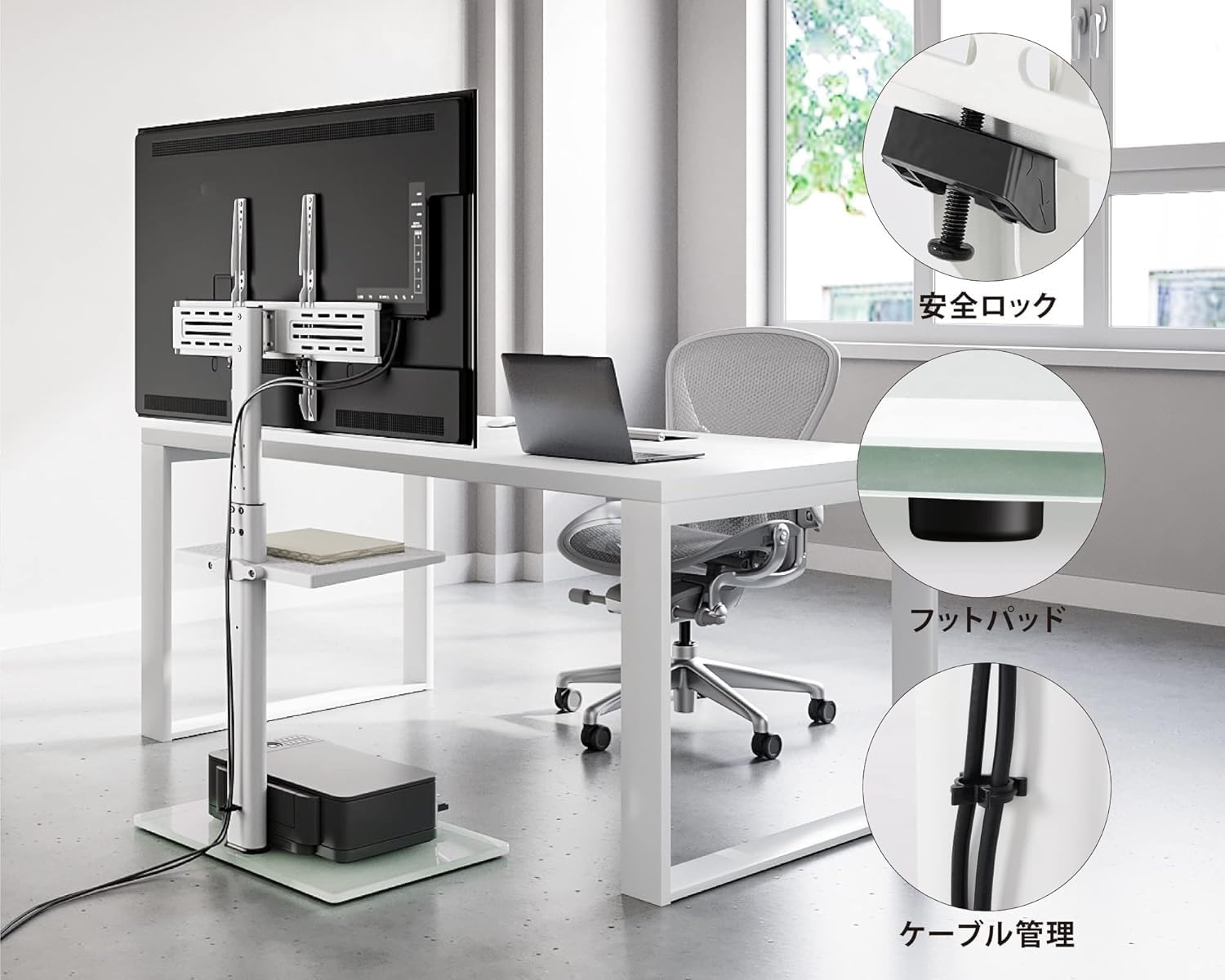
Image: Details showing cable management, a safety lock for the TV bracket, and protective foot pads on the base.
6. Maintenance
- Cleaning: Wipe the stand with a soft, damp cloth. Avoid abrasive cleaners or solvents that may damage the finish or glass.
- Inspection: Periodically check all screws and connections to ensure they remain tight and secure.
- Glass Care: For the tempered glass base, use a glass cleaner for streak-free shine.
7. Troubleshooting
- Stand is wobbly:
- Ensure all assembly screws and bolts are fully tightened.
- Verify the stand is placed on a flat, level surface.
- TV not fitting the bracket:
- Check your TV's VESA pattern against the stand's compatibility (100x100mm to 600x400mm).
- Ensure you are using the correct size mounting screws for your TV.
- Difficulty adjusting height or swivel:
- Ensure no cables are obstructing the movement.
- For height adjustment, ensure the locking mechanism (if any) is disengaged before attempting to move.
8. Specifications
| Model Number | F02A2461A-JP |
| Compatible TV Sizes | 32 - 60 inches |
| VESA Compatibility | Min: 100x100mm, Max: 600x400mm |
| Overall Dimensions (W x D x H) | 64.4 x 38 x 124 cm (25.35 x 14.96 x 48.82 inches) |
| Middle Shelf Dimensions | 39 x 29 cm (15.35 x 11.42 inches) |
| Base Shelf Dimensions | 55 x 38 cm (21.65 x 14.96 inches) |
| Product Weight | 8.4 kg (18.5 lbs) |
| Load Capacity (TV Rack) | 30 kg (66 lbs) |
| Load Capacity (Middle Shelf) | 8 kg (17.6 lbs) |
| Load Capacity (Base Shelf) | 25 kg (55 lbs) |
| Height Adjustment | 8 levels (1060mm - 1240mm) |
| Swivel Angle | ±35 degrees |
| Materials | Steel (frame), 8mm Tempered Glass (base), Plastic (middle shelf) |

Image: Technical drawing illustrating the detailed dimensions and measurements of the TV stand.
9. Warranty and Support
For any questions, concerns, or assistance with your FITUEYES TV Stand, please contact our customer support. We aim to respond to all inquiries within 24 hours.
Customer Support: Contact the seller "somle" directly through the platform where you purchased the product.
Please retain your purchase receipt for warranty purposes.