1. Introduction
This manual provides detailed instructions for the setup, operation, and maintenance of your SCCJGL ELM327 OBD2 Car Failure Detector V1.5 Bluetooth Version. This device is designed to diagnose check engine lights and monitor various vehicle sensors in real-time.
Important Note: This device is compatible with Android devices and Windows PCs only. It is NOT compatible with iOS devices (iPhone or iPad).
2. Product Overview
The ELM327 OBD2 Car Failure Detector is a compact diagnostic tool that connects to your vehicle's On-Board Diagnostics II (OBD-II) port.
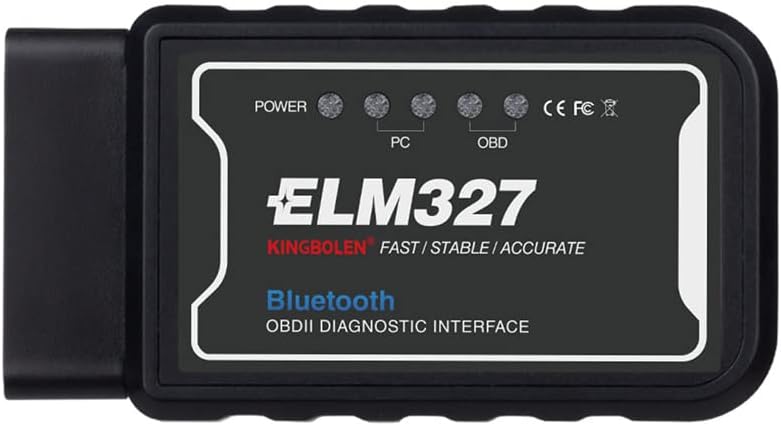
Image 2.1: Front view of the ELM327 OBD2 Bluetooth diagnostic tool. It features indicator lights for Power, PC connection, and OBD connection, along with the ELM327 branding and 'Bluetooth OBDII DIAGNOSTIC INTERFACE' label.
The device features indicator lights for POWER, PC (computer connection), and OBD (vehicle connection) to show its operational status.

Image 2.2: Internal view of the ELM327 device's circuit board. This image displays the electronic components and traces that enable the device's diagnostic functions.
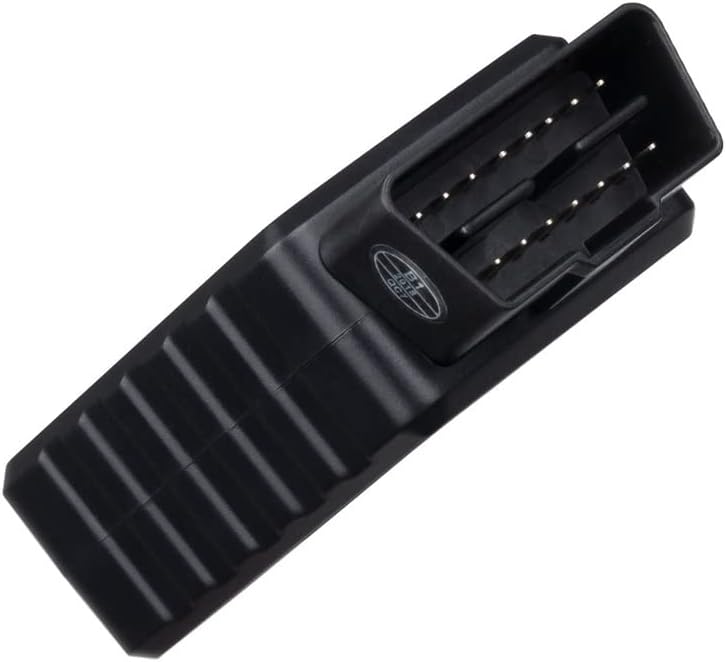
Image 2.3: Bottom view of the ELM327 device, highlighting the standard 16-pin OBD-II connector. This connector plugs directly into your vehicle's diagnostic port.
3. Setup and Installation
3.1 Software Download
Before using the device, you will need to download compatible diagnostic software. Please visit the following website to download the necessary application for your Android device or Windows PC: http://www.elm327.com/soft/
3.2 Device Connection
- Locate your vehicle's OBD2 port. This is typically found under the dashboard on the driver's side.
- Ensure your vehicle is turned off.
- Plug the ELM327 device firmly into your car's OBD2 port.
- Start your car's engine. The device's POWER indicator should illuminate.

Image 3.1: Connection diagram. This image illustrates the process of connecting the ELM327 device to the car's 16-pin OBD2 port and subsequently establishing a Bluetooth connection with a smartphone running a diagnostic application like Torque.
3.3 Bluetooth Pairing (for Android)
- On your Android phone or tablet, go to your device's settings and enable Bluetooth.
- Search for available Bluetooth devices. The ELM327 device will typically appear as "OBDII".
- Select "OBDII" to pair. When prompted for a PIN, enter 1234.
- Confirm the pairing request.
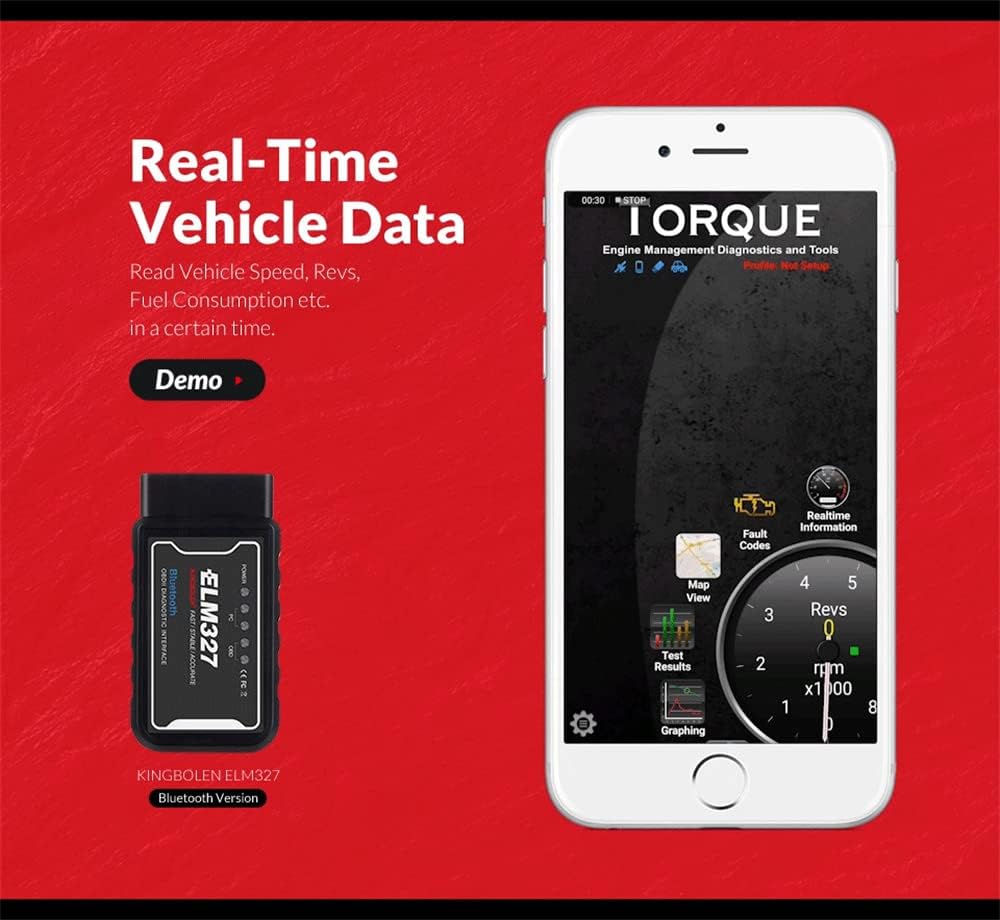
Image 3.2: Android Bluetooth pairing steps. This screenshot guides users through enabling Bluetooth, searching for 'OBDII', and entering the PIN '1234' to successfully pair the device with an Android smartphone.
3.4 Initial App Setup
After successful Bluetooth pairing, open the downloaded diagnostic application on your Android device or Windows PC. Follow the in-app instructions to configure the settings and establish a connection with your car's Engine Control Unit (ECU). Wait until the application successfully connects to the ECU.
3.5 Important Compatibility Notes
- This device is specifically designed for OBD2 gasoline cars and EOBD cars.
- The "Bluetooth for Android (Enhanced Version)" software is generally more stable than the standard "Bluetooth for Android" version.
4. Operating Instructions
4.1 Displaying Sensor Data
Once connected, the diagnostic application can display various real-time sensor data from your vehicle. This data can help in monitoring vehicle performance and diagnosing issues.

Image 4.1: Real-Time Vehicle Data display. This image shows a smartphone screen running a diagnostic application (Torque), illustrating how various vehicle parameters such as speed, RPMs, and fuel consumption are displayed in real-time.
Common sensor data that can be displayed includes:
- Engine speed (RPM)
- Calculated load value
- Coolant temperature
- Fuel system status
- Vehicle speed
- Short-term fuel trim
- Long-term fuel trim
- Intake manifold absolute pressure
- Timing advance
- Intake air temperature
- Airflow rate (MAF)
- Absolute throttle position
- Oxygen sensor voltages / associated short-term fuel trims
- Fuel pressure
4.2 Multiple Vehicle Use
If you intend to use the ELM327 device on two or more different vehicles, follow these steps:
- After finishing diagnostics on one car, disconnect the Bluetooth connection on your phone/tablet.
- Close the diagnostic application.
- Remove the ELM327 device from the first car's OBD2 port.
- Insert the ELM327 device into the second car's OBD2 port.
- Repeat the Bluetooth pairing process (Section 3.3) and initial app setup (Section 3.4) for the new vehicle.
5. Vehicle Compatibility
The ELM327 device is compatible with most OBDII-compliant vehicles. To determine if your car is supported, consider the following methods:
5.1 Method 1: Check Vehicle Emission Control Information Label
Look for the Vehicle Emission Control Information (VECI) label, usually located under the hood or on the radiator support. If it states that your vehicle is OBDII certified, the ELM327 device should support it.

Image 5.1: Vehicle Emission Control Information label and compatibility table. This image displays an example of a VECI label, which indicates if a vehicle is OBDII compliant, alongside a table detailing general ELM327 compatibility based on vehicle region and manufacturing year.
5.2 Method 2: Check Region and Year of Manufacture
Generally, vehicles manufactured after certain years in specific regions are OBDII compliant:
| Region | Year | Region | Year |
|---|---|---|---|
| USA | 1996 - Now | Russia | 2012 - Now |
| EU | 2001 - Now | China | 2009 - Now |
| Japan | 2002 - Now | Korea | 2010 - Now |
| Brazil | 2007 - Now | India | 2013 - Now |
6. Specifications
6.1 General Specifications
- Brand: SCCJGL
- Model: ELM327 V1.5 Bluetooth Version
- Item Weight: 1.06 ounces
- Product Dimensions: 3.15 x 1.57 x 0.39 inches
- Manufacturer: SCCJGL
- Wireless Connection: Bluetooth (5 ~ 10 meters range)
- Power Source: Vehicle OBD2 port (no external batteries required)
6.2 ELM327 Version and Chipset
This device is a V1.5 ELM327, known for its stability and broad protocol support. It utilizes the PIC18F25K80 chip for enhanced performance.
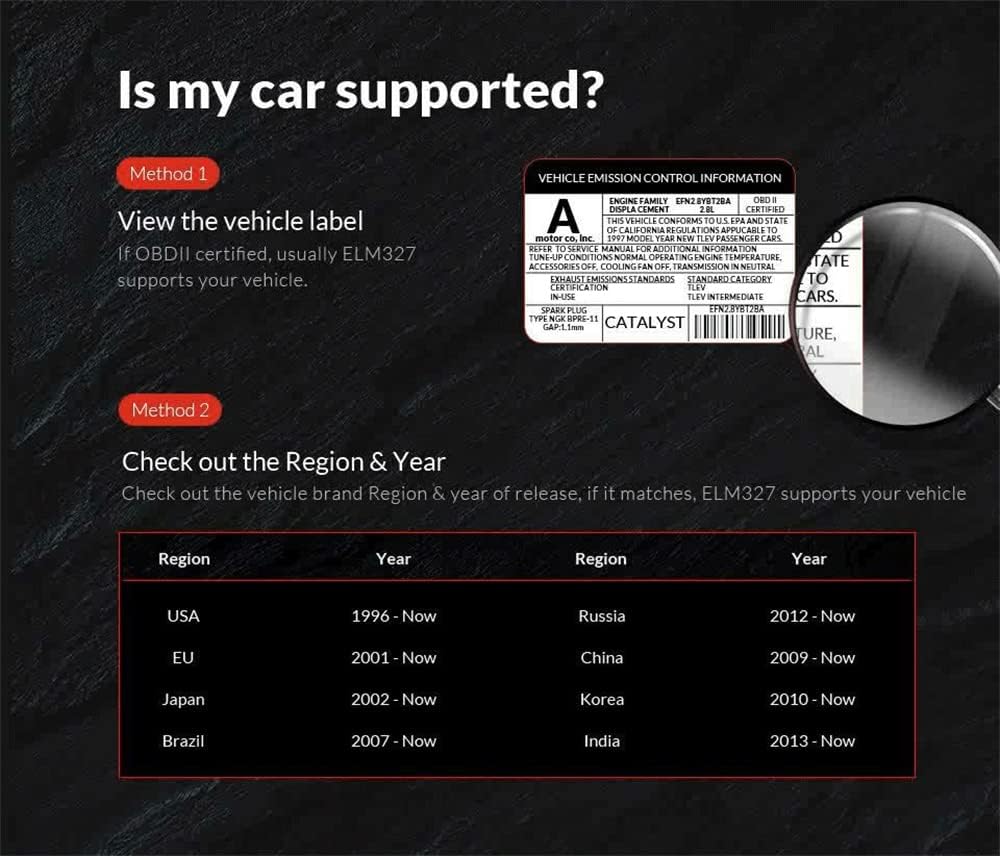
Image 6.1: ELM327 Identifier app displaying V1.5 support. This screenshot confirms the device's ELM327 V1.5 version and its ability to understand various ATAL and ATPPS commands, indicating broad compatibility.
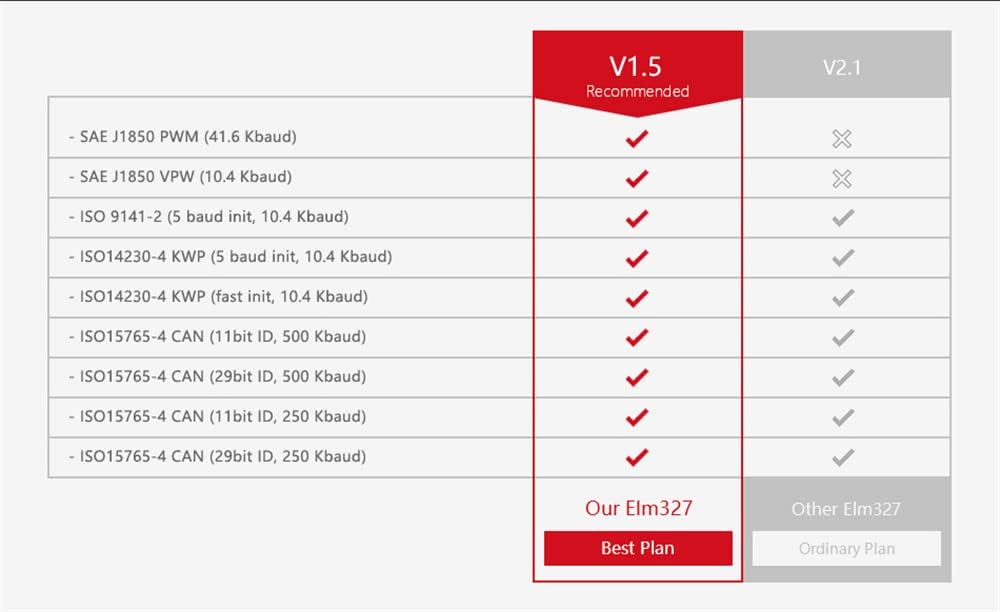
Image 6.2: PIC18F25K80 chip and protocol comparison. This image showcases the PIC18F25K80 chip, which provides superior performance, and includes a table comparing the OBD-II protocols supported by ELM327 V1.5 (recommended) versus V2.1, indicating V1.5 offers broader support for older protocols.
The V1.5 version supports a wider range of protocols compared to some V2.1 versions, making it compatible with more vehicles:
| Protocol | V1.5 (Our ELM327) | V2.1 (Other ELM327) |
|---|---|---|
| SAE J1850 PWM (41.6 Kbaud) | ✓ | ✗ |
| SAE J1850 VPW (10.4 Kbaud) | ✓ | ✗ |
| ISO 9141-2 (5 baud init, 10.4 Kbaud) | ✓ | ✓ |
| ISO14230-4 KWP (5 baud init, 10.4 Kbaud) | ✓ | ✓ |
| ISO14230-4 KWP (fast init, 10.4 Kbaud) | ✓ | ✓ |
| ISO15765-4 CAN (11bit ID, 500 Kbaud) | ✓ | ✓ |
| ISO15765-4 CAN (29bit ID, 500 Kbaud) | ✓ | ✓ |
| ISO15765-4 CAN (11bit ID, 250 Kbaud) | ✓ | ✓ |
| ISO15765-4 CAN (29bit ID, 250 Kbaud) | ✓ | ✓ |
7. Troubleshooting
If you encounter issues while using the ELM327 device, refer to the following common problems and solutions:
- Device Not Connecting to Phone/Tablet:
Ensure Bluetooth is enabled on your Android device. Verify that the ELM327 device is properly plugged into the car's OBD2 port and the car engine is running. Confirm you are searching for "OBDII" and using the correct PIN (1234) during pairing. Try restarting both the device and your phone/tablet. - App Not Connecting to ECU:
Make sure the ELM327 device is successfully paired via Bluetooth. Check the settings within your diagnostic application to ensure it is configured to connect to the correct Bluetooth device. Some apps may require specific settings for ELM327 V1.5. - No Readings for ABS, SRS, TPMS, or Oil Change Lights:
This ELM327 OBD2 scanner is designed to read and clear standard OBDII-related check engine lights and monitor engine sensors. It does not support reading codes for non-OBDII systems such as Anti-lock Braking System (ABS), Supplemental Restraint System (SRS), Tire Pressure Monitoring System (TPMS), or oil change indicators. - Issues When Switching Between Cars:
When using the device on multiple cars, it is crucial to disconnect the Bluetooth connection and close the diagnostic application completely after testing one car. Re-establish the Bluetooth connection and restart the application when inserting the OBD device into another vehicle. - Software Download Issues:
If you have trouble downloading software, ensure you have a stable internet connection and try the provided link again: http://www.elm327.com/soft/.
8. Maintenance
Proper care and maintenance will extend the lifespan of your ELM327 device:
- Storage: Store the device in a cool, dry place away from direct sunlight and extreme temperatures.
- Cleaning: Use a soft, dry cloth to clean the exterior of the device. Do not use liquid cleaners or solvents.
- Handling: Avoid dropping the device or subjecting it to strong impacts.
- Connection: Always ensure the device is properly aligned before plugging it into or unplugging it from the OBD2 port to prevent damage to the pins.
9. Warranty and Support
9.1 Warranty Information
- Quality Guarantee: The product includes a 3-month quality guarantee.
- Manufacturer Warranty: A 2-year warranty covers manufacturing defects. In case of dissatisfaction or defects, a refund or replacement may be provided.
9.2 Customer Support
For any questions, concerns, or support needs regarding your ELM327 device, please contact the seller or manufacturer through the platform where the product was purchased. Ensure you have your purchase details available for faster assistance.