
1. Introduction
This manual provides essential information for the proper setup, operation, and maintenance of your Hotsmtbang Replacement Remote Control. This remote is designed to be a direct replacement for various Metz Smart LED LCD HDTV TV models, ensuring seamless compatibility and ease of use.
The remote control is pre-programmed and requires no additional setup or coding. Simply insert the batteries, and it will be ready for immediate use with your compatible Metz television.
2. Product Overview
Familiarize yourself with the components of your new remote control.

Figure 2.1: Front view of the Hotsmtbang Replacement Remote Control, showing all buttons including power, number pad, navigation, volume, channel, and special function keys.
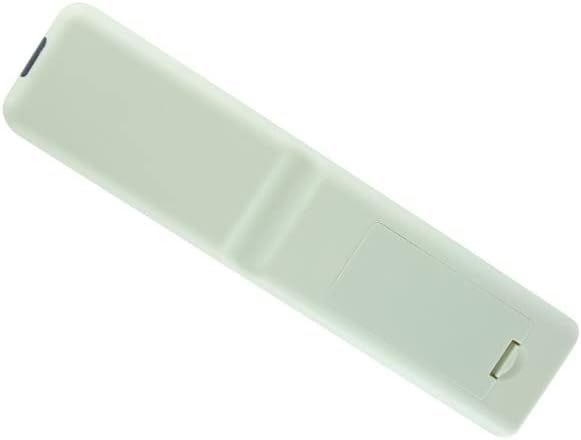
Figure 2.2: Back view of the Hotsmtbang Replacement Remote Control, showing the smooth, ergonomic design and the battery compartment cover.

Figure 2.3: Back view of the Hotsmtbang Replacement Remote Control with the battery compartment cover removed, revealing the slots for two AAA batteries.
3. Setup
Setting up your new remote control is a simple process that primarily involves installing the batteries.
3.1 Battery Installation
- Locate the battery compartment on the back of the remote control.
- Slide the battery compartment cover downwards or press the latch and lift to remove it.
- Insert two (2) new AAA batteries into the compartment, ensuring the positive (+) and negative (-) terminals align correctly with the markings inside the compartment.
- Replace the battery compartment cover by sliding it back into place until it clicks securely.
Important: This remote control is pre-programmed and requires no additional programming or pairing. It will function immediately after battery installation.
4. Operating Instructions
Once batteries are installed, your remote is ready to operate your compatible Metz TV. Point the remote directly at the TV's infrared sensor for optimal performance.
4.1 Basic Functions
- POWER: Turns the TV on or off.
- Number Buttons (0-9): Selects channels directly.
- VOL +/-: Adjusts the volume level.
- CH +/- (or PR +/-): Changes channels sequentially.
- MUTE: Mutes or unmutes the TV sound.
- MENU: Accesses the TV's main menu.
- Navigation Buttons (Up, Down, Left, Right): Navigates through menu options.
- OK (or ENTER): Confirms selections in menus.
- EXIT: Exits the current menu or screen.
- SOURCE (or INPUT): Selects input sources (HDMI, AV, etc.).
- BACK (or RETURN): Returns to the previous screen or channel.
Refer to your Metz TV's original user manual for specific functions of advanced buttons if present on this replacement remote.
5. Maintenance
Proper care and maintenance will extend the life of your remote control.
- Cleaning: Use a soft, dry cloth to clean the remote control. Do not use liquid cleaners or aerosols.
- Battery Replacement: Replace batteries when the remote's response becomes sluggish or stops working. Always replace both batteries at the same time with new ones of the same type (AAA).
- Storage: If the remote will not be used for an extended period, remove the batteries to prevent leakage and damage. Store in a cool, dry place.
- Avoid Damage: Do not drop the remote, expose it to extreme temperatures, or immerse it in water.
6. Troubleshooting
If you experience issues with your remote control, try the following troubleshooting steps:
- Remote Not Responding:
- Ensure batteries are inserted correctly with the correct polarity (+/-).
- Replace old batteries with new AAA batteries.
- Make sure there are no obstructions between the remote control and the TV's infrared sensor.
- Ensure you are within the effective range of the TV's sensor.
- Intermittent Operation:
- This often indicates low battery power. Replace batteries.
- Check for strong light sources (like direct sunlight or bright fluorescent lights) that might interfere with the infrared signal.
If the problem persists after trying these steps, please contact the seller for further assistance.
7. Specifications
| Feature | Detail |
|---|---|
| Brand | Generic (Hotsmtbang) |
| Model Compatibility | Metz 40MTB2000, 40MTB2000Z, 32MTB2000, 32MTB2000Z, 40MTB7000, 40MTB7000Z Smart LED LCD HDTV TVs |
| Batteries Required | 2 x AAA (not included) |
| Special Feature | No additional programming required |
| ASIN | B0B2P2T116 |
| Country of Origin | China |
8. Warranty and Support
This manual does not contain specific warranty information. For details regarding warranty coverage, returns, or technical support, please refer to the product listing on the retailer's website or contact the seller directly.
As per product information, this remote is sold by Hotsmtbang. Please reach out to them for any support inquiries.
9. Official Product Videos
There are no official product videos provided by the seller for this item.


