
Introduction
This manual provides instructions for the YATWIN F18 Bluetooth 5.3 Wireless Earbuds. Please read this guide carefully before using the product to ensure proper operation and to maintain the device's longevity. The earbuds feature Active Noise Cancellation (ANC), Environmental Noise Cancellation (ENC), Bluetooth 5.3 connectivity, and an IPX7 waterproof rating.
Product Overview
The YATWIN F18 earbuds are designed for comfort and performance, featuring a compact in-ear design and a portable charging case.

Image: YATWIN F18 Earbuds and Charging Case. The image displays the blue earbuds and their matching charging case.
Each earbud is equipped with multiple microphones for clear calls and noise reduction, along with touch-sensitive areas for control.
Charging the Earbuds and Case
Before first use, ensure the earbuds and charging case are fully charged.
- Place the earbuds into the charging case. Ensure they are correctly seated.
- Connect the charging case to a power source using the provided USB-C cable. The charging case supports both USB-C wired charging and wireless charging.
- The LED indicator on the charging case will show the charging status. A full charge typically takes a few hours.

Image: YATWIN F18 charging case connected via USB-C cable and placed on a wireless charging pad. This illustrates the dual charging capabilities.
The earbuds provide up to 8 hours of listening time on a single charge, with the charging case extending total playback to 32 hours.
Setup and Pairing
Follow these steps to set up and pair your YATWIN F18 earbuds with your device:
- Initial Preparation: Remove any protective film from the charging contacts on the earbuds. Place the earbuds back into the charging case, close the lid, and charge for at least ten minutes.
- Power On: Open the charging case. The earbuds will automatically power on and enter pairing mode.
- Enable Bluetooth: On your smartphone or tablet, go to the Bluetooth settings.
- Connect: In the list of available devices, select "YATWIN Flybuds F18" to establish a connection.
- Once paired, the earbuds will automatically connect to your device when the charging case is opened.

Image: A diagram illustrating the setup process (removing film, charging, and Bluetooth pairing) and touch controls for the YATWIN F18 earbuds.
Operating Instructions (Touch Controls)
The YATWIN F18 earbuds feature touch controls for managing music, calls, and noise cancellation modes.
| Action | Left Earbud | Right Earbud |
|---|---|---|
| Music Playback | ||
| Play/Pause | Double Tap | Double Tap |
| Next Track | Triple Tap | |
| Previous Track | Triple Tap | |
| Volume Up | Single Tap | |
| Volume Down | Single Tap | |
| Phone Calls | ||
| Answer/End Call | Double Tap | Double Tap |
| Reject Call | Press and hold 2s | Press and hold 2s |
| Noise Control | ||
| Switch ANC/Transparency/Normal Mode | Press and hold 2s | Press and hold 2s |
| Voice Assistant | ||
| Activate Voice Assistant (Siri, Google Assistant, Alexa) | Triple Tap | Triple Tap |
Active Noise Cancellation (ANC) and Environmental Noise Cancellation (ENC)
The YATWIN F18 earbuds feature intelligent noise reduction technology to enhance your listening and calling experience.
- Active Noise Cancellation (ANC): Hybrid ANC technology actively blocks up to 40 dB of ambient noise, allowing you to focus on your audio.
- Environmental Noise Cancellation (ENC): The intelligent ENC system, combined with three microphones per earbud, suppresses environmental noise during calls, ensuring clear voice transmission.
- Transparency Mode: This mode allows you to hear your surroundings without removing the earbuds, useful for awareness in busy environments.
Switch between ANC, Transparency, and Normal modes by pressing and holding the touch area on either earbud for 2 seconds.

Image: Graphic illustrating the YATWIN F18 earbud's ability to reduce ambient noise by up to 40 dB using hybrid composite digital noise reduction.
Sound Quality
The earbuds are engineered with 10mm diaphragms and polymer composite diaphragms to deliver rich instrumental harmonies, clear vocals, and powerful bass. PEEK + UP high fidelity dynamic drivers further enhance the bass performance for an immersive audio experience.
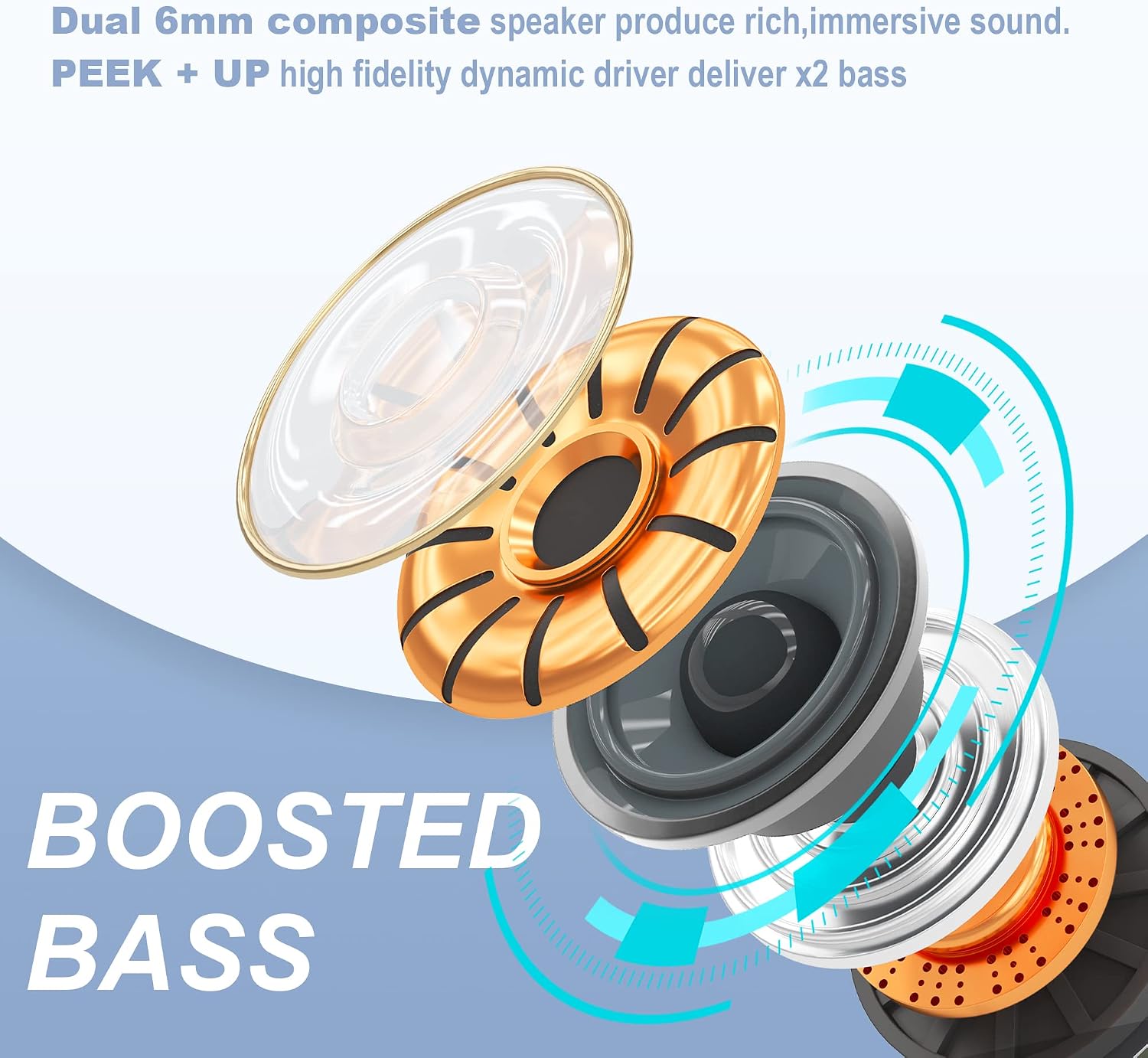
Image: Exploded view diagram of an earbud speaker, highlighting the 10mm diaphragm and composite materials for enhanced bass.
Water Resistance (IPX7)
The YATWIN F18 earbuds feature an IPX7 waterproof rating, making them resistant to splashes and suitable for various weather conditions and sports activities. This rating means the earbuds can withstand immersion in water up to 1 meter for 30 minutes.
Note: The charging case is not waterproof. Do not expose the charging case to water.

Image: YATWIN F18 earbuds shown with water splashes, indicating their IPX7 waterproof capability.
Maintenance
Proper maintenance ensures the longevity and performance of your earbuds.
- Cleaning: Regularly clean the earbuds, especially the ear tips and charging contacts, with a soft, dry, lint-free cloth. Do not use abrasive cleaners or solvents.
- Storage: When not in use, store the earbuds in their charging case to protect them from dust and damage. Keep the case in a cool, dry place.
- Avoid Extreme Conditions: Do not expose the earbuds or charging case to extreme temperatures, humidity, or direct sunlight for extended periods.
Troubleshooting
If you encounter issues with your YATWIN F18 earbuds, refer to the following common solutions:
- Earbuds not pairing: Ensure both earbuds are in the charging case and fully charged. Remove them from the case to initiate pairing mode. On your device, forget the "YATWIN Flybuds F18" connection and attempt to pair again.
- Only one earbud working: Place both earbuds back into the charging case, close the lid, and then open it again. This often resets the connection between the two earbuds.
- No sound: Check the volume level on both your device and the earbuds. Ensure the earbuds are properly connected to your device.
- Charging issues: Verify that the charging cable is securely connected to both the case and the power source. If using wireless charging, ensure the case is correctly positioned on the charging pad. Clean the charging contacts on the earbuds and inside the case.
- Poor call quality: Ensure the microphones are not obstructed. Try switching between ANC/Transparency/Normal modes to see if it improves clarity.
If the issue persists, contact customer support for further assistance.
Specifications
| Feature | Detail |
|---|---|
| Model Number | F18 |
| Bluetooth Version | 5.3 |
| Noise Cancellation | Hybrid ANC (up to 40 dB), ENC for calls |
| Microphones | 3 per earbud |
| Driver Size | 10mm |
| Earbud Battery Life | Up to 8 hours |
| Total Battery Life (with case) | Up to 32 hours |
| Charging Interface | USB-C, Wireless Charging |
| Water Resistance | IPX7 (earbuds only) |
| Control Method | Touch |
| Compatible Devices | All Bluetooth-enabled devices (iOS, Android, etc.) |
Safety Information
Please observe the following safety guidelines:
- Do not disassemble or modify the product.
- Keep the earbuds and charging case away from extreme temperatures, direct sunlight, and open flames.
- Avoid using the earbuds at excessively high volumes for prolonged periods to prevent hearing damage.
- Do not use the earbuds in situations where inability to hear ambient sounds could be dangerous (e.g., driving, cycling, walking in traffic).
- Keep out of reach of children and pets.
Warranty and Support
YATWIN provides customer service and email support. The product is covered by an 18-month support period. For any issues or inquiries, please contact YATWIN customer support through the retailer's platform or the official YATWIN website.