
ZOEYEC AR944M
User Manual
Smart Sensor AR944M Underground Metal Detector
Model: AR944M | Brand: ZOEYEC
Product Overview
The Smart Sensor AR944M is an electronic instrument designed to detect the presence of metal objects underground. It is particularly useful for locating metal inclusions hidden within objects or buried metal items such as gold, silver, aluminum, copper, iron, and other rare metals. The device provides indications of metal detection through both audio signals and LED light indicators, with the intensity of the indication increasing as the detector approaches a metal object.
Key features include a rechargeable lithium battery, adjustable sensitivity for varying detection scopes, and the ability to distinguish between ferrous and non-ferrous metals.

Image: The Smart Sensor AR944M Metal Detector, fully assembled and ready for use, showcasing its main components including the control unit, shaft, and search coil.
Important Safety Information
Please read and understand all safety warnings before operating the device.
- Do not use this device near airports, power lines, or other sensitive electronic equipment. Interference may occur, or the device may be damaged.
- Do not use in hazardous environments without proper grounding. Ensure safe operating conditions at all times.
- Always handle the battery with care. Refer to the battery section for specific warnings regarding charging and handling.
Setup and Assembly
The AR944M metal detector requires simple assembly before first use. Follow these steps carefully:

Image: All components of the Smart Sensor AR944M Metal Detector laid out, including the control unit, search coil, shaft sections, armrest, and assembly hardware.
- Attach the Search Coil: Secure the search coil to the lower stem using the provided non-metallic bolt and nut. Ensure it is firmly attached but allows for slight angle adjustment.
- Connect the Stems: Connect the middle stem to the lower stem, and then connect the upper stem (with the control unit and armrest) to the middle stem. Ensure the spring clips or locking mechanisms engage securely.
- Mount the Control Unit: Slide the control unit onto the upper stem and secure it in place.
- Connect the Coil Cable: Wrap the search coil cable around the stem, ensuring it is not tangled, and plug the connector into the corresponding port on the control unit.
- Adjust Length: Adjust the length of the stem to a comfortable operating height.
- Install Battery: Open the battery compartment on the control unit and insert the 1200mAh Li-battery. Ensure correct polarity. Close the compartment securely.
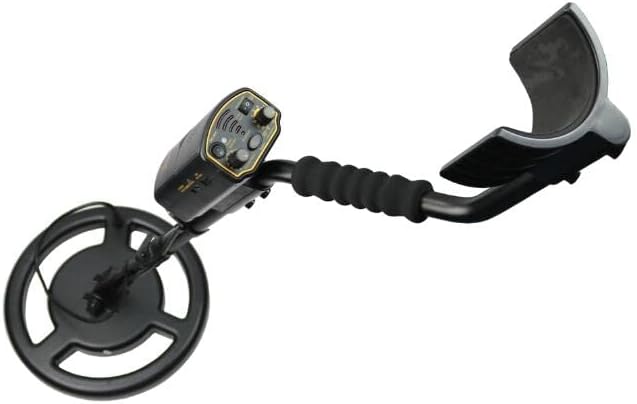
Image: The Smart Sensor AR944M Metal Detector fully assembled, showing the ergonomic armrest and adjustable shaft, ready for field use.
Operating Instructions
Familiarize yourself with the control panel for optimal performance.
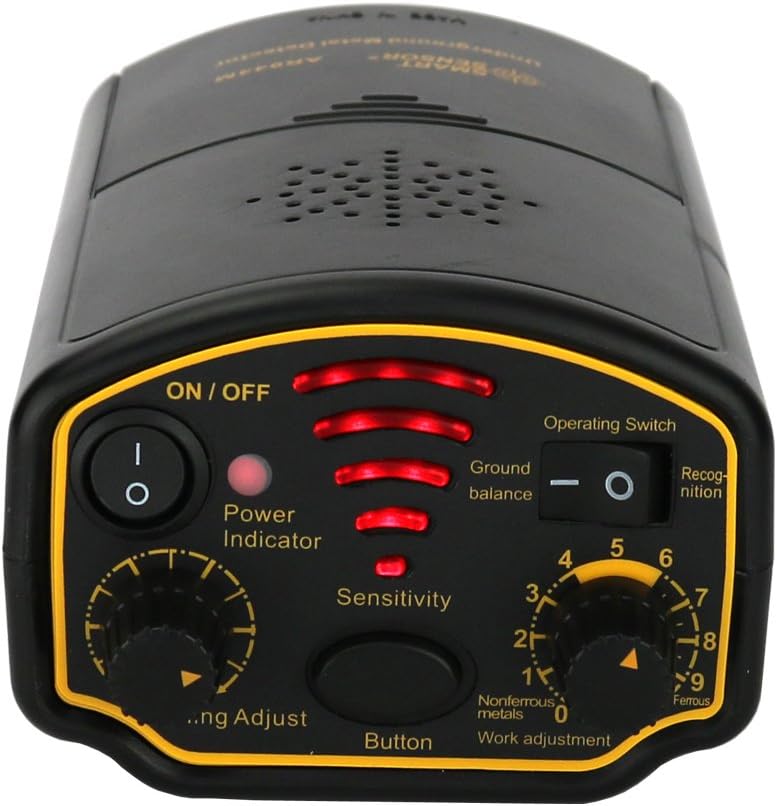
Image: Close-up view of the Smart Sensor AR944M Metal Detector's control panel, highlighting the ON/OFF switch, Power Indicator, Sensitivity knob, Operating Switch (Ground Balance/Recognition), and Work Adjustment knob.
- Power On/Off: Locate the ON/OFF switch on the control panel. Flip it to the "ON" position to power on the device. The Power Indicator LEDs will illuminate. To turn off, flip the switch to "OFF".
- Sensitivity Adjustment: Use the "Sensitivity" knob to adjust the detection sensitivity. Higher sensitivity allows for deeper detection but may also increase false signals from ground mineralization. Start with a medium setting and adjust as needed.
- Operating Mode (Ground Balance/Discrimination):
- Ground Balance: In this mode, the detector is optimized to ignore ground mineralization, allowing for more stable operation in various soil conditions. This is ideal for general searching.
- Discrimination (Recognition): This mode allows the detector to distinguish between different types of metals (ferrous and non-ferrous). Use the "Work adjustment" knob (numbered 0-9) to set the discrimination level. Lower numbers typically detect more types of metal, while higher numbers filter out more common junk metals like iron.
- Detection Indication: When a metal object is detected, the device will emit an audible tone, and the LED light indicators will illuminate. The strength of the signal (audio pitch/volume and LED intensity) will increase as the search coil gets closer to the target.
- Searchlight: The control unit features a built-in searchlight. This can be useful for detecting in low-light conditions.
- Earphone Jack: For private searching or in noisy environments, connect headphones to the earphone jack.
Battery Information
The AR944M is powered by a 1200mAh rechargeable Li-battery.

Image: The battery compartment of the Smart Sensor AR944M Metal Detector, showing the slot for the rechargeable lithium-ion battery and the battery itself with its specifications.
- Charging: Use the provided charger to recharge the battery. The charging port is located on the control unit. Ensure the device is turned off during charging.
- Battery Indication: The device features a battery indication system to show the remaining power level. Recharge the battery when the indicator shows low power to avoid interruption during use.
- Storage: If storing the detector for an extended period, ensure the battery is partially charged (around 50%) and remove it from the device. Store in a cool, dry place.
Maintenance and Care
- Cleaning: After each use, wipe down the detector with a damp cloth to remove dirt and debris. Do not use abrasive cleaners or solvents.
- Storage: Store the metal detector in a dry, cool place, away from direct sunlight and extreme temperatures. If storing for long periods, remove the battery.
- Coil Protection: Avoid dragging the search coil directly on rough surfaces to prevent wear and tear.
- Cable Care: Ensure the coil cable is not pinched or cut. Handle connectors carefully.
Troubleshooting
| Problem | Possible Cause | Solution |
|---|---|---|
| No power | Battery discharged or incorrectly installed. | Ensure battery is fully charged and correctly inserted. Check ON/OFF switch. |
| Constant false signals | High sensitivity, ground mineralization, or electromagnetic interference. | Reduce sensitivity. Switch to Ground Balance mode. Move away from power lines or other electronic devices. |
| Poor detection depth | Low sensitivity, small target, or deep target. | Increase sensitivity. Ensure proper sweep technique. |
| Inaccurate discrimination | Incorrect discrimination setting. | Adjust the "Work adjustment" knob. Practice with known metal samples. |
Specifications
| Feature | Detail |
|---|---|
| Model | AR944M |
| Color | Black |
| Material | ABS Plastic + Iron |
| Detectable Indication | Audio / LED light |
| Max Detection Depth | 1.8m |
| Operating Mode | Ground Balance / Discrimination |
| Signal Frequency | 7.2kHz |
| Object Detectable | Ferrous & Non-ferrous Metal Distinguish |
| Battery Indication | Yes |
| Min Detection Diameter | 3.5cm / 1.38" |
| Searchlight | Yes |
| Earphone Jack | Yes |
| Underground Detection | Yes |
| Rated Power | ≤1.0W |
| Operation Temperature | 0°C ~ 50°C |
| Storage Temperature | -20°C ~ 60°C |
| Power | 1200mA Li-Battery (7.4V) |
| Weight | 2220g (approx. 4.9 lbs) |
| Dimensions (assembled) | 30x30x113.5cm (approx. 11.8x11.8x44.7 inches) |
| Sensitivity | Applicable for detecting gold, silver, aluminum, copper, iron, and rare metals. |
| International Protection Rating | IP55 |
Warranty and Support
For warranty information, technical support, or service inquiries, please contact the manufacturer or your point of purchase. Keep your purchase receipt as proof of purchase.
Manufacturer: Smart Sensor
Model: AR944M
UPC: 746664892680