
1. Introduction
This manual provides essential information for the safe and efficient operation of your Haam HWM8S-21N 8kg Top Load Washing Machine. Please read these instructions carefully before installation, use, or maintenance. Keep this manual for future reference.
2. Safety Information
Always follow basic safety precautions when using electrical appliances to reduce the risk of fire, electric shock, and injury.
- Ensure the washing machine is properly grounded.
- Do not operate the machine with a damaged power cord or plug.
- Keep children and pets away from the appliance during operation.
- Do not wash items that have been cleaned, washed, soaked, or spotted with combustible or explosive substances.
- Unplug the appliance before cleaning or performing any maintenance.
- Do not attempt to repair or replace any part of your washing machine unless specifically recommended in this manual.
3. Product Overview
The Haam HWM8S-21N is an 8kg top-load washing machine designed for efficient laundry care. It features an inverter motor for energy saving and quiet operation, along with a magic filter for lint collection.

This image shows a front-top view of the Haam HWM8S-21N 8kg top load washing machine in silver. The control panel with knobs and buttons is visible, along with the transparent lid.
4. Setup and Installation
4.1 Unpacking
Carefully remove all packaging materials. Inspect the machine for any damage incurred during transit. Keep packaging materials out of reach of children.
4.2 Location Requirements
Place the washing machine on a firm, level surface. Ensure there is adequate space for water inlet and drain hoses, and a power outlet. Avoid direct sunlight or extreme temperatures.
4.3 Connecting Water Hoses
Connect the water inlet hose(s) to the corresponding hot and cold water taps. Ensure connections are tight to prevent leaks. Open the water taps fully to check for any leaks.
4.4 Drain Hose Installation
Position the drain hose securely into a standpipe or over the edge of a sink. Ensure the hose is not kinked or blocked, and that it is at an appropriate height to prevent siphoning.
4.5 Power Connection
Plug the power cord into a grounded electrical outlet. Do not use extension cords or adapters.
5. Operating Instructions
5.1 Control Panel Overview
The control panel features various knobs and buttons for program selection, temperature, water level, and special functions. Refer to the markings on your specific model for detailed functions.
5.2 Loading Laundry
Open the top lid and load clothes loosely into the drum. Do not overload the machine. Distribute items evenly to maintain balance during the wash cycle.
5.3 Adding Detergent and Softener
Add the appropriate amount of detergent to the detergent dispenser. If using fabric softener, add it to the designated softener compartment. Do not exceed the maximum fill line.
5.4 Selecting a Wash Program
Turn the program selection knob or press the program buttons to choose the desired wash cycle (e.g., Normal, Delicate, Heavy, Quick Wash, Spin). Adjust water temperature and level as needed.
5.5 Starting a Wash Cycle
Close the top lid securely. Press the 'Start/Pause' button to begin the wash cycle. The machine will automatically fill with water and proceed with the selected program.
5.6 FCS Function
The FCS (Fast Clean System) function optimizes the wash program for reduced time and improved performance. Select this option for quicker and more effective cleaning.
5.7 End of Cycle
Once the wash cycle is complete, the machine will signal. Open the lid and remove your laundry promptly to prevent wrinkles and odors.
6. Maintenance and Cleaning
6.1 Cleaning the Magic Filter
The magic filter collects lint and debris during washing. Regularly remove and clean the filter under running water to ensure optimal performance and prevent lint transfer to clothes.
6.2 Cleaning the Exterior
Wipe the exterior of the washing machine with a soft, damp cloth. Do not use abrasive cleaners or solvents.
6.3 Drum Cleaning
Periodically run a self-clean cycle or a hot wash cycle with a washing machine cleaner to remove detergent residue and prevent odors.
6.4 Water Inlet Filter Cleaning
If water flow is reduced, check and clean the water inlet filters located at the connection point of the water hoses to the machine. Turn off water supply before cleaning.
7. Troubleshooting
Before contacting service, check the following common issues:
- Machine does not start: Ensure the power cord is plugged in, the lid is closed, and the water supply is on.
- No water filling: Check if water taps are open and water inlet filters are not blocked.
- Water leakage: Verify that water hoses are securely connected and the drain hose is properly installed.
- Unusual noise/vibration: Ensure the machine is on a level surface and laundry is evenly distributed. Remove any foreign objects from the drum.
- Poor washing results: Check detergent quantity, water temperature, and selected wash program. Clean the magic filter.
If problems persist, contact customer support.
8. Specifications
| Feature | Specification |
|---|---|
| Brand | Haam Electric |
| Model | HWM8S-21N |
| Capacity | 8 kg |
| Product Dimensions (W x H x D) | 60 x 84.5 x 59.8 cm |
| Item Weight | 76.5 kg |
| Efficiency Rating | A |
| Annual Energy Consumption | 289 kWh |
| Annual Water Consumption | 28,600 Liters |
| Installation Type | Freestanding |
| Special Features | Inverter (Power Saving Technology), FCS Function, Magic Filter |
| Color | Silver |
| Control Type | Knob |
| Access Location | Top Load |
| Material Type | Plastic |
| Cycle Options | Spin |
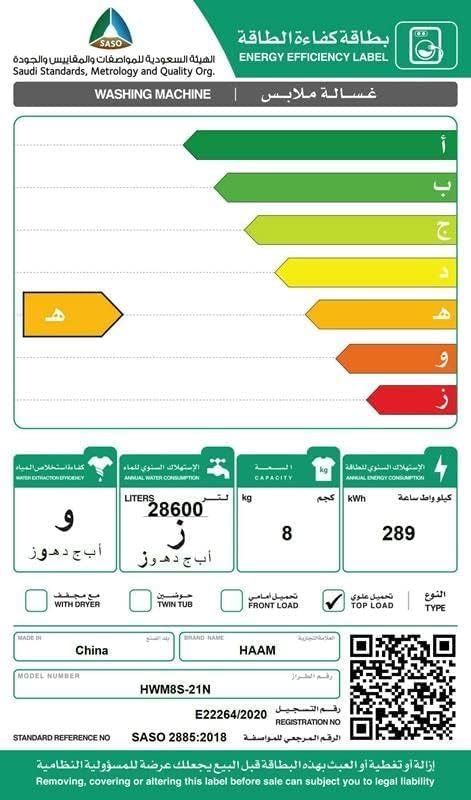
This image displays the energy efficiency label for the Haam HWM8S-21N washing machine. It indicates an 'A' efficiency rating, an 8 kg capacity, annual water consumption of 28,600 liters, and annual energy consumption of 289 kWh. The label also confirms it is a top-load type, made in China, with model number HWM8S-21N. A QR code is present for certificate authentication. For more details, visit sls.gov.sa.
9. Warranty Information
Your Haam HWM8S-21N washing machine comes with a standard manufacturer's warranty. Please refer to the warranty card included with your purchase for specific terms, conditions, and duration. Keep your proof of purchase for warranty claims.
10. Customer Support
For technical assistance, service requests, or inquiries regarding your Haam washing machine, please contact Haam Electric customer support. Contact details can typically be found on the manufacturer's website or in your warranty documentation.