Product Overview
The Eaglerich Model 520 is a 1 Din car radio designed for 24V vehicle systems. It functions as an audio FM MP3 player with USB, SD, and AUX input capabilities. Key features include hands-free calling via Bluetooth and control with a wireless remote.
This multi-functional unit provides a comprehensive in-car entertainment solution, supporting various audio formats and offering multiple EQ options for an optimized listening experience.

Image: Front view of the Eaglerich 1 Din Car Radio, showing the main unit, included remote control, wiring harnesses, and a small user manual.

Image: Promotional image highlighting the main features of the car MP3 player, including SD card support, USB, AUX, MP3 playback, FM radio, Bluetooth audio, and Bluetooth hands-free calling.
Package Contents
- 1 x Eaglerich Model 520 Car Radio
- 1 x Wireless Remote Control (battery not included)
- 2 x Wiring Harnesses
- 2 x Installation Tool Set
- 1 x User Manual
Setup and Installation
Before installation, ensure your vehicle's electrical system is 24V. This unit is designed for 24V operation. Incorrect voltage can damage the device.
Wiring Diagram
Refer to the following diagram for proper wiring connections. It is recommended to have installation performed by a qualified professional.

Image: Detailed wiring diagram located on the top of the car radio unit, indicating connections for power (DC 12-24V, Negative Ground), speaker outputs (RCA and direct), and antenna input.
- Power Connection: Connect the yellow wire to the constant 24V power supply, the red wire to the ignition switch 24V power, and the black wire to the vehicle's ground.
- Speaker Connections: Connect the speaker wires according to the diagram (e.g., white/white-black for front left, gray/gray-black for front right, green/green-black for rear left, purple/purple-black for rear right).
- Antenna Input: Connect your car's FM antenna to the designated input.
- RCA Audio Output: Use the L/R RCA audio output jacks for connecting external amplifiers.
Physical Installation
Use the provided installation tool set to secure the radio into the 1 Din slot of your vehicle's dashboard. Ensure all connections are firm and insulated to prevent short circuits.

Image: Side view of the car radio unit, illustrating the mounting brackets and screw holes for secure installation into a vehicle's dashboard.
Controls and Functions
The front panel of the radio features various buttons and controls for easy operation. The included remote control provides convenient access to most functions.

Image: Front view of the car radio, highlighting the main control knob, display screen, USB port, SD card slot, and various function buttons.
Front Panel Functions:
- Power Switch and Model Button: Press to turn on/off, short press to cycle through modes (FM/USB/SD/AUX/BT).
- Band Control Button: In FM mode, press to switch between FM1, FM2, FM3 bands.
- Station Tuning/Fast Forward/Rewind: Use the tuning buttons to search for radio stations or navigate tracks.
- Multi-functional Selection Key: Used for various selections depending on the mode.
- Button to Adjust Volume or Functional Changes: Rotate the large knob for volume control. Press for menu options.
- Storage Key (1-6): Preset buttons for saving and recalling radio stations.
- Display Window: Shows current mode, frequency, track information, and time.
- USB Connector: For USB flash drives.
- IR Remote Control Window: Infrared receiver for the remote control.
- Clock Adjustment (CLK): Press to display time, long press to set time.
Operating Instructions
Bluetooth Operation
The unit supports Bluetooth for hands-free calling and audio streaming.

Image: Illustration of the Bluetooth function, showing a smartphone displaying a charging icon and a woman driving, emphasizing hands-free operation.
- Pairing: Turn on the radio and enable Bluetooth on your mobile phone. Search for available devices and select "BT-CAR" or similar. Enter "0000" if a PIN is required.
- Hands-Free Calling: Once paired, you can answer, reject, or redial calls directly from the radio's panel or remote control. Your voice will be picked up by the built-in microphone.
- Audio Streaming: Play music from your Bluetooth-enabled device through the car radio.
FM Radio Function
Enjoy high-quality FM stereo radio with preset station capabilities.

Image: Visual representation of the FM radio function, showing a classic radio alongside the car radio unit, highlighting its ability to receive FM signals.
- Automatic Search: Press the "AMS" button for automatic station search and storage.
- Manual Tuning: Use the tuning buttons to manually search for stations.
- Preset Stations: The radio can store 18 FM stations (87.5-108 MHz) across three bands (FM1, FM2, FM3). Long press preset buttons (1-6) to save the current station. Short press to recall.
USB/SD/AUX Playback
The unit supports various audio sources for versatile music playback.
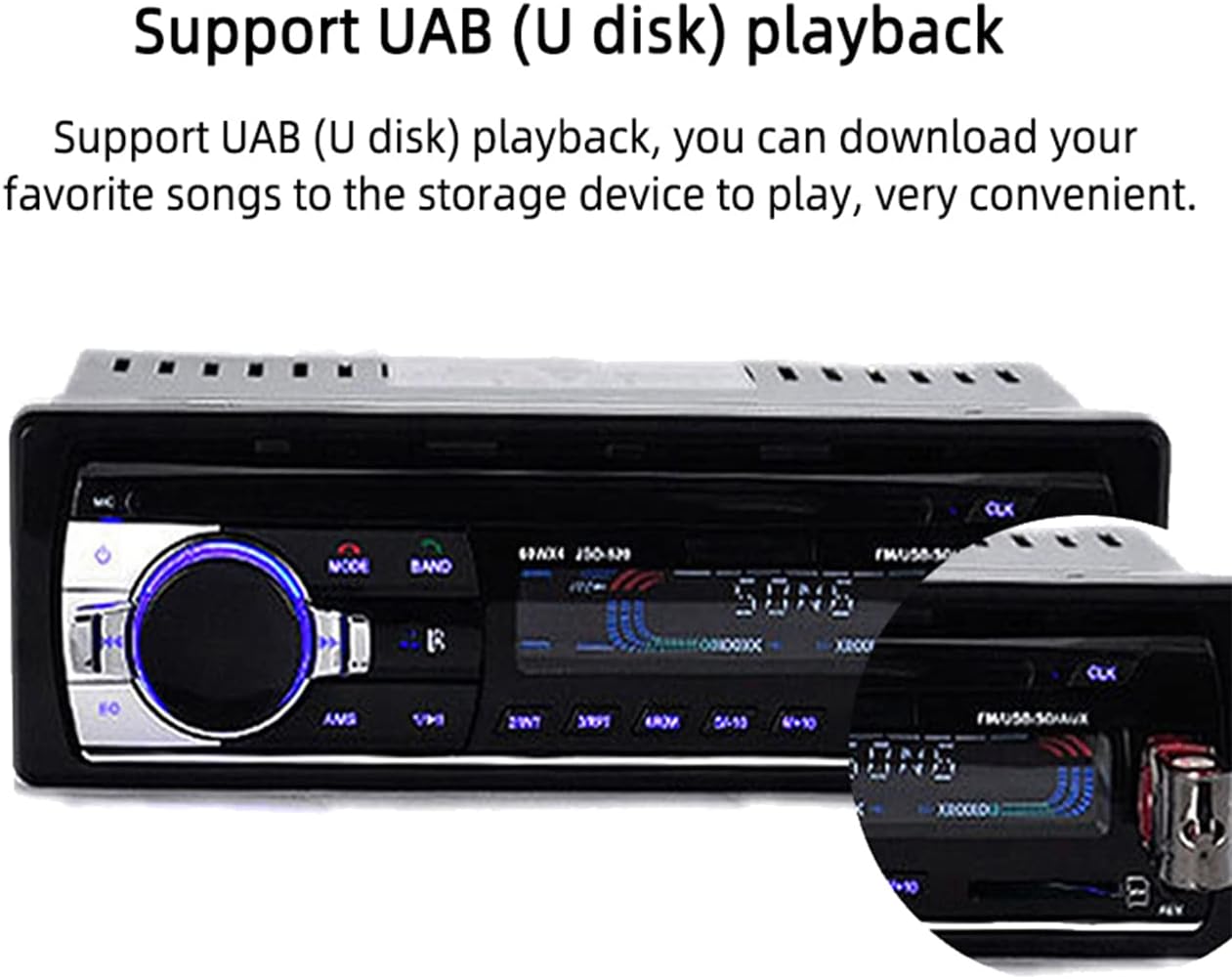
Image: Close-up of the car radio's front panel with a USB flash drive inserted, demonstrating its USB playback capability.

Image: The car radio connected to a smartphone via a 3.5mm AUX cable, illustrating the auxiliary audio input function.
- USB/SD Card: Insert a USB flash drive or SD card into the respective slot. The unit will automatically switch to USB/SD mode and begin playing supported audio files (MP3 / WMA / APE / FLAC / WAV).
- AUX Input: Connect external audio devices (e.g., smartphone, MP3 player) to the 3.5mm AUX input jack on the front panel using an audio cable. Select AUX mode to play audio from the connected device.
- Folder Function: Navigate through folders on USB/SD cards.
- Breakpoint Play: The unit can resume playback from where it left off.
- ID3 Play: Displays song information (title, artist) for compatible files.
Audio Settings
- EQ Options: Press the "EQ" button or navigate through the menu to select from various equalizer presets such as Jazz, Rock, Pop, Classical, etc.
- Treble/Bass/Balance/Fader: Adjust these settings electronically via the volume knob or menu to customize your sound.
- Loudness Control: Press the "LOUD" button to enhance bass and treble at low volumes.
- Mute Function: Press the "MUTE" button on the remote or front panel to instantly silence the audio.
Maintenance
To ensure the longevity and optimal performance of your Eaglerich car radio, follow these maintenance guidelines:
- Cleaning: Use a soft, dry cloth to clean the front panel and display. Avoid using abrasive cleaners or solvents, which can damage the surface.
- Dust and Debris: Keep the USB and SD card slots free from dust and debris. Use compressed air if necessary.
- Temperature: Avoid exposing the unit to extreme temperatures, direct sunlight for prolonged periods, or high humidity.
- Power Supply: Ensure a stable 24V power supply to prevent damage to the internal components.
Troubleshooting
If you encounter issues with your car radio, refer to the following common problems and solutions:
| Problem | Possible Cause | Solution |
|---|---|---|
| No power/Unit does not turn on. | Incorrect wiring; Blown fuse; Insufficient voltage. | Check power and ground connections. Verify fuse is intact. Ensure vehicle provides stable 24V. |
| No sound from speakers. | Speaker wires disconnected; Volume too low; Mute function active; Incorrect audio source. | Check speaker wiring. Increase volume. Deactivate mute. Select correct input mode (FM, USB, AUX, BT). |
| Bluetooth not connecting. | Bluetooth not enabled on phone/radio; Incorrect pairing process; Device out of range. | Ensure Bluetooth is active on both devices. Re-attempt pairing. Move phone closer to the radio. |
| Poor FM radio reception. | Antenna not connected; Weak signal area; Damaged antenna. | Check antenna connection. Try tuning to stronger stations. Consider antenna inspection/replacement. |
| USB/SD card not recognized. | Unsupported file format; Corrupted card/drive; Incorrectly inserted. | Ensure files are MP3/WMA/APE/FLAC/WAV. Reformat card/drive if necessary. Reinsert securely. |
Specifications
Detailed technical specifications for the Eaglerich Model 520 Car Radio:
| Feature | Specification |
|---|---|
| Model Name | 520 |
| Display Size | 2.5 inches |
| Resolution | 240*320 |
| Material Type | Metal + Plastic |
| Item Weight | 0.43 kg (13.4 ounces) |
| Item Size (Product Dimensions) | 18.3 x 8 x 5.8 cm (7.2 x 3.15 x 2.28 inches) |
| Output Power | 4 x 60W |
| Voltage | 24V |
| FM Frequency Range | 87.5-108 MHz |
| Supported Audio Formats | MP3 / WMA / APE / FLAC / WAV |
| Connectivity Technology | RCA, Bluetooth, Auxiliary, USB |
| Audio Output Mode | Stereo |
| Surround Sound Channel Configuration | 4 Channel |

Image: Diagram illustrating the physical dimensions of the car radio unit in centimeters (17.8cm, 8cm, 5.8cm, 18.8cm).
Warranty and Support
Specific warranty information for the Eaglerich Model 520 Car Radio is not provided in this manual. Please refer to your purchase documentation or contact the retailer for warranty details.
For technical support or further assistance, please contact the manufacturer or your point of purchase. Keep your purchase receipt and product model number (520) handy when seeking support.


