
Introduction
Thank you for choosing the ANTSIR F-22 Raptor 2.4GHz RC Airplane. This instruction manual provides essential information for the safe and enjoyable operation, maintenance, and setup of your new remote control aircraft. Please read this manual thoroughly before use and retain it for future reference.
Safety Information
Important Safety Guidelines:
- Do not fly this plane in windy weather.
- Choose an open area for flight, clear of trees, buildings, and other obstacles.
- For the first flight, set the throttle to 30–40% and adjust lightly. Avoid setting the throttle to maximum to prevent uncontrolled flight.
- Charge batteries for 50 minutes for 15 minutes of flight. Do not charge for more than 2 hours.
- This product is recommended for ages 14 years and up. Adult supervision is highly recommended for younger users.
What's in the Box
Your ANTSIR F-22 Raptor package includes the following components:
- F22 RC Plane
- Remote Control
- Landing Gear (2 sets)
- Li-Po Battery (3 included)
- Charging Cable (USB)
- Spare Propellers (2 sets)
- Propeller Removal Tool
- Instruction Manual
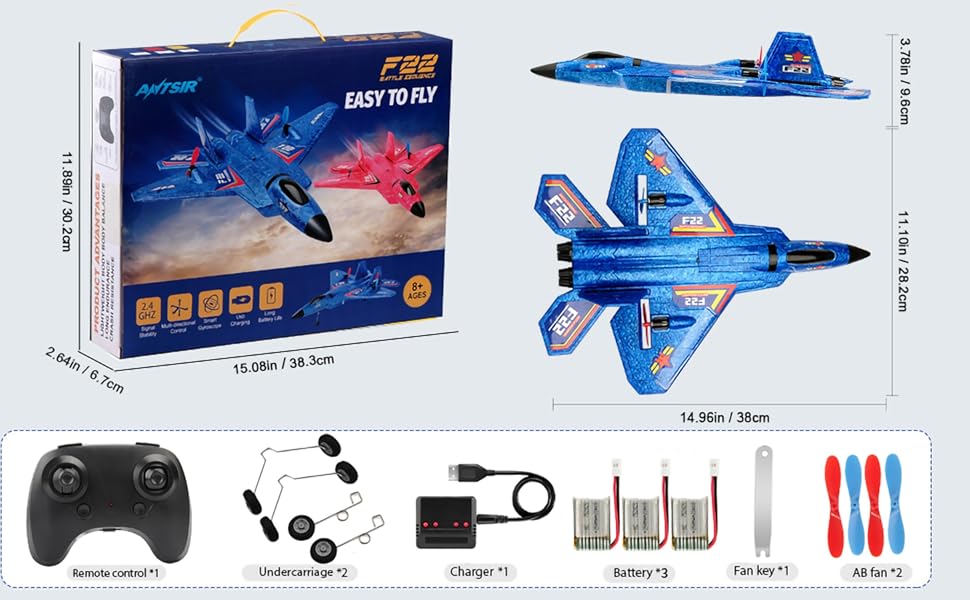
Figure 1: Package contents of the ANTSIR F-22 Raptor RC Airplane.
Setup
1. Battery Charging
Before first use, fully charge all three Li-Po batteries using the provided USB charging cable. The charging port illuminates red when a battery is sensed. The light will turn off when the battery is fully charged. Charging typically takes 50 minutes for 15 minutes of flight time per battery. Do not exceed 2 hours of charging.
Video 1: Demonstrates the battery charging process for the F-22 Raptor RC Plane.
2. Remote Control Battery Installation
The remote control requires 3 x AAA batteries (not included). Open the battery compartment on the back of the remote control using the mini screwdriver provided, insert the batteries, and close the compartment.
Video 2: Shows the installation of batteries into the remote control.
3. Landing Gear Installation
The landing gear can be optionally installed for ground take-offs. Insert the wire ends of the landing gear into the designated slots on the underside of the aircraft. Ensure they are securely in place.
4. Aircraft Battery Installation & Power On
Open the battery compartment on the underside of the F-22 Raptor. Connect a charged Li-Po battery to the aircraft's power connector. Carefully tuck the battery and wires into the compartment and close the cover. Once connected, the aircraft's LED lights will flash, indicating it is searching for a signal.
Video 3: Illustrates the process of installing the aircraft battery and powering on.
5. Pairing the Remote Control
With the aircraft powered on and its lights flashing, turn on the remote control. Push the left throttle lever of the remote control to the top, then pull it back down. The remote control light will become solid, and the aircraft's lights will stop flashing, indicating successful pairing.
Video 4: Demonstrates the remote control pairing process with the aircraft.
Operating Instructions
1. Take-off Modes
The F-22 Raptor offers two beginner-friendly take-off modes:
- Hand-Throw: Hold the aircraft at average shoulder height, parallel to the ground or with the nose slightly upward. Gently and smoothly throw it forward while applying full throttle.
- Ground Launch: Place the aircraft on a flat, clear surface. The length of the windward runway should be more than 10 meters. Apply full throttle and taxi for 10 meters before lift-off.
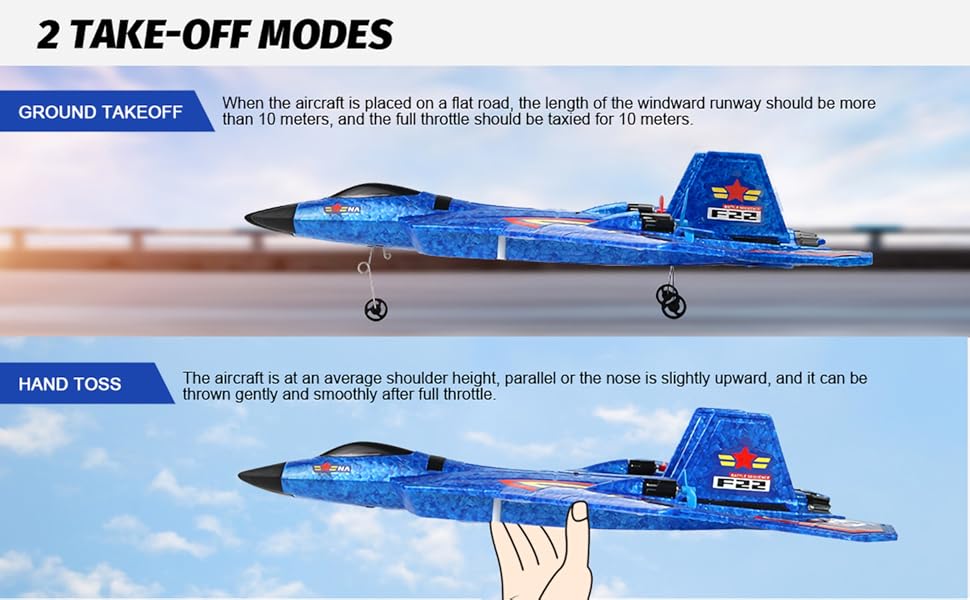
Figure 2: Two take-off modes for the F-22 Raptor.
2. Controls
The remote control allows for precise maneuverability:
- Left Joystick: Controls altitude (up/down) and yaw (left/right rotation).
- Right Joystick: Controls pitch (forward/backward) and roll (left/right banking).
- Smart Gyroscope: Equipped with a smart gyroscope, the aircraft will automatically restore balance if it leans too far left or right, making it stable and easy to control.
- 360-Degree Flips: The aircraft is capable of performing 360-degree flips. Refer to the manual for specific button combinations.
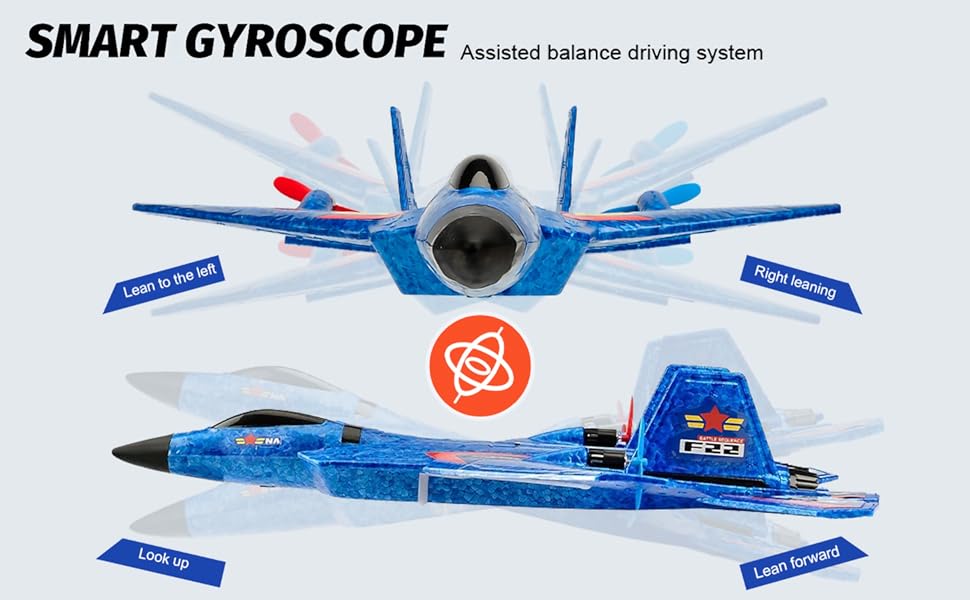
Figure 3: Smart Gyroscope for assisted balance and stable flight.
3. Flight Tips
- Always choose an open area with minimal wind (below level 4).
- For initial flights, use gentle throttle adjustments.
- The aircraft features colorful LED lights, making it visible and enjoyable for evening flights.
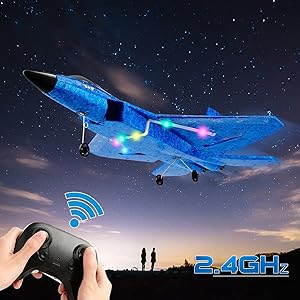
Figure 4: The F-22 Raptor with colorful LED lights for night flying.
Maintenance
1. Material Durability
The F-22 Raptor is constructed from EPP foam, which is lightweight, flexible, waterproof, and designed to withstand impacts. The silicone nose and carbon-fiber blades further enhance its durability against accidental crashes.
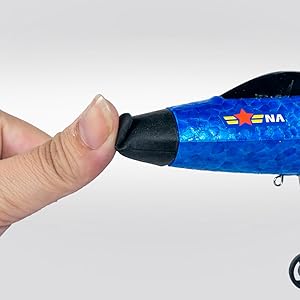
Figure 5: The flexible silicone nose of the F-22 Raptor, designed for impact resistance.
2. Propeller Replacement
The package includes spare propellers and a removal tool. To replace a propeller, use the tool to gently pry off the old propeller. Align the new propeller with the motor shaft and press it firmly into place.
Video 5: Shows how to remove and replace the propellers on the F-22 Raptor RC Plane.
Troubleshooting
- Uncontrolled Flight: If the plane loses control, release the accelerator. The smart gyroscope will activate its balance function and automatically restore stable flight.
- No Power/Lights: Ensure the battery is fully charged and correctly installed. Check the power switch on the aircraft.
- Remote Not Responding: Ensure the remote control has fresh batteries and is properly paired with the aircraft.
- Low Battery Alert: A blinking LED switch on the aircraft indicates a low battery. Charge or replace the battery.
Specifications
- Product Dimensions: 15 x 11.2 x 4.1 inches
- Item Weight: 14.8 ounces
- Item Model Number: 2 channel RC Plane
- Manufacturer Recommended Age: 14 years and up
- Batteries: 2 Lithium Polymer batteries required (3 included in package)
- Manufacturer: ANTSIR
Warranty & Support
For any questions, technical support, or warranty claims, please contact ANTSIR customer service. Refer to the product packaging or the ANTSIR official store on Amazon for contact details.
Manufacturer: ANTSIR