
1. Introduction
This manual provides essential information for the safe and effective installation, operation, and maintenance of your Flastec KCD4 IP67 Sealed Waterproof Rocker Power Switch. Please read this manual thoroughly before use and retain it for future reference. This switch is designed for various electrical applications requiring a durable, waterproof, and illuminated ON/OFF control.
2. Product Overview
The Flastec KCD4 Rocker Power Switch is a robust, self-locking switch featuring an integrated LED indicator. Its IP67 rating ensures protection against dust and water immersion, making it suitable for demanding environments. This particular variant is a 4-pin switch, designed for 220V applications, and features a red LED.

Image 2.1: Front view of the Flastec KCD4 Red 4-pin Rocker Switch. This image shows the 'ON' position indicated by the 'I' symbol and the 'OFF' position by the 'O' symbol, with the red LED visible.
3. Specifications
| Feature | Specification |
|---|---|
| Model | KCD4 |
| Current Rating | 20A at 125V AC, 16A at 250V AC |
| Voltage Rating | 220V AC (for this variant) |
| Number of Pins | 4-pin |
| Protection Rating | IP67 (Dustproof and Waterproof) |
| Features | Self-locking, LED Indicator |
| Material | Plastic |
| Panel Cutout Size (Approx.) | 30mm x 22mm |
| LED Color | Red (for this variant) |
4. Setup and Installation
Safety Precautions:
- Always disconnect power to the circuit before installing or servicing the switch.
- Ensure all wiring complies with local electrical codes and regulations.
- If you are unsure about electrical wiring, consult a qualified electrician.
- Do not exceed the specified current and voltage ratings of the switch.
Installation Steps:
- Prepare Panel Cutout: Create a rectangular cutout in your mounting panel with approximate dimensions of 30mm x 22mm. Ensure the edges are smooth.
- Insert Switch: Gently push the rocker switch into the cutout. The flexible tabs on the sides of the switch body will secure it in place.
- Wiring: Identify the pins on the back of the switch. For a 4-pin KCD4 switch with LED, the typical pin configuration is as follows:
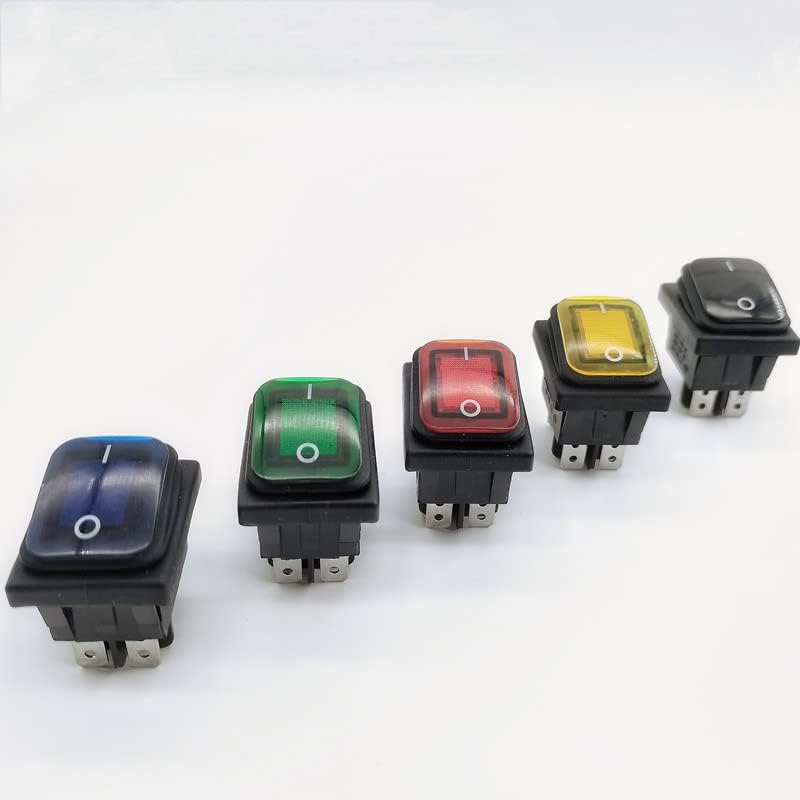
Image 4.1: Rear view of multiple Flastec KCD4 Rocker Switches, showing the 4-pin terminals for wiring. Note the different colors of the switches.
- Pin 1 (Input): Connect to the live/positive power source.
- Pin 2 (Output): Connect to the load (device to be powered).
- Pin 3 (LED Positive): Connect to the live/positive power source (often bridged with Pin 1).
- Pin 4 (LED Negative/Ground): Connect to the neutral/ground.
Note: Pin numbering may vary slightly. Always refer to any markings on the switch body or consult a wiring diagram if available. Ensure secure connections to prevent arcing or short circuits.
- Test: Once wired, restore power and test the switch functionality. The LED should illuminate when the switch is in the 'ON' position.
5. Operating Instructions
The Flastec KCD4 Rocker Power Switch operates as a simple ON/OFF control.
- To turn the connected device ON, press the side of the rocker marked with 'I' (or the side that causes the LED to illuminate).
- To turn the connected device OFF, press the side of the rocker marked with 'O' (or the side that extinguishes the LED).
The self-locking mechanism will hold the switch in the selected position until manually changed.
6. Maintenance
The Flastec KCD4 Rocker Power Switch requires minimal maintenance due to its durable design and IP67 rating.
- Cleaning: If the switch becomes dirty, wipe it with a damp cloth. Avoid using harsh chemicals or abrasive cleaners that could damage the plastic or sealing.
- Inspection: Periodically inspect the switch and its wiring for any signs of wear, damage, or loose connections. Ensure the waterproof seal remains intact.
- Replacement: If the switch shows signs of damage, malfunction, or compromised waterproofing, replace it immediately.
7. Troubleshooting
If you encounter issues with your Flastec KCD4 Rocker Power Switch, consider the following:
- Switch does not operate / No power to device:
- Check the power source to ensure it is active.
- Verify all wiring connections are secure and correct according to the installation instructions.
- Inspect for any blown fuses or tripped circuit breakers in the circuit.
- LED does not light up:
- Ensure the switch is in the 'ON' position.
- Check the LED wiring (Pins 3 and 4) for correct polarity and secure connections.
- The LED itself may be faulty; consider replacing the switch if all other checks pass.
- Switch feels loose or is not secure:
- Ensure the panel cutout dimensions are correct and not oversized.
- Check if the mounting tabs on the switch are damaged.
If troubleshooting steps do not resolve the issue, contact customer support.
8. Warranty Information
The Flastec KCD4 Rocker Power Switch comes with a 2-year warranty from the date of purchase. This warranty covers defects in materials and workmanship under normal use. It does not cover damage resulting from improper installation, misuse, abuse, unauthorized modifications, or natural disasters. Please retain your proof of purchase for warranty claims.
9. Support
For technical assistance, warranty claims, or further inquiries, please contact Flastec customer support through the retailer where the product was purchased or visit the official Flastec website for contact information.