
Shellbot SL60
Shellbot SL60 Robot Vacuum and Mop Combo User Manual
Model: SL60
1. Introduction
This user manual provides essential information for the safe and efficient operation, maintenance, and troubleshooting of your Shellbot SL60 Robot Vacuum and Mop Combo. Please read this manual thoroughly before using the product and retain it for future reference.
2. Safety Instructions
To reduce the risk of injury or damage, read these safety instructions carefully.
- Do not allow children to operate the robot vacuum. Supervise children and pets when the robot is operating.
- Ensure the power adapter voltage is compatible with your local power supply.
- Do not use the robot vacuum in wet environments or near water.
- Remove loose cables, small objects, and fragile items from the cleaning path before operation.
- Do not use the robot vacuum to pick up large debris, liquids, or burning/smoking materials.
- Regularly clean the brushes and filters to maintain optimal performance.
3. Package Contents
Verify that all items are included in your package:

Image: The Shellbot SL60 Robot Vacuum and Mop Combo along with its complete set of accessories, including the charging dock, power adapter, remote control, cleaning tool, 2-in-1 water tank, dust tank, two mop pads, two side brushes, and the user manual.
- 1 x Shellbot SL60 Robot Vacuum and Mop Cleaner
- 1 x Charging Dock
- 1 x Power Adapter
- 1 x Remote Control
- 1 x Cleaning Tool
- 1 x 2-in-1 Water Tank (330ml dust box, 270ml water tank)
- 1 x Extra 580ml Dust Box
- 2 x Mop Pad
- 2 x Side Brush
- 1 x User's Manual
4. Product Overview
The Shellbot SL60 is an advanced robot vacuum and mop combo designed for efficient home cleaning. It features intelligent navigation, powerful suction, and versatile cleaning modes.

Image: The Shellbot SL60 Robot Vacuum and Mop Combo, showcasing its sleek design, accompanied by its mobile application interface and remote control.
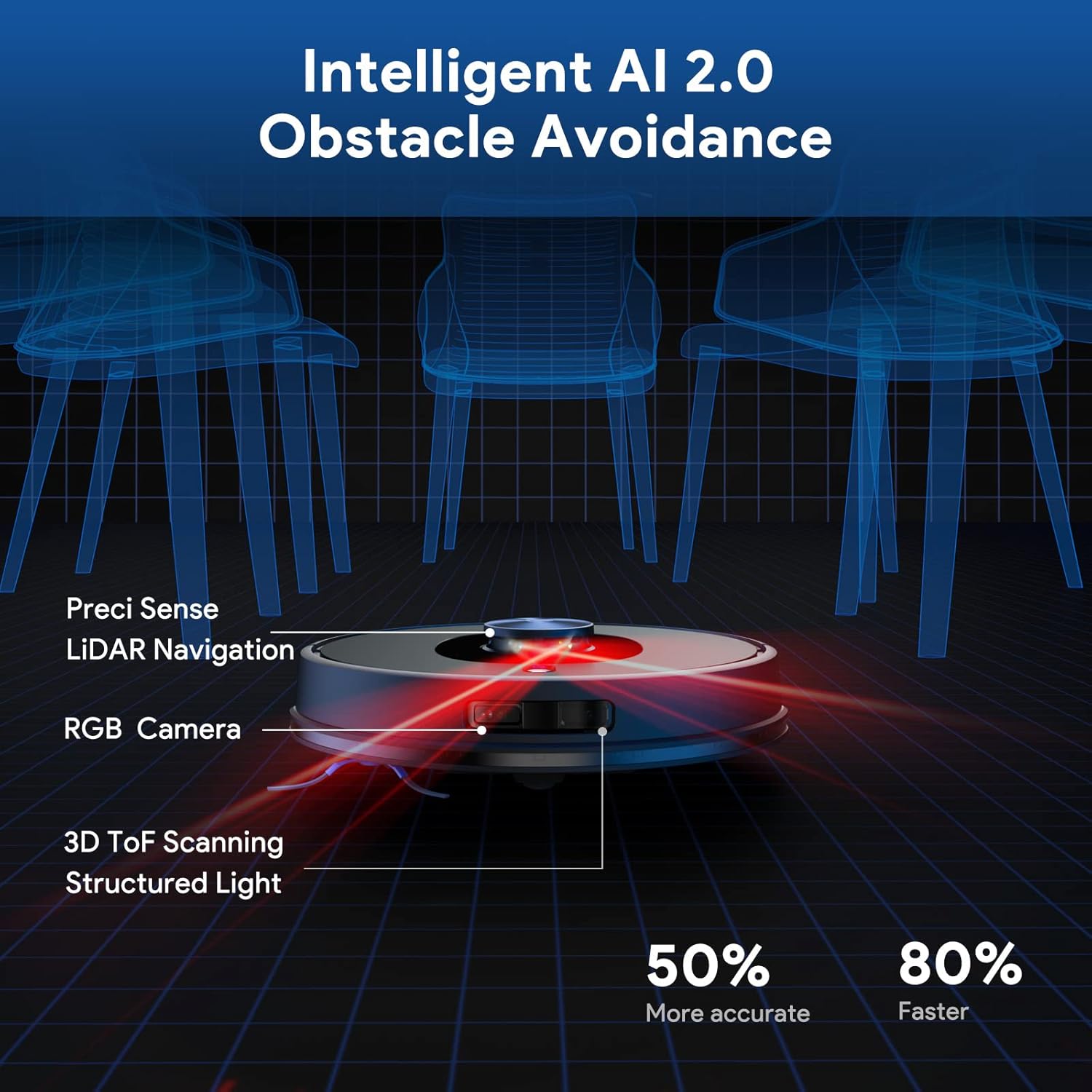
Image: Diagram illustrating the robot's Intelligent AI 2.0 Obstacle Avoidance system, highlighting its Precisi Sense LiDAR Navigation, RGB Camera, and 3D ToF Scanning Structured Light sensors for accurate obstacle detection.

Image: Visual representation of the robot's 2-in-1 Vacuum and Mop capability, showing the integrated dust tank and water tank, along with an indicator for adjustable water mopping levels (Low, Medium, Max).

Image: The robot vacuum demonstrating its 4000Pa Strong Suction power, effectively picking up particles from the floor surface.
Key Features:
- 2-in-1 Vacuum and Mopping: Equipped with a 330ml dust box and 270ml water tank, plus an extra 580ml dust box. Features 3-speed electronically controlled water output via APP.
- Smart App & Voice Control: Compatible with Shellbot App, Alexa, and Google Assistant for scheduling, mode changes, and directional control.
- Lidar Navigation & SLAM Algorithm: Advanced Lidar navigation for efficient route planning and SLAM algorithm for building personal 3D maps, minimizing bumping and entanglement.
- 4000Pa Suction & Deep Cleaning: Four adjustable suction levels, with automatic power increase on carpets for thorough cleaning.
- 200mins Runtime & Self-charging: 5200mAh battery provides up to 200 minutes of runtime, covering up to 2000ft². Automatically returns to the charging dock.
- Intelligent AI Obstacle Recognition: Utilizes RGB camera and 3D TOF sensors to identify and avoid obstacles like walls, stairs, and pets.
5. Setup
5.1 Charging Dock Placement
Place the charging dock against a wall in an open, uncluttered area. Ensure there is at least 0.5 meters (1.6 feet) of clear space on both sides and 1.5 meters (4.9 feet) in front of the dock. Connect the power adapter to the charging dock and plug it into a power outlet.
5.2 Initial Charge
Place the robot vacuum onto the charging dock. Ensure the charging contacts on the robot align with those on the dock. The robot will begin charging automatically. For first-time use, fully charge the robot before operation (approximately 4-5 hours).
5.3 App Connection (Shellbot App)
To unlock the full potential of your Shellbot SL60, download the Shellbot App from your mobile app store. Follow the in-app instructions to connect your robot to your home Wi-Fi network (supports 2.4GHz Wi-Fi only).
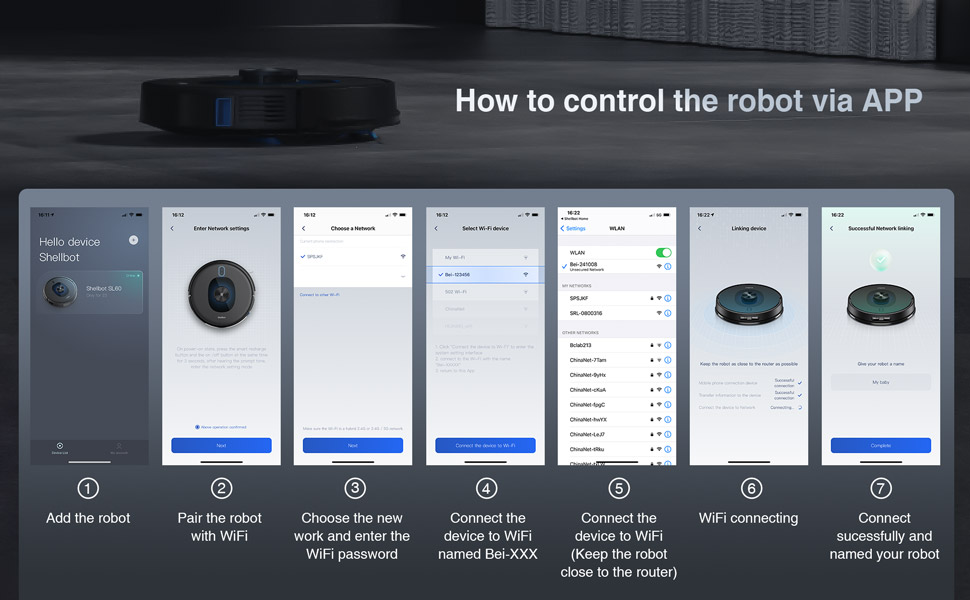
Image: A step-by-step guide showing the process of connecting the Shellbot robot vacuum to the mobile application, including adding the robot, pairing with Wi-Fi, choosing a network, connecting the device to Wi-Fi, and successful connection.
6. Operating Instructions
6.1 Starting a Cleaning Cycle
You can start a cleaning cycle using the following methods:
- On-Robot Button: Press the power button on the robot once to start a general cleaning cycle.
- Shellbot App: Open the app, select your robot, and tap the 'Start' button. The app offers various cleaning modes (Normal, Custom, Edge, etc.) and allows for setting suction levels (Quiet, Standard, Strong, Turbo) and water levels (Small, Medium, Max).
- Remote Control: Use the provided remote control to start, pause, or direct the robot.
- Voice Control: If connected to Alexa or Google Assistant, use voice commands such as "Alexa, turn on the robot."

Image: The Shellbot robot vacuum being activated by a voice command through an Alexa smart speaker, demonstrating its smart app and voice control capabilities.
6.2 Mapping and Navigation
The SL60 uses LiDAR navigation and SLAM algorithm to create a precise map of your home. This map allows for efficient cleaning paths and advanced features.
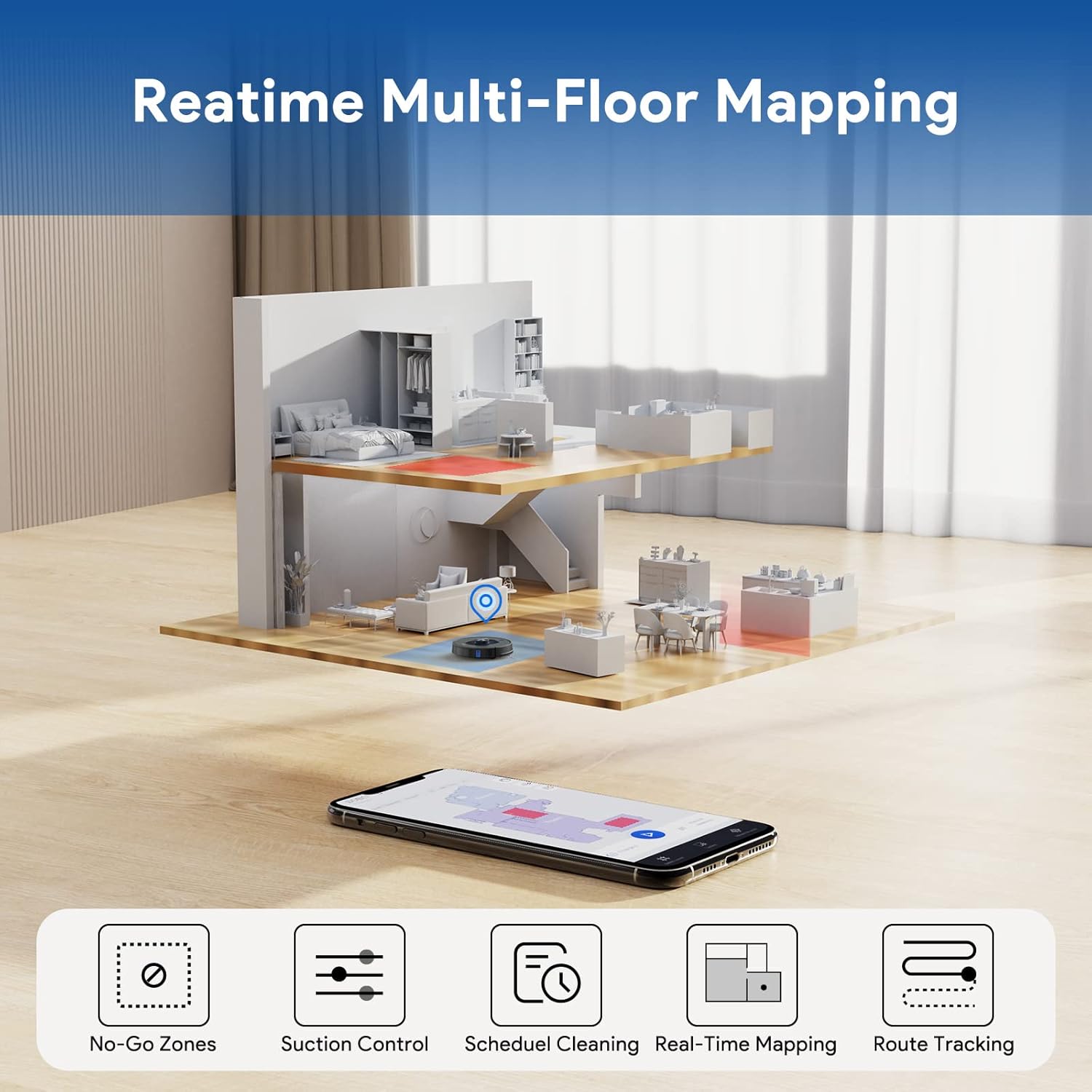
Image: An illustration demonstrating the Shellbot robot vacuum's Realtime Multi-Floor Mapping capability, showing how it maps different levels of a home for comprehensive cleaning.
6.3 Customizing Cleaning Areas
Using the Shellbot App, you can define specific cleaning preferences:
- Select Room Cleaning: Choose specific rooms to clean.
- Select Area Cleaning: Draw a custom area on the map for the robot to clean.
- No-Go Zones / Virtual Walls: Set virtual boundaries to restrict the robot from entering certain areas. For mopping, you can set "no-mop zones" to prevent the robot from mopping carpets.
- Scheduled Cleaning: Set a cleaning schedule for automated cleaning at preferred times.

Image: The mobile app interface displaying various cleaning customization options, including selecting specific rooms, scheduling cleanings, defining custom areas, and setting no-go zones or virtual walls.
6.4 Automatic Recharging
When the battery is low, the robot will automatically return to the charging dock. After recharging, it will resume cleaning from where it left off.
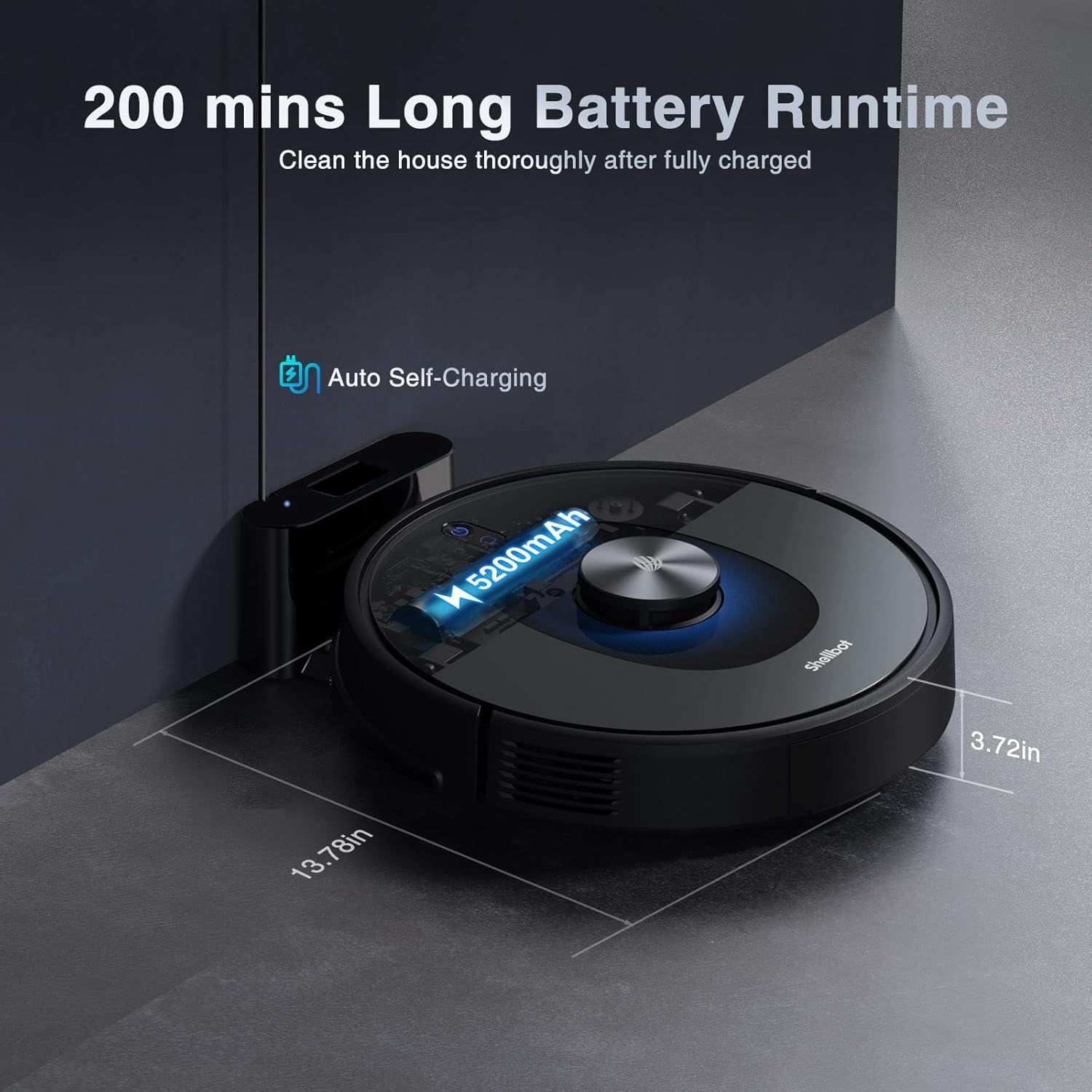
Image: The Shellbot robot vacuum automatically returning to its charging dock to recharge, illustrating its self-charging capability and long battery runtime.
6.5 Official Product Video
Video: An official Shellbot video demonstrating the SL60 Robot Vacuum and Mop Combo's features, including its 4000Pa suction power, intelligent obstacle avoidance, LiDAR navigation, 2-in-1 vacuum and mop function, no-mop zone setting, and self-charging capabilities.
7. Maintenance
Regular maintenance ensures optimal performance and extends the lifespan of your Shellbot SL60.
7.1 Dust Box and Filter Cleaning
- Empty the dust box after each cleaning cycle.
- Clean the filter with the provided cleaning tool or rinse under running water. Ensure the filter is completely dry before reinserting.
7.2 Water Tank and Mop Pad Cleaning
- Empty any remaining water from the tank after mopping.
- Remove and clean the mop pad after each use. Mop pads can be hand-washed or machine-washed.
7.3 Brush Cleaning
- Regularly check and clean the main brush and side brushes for tangled hair or debris. Use the cleaning tool to cut and remove hair.
7.4 Sensor Cleaning
- Wipe the sensors (cliff sensors, wall sensors, charging contacts) with a clean, dry cloth to ensure proper function.
8. Troubleshooting
If you encounter issues with your Shellbot SL60, refer to the following common problems and solutions:
| Problem | Possible Cause | Solution |
|---|---|---|
| Robot does not turn on. | Low battery; Power button not pressed. | Place robot on charging dock; Press and hold power button. |
| Robot cannot charge. | Charging contacts dirty; Dock not powered. | Clean charging contacts on robot and dock; Ensure dock is plugged in. |
| Robot gets stuck frequently. | Too many obstacles; Sensors dirty. | Clear cleaning area; Clean all sensors. |
| Poor cleaning performance. | Dust box full; Brushes tangled; Filter clogged. | Empty dust box; Clean brushes; Clean/replace filter. |
| App connection issues. | Incorrect Wi-Fi password; Router too far; 5GHz Wi-Fi. | Re-enter password; Move robot closer to router; Ensure 2.4GHz Wi-Fi. |
For more complex issues, please refer to the detailed troubleshooting section in the full user manual or contact Shellbot customer support.
9. Specifications
| Feature | Detail |
|---|---|
| Brand | Shellbot |
| Model Name | SL60 |
| Suction Power | Up to 4000Pa |
| Battery Capacity | 5200mAh Lithium Ion |
| Runtime | Up to 200 minutes |
| Dust Box Capacity | 580 Milliliters (extra) / 330ml (2-in-1) |
| Water Tank Capacity | 270 Milliliters (2-in-1) |
| Navigation Type | LiDAR + 3D ToF + RGB Navigation |
| Control Method | App, Remote, Touch, Voice |
| Compatible Devices | Amazon Echo, Google Home |
| Product Dimensions | 13.6"L x 13.6"W x 3.6"H |
| Item Weight | 7.92 pounds |
10. Warranty and Support
Shellbot products come with a standard manufacturer's warranty. Please refer to the warranty card included in your package for specific terms and conditions. For technical support, troubleshooting assistance, or warranty claims, please contact Shellbot customer service through the following channels:
- Email: Refer to your product packaging or the official Shellbot website for the most current contact email.
- Website: Visit the official Shellbot website for FAQs, support resources, and contact forms.
- In-App Support: The Shellbot App may offer direct support options or FAQs.
Please have your model number (SL60) and purchase information ready when contacting support.
Related Documents - SL60
 |
Shellbot SL60 Robot Vacuum Cleaner - Instruction Manual Comprehensive instruction manual for the Shellbot SL60 robot vacuum cleaner, covering setup, operation, maintenance, safety, and product specifications. |
 |
Lubluelu Robot Vacuum User Manual: Safety, Installation, and Operation Comprehensive user manual for the Lubluelu robot vacuum, covering safety warnings, application restrictions, battery and charging instructions, packing list, machine components, sensor details, installation steps, and mopping module setup. |
 |
NanaWall SL60 Architectural Binder Section: Specifications and Testing Results Comprehensive technical specifications, testing results, and installation details for the NanaWall SL60 thermally broken aluminum framed folding glass system, designed for high performance and durability. |
 |
Lubluelu SL60 Plus Robot Vacuum Cleaner User Manual Comprehensive user manual for the Lubluelu SL60 Plus Robot Vacuum Cleaner, covering setup, operation, maintenance, troubleshooting, and app connectivity in multiple languages. |
 |
Robotstøvsugere: Guide og Produktinformation | Robot Støvsugeren Udforsk robotstøvsugere med Robot Støvsugeren. Find information om funktioner, vedligeholdelse, priser og modeller som JONR P20 PRO og LBL SL60. Vejledning til ældre og personer med nedsat funktionsevne. |