Introduction
This manual provides instructions for the Generic replacement remote control, designed for use with TIBO Audio TI 400, TI 410, TI-420, and TI-430 DAB FM Tuner CD Player Amplifiers. This remote control is pre-programmed and requires no additional setup beyond battery installation.

Image: Front view of the Generic replacement remote control, showing all buttons and layout.
Setup
1. Installing Batteries
- Locate the battery compartment on the back of the remote control.
- Slide the battery compartment cover downwards or outwards to open it.
- Insert two (2) AAA batteries, ensuring the positive (+) and negative (-) terminals align correctly with the markings inside the compartment.
- Replace the battery compartment cover by sliding it back into place until it clicks securely.
Note: Batteries are not included with the remote control and must be purchased separately.
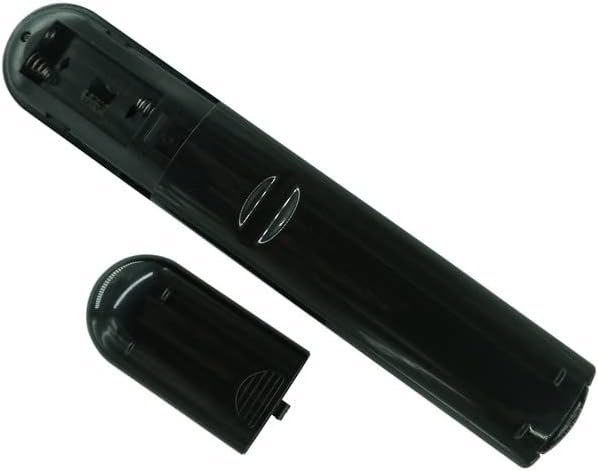
Image: Back view of the remote control with the battery compartment open, showing where to insert AAA batteries.
2. Initial Use
The remote control is pre-programmed for compatible TIBO Audio devices. Once batteries are correctly installed, the remote is ready for immediate use. No additional programming or pairing is required.
Operating Instructions
Point the remote control directly at your TIBO Audio device for optimal performance. Ensure there are no obstructions between the remote and the device.
Button Functions:
- Power (⏻): Turns the device on or off.
- Number Buttons (0-9, +10): Used for direct track selection, station tuning, or inputting numerical values.
- Volume (+/-): Adjusts the audio output level.
- Mute: Silences the audio output.
- DAB/FM: Switches between Digital Audio Broadcasting (DAB) and FM radio modes.
- ENTER: Confirms selections or enters menu options.
- FUNCTION: Cycles through various functions or modes of the connected device.
- AUTOTUNE: Initiates automatic station scanning for radio tuners.
- Playback Controls (⏸ Play, ⏹ Pause, ⏴ Stop, ⏪ Previous, ⏭ Next, ⏩ Fast Forward, ⏮ Rewind): Standard controls for CD players or other media playback.
- REPEAT: Toggles repeat playback mode (e.g., repeat one track, repeat all).
- RANDOM: Toggles random or shuffle playback mode.
- INFO: Displays information about the current track, station, or device status.
- TUNER: Selects the tuner input.
- CD: Selects the CD player input.
- DVD: Selects the DVD player input (if applicable to your TIBO Audio system).
- AUX: Selects the auxiliary input.
- LINE IN: Selects the line-in input.
- PHOTO: Selects the photo input (if applicable).

Image: Side view of the Generic replacement remote control, illustrating its ergonomic design.
Maintenance
Battery Replacement:
If the remote control's range decreases or buttons become unresponsive, it is likely time to replace the batteries. Follow the "Installing Batteries" steps in the Setup section to replace the two AAA batteries.
Cleaning:
To clean the remote control, gently wipe its surface with a soft, dry cloth. For stubborn dirt, slightly dampen the cloth with water. Avoid using harsh chemicals, abrasive cleaners, or excessive moisture, as these can damage the remote.
Troubleshooting
- Remote not responding:
- Ensure fresh AAA batteries are correctly installed.
- Check for any obstructions between the remote control and the TIBO Audio device.
- Verify that the remote is pointed directly at the device's infrared receiver.
- Specific buttons not working:
- Clean the remote control, especially around the unresponsive buttons, to remove any dirt or debris that might be preventing proper contact.
- Replace batteries, even if other buttons seem to work, as low power can affect certain functions.
- Device not compatible:
This remote is specifically designed for TIBO Audio TI 400, TI 410, TI-420, and TI-430 models. If your device is not one of these models, this remote may not function correctly.
Specifications
| Brand | Generic |
| Model Compatibility | TIBO Audio TI 400, TI 410, TI-420, TI-430 |
| Connectivity Technology | Infrared (IR) |
| Power Source | 2 x AAA Batteries (not included) |
| Number of Buttons | Approximately 30 (including numerical and function buttons) |
| Special Feature | No additional programming required |
Warranty and Support
Information regarding warranty coverage or specific customer support for this Generic replacement remote control is not available in the provided product details. Please refer to the seller or your purchase documentation for any warranty claims or support inquiries.


