Introduction
Thank you for choosing the RaceGT 007 Wired Gaming Mouse. This high-precision optical mouse is designed for both gaming and daily computing, offering adjustable DPI, customizable RGB backlighting, and an ergonomic design for comfortable use. This manual provides detailed instructions for setup, operation, maintenance, and troubleshooting to ensure optimal performance.

Image: The RaceGT 007 Wired Gaming Mouse, showcasing its sleek design and vibrant RGB lighting.
Product Features
- Plug & Play Connectivity: Simple USB connection for immediate use without driver installation.
- Adjustable DPI: Five customizable DPI settings (1000/2000/4000/6000/8000) with distinct LED colors for quick identification.
- High Polling Rate: Adjustable polling rates (250/500/1000Hz) for responsive tracking.
- Ergonomic Design: Contoured shape for comfortable grip during extended use.
- RGB Backlighting: 11 dynamic lighting effects to enhance your setup.
- Wide Compatibility: Supports Windows 7/8/10/XP, Vista 7/8, Linux, PC, Mac, and laptops.
- Durable Construction: Built for longevity with robust materials.

Image: The RaceGT 007 mouse demonstrating its ergonomic shape for comfortable hand placement and highlighting its durable construction.
Setup Instructions
- Unpack the Mouse: Carefully remove the RaceGT 007 Wired Gaming Mouse from its packaging.
- Connect to Computer: Locate an available USB port on your computer (desktop, laptop, or Mac). Insert the USB plug of the mouse into the USB port.
- Automatic Installation: The operating system will automatically detect and install the necessary drivers. This process may take a few moments.
- Ready for Use: Once the installation is complete, the mouse will be ready for immediate use. The RGB lighting will illuminate, indicating power.
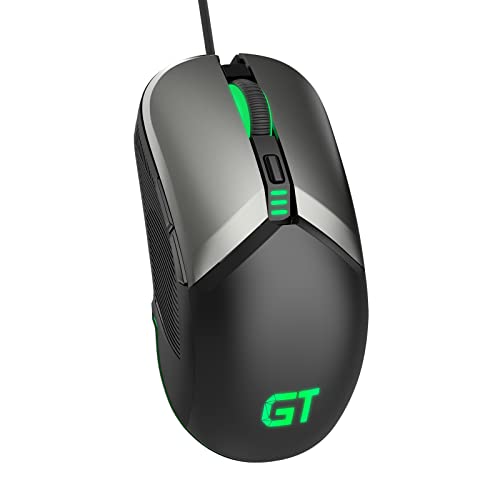
Image: A close-up view of the RaceGT mouse's USB plug and durable braided cable, ready for connection.
Operating Instructions
The RaceGT 007 mouse features standard buttons along with additional programmable buttons for enhanced functionality.
- Left Button: Primary click function.
- Right Button: Secondary click function (context menu).
- Scroll Wheel: Scroll up/down, and middle click function.
- DPI Switch Button: Located below the scroll wheel, cycles through DPI settings.
- Forward Button: (Side button) Navigates forward in web browsers or applications.
- Backward Button: (Side button) Navigates backward in web browsers or applications.

Image: An overhead view of the RaceGT 007 mouse, clearly labeling its Left Button, Right Button, Scroll Wheel, DPI Switch Button, Forward Button, and Backward Button.
DPI and Polling Rate Adjustment
Adjusting DPI (Dots Per Inch)
The mouse features 5 adjustable DPI levels, allowing you to customize cursor sensitivity for different tasks or games. Each DPI level is indicated by a specific LED color.
- Press the DPI Switch Button (located below the scroll wheel) to cycle through the available DPI settings.
- The LED light on the mouse will change color to indicate the current DPI level:
- 1000 DPI (Default)
- 2000 DPI
- 4000 DPI
- 6000 DPI
- 8000 DPI

Image: The RaceGT 007 mouse illustrating how different LED colors correspond to various DPI settings, from 1000 to 8000 DPI.
Adjusting Polling Rate
The polling rate determines how often the mouse reports its position to the computer. Higher polling rates result in smoother and more responsive tracking.
- The RaceGT 007 mouse supports polling rates of 250Hz, 500Hz, and 1000Hz.
- To adjust the polling rate, refer to your computer's mouse settings or any specific software provided by RaceGT (if applicable).

Image: The RaceGT 007 mouse emphasizing its ultra-fast response capabilities, detailing the 3 polling rate options (250/500/1000Hz) and 5 DPI levels (1000/2000/4000/6000/8000).
RGB Backlight Control
The RaceGT 007 mouse features 11 different RGB lighting effects to personalize your gaming or work environment.
- To switch between the 11 lighting effects, simultaneously press the Forward Button (side button) and the Scroll Wheel.
- Alternatively, simultaneously press the Backward Button (side button) and the Scroll Wheel to cycle through the effects.

Image: The RaceGT 007 mouse showcasing its brilliant RGB backlighting, with a color wheel graphic indicating the variety of available lighting effects.
Maintenance
To ensure the longevity and optimal performance of your RaceGT 007 mouse, follow these simple maintenance guidelines:
- Cleaning: Use a soft, dry cloth to wipe the surface of the mouse. For stubborn dirt, slightly dampen the cloth with water or a mild cleaning solution. Avoid harsh chemicals or abrasive materials.
- Sensor Cleaning: Occasionally, dust or debris may accumulate around the optical sensor on the underside of the mouse. Use a cotton swab or compressed air to gently clean the sensor area.
- Cable Care: Avoid sharply bending or twisting the mouse cable to prevent internal damage.
- Storage: When not in use for extended periods, store the mouse in a clean, dry environment away from extreme temperatures.
Troubleshooting
If you encounter any issues with your RaceGT 007 mouse, please refer to the following common solutions:
| Problem | Possible Solution |
|---|---|
| Mouse is not responding. |
|
| Cursor movement is erratic or jumpy. |
|
| RGB lighting is not working. |
|
| Side buttons (Forward/Backward) are not working. |
|
Specifications
| Feature | Detail |
|---|---|
| Model | 007 |
| Connectivity | Wired USB |
| Movement Detection | Optical |
| DPI Levels | 1000 / 2000 / 4000 / 6000 / 8000 (Adjustable) |
| Polling Rate | 250 / 500 / 1000 Hz (Adjustable) |
| Buttons | 6 (Left, Right, Scroll Wheel, DPI Switch, Forward, Backward) |
| Backlight | RGB with 11 lighting effects |
| Cable Type | Braided |
| Compatible OS | Windows 7/8/10/XP, Vista 7/8, Linux, Mac |
| Item Weight | 92 Grams |
| Material | Plastic |
Warranty and Support
RaceGT products are designed for reliability and performance. For any questions, technical support, or warranty claims, please contact RaceGT customer service.
- Customer Service: The RaceGT customer service team is available 24 hours a day to provide professional assistance. Please refer to the product packaging or the official RaceGT website for contact information.
- Warranty Information: Specific warranty details are typically provided with your purchase or can be found on the official RaceGT website. Please retain your proof of purchase for warranty purposes.


