
1. Product Overview
The Borofone Free Way 20000mAh Power Bank Charger, model BJ14A, is a portable power solution designed to provide reliable and efficient charging for your electronic devices on the go. With its high capacity and compact design, it is an ideal companion for travel and daily use.
Key Features:
- Fast Charging Current: Equipped with a 2.1 Amp output for quick and efficient device charging.
- Compact and Lightweight Design: Easy to carry in a pocket, wallet, or backpack.
- Wide Compatibility: Supports mobile phones, earphones, gaming devices, and other USB-powered electronics.
- Durable Construction: Built to withstand daily use and various conditions.
Package Contents:
- Borofone Free Way 20000mAh Power Bank (BJ14A)
- USB Charging Cable
- User Manual
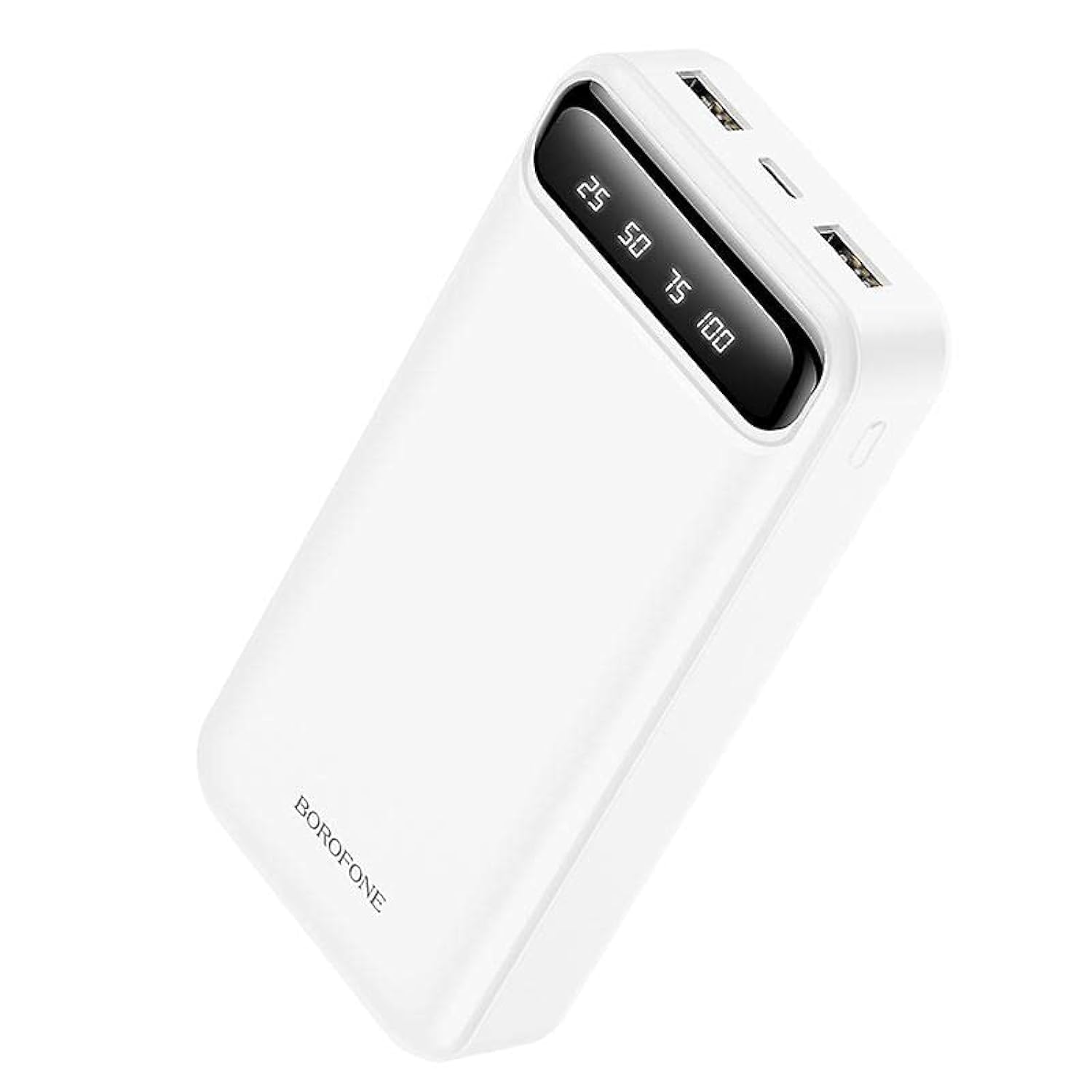
Image 1.1: Front view of the Borofone Free Way 20000mAh Power Bank, highlighting its sleek white casing and accessible USB output ports.
2. Setup
2.1 Initial Charging of the Power Bank
- Connect the provided USB charging cable to the Micro USB input port on the power bank.
- Connect the other end of the USB cable to a compatible USB wall adapter (not included) or a computer's USB port.
- The indicator lights on the power bank will illuminate to show the charging status. Allow the power bank to fully charge before first use. This typically takes several hours.
- Once fully charged, all indicator lights will remain solid. Disconnect the power bank from the charging source.
3. Operating Instructions
3.1 Charging Your Devices
- Connect your device's charging cable to one of the USB output ports on the power bank.
- Connect the other end of the cable to your device.
- The power bank will automatically begin charging your device. The indicator lights will show the remaining power level of the power bank.
- Once your device is fully charged, or when you wish to stop charging, disconnect the cable from both the power bank and your device.
3.2 Checking Battery Level
Press the power button (if available) or observe the LED indicator lights on the power bank. The number of illuminated lights typically corresponds to the remaining battery capacity:
- 4 Lights: 75-100% charged
- 3 Lights: 50-75% charged
- 2 Lights: 25-50% charged
- 1 Light: 0-25% charged (recharge soon)

Image 3.1: The Borofone Power Bank positioned on a desk, actively charging a smartphone, demonstrating its practical use alongside other devices.
4. Maintenance
- Cleaning: Use a soft, dry cloth to clean the power bank. Avoid using harsh chemicals or abrasive materials.
- Storage: Store the power bank in a cool, dry place away from direct sunlight and extreme temperatures.
- Battery Care: To prolong battery life, fully charge the power bank at least once every three months, even if not in regular use. Avoid completely draining the battery frequently.
- Avoid Drops: Do not drop or subject the power bank to strong impacts, as this can damage internal components.
5. Troubleshooting
- Power bank not charging:
- Ensure the charging cable is securely connected to both the power bank and the power source.
- Try a different USB cable or wall adapter.
- Verify the power source is active.
- Device not charging from power bank:
- Check if the power bank has sufficient charge.
- Ensure the device's charging cable is properly connected to both the power bank and the device.
- Try a different USB output port on the power bank.
- Test with a different charging cable or device to isolate the issue.
- Slow charging:
- Ensure you are using a high-quality charging cable.
- Some devices may limit charging speed based on their battery status or internal temperature.
6. Specifications
| Feature | Specification |
|---|---|
| Brand | Borofone |
| Model Name | BJ14A |
| Capacity | 20000mAh |
| Output Current | 2.1A |
| Connector Type | Micro USB (Input) |
| Compatible Devices | Smartphones, earphones, gaming devices, etc. |
| Color | White |
| Item Weight | 200 grams |
| Package Dimensions | 18.9 x 11.1 x 4.2 cm |
7. Safety Information
Please read and follow these safety guidelines to prevent damage to the power bank or injury to yourself:
- Do not expose the power bank to water, moisture, or extreme temperatures.
- Avoid disassembling, modifying, or repairing the device yourself. Contact qualified service personnel if needed.
- Keep the power bank away from flammable materials and direct heat sources.
- Do not use the power bank if it is damaged, swollen, or leaking.
- Keep out of reach of children.
- Dispose of the power bank responsibly according to local regulations.
8. Warranty and Support
This Borofone product is covered by a standard manufacturer's warranty. For specific warranty terms and conditions, please refer to the warranty card included with your purchase or visit the official Borofone website.
For technical support, troubleshooting assistance, or warranty claims, please contact Borofone customer service through their official channels. Ensure you have your product model number (BJ14A) and proof of purchase available when contacting support.