
1. Product Overview
This manual provides essential information for the safe and efficient operation and maintenance of your APOLLOLIFT Full Electric Pallet Jack, Model A-1030. This robust pallet truck is designed for material handling in various industrial and commercial environments, offering a 4400 lbs capacity and a compact design for narrow spaces.
Key features include a 48" x 27" fork size, an emergency key switch, and a built-in charger for convenience. Its design prioritizes maneuverability, stability, and operator safety.

Figure 1: APOLLOLIFT Electric Pallet Jack with key dimensions.

Figure 2: Side view of the pallet jack showing fork dimensions.
2. Safety Information
Always prioritize safety when operating the pallet jack. Familiarize yourself with all safety features and operating procedures before use.
2.1 Multi-Layer Safety Protection System
- Lifting Overload Protection: Prevents lifting loads beyond the rated capacity, protecting the equipment and operator.
- Emergency Power-Off Switch: A prominent red button for immediate shutdown in critical situations.
- Reverse Switch Button: Located on the handle, this button provides enhanced safety by reversing the direction of travel upon contact, preventing the operator from being pinned.
- Height Limit Switch: Prevents cylinder over-extension and ensures cargo stability during lifting operations.
2.2 General Safety Guidelines
- Always wear appropriate personal protective equipment (PPE), including safety shoes and high-visibility clothing.
- Ensure the operating area is clear of obstructions and personnel.
- Never operate the pallet jack under the influence of alcohol or drugs.
- Do not exceed the rated load capacity of 4400 lbs.
- Always lower forks completely when parking the unit.

Figure 3: Key safety and operational components.
3. Components and Controls
Understanding the various components and controls is crucial for effective operation.
3.1 Control Handle
The ergonomic control handle integrates all primary functions:
- Accelerator: Controls forward and reverse movement.
- Lifting and Lowering Buttons: For precise control of fork height.
- Horn Button: For signaling.
- Emergency Reverse Button: Activates reverse movement for operator safety.
- Turtle Speed Button (Creep Speed Mode): Reduces travel speed for enhanced maneuverability in tight spaces.
3.2 Key Switch
The key switch is used to power on/off the pallet jack. Always remove the key when the unit is unattended.
3.3 Smart Display & Fault Light
Provides real-time battery level indication and error code notifications for quick diagnostics.
3.4 Built-in Charger Port
Allows for convenient and fast charging of the maintenance-free GEL battery.

Figure 4: Detailed overview of truck components.

Figure 5: Ergonomic handle with easy-to-use buttons.
4. Setup and Charging
4.1 Initial Setup
Upon receiving the pallet jack, ensure all packaging materials are removed and inspect the unit for any shipping damage. Confirm all components are securely attached.
4.2 Charging the Battery
The pallet jack is equipped with a maintenance-free GEL battery and a built-in charger. To charge:
- Ensure the pallet jack is turned off using the key switch.
- Locate the charger port on the unit.
- Connect the charger cable to a suitable power outlet and then to the pallet jack's charger port.
- Monitor the charging indicator on the smart display. A full charge typically takes 8-10 hours.
- Disconnect the charger once charging is complete.
The battery provides approximately 6-8 hours of working time on a full charge.
5. Operating Instructions
5.1 Starting the Pallet Jack
- Insert the key into the key switch and turn it to the 'ON' position.
- Check the smart display for battery level and any fault indicators.
5.2 Maneuvering and Travel
- Normal Operation: Use the accelerator on the handle to control forward and reverse movement. The pallet jack has a laden travel speed of 2.7 miles/hour.
- Creep Speed (Turtle) Mode: For navigating narrow aisles or tight spaces, press the Turtle Speed Button and rotate the accelerator knob. This allows operation with the handle in a fully vertical position, enhancing maneuverability.
- Turning Radius: The unit features a 59.5-inch turning radius, ideal for confined areas.
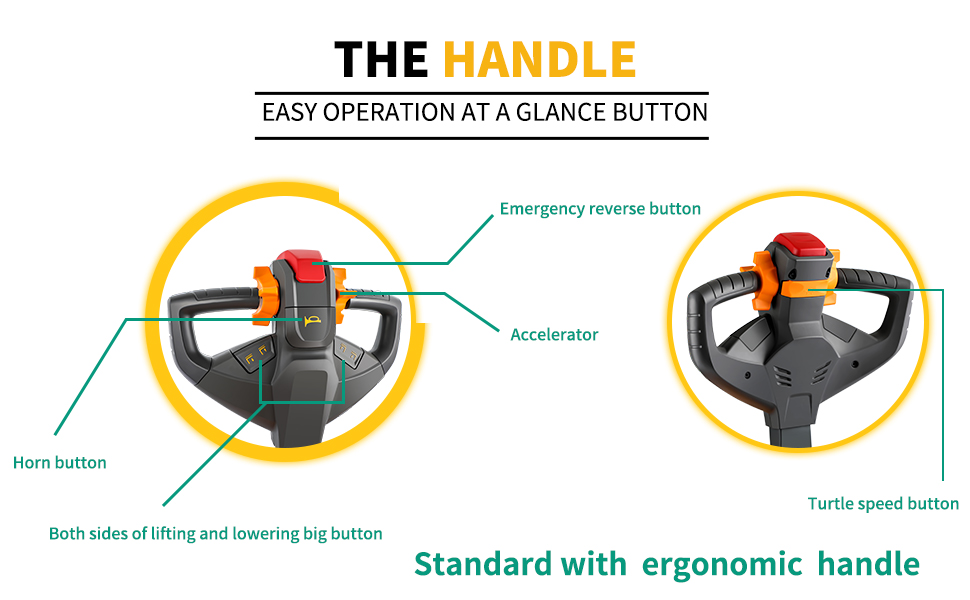
Figure 6: Handle working angles for operation and braking.

Figure 7: Pallet jack demonstrating its tight turning radius in a narrow aisle.
5.3 Lifting and Lowering Loads
- Position the forks squarely under the pallet.
- Press the 'Lift' button on the handle to raise the forks. The maximum lifting height is 7.3 inches.
- Once the load is clear of the ground, transport it to the desired location.
- Press the 'Lower' button to gently lower the forks and the load.

Figure 8: Pallet jack handling a 4400 lbs load on an incline.
5.4 Gradeability
The pallet jack offers a gradeability of 5% when laden and 20% when unladen, allowing it to handle inclines effectively.
5.5 Product Video Demonstration
Video 1: Official product video demonstrating the key features and operational aspects of the APOLLOLIFT Electric Pallet Jack Model A-1029, including safety mechanisms, maneuverability, and lifting functions.
6. Maintenance
Regular maintenance ensures the longevity and optimal performance of your pallet jack.
- Battery: The unit uses a maintenance-free GEL battery. Ensure it is charged regularly as per Section 4.2. Avoid deep discharge.
- Wheels: The pallet jack features wear-resistant PU fork wheels and a horizontal driving wheel designed for easier maintenance. Regularly inspect wheels for wear and tear, and clean any debris.
- General Inspection: Periodically check all bolts, nuts, and connections for tightness. Inspect hydraulic components for leaks.
- Cleaning: Keep the unit clean, especially the control handle and display, to prevent dust and dirt from affecting operation.
7. Troubleshooting
This section provides general guidance for common issues. For complex problems, contact customer support.
- Unit does not power on: Check if the key is fully inserted and turned to 'ON'. Ensure the emergency stop button is disengaged. Verify battery charge level.
- Forks do not lift: Check for overload. Ensure the battery has sufficient charge. Inspect hydraulic fluid levels (if applicable, though this model emphasizes low maintenance).
- Unusual noises during operation: Stop operation immediately and inspect for loose components, damaged wheels, or obstructions.
Refer to the smart display for any error codes, which can help diagnose specific issues.
8. Specifications
| Specification | Value |
|---|---|
| Brand | APOLLOLIFT |
| Model Number | A-1030 |
| Material | Alloy Steel |
| Color | Built in Charger |
| Style | Compact |
| Product Dimensions (L x W x H) | 70.1"L x 27"W x 50.2"H |
| Wheel Type | Polyurethane |
| Load Capacity | 4400 pounds |
| Number of Wheels | 5 |
9. Warranty and Support
9.1 Warranty Information
APOLLOLIFT provides the following warranty terms for its products:
- Within 30 days of receipt: Free maintenance for any quality problems. Customer does not bear freight costs.
- Within 30 days to 1 year of receipt: Free maintenance for any quality problems. Customer bears half of the freight costs.
- After 1 year of receipt: Customer pays for maintenance and all freight costs, quoted based on the specific issue.
9.2 Customer Support
For technical assistance, parts, or warranty claims, please contact APOLLOLIFT customer support. Refer to your purchase documentation or the APOLLOLIFT official website for current contact details.