
1. Introduction
This manual provides comprehensive instructions for the setup, operation, and maintenance of your JIYANG 360 Photo Booth Machine (39.4 inch). Designed for capturing dynamic 360-degree videos and photos, this device offers robust construction, smooth operation, and smart control via the ChackTok application. Please read this manual thoroughly before use to ensure safe and optimal performance.
2. Safety Information
- Ensure the photo booth is placed on a stable, level surface before operation.
- Do not exceed the maximum weight capacity of 880 lbs (for 3-5 people) for the 39.4 inch model.
- Keep hands and loose clothing clear of moving parts during operation.
- Do not allow children to operate the machine unsupervised.
- Disconnect power before cleaning or performing any maintenance.
- Use only the provided power adapter.
3. Package Contents
Verify that all items are present in your package:
- 360 Photo Booth Base (39.4 inch platform)
- Adjustable Selfie Stick/Arm
- Selfie Ring Light with USB cable
- 4 Selfie Holders (for smartphone, iPad, GoPro, camera)
- Remote Control for Photo Booth Rotation
- Power Adapter for Photo Booth
- Installation Tools (wrenches, screws)
- User Manual
- Accessories Bag
- Flight Case or Honeycomb Carton Box (depending on package option)
Note: A power bank for the ring light is not included and must be prepared separately.
4. Setup and Installation
4.1 Unboxing and Initial Inspection
Carefully unpack all components from the flight case or honeycomb carton box. Inspect all parts for any signs of damage. If any parts are missing or damaged, please contact customer support.

For a visual guide on unboxing, refer to the video below:
Video 1: Unboxing JIYANG 360 Photo Booth Machine. This video demonstrates the careful unpacking process of the photo booth and its accessories from the flight case.
4.2 Base and Arm Assembly
- Place the 360 Photo Booth base on a flat, stable surface.
- Attach the main rotating arm to the side of the base using the provided screws and tools. Ensure it is securely fastened.
- Adjust the angle of the arm as desired using the angle adjuster.

For detailed setup instructions, refer to the videos below:
Video 2: Setting Up JIYANG 360 Photo Booth Machine. This video guides users through the shooting process using the ChackTok APP.
Video 3: Unboxing, Set up Demo Video of JIYANG 360 Photo Booth. This video combines unboxing and setup demonstrations.
4.3 Ring Light and Device Holders
- Attach the selfie ring light to the top of the adjustable arm.
- Secure your desired device holder (smartphone, iPad, GoPro, camera) to the ring light or arm.
- Connect the ring light's USB cable to a power bank (not included) for illumination.


4.4 Power Connection
Connect the photo booth's power adapter to the base and then to a power outlet. The ring light requires a separate power bank (not included).
5. Operating Instructions
5.1 ChackTok APP Control
The ChackTok APP is a real-time media creation and processing software for the 360 Photo Booth. It allows you to wirelessly control the photo booth and enhance your videos.
- Download and install the ChackTok APP on your smartphone or tablet.
- Connect the 360 Photo Booth to the ChackTok APP via Bluetooth.
- Use the APP to control the photo booth's rotation (clockwise/counter-clockwise), speed, and duration.
- Utilize the APP's features to shoot special-effect preprocessed videos, GIFs, and photos.
- Edit your media with special effects, filters, and music within the APP.
- Share your creations instantly to social media platforms like Facebook, Instagram, YouTube, Twitter, and TikTok.

For a tutorial on using the ChackTok APP, refer to the video below:
Video 4: MWE Chacktok Tutorial - How to Shoot. This video guides users through the shooting process using the ChackTok APP.
5.2 Remote Control Operation
Use the provided digital remote controller to operate the photo booth's rotation.
- ON/OFF: Power the rotation on or off.
- REVERSE: Change the rotation direction.
- SPEED DOWN: Decrease rotation speed.
- SPEED UP: Increase rotation speed.
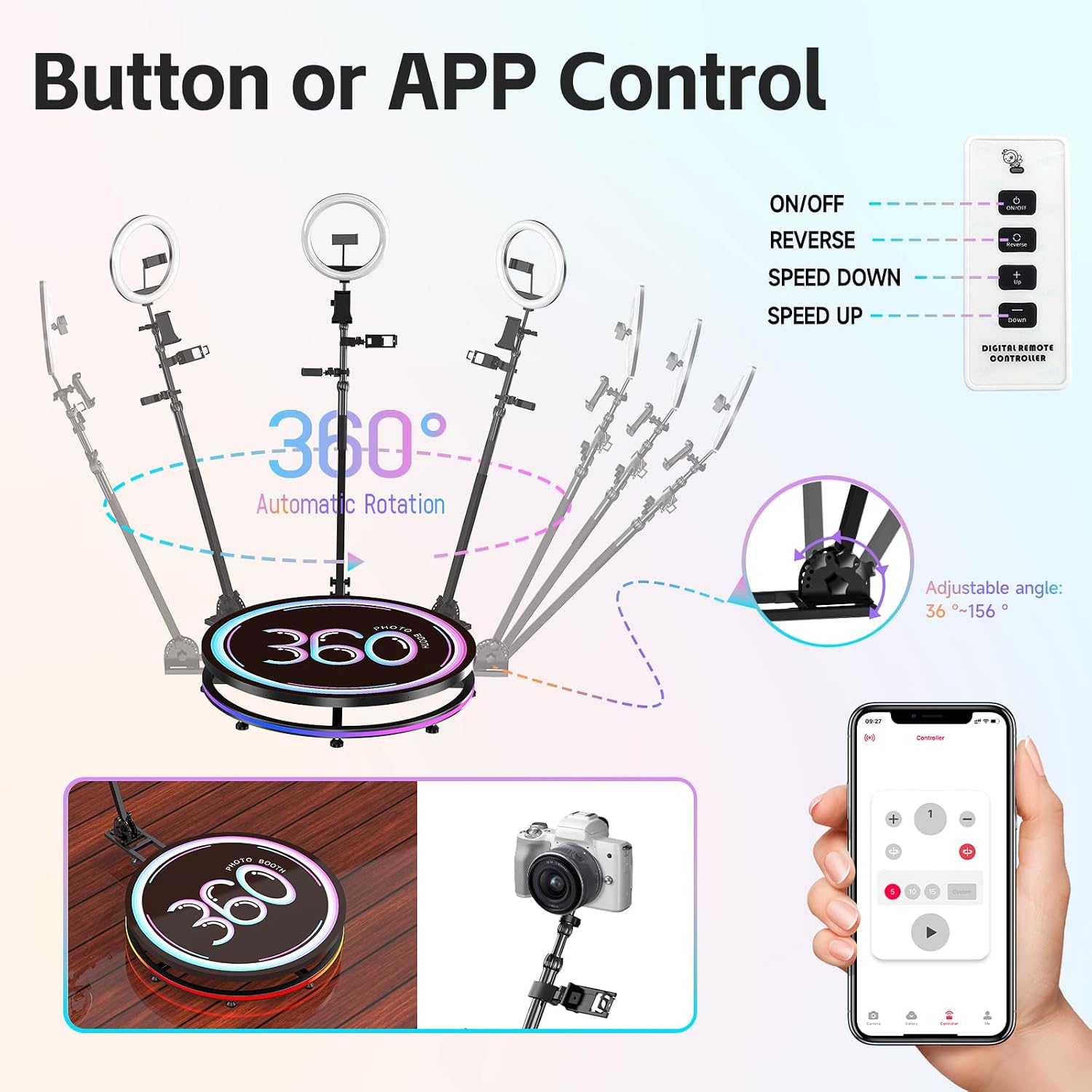
5.3 Adjusting Camera Angle and Length
The selfie stick is adjustable from 16 inches to 63 inches in length and the angle from 36 degrees to 156 degrees, allowing for versatile shot compositions.
- Loosen the adjustment knobs on the arm to change its length and angle.
- Tighten the knobs securely once the desired position is achieved.
6. Maintenance
- Cleaning: Wipe the platform and arm with a soft, damp cloth. Avoid abrasive cleaners.
- Storage: When not in use, disassemble the photo booth and store it in its original flight case or carton box in a dry, cool place.
- Gear Drive: The upgraded gear drive system is designed for low maintenance and high reliability. Regular lubrication is not typically required under normal use.
7. Troubleshooting
- Photo Booth Not Rotating:
- Check if the power adapter is securely connected to the base and a working power outlet.
- Ensure the remote control or ChackTok APP is properly connected and sending commands.
- Ring Light Not Turning On:
- Verify the USB cable is correctly plugged into the ring light and a charged power bank.
- Check the power bank's charge level.
- Unstable Operation:
- Ensure the photo booth is on a completely flat and stable surface.
- Check that all screws and connections for the arm and base are tightened.
8. Specifications
| Feature | Specification |
|---|---|
| Platform Diameter | 39.4 inches (100 cm) |
| Recommended Capacity | 3-5 people |
| Max Load Capacity | 880 lbs |
| Arm Length Adjustment | 16 to 63 inches |
| Arm Angle Adjustment | 36° to 156° |
| Control Methods | Remote Control, ChackTok APP |
| Drive System | Gear Drive (upgraded for stability) |
| Noise Level | Ultra-silent motor |
| Compatible Devices | Smartphones, iPads, GoPros, Cameras |
| Item Weight | 1.1 pounds (Note: This seems to be the package weight, not the unit itself. Actual unit weight is likely higher.) |
| Package Dimensions | 43 x 43 x 10 inches |
9. Warranty and Support
For warranty information or technical support, please refer to the contact details provided in your product packaging or visit the official JIYANG website. Customer service is available to assist with any questions or issues.