
Introduction
This instruction manual provides important information for the safe and efficient use of your AJSWISH MGA6012YF-A10 Cooling Fan. Please read this manual thoroughly before installation and operation, and retain it for future reference.
Safety Information
- Ensure the power supply matches the fan's voltage requirements (12 Volts).
- Disconnect power before installation, cleaning, or maintenance.
- Avoid touching the fan blades while the fan is operating.
- Do not expose the fan to water or excessive moisture.
- Keep out of reach of children.
- Install in a well-ventilated area to prevent overheating of components.
Package Contents
- 1 x AJSWISH MGA6012YF-A10 Cooling Fan
- (Additional mounting hardware or accessories may be included depending on the specific package)
Specifications
| Feature | Detail |
|---|---|
| Model | MGA6012YF-A10 |
| Brand | AJSWISH |
| Dimensions (L x W x H) | 2.36" x 0.39" x 2.36" (60mm x 10mm x 60mm) |
| Voltage | 12 Volts |
| Current | 0.30A |
| Wattage | 1 Watt |
| Power Connector Type | 2-Pin |
| Cooling Method | Forced Air |
| Compatible Devices | Desktop, Graphic Cards |
| Material | Copper |
Setup and Installation
Follow these steps to properly install your cooling fan:
- Prepare the Installation Area: Ensure the device (e.g., desktop computer, graphics card) is powered off and disconnected from its power source. Open the casing to access the installation point.
- Identify Mounting Points: Locate the appropriate mounting holes for a 60mm fan. The fan features four screw holes on its corners for secure attachment.
- Position the Fan: Place the AJSWISH MGA6012YF-A10 fan in the desired location. Consider the airflow direction; typically, fans are installed to either draw cool air in or exhaust hot air out.
- Secure the Fan: Use appropriate screws (not included unless specified in package contents) to firmly attach the fan to the mounting points. Do not overtighten.
- Connect Power: Locate a compatible 2-pin power connector on your device's motherboard or power supply. Carefully plug the fan's 2-pin connector into the designated port. Ensure the polarity is correct if not keyed.
- Verify Installation: Double-check all connections and ensure the fan is securely mounted and free from obstructions.
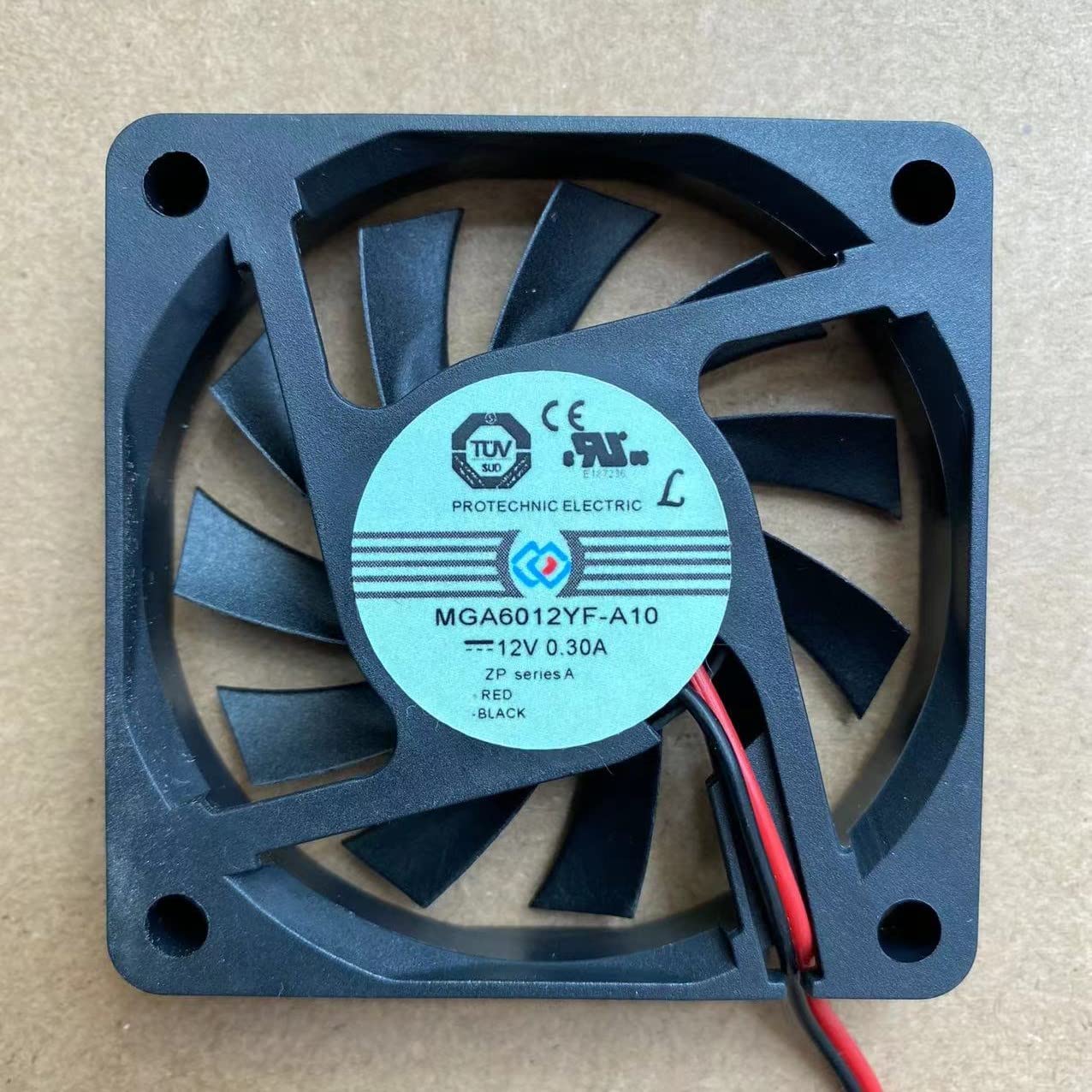
Image: Top view of the AJSWISH MGA6012YF-A10 Cooling Fan, illustrating its 60mm square frame, fan blades, and four corner mounting holes. The 2-pin power cable is visible at the bottom left.
Operation
Once installed and connected, the AJSWISH MGA6012YF-A10 Cooling Fan operates automatically when power is supplied to the connected device. It provides forced air cooling to help dissipate heat from components such as CPUs, GPUs, or other internal hardware.
- The fan will begin to spin when the system is powered on.
- Monitor your system's temperature to ensure effective cooling.
Maintenance
Regular maintenance ensures optimal performance and longevity of your cooling fan.
- Cleaning: Periodically (e.g., every 3-6 months), disconnect power and gently clean dust from the fan blades and frame using compressed air or a soft brush. Accumulation of dust can reduce cooling efficiency and increase noise.
- Inspection: Check for any signs of wear, damage to the blades, or loose connections.
- Lubrication: This fan is designed for maintenance-free operation. Do not attempt to lubricate the bearings unless specifically instructed by the manufacturer.
Troubleshooting
| Problem | Possible Cause | Solution |
|---|---|---|
| Fan does not spin | No power; incorrect connection; faulty fan. | Ensure the device is powered on. Check the 2-pin power connection for proper seating and polarity. Test with another compatible power source if possible. If still unresponsive, the fan may be faulty. |
| Fan is noisy | Dust accumulation; loose mounting; worn bearings. | Clean the fan blades and frame. Ensure the fan is securely mounted and not vibrating against other components. If noise persists and the fan is old, bearings may be worn, requiring replacement. |
| Insufficient cooling | Blocked airflow; incorrect fan direction; dust buildup. | Ensure there are no obstructions to airflow. Verify the fan is oriented correctly for intake or exhaust as intended. Clean any dust from the fan and surrounding vents. |
Warranty and Support
AJSWISH products are manufactured to high-quality standards. For warranty information or technical support, please refer to the retailer where the product was purchased or visit the official AJSWISH website. Please have your model number (MGA6012YF-A10) and purchase details ready when contacting support.
Note: Warranty terms may vary by region and retailer.