
TANGMAI N6N
TANGMAI Neckband Bluetooth Headphones User Manual
Model: N6N
1. Introduction
Thank you for purchasing the TANGMAI Neckband Bluetooth Headphones. This manual provides detailed instructions on how to set up, operate, and maintain your headphones to ensure optimal performance and longevity. Please read this manual thoroughly before using the product.

Image 1.1: TANGMAI Neckband Bluetooth Headphones, showcasing the black neckband and in-ear earbuds with metallic accents.
2. What's in the Box
Upon opening the package, please verify that all the following components are present:
- TANGMAI Neckband Bluetooth Headphones (Model: N6N)
- USB Charging Cable
- Multiple Sizes of Ear Tips (Small, Medium, Large)
- User Manual (This document)
3. Product Overview
The TANGMAI N6N headphones feature a lightweight neckband design with magnetic earbuds for convenient storage. They are equipped with a control panel on the neckband for easy access to functions.

Image 3.1: A person wearing the TANGMAI Neckband Bluetooth Headphones, demonstrating their lightweight and secure fit.

Image 3.2: Close-up of the magnetic earbuds, showing how they click together for secure storage around the neck.
4. Setup and First Use
4.1 Charging the Headphones
Before first use, fully charge your headphones. A full charge provides up to 24 hours of playtime. A quick 15-minute charge can provide 1 hour of playtime.
- Connect the USB charging cable to the charging port on the neckband.
- Connect the other end of the cable to a USB power adapter (not included) or a computer's USB port.
- The LED indicator will show charging status (e.g., red for charging, blue for fully charged).

Image 4.1: Visual representation of the 24-hour playtime capability of the headphones, highlighting their long battery life.
4.2 Bluetooth Pairing
The headphones use Bluetooth 5.0 for a stable and fast connection.
- Ensure the headphones are charged and powered off.
- Press and hold the multi-function button until the LED indicator flashes blue and red alternately, indicating pairing mode.
- On your device (smartphone, tablet, etc.), enable Bluetooth and search for available devices.
- Select "TANGMAI N6N" from the list of found devices.
- Once connected, the LED indicator will flash blue slowly or turn off, and you may hear a confirmation tone.

Image 4.2: A smartphone screen displaying "TANGMAI N6 Connected", illustrating successful Bluetooth pairing.
4.3 Multi-point Connection
The TANGMAI N6N supports connecting to two Bluetooth devices simultaneously, allowing you to switch between them seamlessly.
- Pair the headphones with the first device as described in Section 4.2.
- Disable Bluetooth on the first device.
- Put the headphones back into pairing mode and pair them with the second device.
- Re-enable Bluetooth on the first device. The headphones should now be connected to both devices.
- To switch audio, simply play media on the desired device.

Image 4.3: Diagram illustrating the multi-point connection feature, showing the headphones connected to both a smartphone and a tablet.
5. Operating Instructions
5.1 Basic Controls
The control panel on the neckband allows for easy management of music and calls.
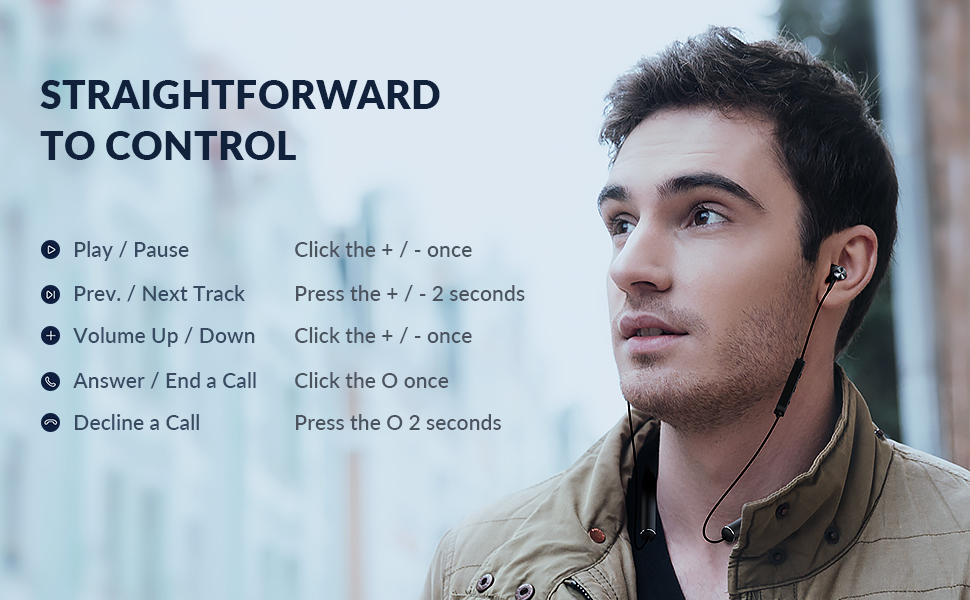
Image 5.1: A visual guide to the headphone controls, showing button functions for music playback and call management.
| Function | Action |
|---|---|
| Play / Pause | Click the + / - button once |
| Previous / Next Track | Press the + / - button for 2 seconds |
| Volume Up / Down | Click the + / - button once |
| Answer / End a Call | Click the O button once |
| Decline a Call | Press the O button for 2 seconds |
5.2 Audio Quality
The 10mm composite diaphragm drivers deliver stunning stereo sound with deep bass, enhancing your listening experience, especially during workouts.

Image 5.2: Detailed view of the 10mm composite driver, illustrating the technology behind the deep bass audio output.
6. Maintenance and Care
Proper care will extend the life of your TANGMAI headphones.
- Cleaning: Use a soft, dry cloth to clean the headphones. Do not use abrasive cleaners or solvents.
- Ear Tips: Regularly remove and clean the ear tips with mild soap and water. Ensure they are completely dry before reattaching.
- Water Resistance: The headphones are IPX5 waterproof, meaning they are resistant to sweat and light splashes. Do not submerge them in water.
- Storage: When not in use, store the headphones in a cool, dry place, away from direct sunlight and extreme temperatures. The magnetic earbuds help prevent tangling.
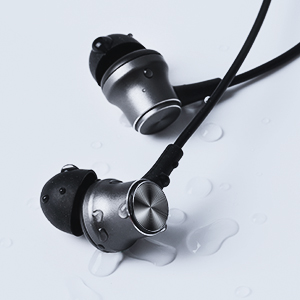
Image 6.1: Earbuds with water droplets, demonstrating the IPX5 water resistance suitable for workouts.
7. Troubleshooting
If you encounter any issues, please refer to the following common solutions:
| Problem | Solution |
|---|---|
| Headphones won't turn on. | Ensure the headphones are fully charged. Connect to a power source and try again. |
| Cannot pair with device. |
|
| No sound or low volume. |
|
| Intermittent connection. |
|
8. Specifications
| Feature | Detail |
|---|---|
| Model Name | N6N |
| Brand | TANGMAI |
| Connectivity Technology | Wireless (Bluetooth) |
| Bluetooth Version | 5.0 |
| Bluetooth Range | Up to 10 meters (33 feet) |
| Audio Driver Type | 10mm Dynamic Driver |
| Frequency Range | 20 Hz - 20,000 Hz |
| Playtime | Up to 24 hours |
| Quick Charge | 15 min charge for 1 hour playtime |
| Water Resistance Level | IPX5 (Sweatproof, Splashproof) |
| Microphone | HD MEMS Microphone |
| Control Type | Media Control, Remote |
| Material | Plastic, Silicone |
| Item Weight | 3.87 ounces |
| Product Dimensions | 7.87 x 3.94 x 0.79 inches |
| Batteries | 1 Lithium Ion battery (included) |
| Special Features | 24 Hours Playtime, Ergonomic Secure Fit, HD MEMS Microphone, Lightweight, Multi-point Connection |
9. Warranty and Support
TANGMAI stands behind the quality of its products.
- Manufacturer's Warranty: Your TANGMAI Neckband Bluetooth Headphones are covered by a 12-month manufacturer's warranty from the date of purchase. This warranty covers manufacturing defects.
- Return Policy: A 90-day free return policy is offered for your convenience.
- Customer Service: For any questions, concerns, or technical support, please contact our 24/7 customer service center. We are always ready to assist you.
- Contact Information: Please refer to the product packaging or the official TANGMAI website for the most up-to-date contact details.