
1. Introduction
The Flysky FS-ST8 Transmitter Controller, paired with the FS-SR8 Receiver, is a versatile 10-channel 2.4GHz radio system designed for a wide range of remote-controlled models including helicopters, gliders, delta-wing airplanes, multicopters, engineering vehicles, robots, cars, and boats. This manual provides essential information for setting up, operating, and maintaining your FS-ST8 system.
2. Package Contents
Please verify that all items are present in your package:
- 1 x FS-ST8 Radio Transmitter
- 1 x FS-SR8 RC Receiver
- 1 x BVD Battery Voltage Detection Line
- 1 x User Manual
3. Product Overview
The FS-ST8 features a highly recognizable whale tail antenna handle and is equipped with a 5TM32 new G series chip, ensuring compliance with the new ANT protocol for stable and safe operation. It supports 8-10 channels and offers extensive customization options.

Figure 1: Flysky FS-ST8 Transmitter Controller highlighting key features like 8-10 channels, RGB ambient light, track mixing control, vibration function, USB simulator, and 4096 resolution.
Key Features:
- Channels: 8-10 adaptive channels.
- Protocol: 2.4GHz ANT protocol.
- Mixing Control: 8 groups of linear mixing control.
- Telemetry: Back transmission of RSSI, BVD voltage, and other telemetry information.
- Power Options: Supports 4 x 1.5AA batteries or 2S Lipo battery (JST interface).
- External Accessories: External RF head aperture, support for Flysky series C sensors and FS-CGPS01 GPS module.
- Customization: Function customization of switches, knobs, and keys; stick mode replacement; five-way simple trim keys.
- Display: 128*64 LCD (Black and white Dot Matrix Screen).
- Connectivity: Type-C Interface for firmware updates and DSC.

Figure 2: Flysky FS-ST8 Transmitter Controller showcasing its all-round functions and support for various accessories like sensors, RF head adapter, and customizable switches.
4. Setup
4.1. Powering the Transmitter
The FS-ST8 can be powered by four 1.5V AA batteries or a 2S Lipo battery (JST connector). The battery compartment is located on the back of the transmitter. Ensure correct polarity when inserting batteries.

Figure 3: The FS-ST8 battery compartment, illustrating the use of AA batteries or a 2S Lipo battery for power.
4.2. Receiver Binding (FS-SR8)
To establish communication between the FS-ST8 transmitter and the FS-SR8 receiver, a binding process is required. The FS-SR8 receiver adapts to transmitters using the ANT protocol.
- Ensure the transmitter is powered off and all switches are in their default (up) position, and the throttle is at its lowest setting.
- Connect the binding plug to the B/VCC port on the FS-SR8 receiver.
- Power on the receiver. The receiver's LED should flash rapidly, indicating it is in binding mode.
- While holding down the 'BIND KEY' on the transmitter, power on the transmitter.
- The transmitter's screen will display 'RX Bind OK' once binding is successful. The receiver's LED will turn solid.
- Power off both the transmitter and receiver. Remove the binding plug from the receiver.
- Power on the transmitter first, then the receiver. The receiver's LED should be solid, indicating a successful connection.
Video 1: An official product video demonstrating the features and components of the Flysky FS-ST8 RC Transmitter and FS-SR8 Receiver, including a visual overview of the system.
5. Operating Instructions
5.1. Basic Controls and Navigation
The FS-ST8 features dual joysticks for precise control, along with various switches, knobs, and trim keys for customizable functions. The 128*64 LCD screen provides essential information and allows for menu navigation.
- Joysticks: Control primary flight/movement functions (e.g., throttle, aileron, elevator, rudder).
- Switches: Four programmable switches (two 2-way, two 3-way) for various functions like flight modes, gear, or auxiliary channels.
- Knobs: Two programmable knobs (VR A, VR B) for fine-tuning parameters.
- Trim Keys: Five-way simple trim keys for adjusting control surfaces.
- Menu Buttons: Use the 'MENU' and 'EXIT' buttons, along with the scroll wheel, to navigate the LCD menu.
5.2. Model Selection and Configuration
The transmitter supports 20 sets of model data, allowing you to save configurations for different RC models.
- From the main menu, navigate to 'Model Select' to choose or create a new model profile.
- Select the appropriate model type (e.g., Helicopter, Glider, Multicopter, Car, Boat).
- Configure channel assignments, mixing, and other parameters as needed for your specific model.
5.3. Data Output and Telemetry
The FS-ST8 supports various data output signals and provides real-time telemetry information.
- Data Output: Configure receiver output signals such as PWM, PPM, i-BUS, and S.BUS.
- Telemetry: Monitor critical data like RSSI (Received Signal Strength Indication), BVD (Battery Voltage Detection), height, rotation speed, temperature, and voltage.
5.4. FlySky Assistant 3.0 and Firmware Updates
The transmitter supports FlySky Assistant 3.0 for advanced configuration and online firmware updates via the Type-C interface.

Figure 4: The FlySky Assistant 3.0 interface, used for firmware upgrades, model data storage, and model data copy.
6. Maintenance
6.1. Battery Care
- Always remove batteries if the transmitter will not be used for an extended period.
- Use only recommended battery types (AA or 2S Lipo).
- Monitor the low voltage warning (AA: <4.2V / Lipo: <7.2V) and replace/recharge batteries promptly.
6.2. Cleaning and Storage
- Clean the transmitter with a soft, dry cloth. Avoid using solvents or abrasive cleaners.
- Store the transmitter in a cool, dry place, away from direct sunlight and extreme temperatures.
7. Troubleshooting
- No Power: Check battery installation and charge level. Ensure the power button is pressed correctly.
- Binding Failure: Re-attempt the binding process carefully, ensuring the binding plug is correctly inserted and the transmitter's BIND KEY is held during power-on. Verify the receiver is compatible (FS-SR8 or other ANT protocol receivers).
- Loss of Control/Range: Check antenna connections on both transmitter and receiver. Ensure no interference sources are nearby. Verify the remote control distance (up to 1000m in air without interference).
- Incorrect Control Response: Check model settings in the transmitter, including channel assignments, trims, and mixing.
8. Specifications
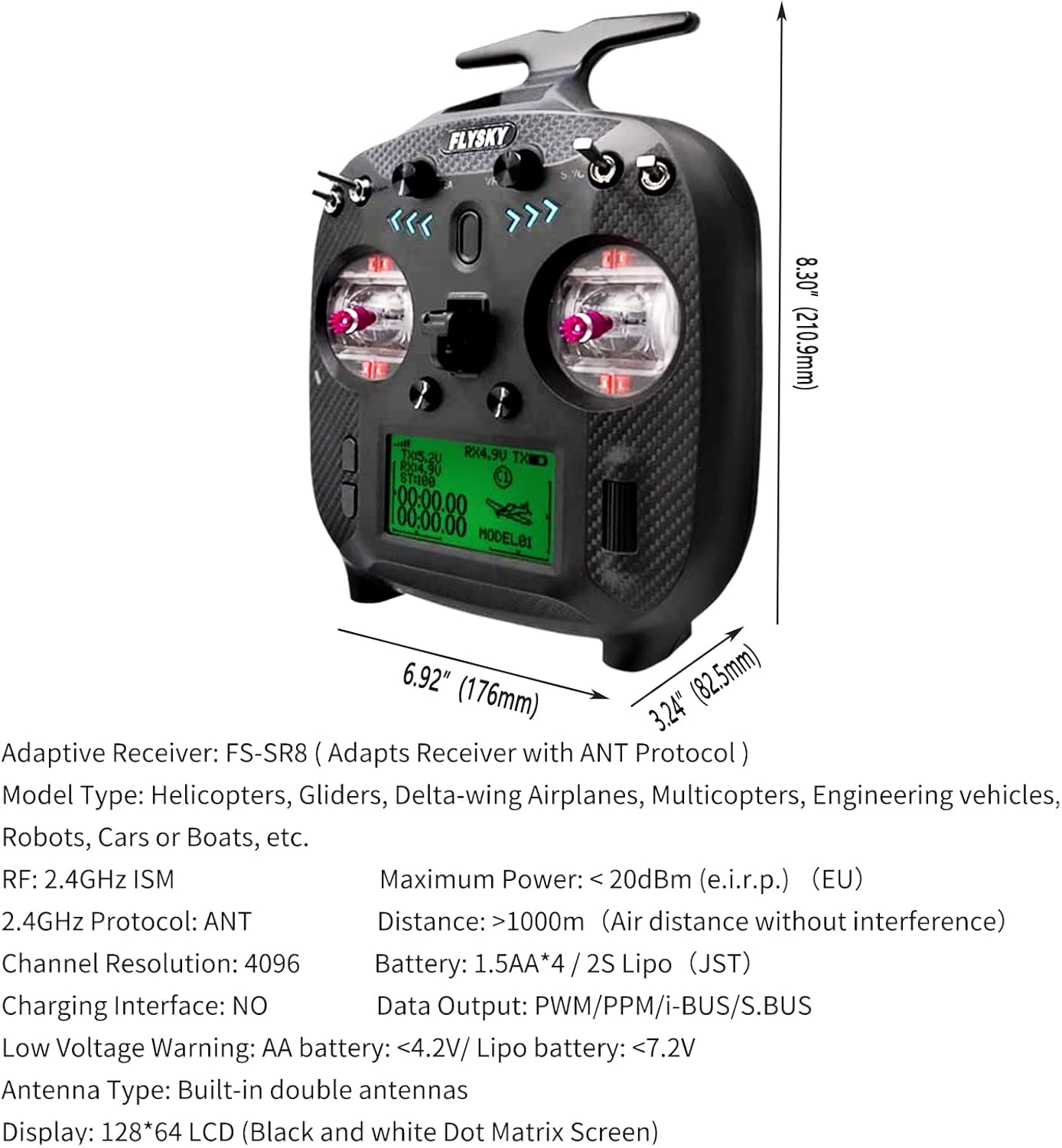
Figure 5: Physical dimensions and key technical specifications of the Flysky FS-ST8 Transmitter Controller.
FS-ST8 Transmitter:
| Feature | Specification |
|---|---|
| Channels | 8-10 |
| Adaptive Receiver | FS-SR8 (Adapts Receiver with ANT Protocol) |
| Model Type | Helicopters, Gliders, Delta-wing Airplanes, Multicopters, Engineering vehicles, Robots, Cars or Boats, etc. |
| RF | 2.4GHz ISM |
| Maximum Power | <20dBm (e.i.r.p.) (EU) |
| 2.4GHz Protocol | ANT |
| Distance | 1000m (Air distance without interference) |
| Channel Resolution | 4096 |
| Battery | 1.5AA*4 / 2S Lipo (JST) |
| Charging Interface | NO |
| Data Output | PWM/PPM/i-BUS/S.BUS |
| Low Voltage Warning | AA battery: <4.2V / Lipo battery: <7.2V |
| Antenna Type | Built-in double antennas |
| Languages | Chinese, English |
| Online Update | Yes |
| Weight | 420g |
FS-SR8 Receiver:
| Feature | Specification |
|---|---|
| Adaptive Transmitter | FS-ST8 (Adapts Transmitter with ANT Protocol) |
| Adaptive Models | Helicopters, Gliders, Delta-wing airplanes, Multicopters, Engineering Vehicles, Robots, Cars or Boats, etc. |
| Number of Channels | 8 |
| RF | 2.4GHz ISM |
| 2.4GHz Protocol | ANT |
| Antenna Type | Two Antennas |
| Input Power | 3.5~9V/DC |
| Data Output | PWM/PPM/i-BUS/S.BUS |
| Online Update | Yes |