
Introduction
This manual provides detailed instructions for the safe and effective use of your Orzorz Home Planetarium Star Projector. Please read this manual thoroughly before operation and retain it for future reference.
Safety Information
- Do not disassemble or modify the device.
- Keep away from water and high humidity environments.
- Use only the provided charging cable.
- Avoid direct eye exposure to the projector light.
- Ensure proper ventilation during operation to prevent overheating.
- Keep out of reach of children without adult supervision.
Package Contents
- Orzorz Home Planetarium Star Projector
- Slide Discs (Galaxy's Veil*5 kit)
- USB Charging Cable
- Instruction Manual
- 1 Lithium Ion Battery (pre-installed)
Setup
Charging the Device
The projector is powered by a rechargeable Lithium Ion battery.
- Connect the provided USB charging cable to the projector's charging port.
- Connect the other end of the cable to a compatible USB power adapter (not included) or a computer USB port.
- Allow approximately 30 minutes for initial charging before first use. A full charge provides up to 6 hours of operation.
Installing Slide Discs
The projector uses interchangeable slide discs to display various celestial scenes.
- Gently pull out the slide tray from the side of the projector.
- Carefully place the desired slide disc into the tray, ensuring it is seated correctly.
- Slide the tray back into the projector until it clicks into place.
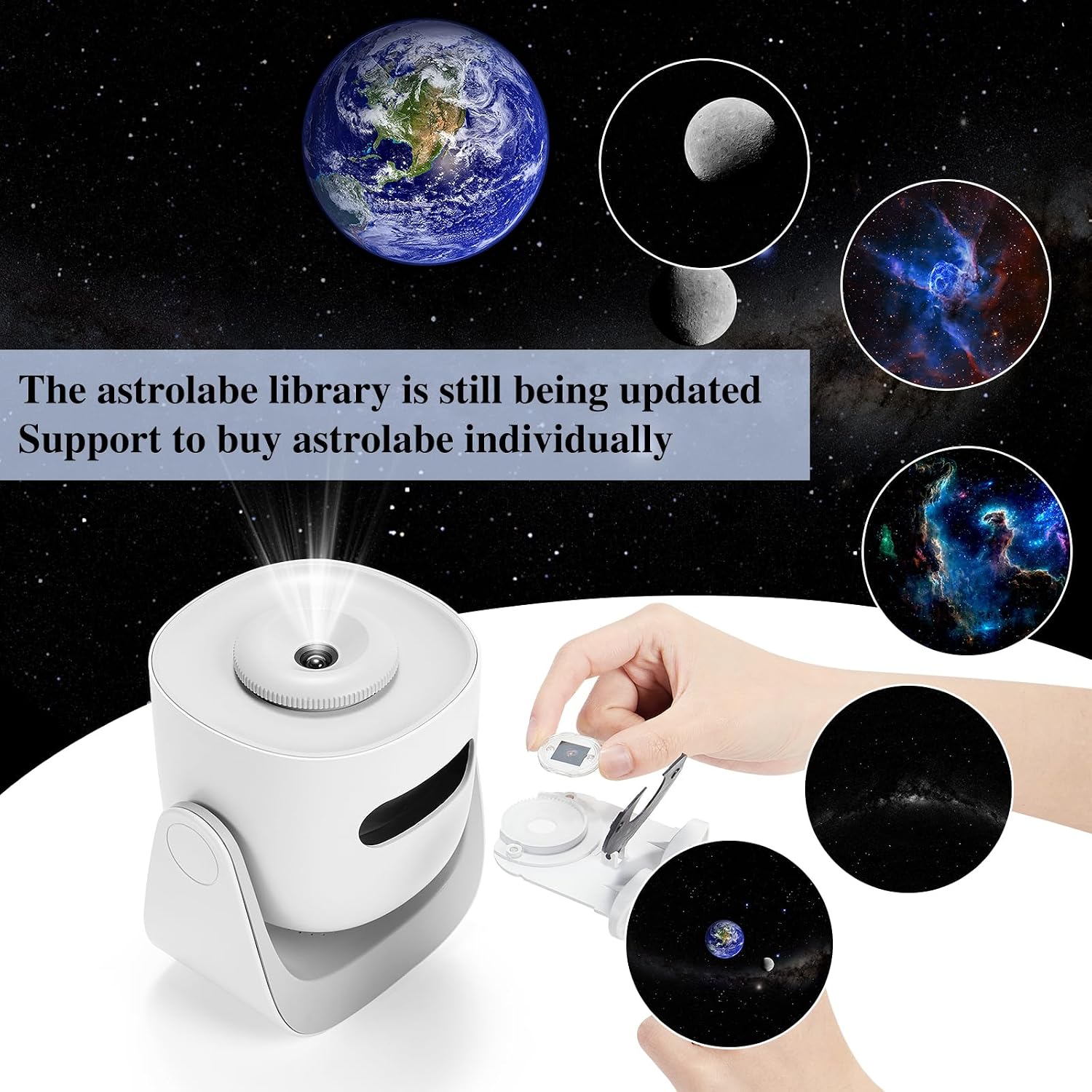
Figure 1: Illustration of inserting a slide disc into the projector's designated slot. The disc is held by hand and guided into the side opening.
Placement and Adjustment
Position the projector on a stable, flat surface. The projector features a 180-degree rotatable base for flexible projection angles.

Figure 2: The projector demonstrating its 180-degree adjustable projection angle, allowing it to cast images on both walls and ceilings.
Operating Instructions
Power On/Off
Press the power button located on the front of the device to turn the projector on or off.
Adjusting Focus
Rotate the focus ring on the top of the projector to achieve a clear image on your projection surface.
Timer Function
The projector includes a 3-stage circadian timer. Press the timer button to cycle through 15, 30, or 60-minute automatic shut-off settings.
Rotation Function
Press the rotation button to activate or deactivate the image rotation feature. The silent wave motor ensures quiet operation.
Changing Projection Scenes
To change the projected scene, replace the slide disc as described in the "Installing Slide Discs" section.

Figure 3: Exploded view diagram of the projector, illustrating key components such as the XP1 12000K HD Lens, rotating mechanism, anti-slip base, and timer settings (15/30/60 min).
Maintenance
Cleaning the Projector
- Use a soft, dry cloth to wipe the exterior of the projector.
- For the lens, use a lens cleaning cloth and solution specifically designed for optical surfaces. Do not use abrasive materials.
Cleaning Slide Discs
- Handle slide discs by their edges to avoid fingerprints.
- If necessary, gently wipe discs with a soft, lint-free cloth.
Battery Care
- To prolong battery life, avoid fully discharging the battery frequently.
- Store the projector in a cool, dry place when not in use for extended periods.
Troubleshooting
- No Projection/Dim Image: Ensure the device is charged and powered on. Check if a slide disc is correctly inserted. Adjust focus. Ensure the room is sufficiently dark.
- Unclear/Blurry Image: Rotate the focus ring on the top of the projector until the image is sharp. Ensure the projection surface is flat and within optimal distance.
- Disc Not Rotating/Clicking Noise: Verify the rotation function is enabled. If a clicking noise occurs or the disc stops, gently remove and reinsert the disc. If the issue persists, contact customer support.
- Device Overheating: Ensure the projector is placed in a well-ventilated area. Avoid blocking any vents. If the device becomes excessively hot, power it off and allow it to cool before resuming use.
Specifications
| Feature | Detail |
|---|---|
| Brand | Orzorz |
| Model | B0B1ZRVDC1 |
| Color | Kit (Multicolor) |
| Shape | Round |
| Material | Plastic |
| Finish Type | Painted |
| Light Source Type | Neon |
| Power Source | Battery Powered (1 Lithium Ion battery included) |
| Item Weight | 1.54 Pounds |
| Voltage | 3.7 Volts |
| Mounting Type | Table Mount |
| Bulb Features | Silent wave motor |
| Product Dimensions | 6.3"L x 6.3"W x 7.8"H |
| Special Features | 180 degree angle adjustment, Rechargeable, Silent Wave Motor |
| Wattage | 5 Watt-hours |
Warranty and Support
Your Orzorz Home Planetarium Star Projector comes with a 12-month replacement guarantee for star slides. For any product inquiries, technical support, or warranty claims, please contact us at support@orzorzvip.com.
Product Visuals and Examples
Immersive Projection Examples
Experience the captivating visuals of the Orzorz Home Planetarium Star Projector in various settings.

Figure 4: The Orzorz projector illuminating a bedroom with a detailed galaxy projection, showcasing its ability to transform a space.

Figure 5: A serene image of a child asleep in bed, with the Orzorz projector casting a gentle starry night sky on the ceiling, promoting a calming environment.

Figure 6: An adult enjoying a book in bed, accompanied by the tranquil projection of a starry sky from the Orzorz projector, demonstrating its suitability for unwinding.