
Introduction
This manual provides detailed instructions for the safe and efficient operation, maintenance, and troubleshooting of your MAMNV D13S MAX Robot Vacuum and Mop. Please read this manual thoroughly before using the product and retain it for future reference.
Product Overview
The MAMNV D13S MAX is a 3-in-1 robotic cleaning device designed for vacuuming, sweeping, and mopping. It features advanced LiDAR navigation, a self-emptying dustbin, and smart mapping capabilities for comprehensive home cleaning.
What's in the Box
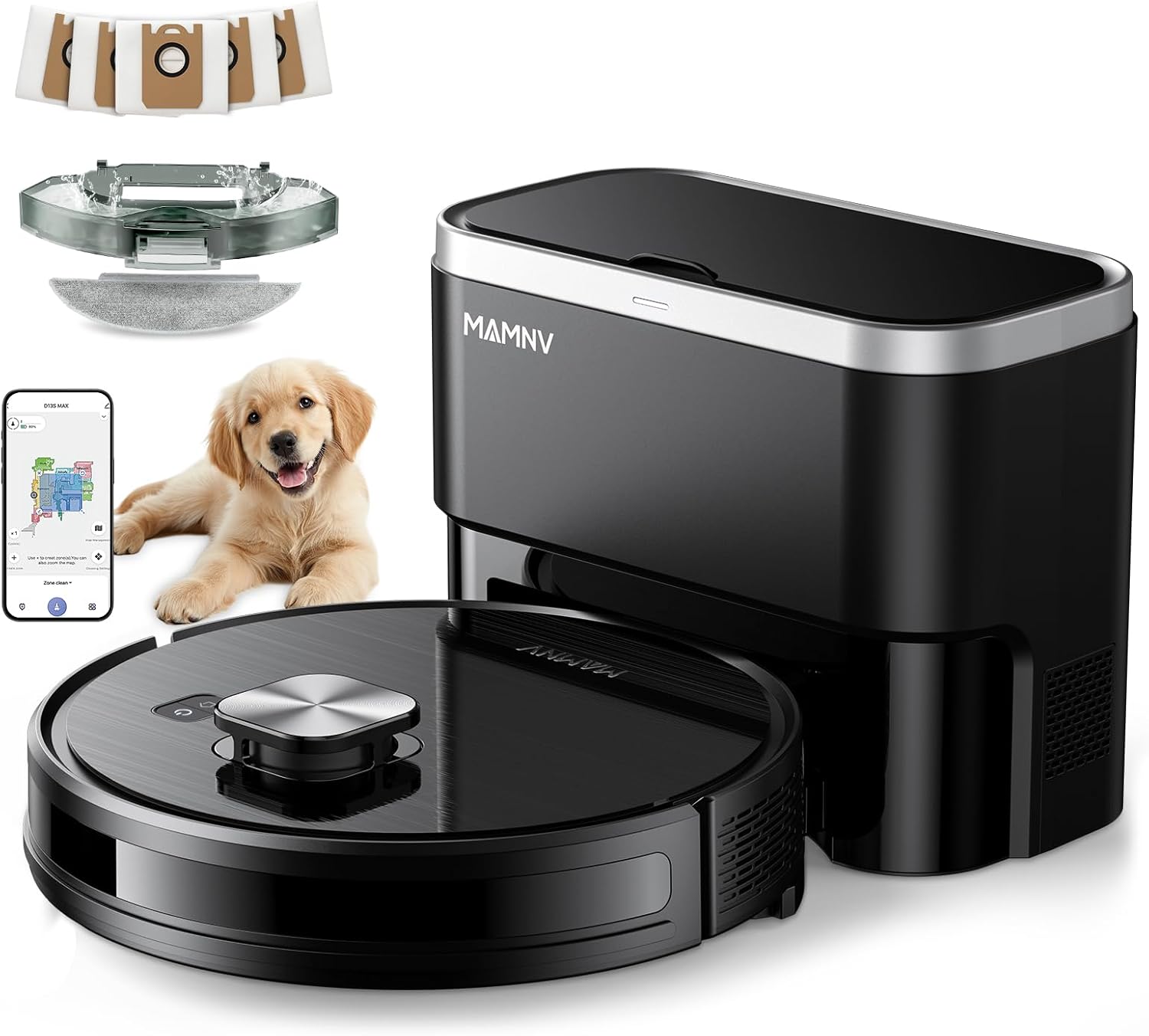
Image: MAMNV D13S MAX Robot Vacuum, Self-Emptying Station, and included accessories.
- D13S MAX LiDAR Navigation Robot Vacuum
- Dust Collection Station
- 2-in-1 Water Tank and Dustbin
- Dust Bags (x5)
- Rolling Brush (x1)
- Side Brushes (x2)
- Mop Holder
- Mops (x2)
- Filters (x2)
- User Manual
- FQA (Frequently Asked Questions)
- App Connection Guide
Important Safety Information
Please read and follow all safety instructions to prevent injury or damage. Keep this manual for future reference.
- Do not allow children to operate the robot vacuum.
- Ensure the charging station is placed on a flat, stable surface.
- Keep hair, loose clothing, fingers, and all body parts away from openings and moving parts.
- Do not use the robot vacuum to pick up large objects, sharp objects, or liquids.
- Do not use the robot vacuum in wet environments or near flammable materials.
- Only use the provided power adapter and charging station.
- Do not use detergents or disinfectants in the water tank, as they may corrode the tank and clog pipes.
Setup
1. Unpacking and Placement
Carefully remove all components from the packaging. Place the dust collection station against a wall in an open area, ensuring there are no obstacles within 1 meter (3 feet) to the front and 0.5 meters (1.5 feet) to the sides.

Image: The MAMNV D13S MAX Robot Vacuum and its self-emptying station, along with various accessories like dust bags, brushes, and mop pads.
2. Charging the Robot
Connect the dust collection station to a power outlet. Place the robot vacuum onto the charging contacts of the station. Ensure the robot is properly aligned and charging. The indicator light on the robot will show charging status.
3. App Connection
To unlock full features, download the "Tuya Smart" or "Smart Life" app from your smartphone's app store. Follow the in-app instructions to connect your D13S MAX.

Image: App connection guide showing QR codes for Tuya Smart and Smart Life apps, and steps for entering distribution mode.
- Download, register, and log into the "Tuya Smart" or "Smart Life" APP.
- How to Enter Distribution Mode:
- Step 1: Press and hold the power button for 3-5 seconds to turn on the device. (Ensure your phone has Bluetooth enabled).
- Step 2: Press and hold the home button for 3-5 seconds.
- Step 3: Confirm that the home button light flashes white, play the corresponding prompt, and enter the network configuration.
- For detailed operating steps, refer to the "APP Connection" guide included with your product.
Download the Tuya Smart app: https://smartapp.tuya.com/tuyasmart
Download the Smart Life app: https://smartapp.tuya.com/smartlife
Operating Instructions
Cleaning Modes
- Auto Clean: The robot intelligently navigates and cleans your home.
- Spot Clean: Directs the robot to clean a specific area more intensely.
- Edge Clean: The robot cleans along walls and furniture edges.
- Scheduled Clean: Set specific times for the robot to clean automatically via the app.
- Manual Control: Control the robot's movement manually using the app.

Image: App interface demonstrating various cleaning modes and scheduling options.
LiDAR Navigation and Mapping
The D13S MAX uses LiDAR technology to scan your home in 360 degrees, creating detailed maps for efficient route planning. It can save up to 5 multi-floor maps.

Image: Robot vacuum utilizing LiDAR navigation for precise home mapping.
No-Go Zones and Virtual Walls
Use the app to set No-Go Zones or Virtual Walls to prevent the robot from entering specific areas, such as pet feeding areas or fragile zones.

Image: Illustration of No-Go Zones and Virtual Walls preventing the robot from entering designated areas.
Vacuuming and Mopping
The D13S MAX can vacuum, sweep, and mop simultaneously. Ensure the 2-in-1 water tank and dustbin is properly installed for mopping functions.

Image: Robot vacuum performing both vacuuming and mopping operations.
The robot features 11500Pa suction power and Carpet Auto-Boost, which automatically increases suction on carpets.

Image: Robot vacuum demonstrating carpet auto-boost feature and carpet area planning.
Self-Emptying Function
After each cleaning cycle, the robot automatically returns to the dust collection station to empty its dustbin. The station can hold up to 70 days of dirt and dust.

Image: Robot vacuum automatically emptying its dustbin into the self-emptying station.
Voice Control
The D13S MAX is compatible with Amazon Alexa and Google Assistant for convenient voice control.

Image: Demonstrating voice control functionality with Amazon Alexa and Google Assistant.
Maintenance
Regular maintenance ensures optimal performance and extends the lifespan of your robot vacuum.
Dustbin and Filters
- The self-emptying station's dust bag should be replaced approximately every 70 days, or when full.
- The robot's internal filters (HEPA, Primary, Sponge) should be cleaned regularly and replaced as needed.
Brushes
- Clean the rolling brush and side brushes regularly to remove tangled hair and debris.
- Replace brushes when they show signs of wear.
Mop Pad and Water Tank
- The washable mop pad should be cleaned after each mopping session.
- Empty and rinse the water tank after each use.
- Important: Do not use detergents or disinfectants in the water tank, as they can corrode the tank and clog the water outlet pipes.
Sensors and Charging Contacts
- Wipe the sensors and charging contacts on both the robot and the station with a dry cloth periodically to ensure proper function.
Troubleshooting
This section addresses common issues you might encounter with your D13S MAX robot vacuum.
Robot Does Not Start or Charge
- Ensure the power cord of the dust collection station is securely plugged into a working outlet.
- Verify that the robot is correctly docked on the charging contacts.
- Clean the charging contacts on both the robot and the station with a dry cloth.
- Check if the robot's power button is pressed.
Robot Gets Stuck Frequently
- Clear obstacles such as cables, toys, or loose rugs from the cleaning path.
- Ensure the robot's wheels and brushes are free from tangled hair or debris.
- Set No-Go Zones in the app for areas where the robot frequently gets stuck.
Mop Does Not Wet the Pad or Dispense Water

Image: App settings for mopping functions, including water quantity and cleaning mode.
- Ensure all mopping modules are correctly installed according to the user's manual.
- When the machine first enters mop mode, the mop might dampen slowly. Wait a few minutes for this process or manually dampen the mop in advance. If there is oil residue on the mop pad making it difficult to absorb water, wash it with cleaner and reinstall.
- Check if the cleaning mode is set to "Sweep" and the Water volume adjustment is set to "OFF" in the app. Adjust settings as needed.
- Note: Do not use detergents or disinfectants, as they may corrode the water tank and clog the water outlet pipes.
Poor Cleaning Performance
- Empty the dustbin and clean the filters.
- Clean the rolling brush and side brushes.
- Ensure the suction power setting in the app is appropriate for the surface.
- Check if the water tank is filled for mopping.
Specifications
| Feature | Specification |
|---|---|
| Brand | MAMNV |
| Model Name | D13S MAX Robot Vacuum and Mop |
| Special Features | Advanced Custom Cleaning, LiDAR Navigation, Precision Laser Mapping & Navigation, Self-Emptying, Smart Mapping |
| Color | Black |
| Product Dimensions (Robot) | 12.59"L x 12.59"W x 3.82"H |
| Included Components | Combination Water Tank, Dust Collection Station, Dust Bags*5, Instruction Manual, User Guide, FQA, Mop Holder, Mops*2, Filters*2, Side Brushes*2, Rolling Brush*1 |
| Filter Type | HEPA Triple-stage Filtration, Primary Filter, Sponge |
| Battery Life | 1000 Hours (estimated) |
| Voltage | 220 Volts |
| Dustbin Capacity | 470 Milliliters (robot) |
| Water Tank Capacity | 240 Milliliters (integrated with dustbin) |
| Power Source | Battery Powered |
| Control Method | App, Voice |
| Compatible Devices | Amazon Echo, Google Home, Smartphones |
| Form Factor | Robotic |
| Item Weight | 18.26 pounds |
| Batteries | 4 12V batteries required (included) |
| Runtime | Up to 160 minutes |
| Suction Power | 11500Pa |
| Self-Emptying Capacity | Up to 70 days |

Image: Dimensions of the robot vacuum and its self-emptying station.
Warranty and Support
The product includes professional customer service and a 12-month service period. For warranty claims or technical support, please refer to the contact information provided in the product packaging or on the manufacturer's official website.
For additional assistance, please consult the FQA (Frequently Asked Questions) document included with your product.