
1. Introduction
The RUZIZAO SPS3010 is a high-precision, regulated DC power supply designed for various applications including laboratories, educational institutions, electronic maintenance, and DIY projects. It features a 4-digit LED display for clear readings of voltage, current, and power, along with automatic Constant Voltage (CV) and Constant Current (CC) switching modes. This unit is built with multiple protection mechanisms to ensure safe and reliable operation.

Figure 1: RUZIZAO SPS3010 DC Power Supply
Key Features:
- High precision (0.01V, 0.001A) and low ripple output.
- 4-digit LED display for voltage, current, and power.
- Automatic CV/CC mode switching.
- Integrated 5V/2A USB charging port.
- Intelligent cooling fan for extended lifespan.
- Compact and portable design.
2. Safety Instructions
Before operating the RUZIZAO SPS3010 DC Power Supply, please read and understand all safety instructions to prevent injury or damage to the device. This unit is CE & FCC certified, incorporating multiple safety features.
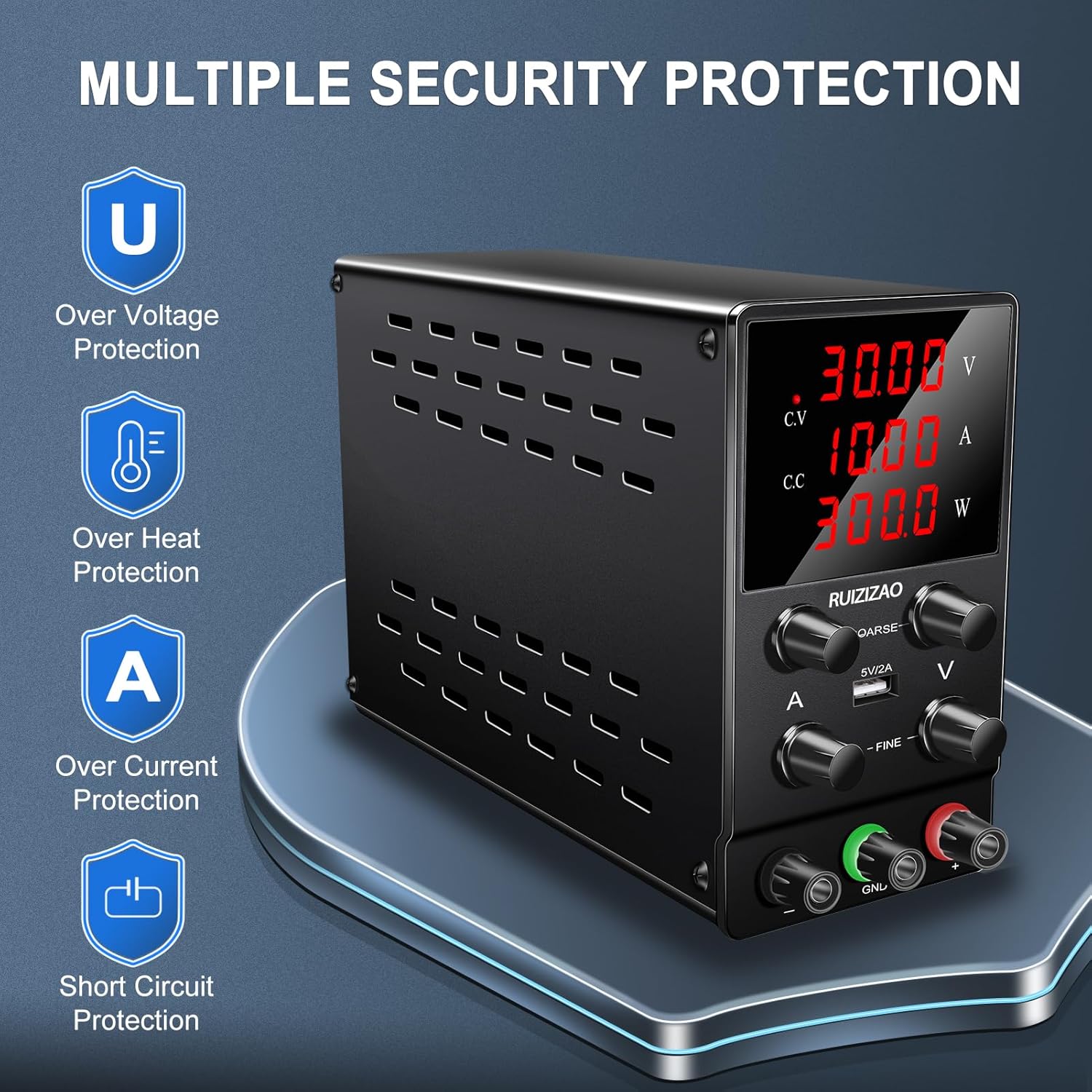
Figure 2: Multiple Security Protections
Safety Precautions:
- Power Source: Connect the power supply only to a grounded AC outlet with the correct voltage.
- Ventilation: Ensure adequate ventilation around the unit. Do not block the cooling fan or vents.
- Environment: Operate the device in a dry, well-ventilated area, away from direct sunlight, high temperatures, humidity, and corrosive gases.
- Liquid Contact: Avoid contact with liquids. Do not operate the device with wet hands.
- Overload: Do not exceed the rated voltage and current output of the power supply.
- Protection Features: The unit includes overvoltage protection, overcurrent protection, overheat protection, overpower protection, and short-circuit protection. However, always operate within safe limits.
- Maintenance: Do not attempt to open or repair the unit yourself. Refer all servicing to qualified personnel.
- Output Terminals: Ensure proper polarity when connecting loads to the output terminals.
3. Product Overview
Familiarize yourself with the components and controls of your RUZIZAO SPS3010 DC Power Supply.
3.1 Front Panel Controls and Displays

Figure 3: Front Panel Layout
- Voltage Display (V): Shows the output voltage in Volts.
- Current Display (A): Shows the output current in Amperes.
- Power Display (W): Shows the output power in Watts.
- Constant Voltage (C.V) Indicator: Lights up when the power supply is operating in Constant Voltage mode.
- Constant Current (C.C) Indicator: Lights up when the power supply is operating in Constant Current mode.
- Coarse Voltage Knob: Adjusts the output voltage in larger increments.
- Fine Voltage Knob: Adjusts the output voltage in smaller, precise increments.
- Coarse Current Knob: Adjusts the output current limit in larger increments.
- Fine Current Knob: Adjusts the output current limit in smaller, precise increments.
- USB Interface (5V/2A): Provides a stable 5V, 2A output for charging compatible devices.
- Output Negative (-) Terminal: Black terminal for negative connection.
- Ground (GND) Terminal: Green terminal for ground connection.
- Output Positive (+) Terminal: Red terminal for positive connection.
3.2 Rear Panel Features

Figure 4: Rear Panel Features
- Power Switch: Turns the unit ON or OFF.
- AC Power Input: Connects the power cord to the AC mains.
- Intelligent Cooling Fan: Activates automatically when the internal temperature exceeds 50°C (122°F) to maintain optimal operating temperature and extend device lifespan.
- Fuse Holder: Contains the main protective fuse. A spare fuse is often included.
3.3 Physical Characteristics
- Dimensions: Approximately 23 x 14.9 x 8.3 cm (9.06 x 5.87 x 3.27 inches)
- Weight: Approximately 1.7 kg (3.75 lbs)
- Design: Stable vertical design with shock-absorbing rubber feet.
4. Setup
Follow these steps to set up your RUZIZAO SPS3010 DC Power Supply for first use.

Figure 5: Package Contents
- Unpacking: Carefully remove the power supply and all accessories from the packaging. Verify that all components are present: the power supply unit, power cord, and user manual.
- Placement: Place the power supply on a stable, flat surface with sufficient space for ventilation, especially around the rear cooling fan and side vents.
- Power Connection: Ensure the power switch on the rear panel is in the OFF position. Connect the provided AC power cord to the AC power input on the rear panel of the unit, then plug the other end into a grounded AC outlet.
- Initial Check: Before connecting any load, turn the power switch ON. The LED display should illuminate, showing default voltage and current readings.
5. Operating Instructions
This section details how to operate your RUZIZAO SPS3010 DC Power Supply.
5.1 Powering On/Off
- To turn ON the power supply, flip the power switch on the rear panel to the 'I' (ON) position.
- To turn OFF the power supply, flip the power switch on the rear panel to the 'O' (OFF) position.
5.2 Adjusting Voltage and Current

Figure 6: Coarse and Fine Adjustments
- Pre-setting Voltage and Current (No Load):
Before connecting a load, it is recommended to set the desired voltage and current limit. Turn the Coarse and Fine Current knobs clockwise to their maximum position. Then, use the Coarse and Fine Voltage knobs to set the desired output voltage. The voltage display will show the set value. The current display will show 0.000A until a load is connected. - Connecting the Load:
Ensure the power supply is OFF or the output is disabled (if applicable, though this model does not have a separate output enable button). Connect the positive (+) terminal of your load to the red output terminal, and the negative (-) terminal of your load to the black output terminal. For safety, connect the ground (GND) terminal to the chassis of your device if required. - Applying Power to Load:
Turn the power supply ON. The voltage and current displays will show the actual output values. - Adjusting Current Limit with Load:
With the load connected, you can now adjust the current limit using the Coarse and Fine Current knobs. Turn the knobs counter-clockwise to reduce the current limit, or clockwise to increase it. The C.C indicator will light up if the current limit is reached. - Constant Voltage (CV) Mode:
When the output voltage is stable and below the set current limit, the C.V indicator will be lit. The power supply maintains the set voltage. - Constant Current (CC) Mode:
When the load draws current equal to or greater than the set current limit, the C.C indicator will be lit. The power supply maintains the set current, and the output voltage will drop accordingly.
5.3 Using the USB Charging Port

Figure 7: USB Charging Port
The integrated 5V/2A USB port can be used to charge compatible electronic devices. Simply connect your device's USB cable to the port. This port operates independently of the main DC output settings.
6. Maintenance
Proper maintenance ensures the longevity and optimal performance of your power supply.
6.1 Cleaning
- Always disconnect the power supply from the AC outlet before cleaning.
- Use a soft, dry cloth to wipe the exterior of the unit.
- Do not use abrasive cleaners, solvents, or harsh chemicals.
- Periodically check the ventilation openings for dust accumulation and clean them gently with a soft brush or compressed air.
6.2 Fuse Replacement
Figure 8: Fuse Holder Location
If the power supply fails to turn on, the fuse may need replacement.
- Ensure the power supply is completely disconnected from the AC mains.
- Locate the fuse holder on the rear panel (often integrated with the AC power input).
- Carefully pry open or unscrew the fuse holder.
- Remove the old fuse and replace it with a new fuse of the exact same type and rating (e.g., 5A/250V). Using an incorrect fuse can damage the unit or pose a fire hazard.
- Close the fuse holder securely.
- Reconnect the power supply and test its operation.
7. Troubleshooting
This section addresses common issues you might encounter with your RUZIZAO SPS3010 DC Power Supply.
- No Power / Unit Does Not Turn On:
- Check if the power cord is securely connected to both the unit and the AC outlet.
- Verify that the AC outlet is functional.
- Check the fuse on the rear panel and replace it if blown (refer to Section 6.2).
- Ensure the power switch on the rear panel is in the ON position.
- No Output Voltage/Current:
- Ensure the power supply is ON.
- Check that the output terminals are correctly connected to the load.
- Verify that the voltage and current knobs are not set to zero.
- If the C.C indicator is lit and voltage is low, the current limit may be set too low for the load. Increase the current limit using the current adjustment knobs.
- Inaccurate Readings:
- Ensure proper connections and that the load is not drawing excessive current beyond the unit's capabilities.
- If readings appear consistently off, contact customer support.
- Fan Not Running:
- The intelligent cooling fan only activates when the internal temperature exceeds 50°C (122°F). If the unit is cool, the fan will not run.
- If the unit is hot and the fan is not running, ensure the vents are not blocked. If the issue persists, discontinue use and contact support.
- Difficulty Setting Current Without Load:
- When no load is connected, the current display will typically show 0.000A, even if the current limit knobs are adjusted. To pre-set a current limit, first set the desired voltage. Then, short-circuit the output terminals briefly (using a suitable low-resistance wire, with caution) and adjust the current knobs to the desired limit while observing the current display. Remove the short-circuit before connecting your actual load. Alternatively, connect a known resistive load to set the current.
8. Specifications
| Specification | Value |
|---|---|
| Brand | RUZIZAO |
| Model Number | SPS3010 |
| Output Voltage | 0-30V DC (Adjustable) |
| Output Current | 0-10A DC (Adjustable) |
| Output Power | 300 Watts |
| Input Voltage (Max) | 30 Volts (AC) - Note: This likely refers to the internal AC voltage, not mains input. Mains input is typically 110V/220V AC. |
| Display | 4-Digit LED (Voltage, Current, Power) |
| USB Port | 5V/2A |
| Cooling Method | Intelligent Fan |
| Dimensions (Package) | 29.5 x 25.6 x 12.7 cm |
| Weight (Unit) | 1.56 kg (3.44 lbs) |
| Certifications | CE, FCC |
| UPC | 700721649389 |
9. Warranty and Support
RUZIZAO is committed to providing high-quality products. All DC power supply units and accessories undergo thorough inspection before shipment to ensure product quality.
If you encounter any issues or have questions regarding your RUZIZAO SPS3010 DC Power Supply, please do not hesitate to contact our customer support. We aim to respond to all inquiries within 24 hours.
For support, please refer to the contact information provided with your purchase or visit the official RUZIZAO website.