
Carlinkit for 4.0 CP2A carplay
CarlinKit 4.0 Wireless CarPlay & Android Auto Adapter User Manual
Model: for 4.0 CP2A carplay | Brand: Carlinkit
1. Introduction
The CarlinKit 4.0 Wireless CarPlay & Android Auto Adapter is designed to convert your vehicle's existing wired CarPlay system into a wireless one, offering seamless integration for both Apple CarPlay and Android Auto. This device enhances your driving experience by providing wireless access to navigation, music, calls, and voice assistants, eliminating the need for USB cables.
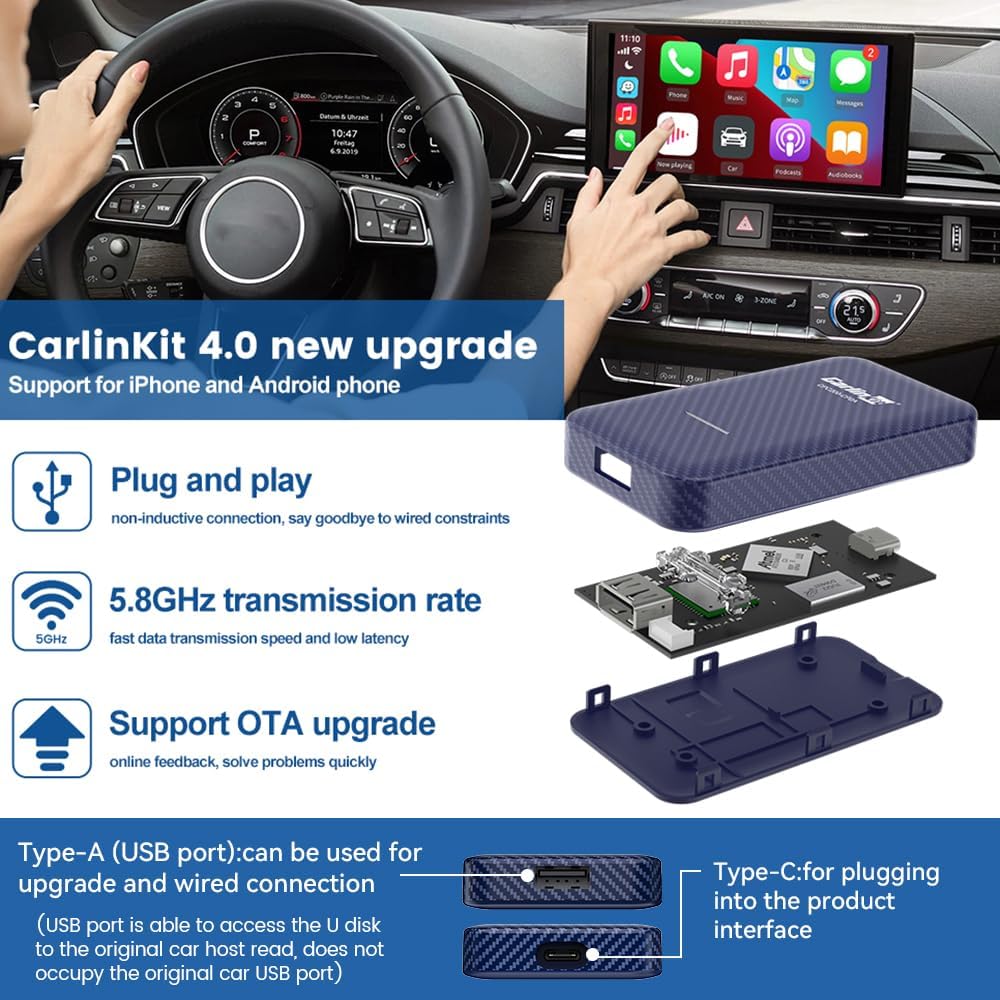
It features a built-in 5G smart chip for fast processing and reduced latency, supporting 2.4GHz/5.8GHz WiFi connections. The compact design allows for easy storage and discreet placement within your vehicle.
2. What's in the Box
- 1x CarlinKit 4.0 Wireless Adapter
- 1x Type-C to Type-C Cable
- 1x USB-A to Type-C Cable
- 1x Instruction Manual

3. Compatibility
This CarlinKit 4.0 adapter is designed for vehicles that come with a factory-installed wired CarPlay system. It is compatible with approximately 98% of car models that feature wired CarPlay. Please note the following:
- Incompatible Vehicles: BMW Series, Nissan, 2022 Volvo/Polestar, 2018 Chevy Bolt, Mitsubishi, and Tesla models.
- Supported Mobile Phones (Apple): iPhone 6 or above, running iOS 10 or above.
- Supported Mobile Phones (Android): Android 10.0 and above. Some Android phones may require Android 11.0 or above. Ensure your Android phone supports wireless Android Auto.
- Not suitable for Android car radios.


4. Setup
4.1 General Setup
The CarlinKit 4.0 adapter offers a plug-and-play experience, converting your wired CarPlay to wireless without complex installations. Simply connect the adapter to your car's USB port.
4.2 CarPlay Pairing (for Apple iPhone)
- Turn on Bluetooth and WiFi on your iPhone.
- Plug the adapter's USB cable into your car's USB port. The product indicator light will flash red, indicating it's ready to pair.
- Open the Bluetooth list on your iPhone, select the corresponding Bluetooth name (e.g., "SmartBox-xxxx"), and connect.
- Once connected, the product indicator will flash green, and the CarPlay system interface will appear on your car's screen.
4.3 Android Auto Pairing (for Android Phone)
- Turn on Bluetooth and WiFi on your Android phone.
- Plug the adapter's USB cable into your car's USB port. The product indicator light will flash red.
- Open the Bluetooth list on your Android phone, select the corresponding Bluetooth name, and connect.
- After successful connection, the product indicator will flash green, and the Android Auto system interface will appear on your car's screen.
5. Operating Instructions
5.1 Seamless Auto-Connect & Multi-Device Support
The CarlinKit 4.0 adapter automatically connects to your phone once paired, providing a seamless experience. It can store up to 5 devices, allowing for quick and easy switching between users without repetitive setup. This feature is ideal for families or friends sharing the vehicle.

5.2 CarPlay Features
Once connected, you can utilize various CarPlay functions directly on your car's display:
- Voice Assistant: Use Siri for hands-free calls, messages, and commands.
- Music Playback: Access your favorite music apps and control playback.
- Navigation: Utilize real-time navigation apps for directions.
- Original Car Control: Maintain control through your car's original touchscreen, knob, and steering wheel buttons.
- System Switching: Easily switch between the CarPlay system and your car's original system.

5.3 Android Auto Features
For Android users, the adapter provides full Android Auto functionality:
- Voice Navigation: Use voice commands for navigation, including finding gas stations or other points of interest.
- Music Playback: Stream music from your preferred apps.
- System Switching: Seamlessly switch between the Android Auto system and your car's original system.

Video: An official demonstration of the CarlinKit 4.0 Wireless CarPlay and Android Auto adapter, showcasing its features and seamless operation within a vehicle's infotainment system.
6. Maintenance
6.1 Over-the-Air (OTA) Updates
The CarlinKit 4.0 supports Over-the-Air (OTA) updates to improve product performance and add new features. To update the software:
- Connect the USB adapter to your car's USB port.
- Connect your phone to the adapter's WiFi network.
- Open your phone's browser and enter "192.168.50.2" to access the device background. (Note: You may need to enable mobile data on your phone to access the browser.)
- Navigate to the "Infos page" or "Help page", scroll down to find "Check Update", and proceed to upgrade to the latest version.

7. Troubleshooting
If you encounter issues with your CarlinKit 4.0 adapter, consider the following common solutions:
- Connection Issues: Ensure the USB cable is firmly inserted into the car's USB port. You should hear a click sound.
- Compatibility: Verify that your car has factory-installed wired CarPlay and that your phone meets the minimum OS requirements (iPhone 6+/iOS 10+; Android 10.0+, some 11.0+).
- Android Phone Settings: For Android phone users, use AutoKitools to access the product setting page for advanced configurations.
- Software Updates: Regularly check for and install OTA updates as they often resolve performance issues.
For more detailed troubleshooting, refer to the Troubleshooting Guide (PDF) provided by the manufacturer.

8. Specifications
| Feature | Specification |
|---|---|
| Model Number | for 4.0 CP2A carplay (CPC200-CP2A) |
| Product Dimensions | 3.15 x 1.81 x 0.51 inches (80 x 46 x 13 mm) |
| Item Weight | 4.6 ounces (approx. 33g) |
| Power Input | 5V±0.2V 1.0A |
| Power Output | DC 5V±0.2V 1.0A |
| Power Consumption | 0.75W |
| Bluetooth Frequency | 2412-2483.5MHz |
| WiFi Frequency | 5150-5250MHz, 5725-5850MHz |
| Connectivity Technology | Bluetooth, WiFi (2.4GHz/5.8GHz) |
| Surface Treatment | Carbon fiber texture |
| Ports | LED light, Type-C female port, USB female port |
| Resolution | Adaptive (maintains original protocol resolution) |

9. Safety Information
When inserting the USB cable, ensure it is pressed firmly into the port until you hear a click sound to ensure a secure connection.
This device is not applicable to BMW and Tesla models.
The visible screen diagonal of the device is 2 inches (6 cm).
10. Warranty and Support
CarlinKit products are backed by a professional after-sales team dedicated to providing technical support. The manufacturer maintains strict quality control, including full pre-sale inspection and after-sale tracking service.
If you encounter any issues or require technical assistance, please contact CarlinKit's customer support team. They are available to help resolve problems with your device.