
Ddidbi IT100 PLUS
Ddidbi IT100 PLUS Wireless Earbuds User Manual
Model: IT100 PLUS | Brand: Ddidbi
1. Introduction
Thank you for choosing the Ddidbi IT100 PLUS Wireless Earbuds. These earbuds are designed to provide a superior audio experience with advanced features such as Bluetooth 5.3 connectivity, Environmental Noise Cancellation (ENC) for clear calls, immersive stereo sound with deep bass, and a long-lasting battery life of up to 40 hours with the charging case. Their IP7 waterproof rating makes them suitable for various activities, including sports and outdoor use.

Figure 1: Ddidbi IT100 PLUS Wireless Earbuds and Charging Case
Video 1: Overview of Ddidbi Wireless Earbuds features, including Bluetooth connectivity, sound quality, and design.
2. What's in the Box
The Ddidbi IT100 PLUS package includes the following components:
- 2x Wireless Headphones (Left/Right)
- 1x Lightweight USB-C Charging Case
- 1x USB-C Cable
- 1x User Manual
3. Setup
3.1. Initial Pairing
The Ddidbi IT100 PLUS earbuds feature effortless pairing. They will instantly pair with each other once taken out of the charging case and automatically connect to the last-paired device.
- Ensure your device's Bluetooth is turned on.
- Open the charging case. The earbuds will automatically power on and enter pairing mode.
- On your device, search for Bluetooth devices and select "IT100 PLUS" from the list.
- Once connected, you will hear a confirmation prompt.

Figure 2: One-Step Auto Pairing process for the earbuds.
Video 2: Detailed demonstration of unboxing, initial pairing, and touch controls for the Ddidbi Wireless Earbuds.
4. Operating Instructions
4.1. Touch Controls
The earbuds feature intuitive touch controls for various functions:
- Volume Control: Tap the left earbud once to decrease volume, tap the right earbud once to increase volume.
- Play/Pause: Double-tap either earbud.
- Previous Track: Long press the left earbud for 2 seconds.
- Next Track: Long press the right earbud for 2 seconds.
- Voice Assistant: Triple-tap either earbud to activate your device's voice assistant (e.g., Siri).
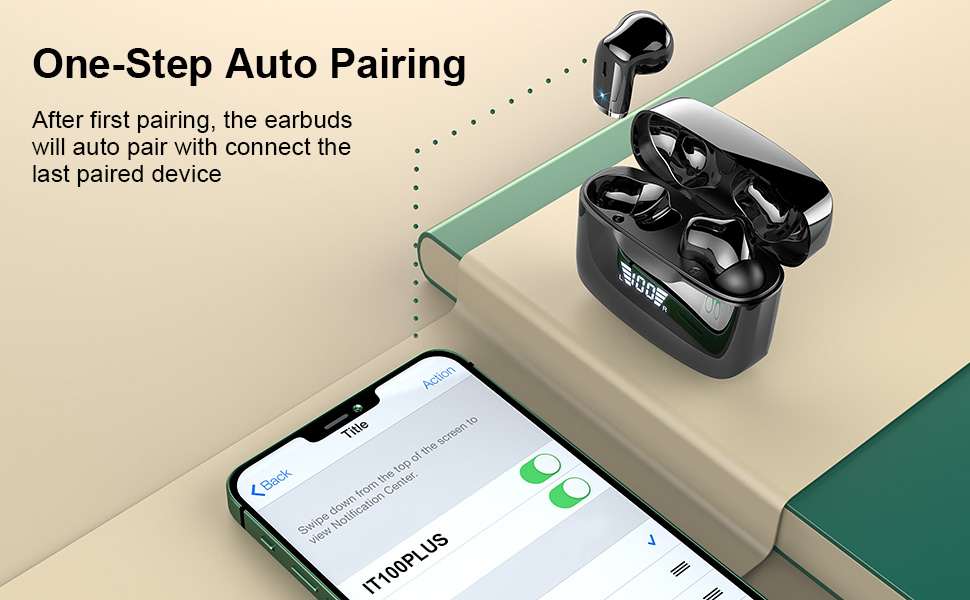
Figure 3: Visual guide to earbud touch control functions.
4.2. Call Management
Each earbud has a built-in microphone with ENC noise reduction for clear calls.
- Answer/End Call: Single-tap either earbud.
- Reject Call: Long press either earbud for 2 seconds.

Figure 4: Demonstrating ultra-clear calls with the earbuds.
4.3. Sound Quality
These earbuds are equipped with 13mm speakers and triple-layer composite diaphragms, delivering powerful bass, stunning treble, and clear mids for an immersive stereo sound experience.

Figure 5: Internal components illustrating the 13mm dynamic drivers for immersive sound.
4.4. Battery Life and Charging
The earbuds offer up to 6 hours of playtime on a single charge, with the charging case providing an additional 5 charges for a total of 40 hours of playtime. The charging case features a smart LED digital display to show the battery consumption of both earbuds and the case.
- Charging Time: Approximately 1 hour for a full charge using the included Type-C fast charging cable.
- Battery Display: The LED display on the charging case indicates the battery percentage (1-100) and charging status of the earbuds.

Figure 6: Illustrates the 40-hour total playtime and charging indicators.
5. Maintenance
5.1. Water Resistance
The earbuds are IP7 waterproof, protecting them from splashing water and rain. This makes them ideal for sports and outdoor activities without concern for moisture damage.

Figure 7: Earbuds demonstrating IP7 water and sweat resistance.
5.2. Cleaning and Storage
- Wipe the earbuds and charging case with a soft, dry cloth.
- Avoid using harsh chemicals or abrasive materials.
- Store the earbuds in their charging case when not in use to protect them and ensure they remain charged.
- Keep the product away from extreme temperatures and direct sunlight.
6. Troubleshooting
If you encounter any issues with your Ddidbi IT100 PLUS earbuds, please refer to the following common solutions:
- No Sound: Ensure the earbuds are properly paired and connected to your device. Check the volume levels on both the earbuds and your device.
- Pairing Issues: Turn off Bluetooth on your device, place the earbuds back in the case, close the lid, then open it again. Re-enable Bluetooth on your device and try pairing again. If issues persist, try resetting the earbuds (refer to specific reset instructions if available in a full manual, or try forgetting the device on your phone and re-pairing).
- Charging Problems: Ensure the USB-C cable is securely connected to both the charging case and a power source. Check the charging indicator on the case.
- Unstable Connection: Ensure there are no significant obstacles between the earbuds and your device. Keep the devices within the Bluetooth range (10 meters).
7. Specifications
| Feature | Specification |
|---|---|
| Model Name | IT100 PLUS |
| Connectivity Technology | Wireless (Bluetooth 5.2) |
| Audio Driver Type | Dynamic Driver |
| Audio Driver Size | 13 Millimeters |
| Battery Life (Earbuds) | 6 Hours |
| Total Playtime (with Case) | 40 Hours |
| Charging Time | 1 Hour |
| Control Method | Touch |
| Water Resistance Level | IP7 Waterproof |
| Item Weight | 3.7 Grams (each earbud) |
| Bluetooth Range | 10 Meters |
| Frequency Range | 20 Hz - 20,000 Hz |
| Material | Rubber (ear tips), Plastic (case) |
| Included Components | 2x Wireless Headphones (L/R), 1x lightweight USB-C Charging Case, 1x USB-C Cable, 1x Manual |
8. Warranty and Support
Ddidbi products are manufactured to the highest quality standards. For any warranty claims or technical support, please contact the seller or manufacturer directly through the platform where the product was purchased. Please retain your proof of purchase for warranty validation.
Ask a question about this manual
Ask about setup, troubleshooting, compatibility, parts, safety, or missing instructions. Manuals+ will review the question and use this page’s manual context to help answer it.