
1. Introduction
Thank you for choosing the Wleome IPX7 Waterproof Digital Battery Capacity Tester. This device is designed to accurately measure and display the voltage and percentage level of various battery types, providing essential information for monitoring your power sources. Its robust IPX7 waterproof design ensures reliable performance in diverse environments.
This manual provides detailed instructions for the proper installation, operation, and maintenance of your battery capacity tester. Please read it thoroughly before use to ensure optimal performance and longevity of the product.
2. Safety Information
- Always ensure correct polarity when connecting the device. Incorrect wiring can damage the tester and/or the battery.
- Do not exceed the specified voltage range of 8-100V.
- Keep the device away from extreme temperatures and corrosive substances.
- Do not attempt to disassemble or modify the device. Refer all servicing to qualified personnel.
- Although the device is IPX7 waterproof, avoid prolonged submersion or high-pressure water jets.
3. Product Overview
The Wleome Digital Battery Capacity Tester features a clear LCD color screen display that shows battery capacity, voltage, and percentage. It is equipped with two buttons for operation: 'SET' and 'PWR'.

Figure 3.1: Front view of the Wleome Digital Battery Capacity Tester.
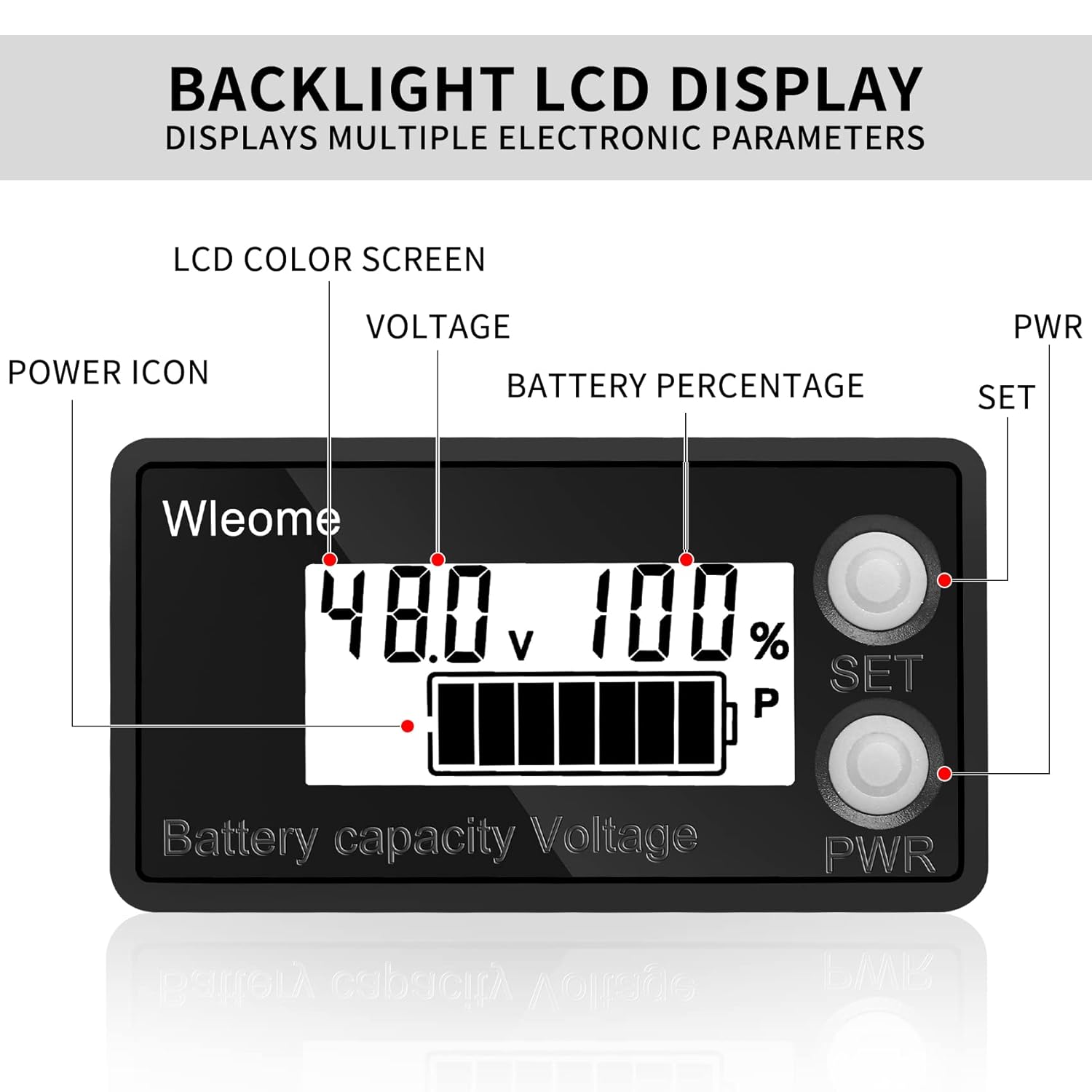
Figure 3.2: Detailed view of the LCD display showing Voltage, Battery Percentage, Power Icon, and button labels (SET, PWR).
4. Setup and Installation
4.1 Battery Compatibility
This battery digital multimeter is compatible with a wide range of battery types, including:
- Lithium Battery (8-100V, e.g., 12V, 24V, 36V, 48V, 60V, 72V, 86V)
- Lead Acid Battery (Default setting is 12V lead acid battery)
- Lithium Iron Phosphate Battery
- NiMH Battery

Figure 4.1: Illustration of various compatible battery types including Lead Acid, Lithium, Storage, and Water Batteries.
4.2 Wiring Instructions
The device requires a simple two-wire connection:
- Connect the red line to the positive (+) terminal of your battery.
- Connect the black line to the negative (-) terminal of your battery.
The wire length provided is approximately 15 cm. Ensure all connections are secure and properly insulated.

Figure 4.2: Simplified wiring diagram showing connections for easy installation.
4.3 Mounting
The battery meter is equipped with double-sided adhesive tape for convenient mounting. Choose a clean, dry, and flat surface for installation. Press firmly to ensure a secure attachment.
5. Operating Instructions
5.1 Power On/Off
The device powers on automatically when connected to a compatible battery. It features a power-off memory function, retaining your last settings.
5.2 Switching Display Modes
To switch between displaying voltage and battery capacity percentage, briefly press the 'M' (Mode) or 'SET' key. The LCD screen will update to show the selected parameter.
5.3 Low Voltage Alarm
When the battery voltage drops to a low level, the battery meter will flash a red indicator to alert the user, signaling that the battery requires charging or attention.
6. Maintenance
6.1 Cleaning
To clean the device, gently wipe the surface with a soft, dry cloth. Avoid using abrasive cleaners or solvents that could damage the display or casing.
6.2 Waterproof and Dustproof Protection
The battery power detector is equipped with a protective shell, offering IPX7 waterproof and dustproof capabilities. This means it can withstand immersion in water up to 1 meter for 30 minutes. However, it is recommended to avoid unnecessary exposure to water to prolong the device's lifespan.

Figure 6.1: The device highlighting its IPX7 waterproof capability, showing water droplets on its surface.

Figure 6.2: Visual representation of the product's good waterproof protection, with water splashing around it.
7. Troubleshooting
| Problem | Possible Cause | Solution |
|---|---|---|
| No display | Incorrect wiring; Battery voltage too low; Device fault | Check red/black wire connections; Ensure battery voltage is within 8-100V; Contact support if problem persists. |
| Inaccurate readings | Incorrect battery type setting (if applicable); Loose connection | Verify battery type and ensure it's within the supported range; Check all wiring connections. |
| Red indicator flashing | Low battery voltage alarm | Charge or replace the battery. |
8. Specifications
- Brand: Wleome
- Model: B0B1MCLW6B
- Applicable Voltage Range: 8-100V DC
- Compatible Battery Types: Lithium Battery, Lead Acid Battery, Lithium Iron Phosphate Battery, NiMH Battery
- Display: LCD Color Screen
- Protection: IPX7 Waterproof, Dustproof, Input Reverse Connection Protection
- Features: Power-off Memory Function, Low Voltage Alarm
- Certifications: CE & ROHS
- Color: White
- Package Dimensions: 4.88 x 3.15 x 0.79 inches
- Item Weight: 1.13 ounces

Figure 8.1: Detailed dimensions of the Wleome Digital Battery Capacity Tester.
9. Warranty and Support
Wleome products are manufactured to high-quality standards. For warranty information, technical support, or assistance with your product, please refer to the contact information provided at the point of purchase or visit the official Wleome website. Please have your model number (B0B1MCLW6B) ready when contacting support.