
1. Introduction and Overview
The WENGART WG02B05 is a WiFi smart thermostat designed for hydronic underfloor heating systems. It offers advanced control over your home's heating, aiming to improve comfort and energy efficiency. This thermostat features a highly sensitive WiFi chip and an intuitive interface, allowing full control via a smartphone application. It is compatible with 2.4GHz Wi-Fi networks and supports voice control through Amazon Alexa and Google Home.

Image: The WENGART WG02B05 thermostat displayed in a modern home environment, illustrating its integration into daily life.
2. Safety Information
Please read this section carefully before installation and operation to ensure safe and correct use of the thermostat.
- Electrical Compatibility Warning: This model provides an active 230V output to directly power electrothermal actuators. If your boiler requires a two-wire, voltage-free connection (dry contact), this model is not suitable. Its 3A power is optimized for water heating only.
- Always consult a qualified electrician for installation to prevent electrical hazards and ensure compliance with local regulations.
- Do not attempt to disassemble or repair the thermostat yourself. Contact customer support for assistance.
- Ensure the power supply is disconnected before any installation or maintenance work.
3. Package Contents
Verify that all items are present in the package:
- WENGART WG02B05 Thermostat Unit (1)
- Mounting Screws (2)
- User Manual (1)
4. Product Features
The WENGART WG02B05 thermostat offers a range of features designed for optimal heating control and user convenience:
- WiFi Connectivity: Supports IEEE802.11b/g/n standard (2.4GHz only) for remote control.
- App Remote Control: Manage your heating from anywhere using the Smart Life or TuyaSmart application on your mobile device.
- Voice Control: Compatible with Amazon Alexa and Google Assistant for hands-free operation.
- Programmable Modes: Flexible weekly programming (5+2, 6+1, or 7 days) with 6 fixed time periods for weekdays and 2 for rest days.
- Open Window Detection: Automatically stops heating when a rapid temperature drop is detected, saving energy.
- Frost Protection: Integrated safety feature to protect pipes during cold periods.
- Power-Off Memory: Retains settings and programs even after a power outage.
- LCD Display: Large screen displays ambient temperature, set temperature, heating status, and current time, with a white backlight for visibility in dark environments.
- Temperature Calibration: Allows adjustment of the measured temperature by up to 1°C if it deviates from the actual room temperature.
- Child Lock: Features half-lock (allows power on/off) and full-lock (disables all buttons) to prevent accidental changes.
- Hot/Cold Reversible Function: Switch between heating and cooling modes, suitable for hydronic cooling floors.

Image: Visual representation of the thermostat's main functions, including double temperature display, WiFi, easy installation, weekly programming, LCD, polycarbonate material, child lock, and voice control.
5. Setup
5.1. Installation
The WENGART WG02B05 thermostat is designed for wall-mounted installation and is compatible with European 60mm round boxes. Ensure the installation location is free from direct sunlight, drafts, or other heat sources that could affect temperature readings.

Image: The WENGART thermostat mounted on a wall, demonstrating its integration with a radiant underfloor heating system and a radiator.
5.2. Wiring Diagram
Follow the wiring diagram carefully. Disconnect all power before wiring. This thermostat is designed for AC230V power supply and 3A load for water heating systems.

Image: A clear diagram illustrating the electrical connections for the thermostat, including Live (L), Neutral (N), heating actuators (NO/NC), and an optional external sensor.
- Connect the Live (L) and Neutral (N) wires from your AC230V power supply to the corresponding terminals on the thermostat.
- Connect your Normally Open (NO) or Normally Closed (NC) electrothermal actuators to the designated output terminals.
- If using an external floor sensor, connect it to the sensor terminals.
5.3. App Connection (Tuya Smart / Smart Life)
To enable remote control and smart features, connect your thermostat to the mobile application:
- Download the 'Smart Life' or 'TuyaSmart' app from your smartphone's app store (Android & iOS).
- Register or log in to your account.
- Ensure your smartphone is connected to a 2.4GHz WiFi network. The thermostat does not support 5.0GHz WiFi.
- Follow the in-app instructions to add a new device. The thermostat will typically enter pairing mode when first powered on or by holding a specific button (refer to the on-screen prompts or the thermostat's display).
- Once connected, you can control the thermostat, set schedules, and access advanced features via the app.
6. Operating Instructions
6.1. Basic Operation and Display
The thermostat features an LCD display and several buttons for manual control. The display shows current room temperature, set temperature, time, and various status icons.
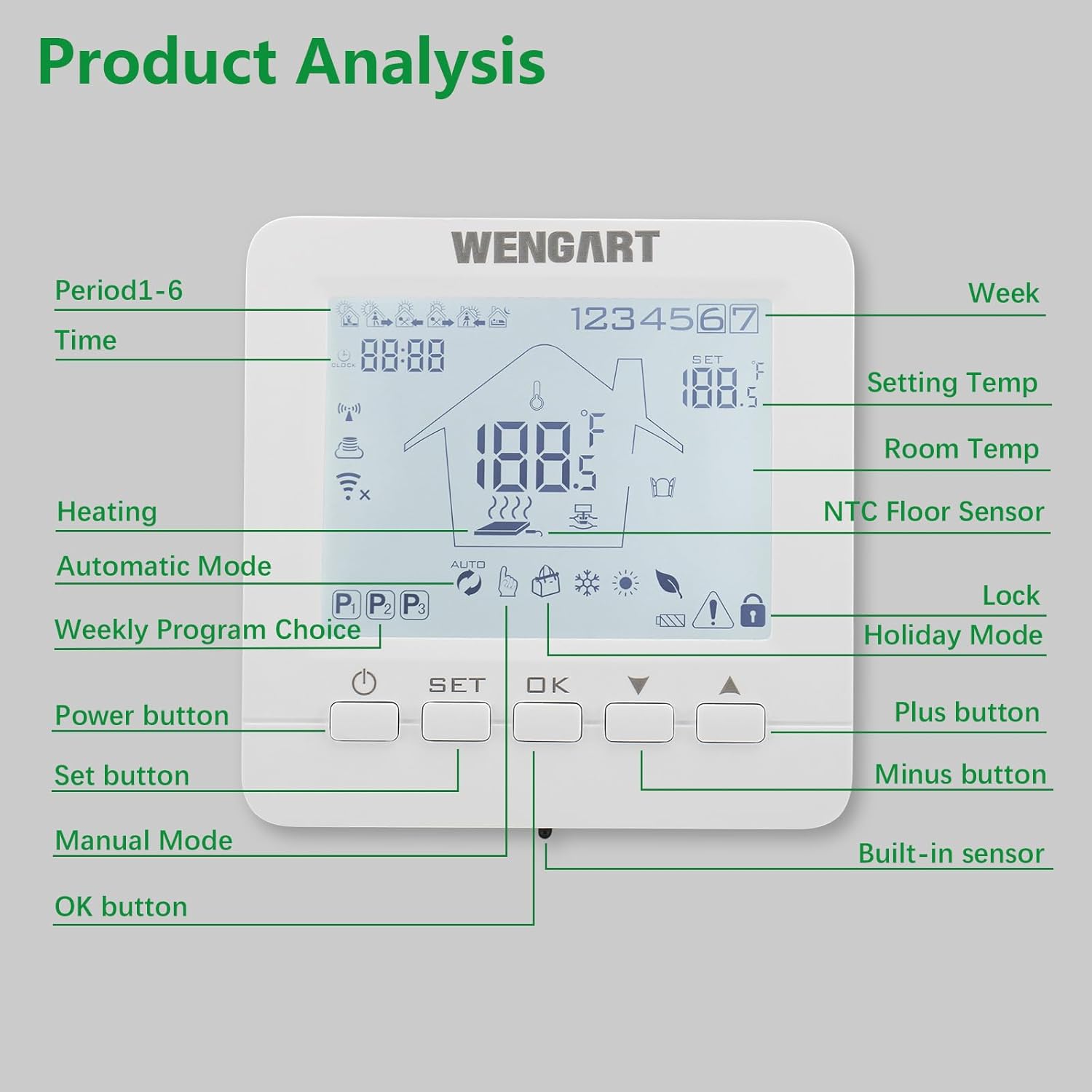
Image: A detailed breakdown of the thermostat's LCD display and physical buttons, indicating functions like Power, Set, OK, Plus, Minus, Manual Mode, Automatic Mode, Heating indicator, Lock, and Holiday Mode.
- Power Button: Turns the thermostat on or off.
- SET Button: Enters settings or programming mode.
- OK Button: Confirms selections.
- Up/Down Buttons: Adjust temperature, navigate menus, or change settings.
- Backlight: The white backlight illuminates when buttons are pressed and automatically turns off after 5-30 seconds of inactivity (adjustable).
6.2. Operating Modes
- Manual Mode: Allows you to set a desired temperature that the thermostat will maintain until changed.
- Programming Mode: Follows a pre-set weekly schedule.
- Holiday Mode: Maintains a specific temperature for a set duration, ideal for when you are away.
6.3. Weekly Programming
The thermostat supports flexible weekly programming to match your lifestyle:
- Choose between 5+2 (weekdays + weekend), 6+1 (weekdays + one rest day), or 7-day programming.
- Set up to 6 fixed time periods for weekdays and 2 for rest days, each with a specific temperature setting.

Image: A table illustrating custom programming options, showing different time periods (e.g., 06:00, 08:00) and their corresponding default temperatures for working days and weekends.
6.4. Voice Control Integration
Integrate your thermostat with smart home assistants for convenient voice control:
- Amazon Alexa: Link your Tuya Smart/Smart Life account in the Alexa app. Use commands like, "Alexa, set the living room thermostat to 22 degrees."
- Google Assistant: Link your Tuya Smart/Smart Life account in the Google Home app. Use commands like, "Hey Google, turn on the heating."

Image: The WENGART thermostat displayed alongside Amazon Alexa and Google Home smart speakers, highlighting its compatibility with voice control services.
6.5. Child Lock Function
To prevent unintended changes, activate the child lock:
- Half-Lock: Allows the power button to function while other settings are locked.
- Full-Lock: Disables all buttons on the thermostat.
- Refer to the app or thermostat settings menu to activate and deactivate the child lock.
7. Maintenance
To ensure the longevity and optimal performance of your thermostat:
- Clean the thermostat surface regularly with a soft, dry cloth.
- Do not use abrasive cleaners, solvents, or chemical sprays, as these can damage the unit.
- Ensure that the thermostat's ventilation openings are not obstructed.
- Avoid exposing the thermostat to extreme temperatures, humidity, or direct water contact.
8. Troubleshooting
If you encounter issues with your WENGART WG02B05 thermostat, refer to the following common problems and solutions:
- No Power:
- Check the main power supply and circuit breaker.
- Verify that the thermostat's wiring connections are secure and correct according to the diagram.
- WiFi Connection Issues:
- Ensure your WiFi router is operating on a 2.4GHz frequency. The thermostat does not support 5.0GHz networks.
- Check your router's signal strength at the thermostat's location.
- Restart your WiFi router and the thermostat.
- Re-attempt the pairing process in the Smart Life/TuyaSmart app.
- Incorrect Temperature Reading:
- Use the temperature calibration function in the thermostat's settings to adjust the reading by up to 1°C.
- Ensure the thermostat is not exposed to direct sunlight, drafts, or other external heat/cold sources.
- Heating Not Working:
- Verify that the thermostat is in an active heating mode (Manual or Programmed).
- Check the set temperature; it must be higher than the current room temperature for heating to activate.
- Confirm that the wiring to the heating actuators is correct and secure.
- Ensure the heating system (boiler, pump) is operational.
- Buttons Unresponsive (Child Lock):
- Check if the child lock function is activated. Deactivate it via the thermostat settings or the mobile app.
9. Specifications
Detailed technical specifications for the WENGART WG02B05 WiFi Smart Thermostat:
- Model Number: WG02B05
- Power Supply: AC 230V, 50/60Hz
- Load Current: Max 3A (for water heating / hydraulic valves)
- Power Consumption: 2 Watts
- Temperature Precision: ±1°C
- Set Temperature Range: 1°C to 70°C
- Display Type: LCD with white backlight
- Connectivity: Wi-Fi (2.4GHz IEEE802.11b/g/n)
- App Compatibility: Tuya Smart / Smart Life (Android & iOS)
- Voice Assistant Compatibility: Amazon Alexa, Google Assistant
- Installation: Wall-mounted, compatible with 60mm round European cassette
- Product Dimensions (L x W x H): 8.6 x 8.6 x 2.7 cm (3.38 x 3.38 x 1.08 inches)
- Product Weight: 245 grams
- Material: Polycarbonate (PC)
- Color: White
- Certifications: CE

Image: Technical drawing illustrating the precise dimensions of the WENGART WG02B05 thermostat, including front, side, and rear views with measurements in millimeters and inches.
10. Warranty and Support
For warranty information regarding your WENGART WG02B05 WiFi Smart Thermostat, please refer to the documentation provided at the time of purchase or contact your retailer directly. Warranty terms and conditions may vary by region and seller.
For technical support, assistance with installation, or troubleshooting issues not covered in this manual, please contact WENGART customer service. Contact details can typically be found on the product packaging or the official WENGART website.