
1. Product Overview
The JESSINIE DY-SV5W is an intelligent voice playback module designed for various audio applications. It supports MP3 and WAV decoding formats and features a 5W Class D power amplifier, allowing it to directly drive 4Ω, 3-5W speakers. This module offers flexible control options, including IO trigger playback and UART serial communication, making it suitable for a wide range of embedded projects requiring audio output.
Key functionalities include:
- Support for MP3 and WAV audio formats.
- Integrated 5W Class D amplifier.
- UART serial control for playback, pause, track selection, and volume adjustment.
- IO trigger function for playing up to 255 tracks.
- Compatibility with FAT16/FAT32 file systems and up to 32GB SD cards.
- Micro USB port for easy file transfer.
2. Features
- Audio Decoding: Supports MP3 and WAV formats.
- Sampling Rates: Compatible with 8/11.025/12/16/22.05/24/32/44.1/48 kHz.
- DAC Output: 24-bit DAC with 90dB dynamic range and 85dB signal-to-noise ratio.
- File System: Fully supports FAT16/FAT32 file systems.
- Storage: Supports up to 32GB Micro SD cards.
- Amplifier: Equipped with a 5W Class D power amplifier for direct speaker connection (4Ω, 3-5W).
- UART Control: Serial adapter for controlling playback, pause, track selection (up to 65535 tracks), and volume. Baud rate: 9600 bit/s.
- IO Trigger: Supports 8 IO ports for triggering 8 tracks individually or 255 tracks in combination.
- One_Line Control: Single bus serial adapter port control for playback, pause, track selection, and volume.
- Working Modes: 3 configurable IOs to select up to 7 working modes via a dial switch.
- Connectivity: Micro USB for file updates.
3. Setup and Initial Use
Follow these steps to set up your DY-SV5W module:
- Power Supply: Connect a 5V DC power supply to the module. Ensure correct polarity: positive to "5V power supply positive pole" and negative to "5V power supply negative pole (GND)".
- Micro SD Card Preparation:
- Format a Micro SD card (up to 32GB) to FAT16 or FAT32 file system.
- Connect the module to a computer via a Micro USB cable. The module will appear as a storage device.
- Copy your MP3 or WAV audio files to the Micro SD card. Ensure file names are simple and sequential if using IO trigger mode for specific track numbers.
- Speaker Connection: Connect a 4Ω, 3-5W speaker to the "Speaker" output terminals on the module.
- Mode Selection: Use the onboard dial switch (labeled 1, 2, 3) to select one of the 7 available working modes. Refer to the module's specific documentation for detailed mode configurations, as these define how IO triggers or UART commands are interpreted.
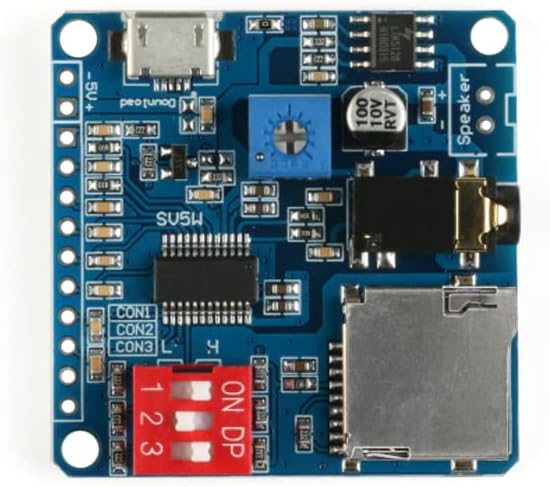
Figure 1: Top-down view of the DY-SV5W module, highlighting key components like the Micro USB port, SD card slot, and mode selection switches.

Figure 2: Close-up of the DY-SV5W module's speaker output and volume adjustment potentiometer.
4. Pin Description
Understanding the pinout is crucial for integrating the DY-SV5W module into your projects. The following table details each pin's function:
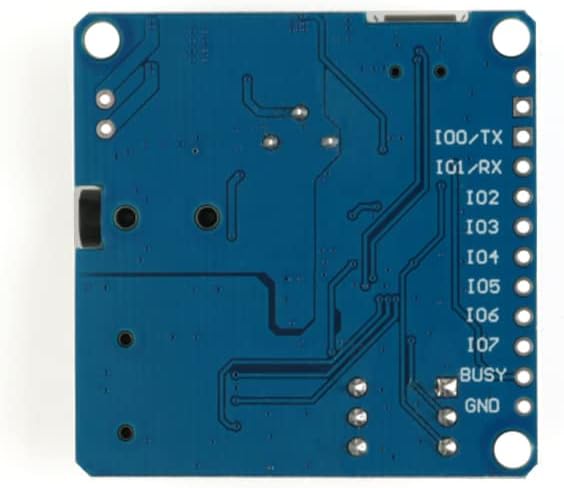
Figure 3: Bottom view of the DY-SV5W module, illustrating the labeled pins for connection.
| Pin Name | Function |
|---|---|
| 5V Power Supply Negative Pole | Connect to 5V power supply negative pole (GND). |
| 5V Power Supply Positive Pole | Connect to 5V power supply positive pole. |
| Txd/IO0 | Input pin IO0 in IO trigger mode; TX pin in UART control mode (connects to RX of control terminal/MCU). |
| Rxd/IO1 | Input pin IO1 in IO trigger mode; RX pin in UART control mode (connects to TX of control terminal/MCU). |
| IO2 | Input pin IO2 in IO trigger mode. |
| IO3 | Input pin IO3 in IO trigger mode. |
| IO4/One_Line | Input pin IO4 in IO trigger mode; Data receiving pin in One_Line serial port control mode. |
| IO5 | Input pin IO5 in IO trigger mode. |
| IO6 | Input pin IO6 in IO trigger mode. |
| IO7 | Input pin IO7 in IO trigger mode. |
| Busy | Outputs low level (0V) when a track is playing, and high level (3.3V) after playback finishes. |
| GND | Reference ground terminal (connects with control terminal GND). |
5. Operating Instructions
The DY-SV5W module supports two primary control methods: IO Trigger and UART Serial Control. The specific behavior depends on the selected working mode via the dial switch.
5.1. IO Trigger Playback
In IO trigger mode, audio tracks are played by applying specific logic levels to the IO pins (IO0-IO7). The module can be configured to trigger 8 tracks individually or up to 255 tracks using combinations of the 8 IO ports.
- Individual Trigger: Each IO pin (e.g., IO0) can be configured to trigger a specific audio file when activated (e.g., pulled low or high, depending on the mode).
- Combined Trigger: By setting combinations of high/low states across multiple IO pins, a larger number of unique tracks can be triggered. Refer to the module's detailed mode documentation for the exact mapping of IO states to track numbers.
- Busy Signal: The "Busy" pin can be monitored to determine if a track is currently playing (low level) or if the module is idle (high level).
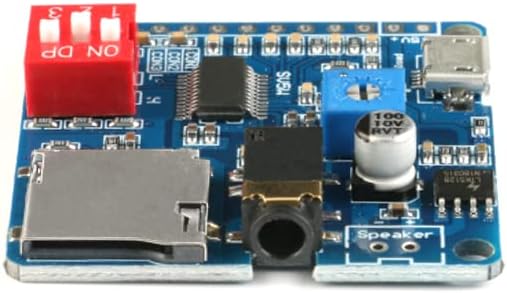
Figure 4: Angled view showing the SD card slot and mode selection dip switches.
5.2. UART Serial Control
For more advanced control, the module can be interfaced with a microcontroller (MCU) via its UART serial port (Txd/IO0 and Rxd/IO1). This allows for programmatic control over various playback functions.
- Connection: Connect the MCU's TX pin to the module's RXD/IO1 pin, and the MCU's RX pin to the module's TXD/IO0 pin. Ensure both devices share a common ground (GND).
- Baud Rate: The default baud rate is 9600 bit/s.
- Commands: Specific serial commands can be sent to the module to perform actions such as:
- Play a specific track (by number, up to 65535).
- Pause/Resume playback.
- Stop playback.
- Increase/Decrease volume.
- Query playback status.
- One_Line Control: The IO4/One_Line pin can be used for a simplified single-bus serial control, offering similar functions with fewer wires.
Detailed serial communication protocols and command sets are typically provided in the module's specific technical documentation or datasheets, which should be consulted for precise implementation.
6. Specifications
| Specification | Value |
|---|---|
| Model Number | DY-SV5W |
| Audio Decoding Formats | MP3, WAV |
| Supported Sampling Rates | 8/11.025/12/16/22.05/24/32/44.1/48 kHz |
| DAC Output | 24-bit, 90dB Dynamic Range, 85dB SNR |
| File System Support | FAT16, FAT32 |
| Max SD Card Capacity | 32GB |
| Amplifier | 5W Class D (drives 4Ω, 3-5W horn) |
| UART Baud Rate | 9600 bit/s |
| Control Interfaces | IO Trigger, UART Serial, One_Line Serial |
| Power Supply | 5V DC |
| Dimensions (Package) | 6.89 x 4.65 x 0.28 inches |
| Item Weight | 0.528 ounces |
7. Troubleshooting
If you encounter issues with your DY-SV5W module, consider the following common troubleshooting steps:
- No Sound Output:
- Verify the speaker is correctly connected to the "Speaker" terminals.
- Ensure the speaker impedance and power rating match the module's requirements (4Ω, 3-5W).
- Check the volume level, especially if using UART control.
- Confirm audio files are correctly loaded onto the Micro SD card and are in supported MP3 or WAV format.
- Module Not Powering On/Responding:
- Check the 5V power supply connection and ensure correct polarity.
- Verify the power supply is providing stable 5V DC.
- IO Trigger Not Working:
- Ensure the module is set to an appropriate IO trigger working mode via the dial switch.
- Verify the logic levels applied to the IO pins are correct (e.g., pulled low/high as expected by the mode).
- Check the "Busy" pin to see if the module is already playing a track.
- Confirm audio files are named and organized according to the selected IO trigger mode's requirements.
- UART Control Issues:
- Double-check TX/RX connections between the module and your MCU.
- Ensure both devices share a common GND.
- Verify the baud rate is set to 9600 bit/s on both ends.
- Confirm the serial commands being sent are correct according to the module's protocol.
- Files Not Transferring via USB:
- Ensure the Micro SD card is properly inserted.
- Verify the Micro SD card is formatted to FAT16 or FAT32.
- Try a different Micro USB cable or port on your computer.
8. Maintenance
To ensure the longevity and proper functioning of your DY-SV5W module, follow these maintenance guidelines:
- Handling: Handle the module with care to avoid physical damage to components or solder joints.
- Environment: Operate the module in a clean, dry environment. Avoid exposure to moisture, extreme temperatures, or corrosive substances.
- Cleaning: If necessary, gently clean the module with a soft, dry brush or compressed air to remove dust. Do not use liquid cleaners.
- Power: Always use a stable 5V DC power supply within the specified voltage range. Over-voltage can damage the module.
- Storage: When not in use, store the module in an anti-static bag to protect it from electrostatic discharge.
9. Warranty and Support
For specific warranty information, please refer to the purchase documentation or contact JESSINIE customer support. General support resources may include:
- Online forums and communities for embedded electronics.
- Technical documentation or datasheets provided by the manufacturer (if available).
- Contacting the seller or manufacturer directly for technical assistance.
While this manual provides essential information, detailed programming examples or advanced application notes may be found through online resources or the manufacturer's official channels.