1. Product Overview
The Yahboom ROS2 Robot is an advanced educational robotic kit designed for learning and exploring robotics, Python programming, and AI concepts. It features Lidar mapping and navigation capabilities, Mecanum wheels for omnidirectional movement, and supports various control boards including Jetson series and Raspberry Pi 5. This kit is suitable for both beginners and professional developers interested in robotics and artificial intelligence.
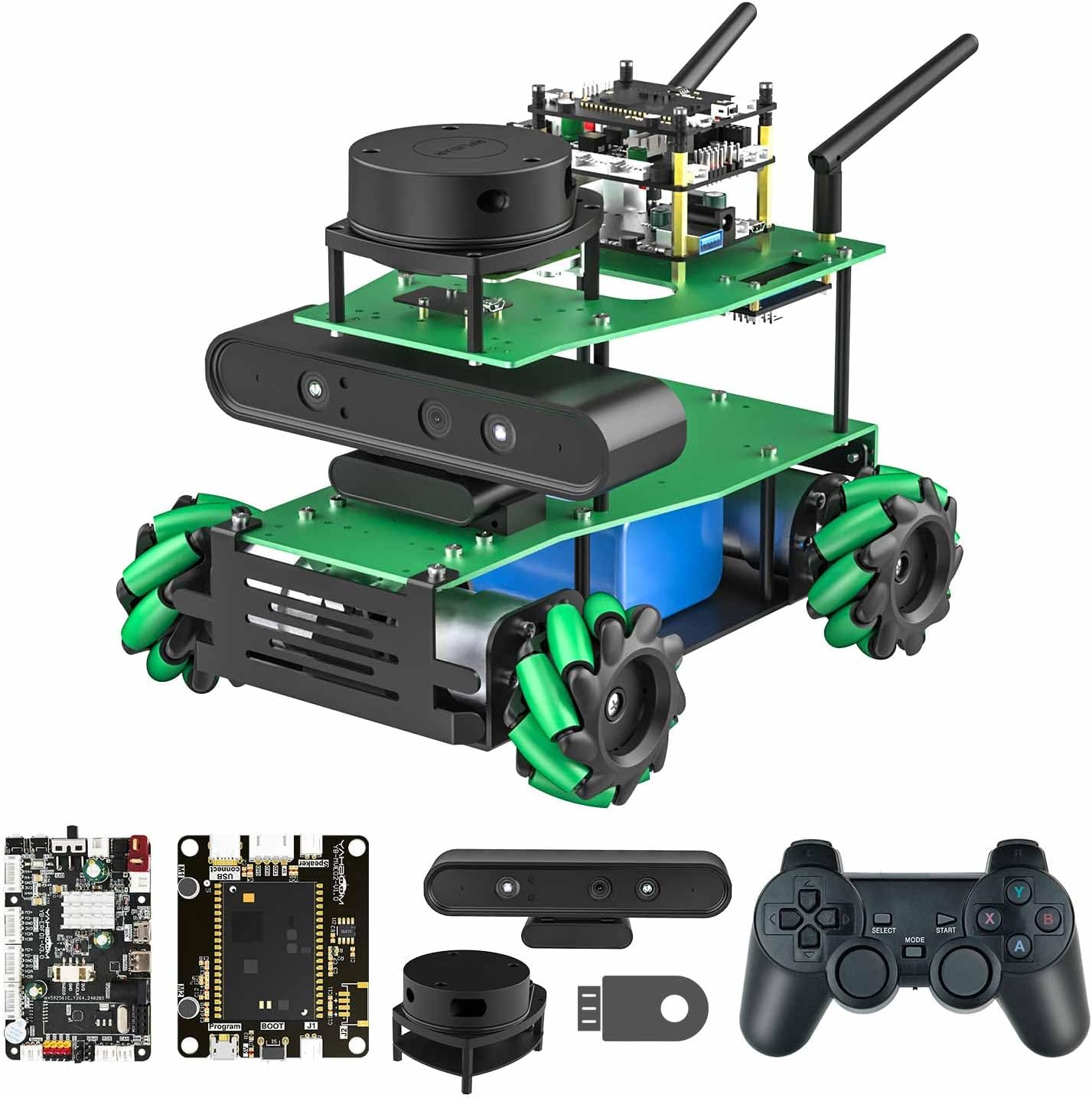
Figure 1: The Yahboom ROS2 Robot Kit, showcasing its main components including the Lidar sensor, depth camera, and Mecanum wheels.

Figure 2: Overview of the ROSMASTER-X3 educational robot, highlighting its key features such as Lidar navigation, 3D mapping, voice control, and omnidirectional movement.
2. Setup and Assembly
The Yahboom ROS2 Robot kit requires assembly. Detailed video tutorials and a comprehensive manual are provided to guide users through each step of the building process. Ensure all components listed in the shipping list are present before beginning assembly.
2.1 Unpacking and Component Check
Carefully unpack all items from the box. Refer to the provided shipping list to verify that all parts are included. The kit typically includes:
- Robot Chassis components (Green aluminum alloy material)
- Mecanum Wheels (4 units)
- ROS Robot Expansion Board
- USB3.0 HUB Expansion Board
- Lidar Module (Optional, depending on version)
- Depth Camera (Optional, depending on version)
- Voice Interaction Module (Optional, depending on version)
- 7-inch LCD Screen (Optional, depending on version)
- Power Battery Pack (12V, 6000mAh)
- Controller (e.g., PS2 game handle)
- Cables and Fasteners
- CD with software and documentation

Figure 3: An example of the shipping list, detailing the components included in the Yahboom ROS2 Robot kit. Note that configurations may vary slightly by package.
2.2 Assembly Instructions
Follow the step-by-step instructions provided in the included CD or online tutorials. Assembly typically involves:
- Assembling the chassis and attaching the Mecanum wheels.
- Mounting the main control board and expansion boards.
- Connecting the Lidar, depth camera, and other modules.
- Wiring the power supply and motors.
- Installing the operating system and necessary software from the CD.
It is highly recommended to watch the official assembly videos for visual guidance. These videos provide detailed instructions for every step of building and programming.

Figure 4: Exploded view of the ROSMASTER X3, illustrating the various components and their assembly points, including optional modules like the Lidar and 7-inch display screen.
3. Operating Instructions
The Yahboom ROS2 Robot offers a wide range of operating modes and functionalities, leveraging its advanced hardware and ROS2 operating system.
3.1 Movement and Navigation
Thanks to its Mecanum wheels and pendulum suspension chassis, the robot can achieve 360-degree omnidirectional movement, both indoors and outdoors. It supports advanced navigation features:
- Lidar Mapping and Navigation: Utilizes SLAM high-precision Lidar for simultaneous positioning and mapping of its environment.
- Route Planning: Users can define specific routes, and the robot will autonomously navigate to the destination, even with multiple waypoints.
- Obstacle Avoidance: The Lidar sensor enables the robot to detect and autonomously avoid obstacles in its path.
- Multi-robot Navigation: For users with multiple ROSMASTER robots, advanced formation performance and coordinated navigation can be achieved.
Video 1: A comprehensive demonstration of the ROSMASTER X3's capabilities, including its movement, navigation, AI features, and various control methods.

Figure 5: Visual representation of the robot's advanced navigation features, including autopilot, Lidar obstacle avoidance, Lidar tracking, and intelligent patrol.
3.2 AI and Visual Recognition
The robot integrates AI deep learning and augmented reality technologies, allowing for sophisticated visual processing:
- Object Recognition: Based on AI algorithms like YOLOv5, the robot can recognize various objects in its environment.
- 3D Environment Scanning: The depth camera enables the robot to scan its surroundings in 3D, obtaining depth point cloud images for real-scene navigation.
- Color Tracking: The robot can track colors in real-time, allowing for applications like following a colored line or object.
- QR Code Recognition: It can identify QR code labels and obtain their pose coordinates for dynamic tracking.
- AR Augmentation: Users can present virtual graphics on checkerboard paper, demonstrating augmented reality capabilities.
- Hand and Face Detection: Utilizing MediaPipe development framework, the robot can perform hand detection, attitude detection, and face detection.

Figure 6: Examples of the robot's AI capabilities, including ORBSLAM2 mapping, depth image data processing, RRT exploration for map building, and AR tag recognition.
3.3 Control Methods
The ROSMASTER X3 can be controlled through multiple interfaces:
- Mobile APP Remote Control: Dedicated mobile applications allow users to control the robot's motion, view real-time video, and perform mapping and navigation tasks.
- Voice Interaction: An optional voice interaction module enables the robot to recognize and respond to voice commands.
- PS2 Game Handle: For a more tactile control experience, the robot can be operated using a PS2 game handle, often combined with a mobile phone for FPV (First-Person View).
- Python Programming: Users can expand and customize the robot's functions by writing Python code, with complete source code and manuals provided.

Figure 7: Demonstrates the various control methods for the robot, including omnidirectional movement via Mecanum wheels, mobile APP remote control, and FPV control using a game handle.

Figure 8: Illustrates the voice interaction capabilities of the robot, showing how it can respond to commands for movement, color recognition, and autopilot functions.
4. Maintenance
Regular maintenance ensures the longevity and optimal performance of your Yahboom ROS2 Robot.
- Cleaning: Periodically clean the robot's chassis, wheels, and sensors to prevent dust and debris buildup, which can affect performance. Use a soft, dry cloth.
- Battery Care: Ensure the 12V lithium battery is charged according to manufacturer guidelines. Avoid overcharging or deep discharging to prolong battery life.
- Software Updates: Regularly check for and install software updates for the robot's operating system and applications to ensure access to the latest features and bug fixes.
- Component Inspection: Inspect all connections, wires, and mechanical parts for any signs of wear or damage. Tighten any loose screws.
5. Troubleshooting
If you encounter issues with your Yahboom ROS2 Robot, consider the following common troubleshooting steps:
- Robot Not Responding:
- Check battery level and ensure it is fully charged.
- Verify all power connections are secure.
- Restart the robot and the control application/software.
- Navigation/Mapping Issues:
- Ensure Lidar and depth camera sensors are clean and unobstructed.
- Verify software configurations for mapping and navigation are correct.
- Perform a software recalibration if necessary.
- Connectivity Problems (APP/Remote Control):
- Ensure the robot and control device are on the same Wi-Fi network.
- Check network stability and signal strength.
- Update the mobile APP to the latest version.
- Software/Programming Errors:
- Review your Python code for syntax errors or logical flaws.
- Consult the provided video tutorials and documentation for programming guidance.
- Ensure all necessary libraries and dependencies are installed.
For persistent issues, refer to the detailed troubleshooting guides available on the provided CD or contact Yahboom technical support.
6. Specifications
| Feature | Specification |
|---|---|
| Model | ROSMASTER X3 (Advanced Ver-without Nano) |
| Brand | Yahboom |
| Control Board Support | Raspberry Pi 4B, Jetson Nano, Jetson Orin Nano, Jetson Orin NX (depending on version) |
| Movement Type | Omnidirectional (Mecanum Wheels) |
| Navigation | Lidar SLAM Mapping & Navigation, Depth Camera 3D Real-Scene Navigation |
| AI Features | Object Recognition (YOLOv5), Color Tracking, QR Code Recognition, Hand/Face Detection, AR Augmentation |
| Programming Language | Python (ROS/ROS2 based) |
| Battery | 1 x 12V 6000mAh Lithium Battery (included) |
| Chassis Material | Green Aluminum Alloy |
| Included Accessories | CD (with software), various cables, screwdriver, etc. |

Figure 9: A table detailing the features included with different versions of the ROSMASTER X3, such as Lidar, Depth Camera, Voice Interaction Module, and 7-inch LCD screen.

Figure 10: Detailed product parameters for the ROSMASTER X3, including main control board specifications, camera parameters, and battery pack details.
7. Warranty and Support
Yahboom is committed to providing comprehensive support for its products. While specific warranty details are not provided in this manual, general technical support is available to assist users with any questions or issues encountered during use, assembly, or programming.
For technical assistance, please refer to the contact information provided on the product packaging or the official Yahboom website. The manufacturer also provides extensive video tutorials with English subtitles to aid in learning and troubleshooting.