
1. Introduction
This manual provides essential instructions for the proper installation, operation, and maintenance of the ROGER TECHNOLOGY MC772 Mechanical Limit Switch. This component is designed for use with ROGER TECHNOLOGY control units H70/103AC, H70/104AC, B70/1DC, and B70/1DCHP. Please read this manual thoroughly before proceeding with installation or use to ensure safe and efficient operation.
2. Safety Information
WARNING: Failure to follow these safety instructions may result in serious injury or damage to equipment.
- Installation must be performed by qualified personnel only.
- Disconnect power to the control unit before any installation, maintenance, or repair work.
- Ensure all electrical connections comply with local regulations and standards.
- Do not modify the limit switch or its components.
- Keep children and unauthorized persons away from the installation area during work.
- Always use appropriate personal protective equipment (PPE).
3. Product Overview
The ROGER TECHNOLOGY MC772 is a mechanical limit switch designed to precisely control the travel limits of automated gate or door systems. It ensures that the gate or door stops at its intended open and closed positions, preventing overtravel and potential damage. This specific model is compatible with ROGER TECHNOLOGY H70/103AC, H70/104AC, B70/1DC, and B70/1DCHP control units.
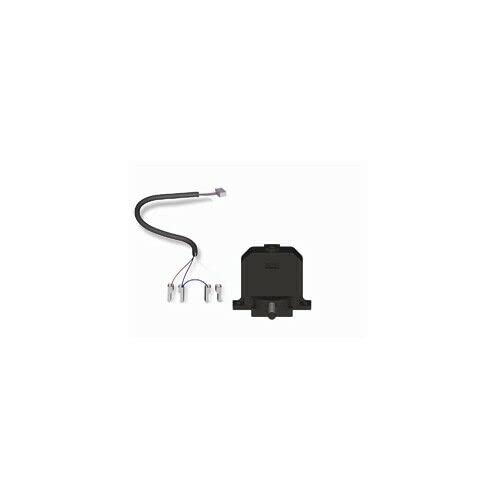
Figure 1: ROGER TECHNOLOGY MC772 Mechanical Limit Switch. This image shows the compact design of the MC772, highlighting its robust construction suitable for outdoor gate automation systems.
4. Setup & Installation
Proper installation is crucial for the correct functioning of the limit switch. Refer to the specific control unit's manual for detailed wiring diagrams and mounting instructions.
- Power Disconnection: Ensure the main power supply to the gate automation system is completely disconnected before beginning installation.
- Mounting: Mount the MC772 limit switch securely in the designated position on the gate operator mechanism. The position should allow the gate's moving parts to reliably activate the switch at the desired open and closed limits.
- Wiring: Connect the limit switch wires to the appropriate terminals on the H70/103AC, H70/104AC, B70/1DC, or B70/1DCHP control unit, following the wiring diagram provided in the control unit's manual. Pay close attention to polarity if applicable.
- Adjustment: Once physically installed and wired, manually move the gate to its fully open and fully closed positions. Adjust the position of the limit switch or its activation lever (if adjustable) to ensure it triggers precisely at these desired points.
- Testing: Restore power and perform several test cycles of the gate operation, observing that the limit switch correctly stops the gate at both open and closed positions. Make fine adjustments as necessary.
5. Operating Instructions
The MC772 mechanical limit switch operates automatically as part of the gate automation system. Once correctly installed and adjusted, it requires no direct user interaction during normal operation.
- When the gate reaches its fully open position, the limit switch is activated, signaling the control unit to stop the motor.
- When the gate reaches its fully closed position, the limit switch is activated, signaling the control unit to stop the motor.
- The control unit interprets these signals to manage the gate's movement and ensure it operates within safe and defined parameters.
6. Maintenance
Regular inspection and basic maintenance can extend the lifespan and ensure reliable operation of the MC772 limit switch.
- Visual Inspection (Monthly): Check the limit switch for any signs of physical damage, corrosion, or loose connections. Ensure the mounting is secure.
- Cleanliness: Keep the switch and its activation area free from dirt, debris, leaves, or insects that could impede its movement or activation. Use a soft, dry cloth or brush.
- Functionality Check (Quarterly): Manually operate the gate to its full open and closed positions and observe that the limit switch activates correctly and consistently.
- Lubrication: The MC772 is generally maintenance-free regarding internal lubrication. Do not apply lubricants unless specifically instructed by ROGER TECHNOLOGY, as this could attract dirt.
7. Troubleshooting
If the gate system is not stopping correctly at its limits, consider the following:
| Problem | Possible Cause | Solution |
|---|---|---|
| Gate overtravels or doesn't stop at limits. | Limit switch misaligned or damaged. | Check alignment and adjust. Inspect for physical damage and replace if necessary. |
| Gate stops prematurely or not at all. | Wiring issue or debris obstructing switch. | Inspect wiring for loose connections or breaks. Clear any obstructions around the switch. |
| Intermittent stopping issues. | Loose connections or worn switch contacts. | Tighten all electrical connections. If contacts are worn, the switch may need replacement. |
If troubleshooting steps do not resolve the issue, contact a qualified technician or ROGER TECHNOLOGY support.
8. Specifications
- Model: MC772
- Manufacturer: Dieffematic (ROGER TECHNOLOGY)
- Compatibility: H70/103AC, H70/104AC, B70/1DC, B70/1DCHP control units
- Type: Mechanical Limit Switch
- ASIN: B0B1F4KMHH
- Availability of spare parts: Information unavailable
9. Warranty & Support
Information regarding the specific warranty period for the ROGER TECHNOLOGY MC772 Mechanical Limit Switch is not provided in this document. Please refer to your purchase documentation or contact your ROGER TECHNOLOGY dealer or the manufacturer directly for warranty details and technical support.
For further assistance, visit the official ROGER TECHNOLOGY website or consult your local distributor.