
1. Introduction
This manual provides essential information for the installation, operation, maintenance, and troubleshooting of your LIAN LI SP750 White SFX 750W 80+ Gold Power Supply. The SP750 is a high-performance, fully modular power supply designed for compact systems, offering 80 PLUS Gold efficiency and quiet operation.
2. Safety Information
- High Voltage: The power supply contains high voltage components. Do not open the unit. Servicing should only be performed by qualified personnel.
- Proper Grounding: Ensure the power supply is properly grounded to prevent electrical shock.
- Ventilation: Do not block the ventilation openings of the power supply. Ensure adequate airflow for optimal cooling.
- Environment: Operate the power supply in a dry, well-ventilated environment. Avoid extreme temperatures and humidity.
- Cable Connections: Always ensure all cables are securely connected before powering on your system. Loose connections can cause damage.
3. Package Contents
Verify that all items are present in your package:
- LIAN LI SP750 White SFX 750W Power Supply
- Modular Cable Set:
- 1 x 24/20-Pin Motherboard Connector
- 2 x 8/4-Pin EPS/ATX 12V Connectors
- 2 x 8/6-Pin PCIe Connectors
- 8 x SATA Connectors (on 2 cables)
- 2 x 4-Pin Peripheral Connectors (on 1 cable)
- AC Power Cord
- Mounting Screws
- User Manual (this document)

Image: The complete set of fully modular braided cables included with the LIAN LI SP750 power supply.
4. Product Overview
The LIAN LI SP750 is an SFX form factor power supply featuring a sleek white finish and a fully modular design for clean cable management. It includes a 92mm fan for cooling and a brushed aluminum housing.

Image: An angled view of the LIAN LI SP750 White power supply, showcasing its compact SFX form factor and modular cable ports.
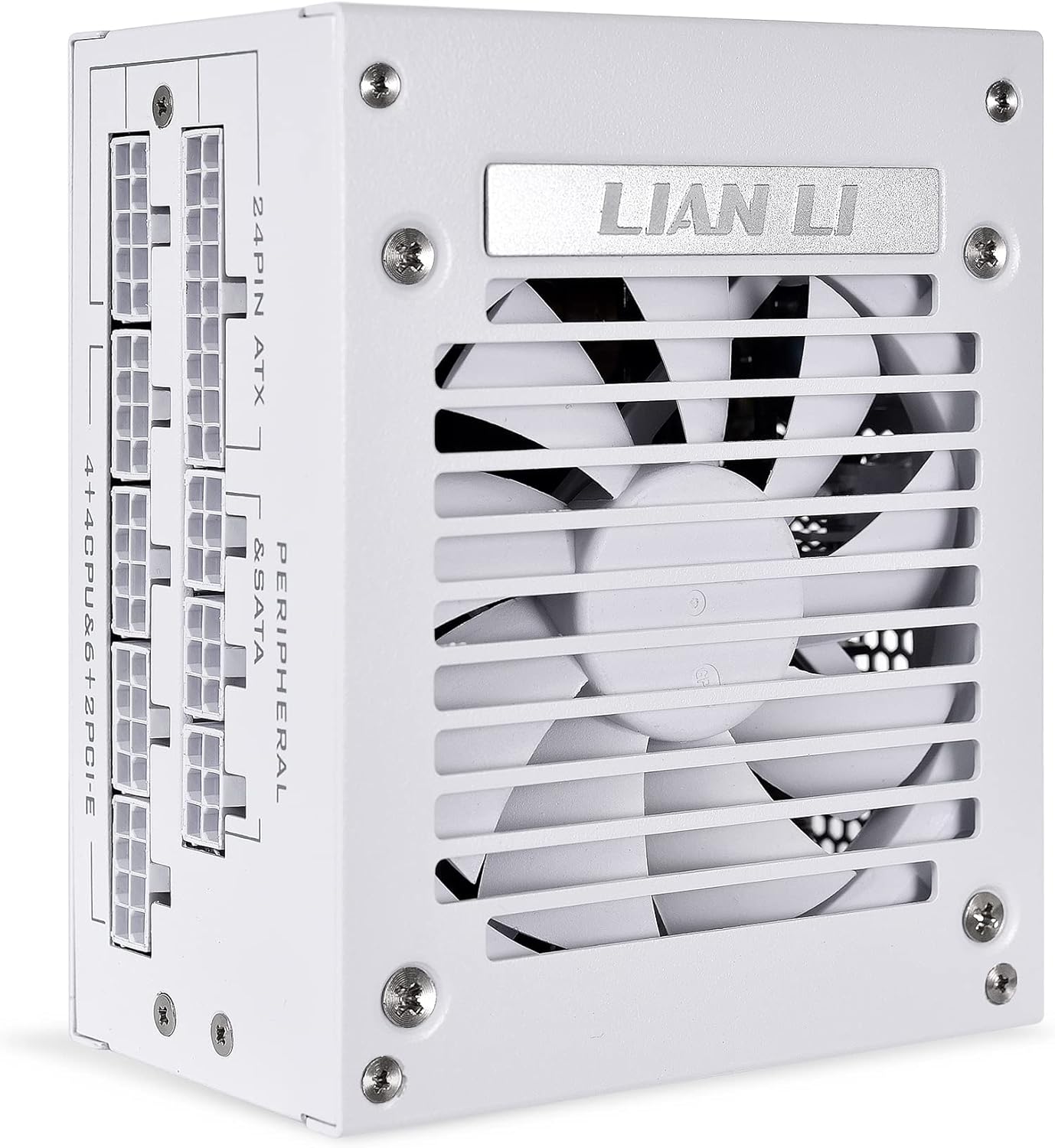
Image: A close-up view of the modular cable connection ports on the LIAN LI SP750, clearly labeled for 24-pin ATX, 4+4 CPU & 6+2 PCIe, and Peripheral & SATA connections.

Image: The rear panel of the LIAN LI SP750 power supply, showing the AC power inlet, the power switch, and the honeycomb ventilation pattern.
5. Setup and Installation
Follow these steps to install your LIAN LI SP750 power supply:
- Mounting the PSU: Secure the SP750 into the designated SFX power supply bay in your computer case using the provided mounting screws. Ensure the fan is oriented correctly for optimal airflow, typically facing downwards or towards an intake vent.
- Connecting the Motherboard: Connect the 24-pin ATX motherboard cable to the corresponding port on your motherboard.
- Connecting the CPU: Connect the 8-pin (or 4+4-pin) EPS/ATX 12V cable(s) to the CPU power connector(s) on your motherboard. Some motherboards may require two CPU power connectors.
- Connecting Graphics Cards: Connect the 8-pin (or 6+2-pin) PCIe cables to your graphics card(s). Ensure all required power connectors on the graphics card are populated.
- Connecting Storage and Peripherals: Use the SATA power cables for SSDs, HDDs, and other SATA-powered devices. Use the 4-pin peripheral (Molex) cables for older devices or case accessories if needed.
- AC Power Connection: Once all internal connections are secure, connect the AC power cord to the power supply's inlet and then to a wall outlet or surge protector. Ensure the power switch on the PSU is in the OFF position before connecting to AC power.
Note: The SP750 is a fully modular power supply. Only connect the cables you need to reduce cable clutter and improve airflow within your system.
6. Operating Instructions
After installation, ensure the power switch on the rear of the PSU is in the 'ON' position. You can then power on your computer system.
Zero RPM Mode
The LIAN LI SP750 features a Zero RPM mode for silent operation under low loads. The 92mm hydraulic bearing fan will remain off until the power supply reaches approximately 40% load or internal components reach 60°C. This design minimizes noise during light tasks or idle states. Once the load increases or temperature rises, the fan will automatically activate to maintain optimal cooling.

Image: A graph illustrating the fan speed and acoustic noise levels of the SP750 power supply relative to its power output, demonstrating the Zero RPM mode up to approximately 300W.
7. Maintenance
- Dust Removal: Periodically clean the exterior of the power supply and its fan grille to prevent dust buildup, which can impede cooling. Use compressed air to gently clear dust from the fan and vents.
- Do Not Open: Never attempt to open the power supply unit. It contains high voltage components that can be dangerous even when unplugged. Opening the unit will also void your warranty.
- Cable Management: Ensure cables are neatly routed and do not obstruct airflow within your PC case.
8. Troubleshooting
- System Does Not Power On:
- Check if the AC power cord is securely connected to both the power supply and the wall outlet.
- Ensure the power switch on the rear of the PSU is in the 'ON' position.
- Verify that the 24-pin motherboard cable and EPS/ATX 12V CPU cables are correctly and firmly seated.
- Test the wall outlet with another device to confirm it has power.
- System Instability or Random Shutdowns:
- Ensure all power cables (motherboard, CPU, PCIe, SATA) are securely connected.
- Confirm that the total wattage required by your components does not exceed the 750W capacity of the power supply.
- Check for proper ventilation within your PC case to prevent overheating.
- Fan Noise or Coil Whine:
- The SP750 operates in Zero RPM mode under low loads, meaning the fan will be off. If the fan is spinning, it indicates the PSU is under load or has reached a certain temperature.
- Some minor fan noise or coil whine can occur under heavy load, which is normal for power supplies. If the noise is excessive or unusual, ensure the PSU is securely mounted and not vibrating against the case.
- If a rattling sound is heard upon initial unboxing, contact LIAN LI support immediately. This may indicate a manufacturing defect.
9. Specifications
Detailed technical specifications for the LIAN LI SP750 White SFX 750W 80+ Gold Power Supply:
| Feature | Specification |
|---|---|
| Model | SP750 WHITE |
| Form Factor | SFX |
| Max. DC Output | 750W |
| Efficiency Certification | 80 PLUS Gold (91.94% ~ 89.09% at 20% ~ 100% Load) |
| Color | White |
| Material | Steel / Brushed Aluminum Housing |
| Input Voltage | 90 ~ 264 Vrms |
| Input Frequency Range | 47Hz – 63 Hz |
| PFC | Active PFC (PF > 0.90 at full load) |
| Combined +3.3V & +5V | 100W |
| Combined +12V | 744W |
| Noise Level | 17.6 – 31.8 dBA |
| Dimensions (LxWxH) | 9.5 x 7 x 4 inches (Product) |
| Item Weight | 3.59 pounds (1.63 Kilograms) |

Image: Official 80 PLUS Gold certification graphic, indicating high power efficiency.

Image: The product label on the LIAN LI SP750 power supply, displaying detailed electrical specifications and certifications.
10. Warranty and Support
The LIAN LI SP750 White SFX 750W 80+ Gold Power Supply comes with a 5-year limited warranty. This warranty covers defects in materials and workmanship under normal use.

Image: A graphic indicating the 5-year limited warranty provided by LIAN LI for the SP750 power supply.
For technical support, warranty claims, or further assistance, please visit the official LIAN LI website or contact their customer service department. Keep your proof of purchase for warranty validation.