
Introduction
Thank you for purchasing the Culitek CTMS10TS Microwave Oven. This manual provides essential information for the safe and efficient operation, maintenance, and troubleshooting of your new appliance. Please read these instructions thoroughly before use and retain them for future reference.
This microwave oven is designed for residential use to heat, cook, and defrost food. It features a 0.8 cubic foot capacity and 1000 watts of cooking power, controlled via a user-friendly touchpad.
Important Safety Instructions
When using electrical appliances, basic safety precautions should be followed, including the following:
- Read all instructions before using the appliance.
- Do not attempt to operate this oven with the door open as this can result in harmful exposure to microwave energy.
- Do not place any object between the oven front face and the door or allow soil or cleaner residue to accumulate on sealing surfaces.
- Do not operate the oven if it is damaged. It is particularly important that the oven door closes properly and that there is no damage to the: (1) door (bent), (2) hinges and latches (broken or loosened), (3) door seals and sealing surfaces.
- The oven should not be adjusted or repaired by anyone except properly qualified service personnel.
- Ensure the appliance is properly grounded.
- Do not heat liquids or other foods in sealed containers as they are liable to explode.
- Do not use corrosive chemicals or vapors in this appliance.
- Close supervision is necessary when the appliance is used by or near children.
Setup and Installation
Unpacking
Carefully remove the microwave oven from its packaging. Remove all packing materials, including any protective film or tape from the oven surfaces and accessories. Inspect the oven for any damage, such as dents or a misaligned door. If any damage is observed, do not operate the oven and contact customer support.
Placement
Place the microwave oven on a flat, stable, heat-resistant surface. Ensure there is adequate ventilation around the unit. Maintain a minimum clearance of 4 inches (10 cm) from the top, back, and sides of the oven to allow for proper airflow. Do not block any ventilation openings. Avoid placing the oven near heat sources or in areas with high humidity.
Electrical Connection
The CTMS10TS microwave oven operates on 120 Volts, 60 Hz AC power. Ensure your electrical outlet meets these requirements. The appliance must be properly grounded. Do not use an extension cord or adapter plug with this appliance. If in doubt, consult a qualified electrician.
Turntable Installation
Before operating, install the turntable components:
- Place the turntable ring securely in the center depression on the oven floor.
- Place the glass tray on top of the turntable ring, ensuring it sits properly on the center hub.
The turntable must always be in place when operating the microwave oven.
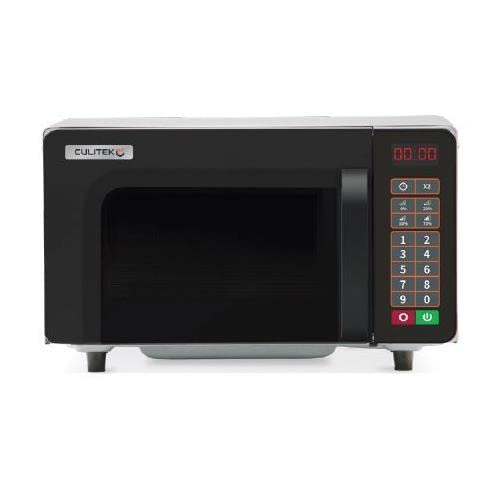
Figure 1: Culitek CTMS10TS Microwave Oven. This image shows the compact design of the microwave oven, featuring a dark exterior and a visible control panel with a digital display. The door handle is integrated, and the overall appearance is sleek and modern. The interior includes a glass turntable.
Operating Instructions
Control Panel Overview
The CTMS10TS features a touch-sensitive control panel with a digital display. Key buttons include:
- Number Pad (0-9): Used to enter cooking times, clock settings, and weight for defrosting.
- Power Level: Selects the microwave power output (5 levels available).
- Time Cook: Initiates manual cooking by time.
- Defrost: Activates defrosting by time or weight.
- Clock: Sets the current time.
- Start: Begins the cooking cycle.
- Stop/Cancel: Stops cooking, clears settings, or cancels a program.
Setting the Clock
- Press the CLOCK button once.
- Use the number pad to enter the current time (e.g., 12:30 for 12:30 PM).
- Press the CLOCK button again to confirm.
Basic Microwave Cooking (Time Cook)
- Place food in a microwave-safe container on the glass turntable. Close the door.
- Press the TIME COOK button.
- Enter the desired cooking time using the number pad (e.g., 1:30 for one minute and thirty seconds).
- To adjust power level (default is 100%): Press POWER LEVEL, then use the number pad (1-5) to select a power level (e.g., 3 for 60% power).
- Press the START button to begin cooking.
Defrosting
The CTMS10TS offers defrosting by time or weight.
Defrost by Time:
- Place frozen food in the oven.
- Press the DEFROST button once.
- Enter the desired defrosting time using the number pad.
- Press the START button.
Defrost by Weight:
- Place frozen food in the oven.
- Press the DEFROST button twice.
- Enter the weight of the food in pounds (e.g., 1.5 for 1.5 lbs) using the number pad.
- Press the START button.
Note: For best results, turn food over periodically during defrosting.
Stopping/Canceling Operation
To temporarily pause cooking, open the oven door. To resume, close the door and press START. To stop cooking completely and clear all settings, press the STOP/CANCEL button.
Care and Maintenance
Regular cleaning and proper care will ensure the longevity and efficient operation of your microwave oven.
Cleaning the Oven Interior
- Always unplug the oven before cleaning.
- Wipe the interior surfaces with a soft, damp cloth and mild soap. For stubborn stains, place a bowl of water with lemon slices inside and microwave for 2-3 minutes to loosen food particles, then wipe clean.
- Do not use abrasive cleaners, steel wool, or harsh chemicals, as these can damage the stainless steel interior.
- Clean the door seals and sealing surfaces regularly to ensure proper door closure.
Cleaning the Oven Exterior
Wipe the exterior with a soft, damp cloth. Avoid getting water into the ventilation openings. Dry thoroughly after cleaning.
Cleaning the Turntable
The glass turntable and turntable ring can be removed for cleaning. Wash them in warm, soapy water or in the dishwasher. Ensure they are completely dry before placing them back in the oven.
Troubleshooting Guide
Before contacting customer service, please refer to the following table for common issues and their solutions.
| Problem | Possible Cause | Solution |
|---|---|---|
| Oven will not start. | Power cord not plugged in. Door not closed properly. Fuse blown or circuit breaker tripped. | Plug into electrical outlet. Close door securely. Replace fuse or reset circuit breaker. |
| Food not heating. | Incorrect cooking time or power level set. Door not closed properly. Metal objects in oven. | Adjust cooking time and power level. Close door securely. Remove all metal objects. |
| Turntable not rotating. | Turntable not properly seated. Debris under turntable ring. | Ensure turntable and ring are correctly positioned. Clean oven floor and turntable ring. |
| Unusual noises during operation. | Food container touching oven walls. Turntable not properly seated. | Ensure food container clears oven walls. Re-seat turntable and ring. |
If the problem persists after trying these solutions, please contact Culitek customer support.
Specifications
| Feature | Detail |
|---|---|
| Brand | Culitek |
| Model Name | CTMS10TS |
| Capacity | 0.8 Cubic Feet |
| Energy Consumption | 1000 Watts |
| Voltage | 120 Volts |
| Product Dimensions (D x W x H) | 12.25"D x 20.12"W x 15.88"H |
| Controller Type | Touch Pad |
| Number of Power Levels | 5 |
| Special Feature | Turntable |
| Inner Material | Stainless Steel |
| Installation Type | Countertop (Note: While product data may indicate 'Over-the-Range', this model's specifications are consistent with a countertop microwave.) |
| Recommended Uses For Product | Residential |
Warranty and Customer Support
For warranty information, please refer to the warranty card included with your product or visit the official Culitek website. Specific warranty terms and conditions may vary.
If you require technical assistance, have questions about your product, or need to report a problem that cannot be resolved using the troubleshooting guide, please contact Culitek customer support. Contact details are typically available on the manufacturer's website or in your product packaging.
