
1. Introduction
This manual provides detailed instructions for the installation, operation, and maintenance of your Reidubo 10-Port 8-Port PoE+ Gigabit Ethernet Switch. This unmanaged network switch is designed to provide reliable data and power transmission for various network devices, including PoE security cameras, access points, and IP phones.
2. Product Overview
The Reidubo 10-Port Gigabit PoE+ Ethernet Switch features 8 Power over Ethernet (PoE+) ports and 2 Gigabit uplink ports. It supports a total PoE power output of 120W, with a maximum of 30W per port, compliant with 802.3af/at standards. The 2 Gigabit uplink ports facilitate connections to Network Video Recorders (NVRs), other switches, routers, and Wi-Fi devices.

Image: Front view of the Reidubo 10-Port Gigabit PoE Switch, highlighting 8 PoE ports and 2 Gigabit uplink ports.
The switch incorporates a built-in power supply, eliminating the need for an external power adapter. It also features 4KV lightning protection, ensuring stable operation even in adverse weather conditions. Each PoE port intelligently detects the power requirements of connected devices, providing 15.4W for normal operation and up to 30W maximum output.

Image: Diagram illustrating the 802.3af/at compliance, 120W total power budget, and 30W maximum power per port of the Reidubo PoE Switch.
Video: An overview of the Reidubo 8-port PoE switch, demonstrating its use with PoE surveillance cameras and AP Wi-Fi devices.
3. Setup
The Reidubo Gigabit PoE Ethernet Switch is an unmanaged, plug-and-play device, requiring no software installation or complex configuration. Simply connect the power cord and your network cables to begin operation.
3.1 Initial Connection
- Connect the provided power cord to the switch and a power outlet.
- Connect your router or main network device to one of the 2 Gigabit uplink ports using a standard Ethernet cable.
- Connect your PoE-compatible devices (e.g., IP cameras, wireless access points, IP phones) to the 8 PoE ports using Ethernet cables.
- For non-PoE devices (e.g., computers, NVRs), connect them to the uplink ports or other available ports on your network.

Image: A diagram illustrating the plug-and-play setup of the Reidubo PoE switch, showing connections to a router, WiFi extender, AP, and wireless AP panel.
4. Operating Modes
The switch supports two primary operating modes: Standard Mode and VLAN Mode.
4.1 Standard Mode
In Standard Mode, all PoE ports can communicate freely with each other and with the uplink ports. This mode is suitable for general data transmission where all connected devices need to interact.
4.2 VLAN Mode
In VLAN Mode, the PoE ports are isolated from each other, meaning devices connected to different PoE ports cannot directly communicate. However, all PoE ports can still communicate with the Gigabit uplink ports. This mode is beneficial for improving local network data transmission performance and reducing network broadcast storms, especially when running multiple security cameras or other devices that need to be segmented but still access the main network.

Image: A visual representation of the One-Key VLAN function, showing how PoE ports are isolated from each other but communicate with uplink ports, and the AI Watchdog feature for auto-restart.
5. Key Features
- Full Gigabit PoE Switch & 120W: 8x 10/100/1000 Mbps Base-TX RJ45 PoE+ ports and 2x Gigabit uplink ports, providing a total of 120W PoE power output (max 30W per port).
- Built-in Power Supply & 4KV Lightning Protection: Integrated power supply for a simpler setup. Robust 4KV lightning protection ensures device stability.
- Unmanaged Plug and Play: Automatic device detection and no configuration required for immediate use.
- Intelligent PD Detection & QoS Function: Automatically identifies PoE devices and can turn off power to non-PoE devices to prevent damage. Quality of Service (QoS) prioritizes important data transmission on ports 1-2.
- VLAN Mode: Isolates PoE ports from each other while maintaining communication with uplink ports, enhancing local network performance.
- Durable Metal Casing: Constructed with a sturdy metal casing for enhanced durability and efficient heat dissipation.
- Fanless & Noise-Free: Operates silently, making it suitable for quiet environments like offices and homes.
- Multiple Installation Options: Supports both desktop placement and wall-mountable installations.
- Wide Operating Temperature: Designed to operate reliably across a broad temperature range.
Video: A detailed product overview of the Reidubo 8-Port Gigabit PoE Switch, highlighting its features and connectivity options.
6. Specifications
- Model Number: 10 port | 8*POE+(1000Mbps) (120w)
- Number of Ports: 8 PoE+ ports, 2 Gigabit Uplink ports (Total 10 ports)
- Data Transfer Rate: 1000 Megabits Per Second (Gigabit)
- PoE Power Output: 120W total, max 30W per port
- Voltage: 230 Volts (AC)
- Interface Type: RJ45
- Case Material: Metal
- Color: Black
- Product Dimensions: 7.95 x 5.55 x 1.73 inches
- Item Weight: 2.18 pounds (0.99 Kilograms)
- Compatible Devices: PoE Security Cameras, Access Points, IP Phones, NVRs, Routers, etc.
7. Package Contents
The following items are included in your product package:
- Reidubo 10-Port 8-Port PoE+ Gigabit Ethernet Switch
- Power Cord
- User Manual
- Rack Mount Brackets
8. Installation Options
The Reidubo PoE switch is designed for flexible installation to suit various environments:
- Desktop Placement: The compact design allows for easy placement on any desktop or flat surface.
- Wall Mountable: Utilize the included rack mount brackets to securely mount the switch on a wall, optimizing space and cable management.
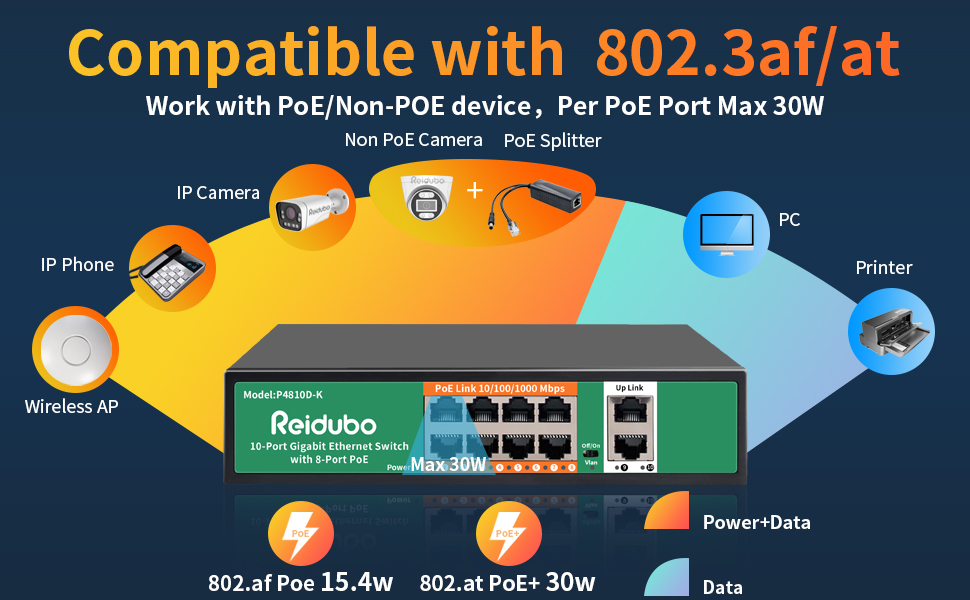
Image: A visual guide demonstrating the versatility of the Reidubo PoE switch for both desktop and wall-mounted installations.
9. Maintenance
To ensure optimal performance and longevity of your Reidubo PoE switch, consider the following maintenance tips:
- Keep the device in a well-ventilated area to prevent overheating.
- Regularly check cable connections to ensure they are secure.
- Clean the exterior of the switch with a soft, dry cloth. Avoid using liquid cleaners.
- Ensure the power supply is stable and within the specified voltage range.
10. Troubleshooting
If you encounter issues with your Reidubo PoE switch, try the following steps:
- No Power: Verify that the power cord is securely connected to both the switch and a working power outlet.
- No Link/Activity: Check the Ethernet cables connected to the ports. Ensure they are properly seated and not damaged. Confirm that connected devices are powered on and functioning correctly.
- PoE Device Not Powering On: Ensure the connected device is PoE-compatible and within the power budget of the port (max 30W) and the total switch (120W). Try a different PoE port.
- Network Congestion: If experiencing slow network speeds, consider activating VLAN mode to isolate traffic between PoE ports.
- Intermittent Connection: Check for loose connections, damaged cables, or environmental interference.
11. Warranty and Support
Every Reidubo switch undergoes rigorous testing for reliability, quality, and performance. We provide a one-year warranty for all products and lifetime technical support.
For technical assistance or warranty claims, please contact Reidubo customer service through the official Reidubo Store on Amazon.