
1. Introduction
The Reidubo 18-Port Gigabit PoE Switch is an unmanaged network switch designed for reliable data and power transmission. It features 16 Gigabit PoE+ ports and 2 Gigabit uplink ports, providing a total PoE power budget of 250W. This fanless switch offers quiet operation and multiple installation options, making it suitable for various networking environments such as offices, homes, and surveillance systems.
2. What's in the Box
- Reidubo 18-Port Gigabit PoE Switch
- Power Cord
- Rack Mount Brackets
- User Manual (this document)
3. Product Features
- Full Gigabit PoE Switch & 250W Power Budget: 16x 10/100/1000 Mbps Base-TX RJ45 PoE+ ports and 2x Gigabit uplink ports. Total PoE power output of 250W, with a maximum of 30W per port.
- Built-in Power Supply & 4KV Lightning Protection: Integrated 250W power supply eliminates the need for an external adapter. 4KV lightning protection ensures stable operation in adverse weather conditions.
- Unmanaged Plug and Play: Automatically detects devices; no software installation or configuration required.
- Intelligent PD Detection & QoS Function: Automatically identifies PoE devices and can turn off power to non-PoE devices to prevent damage. QoS prioritizes important data transmission on ports 1-2.
- VLAN Mode: Isolates PoE ports from each other while allowing communication with uplink ports, improving local network data transmission performance and security for devices like security cameras.
- Fanless Quiet Operation: Metal casing provides excellent heat dissipation without the need for a fan, ensuring silent operation.
- Multiple Installation Options: Supports desktop and 19-inch rackmount installations.

Image: Front view of the Reidubo 18-Port Gigabit PoE Switch highlighting its 16 PoE ports, 2 uplink ports, power indicator, and priority data transmission feature.

Image: Side view of the Reidubo 18-Port Gigabit PoE Switch emphasizing its silent, fanless operation and metal casing for efficient heat dissipation.
4. Setup
The Reidubo 18-Port Gigabit PoE Switch is designed for simple plug-and-play setup without complex configurations.
- Power Connection: Connect the provided power cord to the switch's AC/IN port and then to a power outlet.
- Device Connection: Connect your PoE-compatible devices (e.g., IP cameras, wireless access points, IP phones) to any of the 16 PoE+ ports using standard Ethernet cables.
- Uplink Connection: Connect the 2 Gigabit uplink ports to your network infrastructure, such as a router, NVR, or another switch, to provide network connectivity to your PoE devices.
- Installation: The switch can be placed on a desktop or mounted in a 19-inch rack using the included brackets.
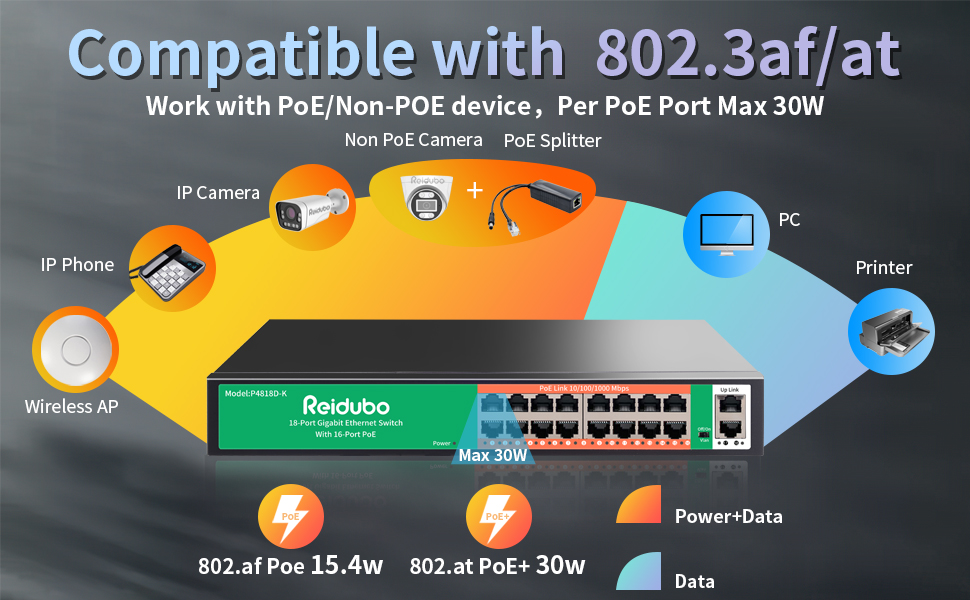
Image: A diagram illustrating the simple plug-and-play setup process for the PoE switch, connecting to power, IP cameras, a router, and an NVR.

Image: The Reidubo 18-Port Gigabit PoE Switch shown installed in a 19-inch rack, highlighting its rackmount compatibility.
Video: An overview of the 18-Port Gigabit Switch with 16 PoE ports and 250W power, demonstrating its features and connectivity.
5. Operating Instructions
Once the switch is physically connected, it operates automatically. No further configuration is typically needed for basic network functionality.
5.1. VLAN Mode
The switch features a physical switch for VLAN mode. In standard mode, all PoE ports can communicate freely. In VLAN mode, PoE ports are isolated from each other but can communicate with the uplink ports. This is useful for segmenting network traffic, such as for security cameras, to improve performance and security.

Image: Close-up of the Reidubo 18-Port Gigabit PoE Switch showing the 'VLAN' physical switch for enabling or disabling VLAN mode.
5.2. Intelligent PD Detection & QoS
The switch automatically detects if a connected device requires PoE power. For non-PoE devices, power is automatically turned off to prevent damage. The Quality of Service (QoS) function prioritizes data traffic on ports 1-2, ensuring critical applications receive sufficient bandwidth.
Video: A demonstration of the 16-Port PoE Switch with Gigabit and 2 Uplink ports, highlighting its features and operational aspects.
6. Maintenance
- Cleaning: Keep the switch clean and free from dust. Use a soft, dry cloth for cleaning. Avoid liquid cleaners.
- Ventilation: Ensure the switch has adequate airflow around its vents, even though it is fanless. Do not block the ventilation holes.
- Cable Management: Periodically check all cable connections to ensure they are secure and undamaged. Organize cables to prevent tangling and improve airflow.
- Firmware Updates: While this is an unmanaged switch, check the manufacturer's website periodically for any recommended firmware updates, if applicable.
7. Troubleshooting
- No Power: Ensure the power cord is securely connected to the switch and a working power outlet. Check if the power indicator LED on the switch is lit.
- No Link/Activity: Verify that the Ethernet cables are correctly connected to both the switch port and the connected device. Check the link/activity LEDs on the switch for the corresponding port. Try a different cable or port.
- PoE Device Not Powering On:
- Confirm the device is PoE-compatible (IEEE 802.3af/at standard).
- Check the total PoE power budget (250W) and individual port power (max 30W) to ensure it's not exceeded.
- For passive PoE devices, a PoE splitter is required to separate power and data.
- Ensure the Ethernet cable length does not exceed 100 meters (328 feet) for standard PoE operation.
- Network Performance Issues:
- If experiencing slow speeds, check for network loops. Avoid connecting both uplink ports to the same central switch without proper aggregation configuration.
- Consider enabling VLAN mode to isolate traffic and reduce network congestion, especially for high-bandwidth devices like cameras.
Video: A short demonstration on how to quickly check for PoE problems, useful for basic troubleshooting.
8. Specifications
| Feature | Description |
|---|---|
| Interface Type | PoE+, PoE |
| Data Transfer Rate | 1 Gigabits Per Second |
| Manufacturer | Reidubo |
| UPC | 755426769795 |
| Product Dimensions | 12.24 x 7.17 x 1.77 inches |
| Item Weight | 4.27 pounds |
| Item Model Number | 18 port | 16*POE+(1000Mbps) (250w) |
| Number of Ports | 16 PoE+ ports + 2 Uplink ports (Total 18) |
| Color | Black |
| Compatible Devices | Camera, Gaming Console, Wireless AP, IP Phone, NVR, Router |
9. Warranty and Support
Every Reidubo switch undergoes rigorous testing for reliability, quality, and performance.
- Warranty: We provide a one-year warranty for all products.
- Technical Support: Lifetime technical support is available to assist you with any product-related inquiries or issues.