
VABIRA VBR-100
VABIRA VBR-100 Quantum PAR Meter User Manual
Model: VBR-100 | Brand: VABIRA
1. Introduction
The VABIRA VBR-100 Quantum PAR Meter is a precision instrument designed for accurate measurement of Photosynthetically Active Radiation (PAR) and Photosynthetic Photon Flux Density (PPFD). This device is essential for optimizing light conditions in various environments, including greenhouses, grow tents, and aquariums, ensuring optimal plant growth and health. It features full spectrum measurement capabilities, including separate readings for red and blue PPFD, DLI calculation, and PPFD distribution recording with data export functionality.

Figure 1: VABIRA VBR-100 Quantum PAR Meter and its app interface displaying light readings.
2. Key Features
- Accurate PAR/PPFD Measurement: Tests PAR and PPFD for any light spectrum, with separate readings for red and blue light, crucial for plant chlorophyll absorption and growth.
- DLI Calculation: Calculates Daily Light Integral (DLI) when PPFD is stable, aiding in precise light management.
- PPFD Distribution Record (Grid Mapping): Methodically records PPFD data at different points using a grid system to determine PAR Uniformity (Uo), optimizing growth and identifying weak spots. Exportable data for analysis.
- User-Friendly App: Simple and safe mobile application for PAR testing with quick Bluetooth connectivity.
- Portable Design: Easy to carry, allowing for versatile use, including mounting on drones or toy cars for remote PPFD testing in large areas like greenhouses.
3. Setup Guide
3.1 Package Contents
Before starting, ensure all components are present in the package:
- VABIRA VBR-100 Quantum PAR Meter
- 2 x AAA Batteries (included)
- User Manual (this document)
3.2 Battery Installation
The VBR-100 requires 2 AAA batteries for operation. Locate the battery compartment on the back of the device, open it, insert the batteries according to the polarity indicators, and close the compartment securely.
3.3 App Download and Connection
The VBR-100 operates in conjunction with a dedicated mobile application. Follow these steps to connect your device:
- Download the App: Search for "Vsensor" in your mobile device's app store (iOS App Store or Google Play Store) and download the official VABIRA application.
- Power On the Meter: Press the power button on the VBR-100 meter. The indicator light should turn on.
- Enable Bluetooth: Ensure Bluetooth is enabled on your mobile device.
- Connect in App: Open the Vsensor app. The app should automatically detect and connect to your VBR-100 meter. If prompted, grant necessary permissions (e.g., location for Bluetooth on Android 11 and below).

Figure 2: Steps for powering on the VBR-100 and connecting to the Vsensor app.
4. Operating Instructions
4.1 Measuring PAR and PPFD
Once connected, the VBR-100 will immediately begin taking light measurements. The app displays real-time PAR and PPFD values. You can observe the overall PAR, as well as the individual PPFD values for red (600-700nm), green (500-600nm), and blue (400-500nm) light spectrums.

Figure 3: Measuring PAR and PPFD with the VBR-100 and Vsensor app.

Figure 4: Understanding light spectrums and plant absorption with the VBR-100.
4.2 Daily Light Integral (DLI) Calculation
The app includes a DLI calculator. Input the number of lighting hours, and the app will calculate the DLI based on the current PAR reading. This helps in understanding the total amount of light received by plants over a 24-hour period.

Figure 5: DLI calculation for different growth stages.
4.3 PPFD Distribution Record (Grid Mapping)
To assess light uniformity, use the grid mapping feature. Place the meter at various points within your grow area (e.g., a grow tent) and record the PAR values. The app will compile these readings, calculate the average PAR, and determine the Uniformity (Uo) of the PAR distribution. This helps identify areas with insufficient or excessive light, allowing for adjustments to optimize light placement and efficiency.

Figure 6: Grid mapping for PPFD distribution and uniformity.
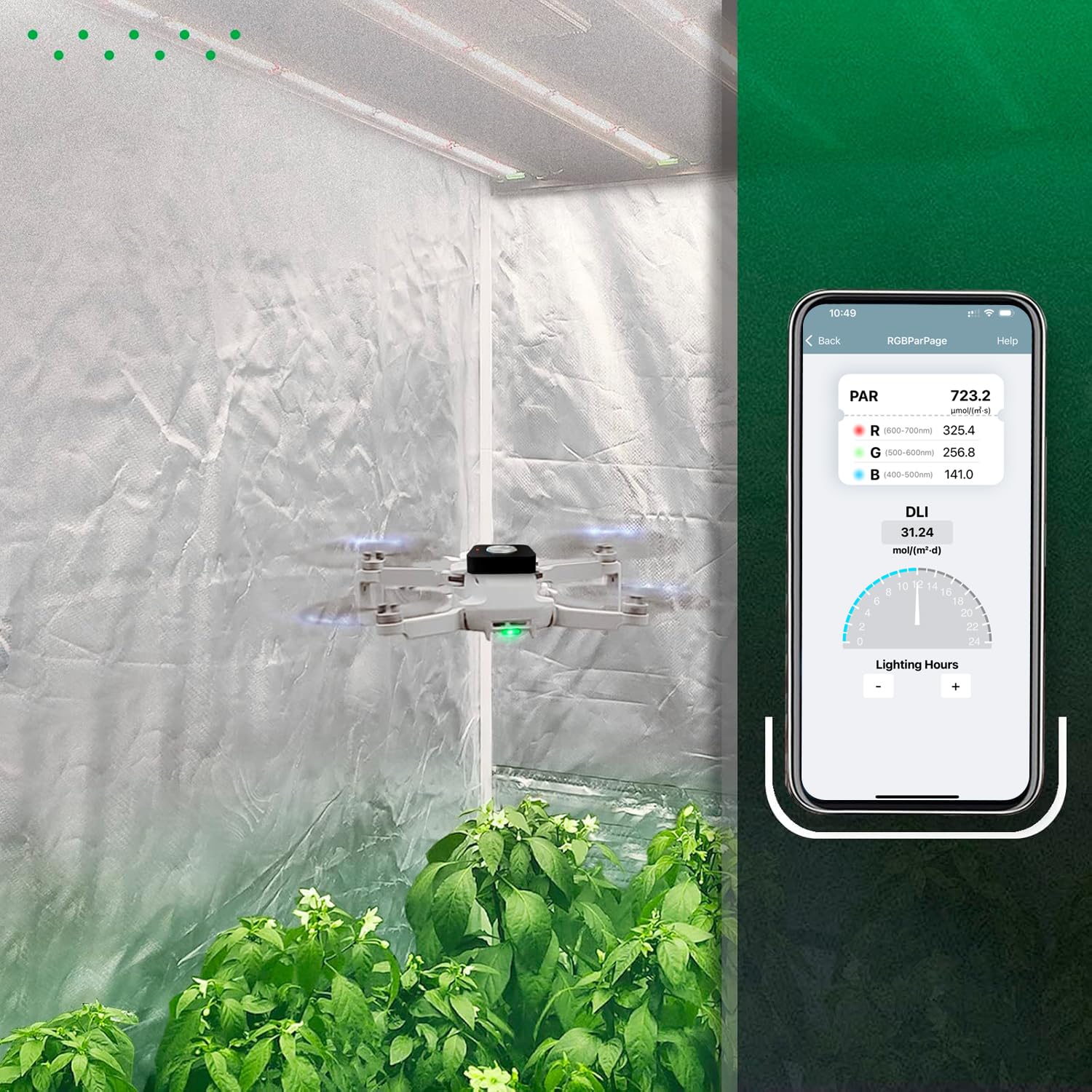
Figure 7: The VBR-100 can be used with drones for comprehensive light mapping in larger areas.
4.4 Data Export
The collected PAR data from grid mapping can be exported for further analysis. The app allows you to save the data, typically in a spreadsheet format, which can then be opened and reviewed on a computer or other devices.
Video 1: Demonstration of PAR measurement, DLI calculation, PPFD data recording, and data export using the VBR-100 and its app.
5. Maintenance
- Cleaning: Wipe the meter with a soft, dry cloth. Do not use abrasive cleaners or solvents.
- Storage: Store the device in a cool, dry place away from direct sunlight and extreme temperatures. Remove batteries if storing for extended periods to prevent leakage.
- Sensor Care: Keep the light sensor clean and free from dust or debris to ensure accurate readings. Avoid touching the sensor surface directly.
6. Troubleshooting
If you encounter issues with your VBR-100, please refer to the following common solutions:
- Inaccurate DLI Calculation: If the app's DLI calculation appears incorrect, ensure your app is updated to the latest version. Previous versions may have had calculation discrepancies that have since been resolved.
- Bluetooth Connectivity Issues:
- Ensure the meter is powered on and within Bluetooth range of your device.
- Verify Bluetooth is enabled on your mobile device.
- For Android 11 and below, the app may require location permission for Bluetooth functionality. Please grant this permission if prompted.
- Try restarting both the meter and your mobile device.
- No Readings Underwater: The VBR-100 is not designed for underwater use. Bluetooth signals are significantly attenuated by water, preventing reliable communication between the meter and your device when submerged.

Figure 8: Common troubleshooting points addressed by VABIRA.
7. Specifications
| Attribute | Value |
|---|---|
| Product Dimensions | 2.87 x 2.87 x 0.81 inches |
| Item Weight | 2.74 ounces (77.7 Grams) |
| Item Model Number | VBR-100 |
| Batteries | 2 AAA batteries (included) |
| Manufacturer | De-Power |
| Brand | VABIRA |
| Power Source | Battery Powered |
| Color | Black |
| PAR Measurement Range | 0~6000 µmol/m²/sec |
| Repeatability | ±1 µmol/m²/sec |
| Display Resolution | 0.001 µmol/m²/sec (0-6000) |
| Measuring Rate | 1 measurement per second |
| Cut-On Wavelength | 400±10nm |
| Cut-off Wavelength | 700±10nm |

Figure 9: VBR-100 Technical Specifications.
8. Warranty and Support
VABIRA products are designed for reliability and performance. For warranty information and technical support, please refer to the contact details provided with your purchase or visit the official VABIRA website. Keep your purchase receipt as proof of purchase for warranty claims.
Ask a question about this manual
Ask about setup, troubleshooting, compatibility, parts, safety, or missing instructions. Manuals+ will review the question and use this page’s manual context to help answer it.