
1. Safety Information
Read all instructions carefully before beginning installation. If you are unfamiliar with electrical wiring, consult a qualified electrician. Improper installation can result in electric shock, fire, or personal injury.
- Always disconnect power at the main circuit breaker before installation or servicing.
- Ensure all electrical connections comply with local codes and ordinances.
- The mounting structure must be capable of supporting the fan's weight (approximately 9.7 lbs).
- Do not bend the blade holders during installation or cleaning.
- Keep children away from the fan during installation.
2. Package Contents
Verify that all components are present before beginning installation:
- Remote Control
- Fan Blades (3 Solid Wood Blades)
- Downrods (5-inch and 10-inch included)
- Motor Assembly
- Integrated LED Light Kit
- Mounting Bracket and Hardware
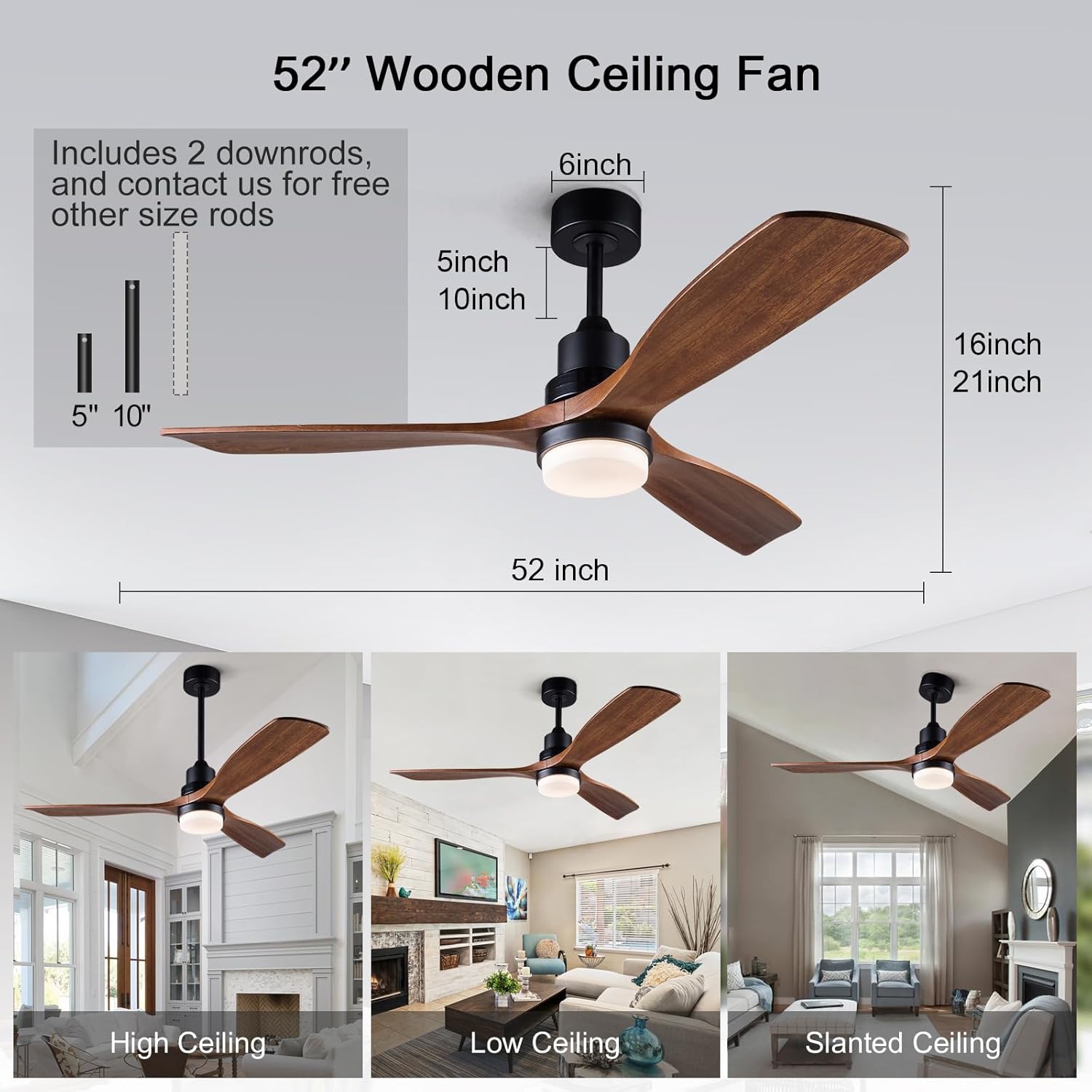
Image: Overview of the BOJUE 52 Inch Ceiling Fan with included downrods.
3. Specifications
| Feature | Specification |
|---|---|
| Brand | BOJUE |
| Model Number | HH52SHDG1620 |
| Size | 52 inch |
| Color | Black Walnut |
| Material | Acrylic, Aluminum, Brass, Copper, Iron, Metal, Plastic, Solid Wood |
| Motor Type | DC Motor |
| Fan Speeds | 6-speeds adjustable |
| Light Source | Integrated LED |
| Color Temperature | 3000K (Warm), 4500K (Natural), 6000K (White) |
| Brightness | 10% to 100% Dimmable (2600 Lumen max) |
| Control Method | Remote Control |
| Timer Function | Yes (1H/4H/8H) |
| Reversible Motor | Yes (Summer/Winter mode) |
| Noise Level | Below 20 dB (at minimum speed) |
| Indoor/Outdoor Usage | Outdoor (Moisture Resistant) |
| Item Weight | 9.7 Pounds |
4. Setup and Installation
Follow these steps for proper installation of your BOJUE ceiling fan. It is recommended to have two people for installation.
4.1 Prepare for Installation
- Turn off power at the circuit breaker.
- Ensure the mounting location is suitable and can support the fan's weight.
- Gather necessary tools: screwdriver, wire strippers, ladder.
4.2 Mounting the Bracket
Secure the mounting bracket to the ceiling junction box. Ensure all screws are tightened securely.
4.3 Assembling the Fan
Attach the chosen downrod to the motor assembly. Carefully feed the electrical wires through the downrod.

Image: Illustration of attaching the downrod to the fan motor assembly.
4.4 Wiring the Fan
Connect the fan's electrical wires to the household wiring according to the wiring diagram provided in the full manual. Ensure proper grounding.
4.5 Attaching Blades and Light Kit
Securely attach the solid wood blades to the motor. Install the integrated LED light kit and its cover.
4.6 Installation Video Guide
Video: Official BOJUE installation guide for 52/60 inch ceiling fans. This video demonstrates the steps for assembling and mounting the fan, including wiring connections.
5. Operating Instructions
Your BOJUE ceiling fan is controlled by the included remote. Ensure batteries are installed correctly in the remote control.
5.1 Remote Control Functions
- Power On/Off: Press the power button to turn the fan and light on or off.
- Fan Speed: Select from 6 adjustable fan speeds (1-6). Speed 1-2 for sleep/reading, 3-4 for family occasions, 5-6 for sports/fitness.
- Light Control: Turn the light on/off, adjust brightness (10%-100%), and change color temperature (3000K Warm, 4500K Natural, 6000K White).
- Timer: Set the fan to turn off automatically after 1, 4, or 8 hours.
- Reversible Motor: Switch between Summer (downward airflow) and Winter (upward airflow) modes.

Image: The remote control for the BOJUE ceiling fan, highlighting light dimming and color temperature options.

Image: Visual representation of the 10%-100% dimmable LED light feature.

Image: Diagram illustrating the 6 adjustable fan speeds and their recommended uses.
5.2 Seasonal Operation (Reversible Motor)
The fan features a reversible DC motor for year-round comfort.
- Summer Mode: Downward airflow creates a cooling breeze.
- Winter Mode: Upward airflow circulates warm air trapped near the ceiling.

Image: Visual explanation of summer (cooling) and winter (air circulation) modes.
5.3 Operation Video Guide
Video: Official BOJUE video demonstrating the remote control functions for the wood ceiling fan with lights, including speed and light adjustments.
6. Maintenance
Regular maintenance ensures optimal performance and extends the life of your ceiling fan.
- Cleaning: Periodically clean the fan blades and motor housing with a soft, damp cloth. Do not use abrasive cleaners or solvents.
- Tighten Fasteners: Check all screws and fasteners annually to ensure they are secure.
- Blade Balance: If the fan wobbles, check that all blades are securely attached and balanced. A balancing kit (not included) may be used if necessary.
7. Troubleshooting
If you experience issues with your ceiling fan, refer to the following common problems and solutions:
| Problem | Possible Cause | Solution |
|---|---|---|
| Fan does not start | No power to the fan; Loose wire connections; Remote control battery low or not paired. | Check circuit breaker; Verify all wire connections are secure; Replace remote battery or re-pair remote. |
| Light does not work | Loose wire connection to light kit; LED driver failure. | Check light kit wiring; Contact customer service for LED driver replacement. |
| Fan wobbles | Loose blade screws; Unbalanced blades; Loose mounting bracket. | Tighten all blade screws; Use a balancing kit; Ensure mounting bracket is securely fastened. |
| Noisy operation | Loose screws; Motor hum; Blades hitting an obstruction. | Check and tighten all screws; Ensure no obstructions are near blades. DC motor is designed for quiet operation (below 20dB at low speed). |
| Remote not responding | Low battery; Remote not paired with fan. | Replace remote battery; Follow pairing instructions in the full manual (if applicable). |
8. Warranty and Support
BOJUE is committed to providing quality products and customer satisfaction.
- Motor Warranty: 10 years.
- Whole Fan Warranty: 2 years.
- Remote Control Replacement: Free replacement service within three years if lost or damaged.
For customer service or warranty claims, please contact BOJUE directly. You can reach us via email at 262492377@qq.com.
For additional information and support, visit the BOJUE Store on Amazon.
