1. Introduction
This manual provides instructions for the Kassionel Universal Replacement Remote Control, model HTR-A18M. This remote is designed as a direct replacement for various Haier TV models, offering immediate functionality without the need for programming.

Image 1.1: Front view of the Kassionel Universal Replacement Remote Control.
2. Setup
2.1 Battery Installation
The remote control requires two (2) AAA alkaline batteries (not included). Follow these steps to install the batteries:
- Locate the battery compartment on the back of the remote control.
- Press down on the latch and slide the battery cover off.
- Insert two AAA batteries, ensuring the positive (+) and negative (-) terminals align correctly with the markings inside the compartment.
- Slide the battery cover back into place until it clicks securely.
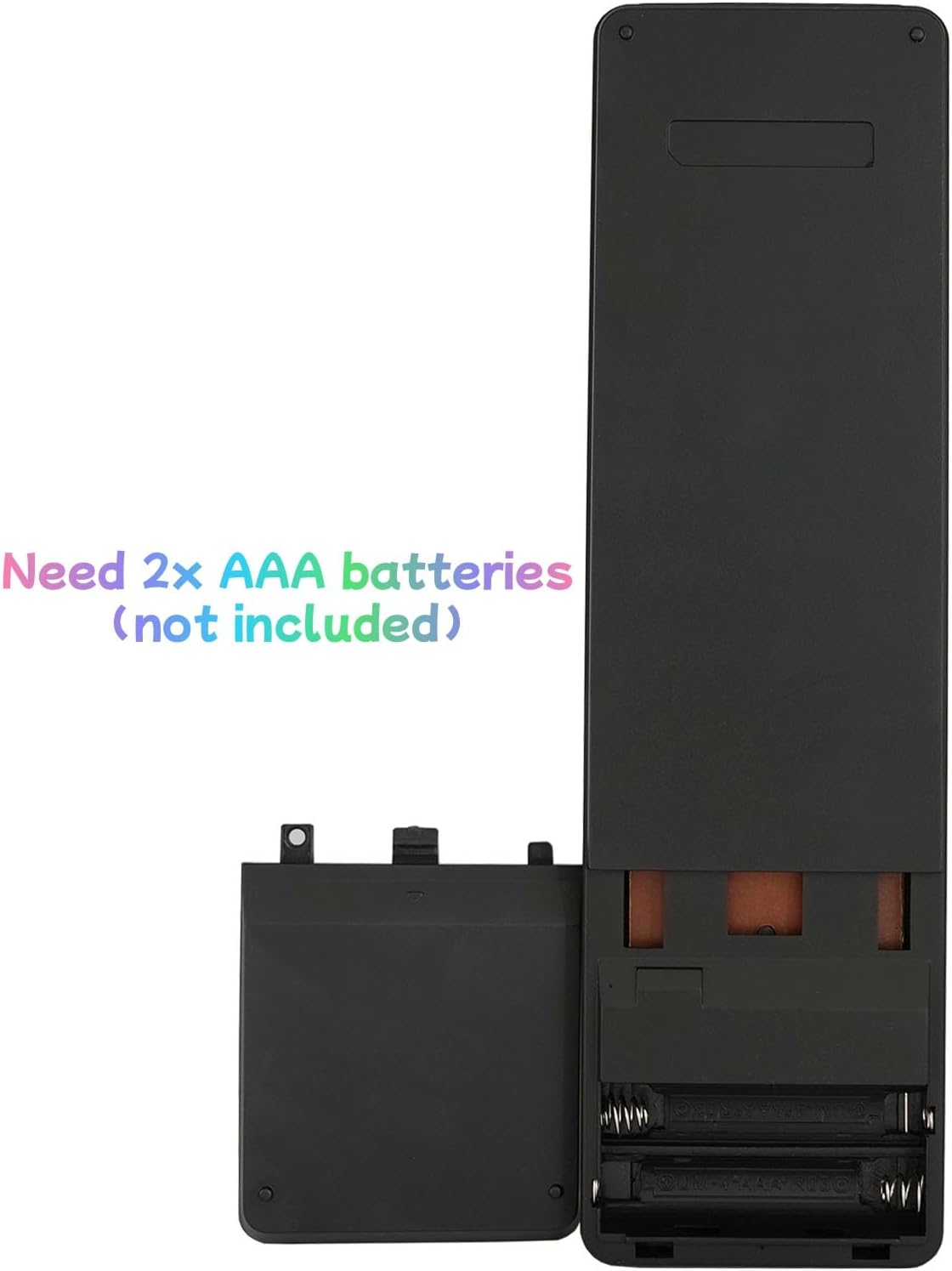
Image 2.1: View of the remote control with the battery compartment open, showing where to insert two AAA batteries.
Important: Ensure batteries are inserted with correct polarity. Do not mix old and new batteries, or different types of batteries.
3. Operating Instructions
This universal replacement remote control is pre-programmed and designed to work immediately with compatible Haier TV models without any setup or programming required. Simply insert the batteries, point the remote at your television, and begin using it.
3.1 Compatible Haier TV Models
This remote control is compatible with a wide range of Haier TV models, including but not limited to:
- LE55F32800
- 240602000472
- 65D3550
- LE58F3281
- 32D3000
- LE32M600M20
- 24D2000
- LE24F33800
- 32D3000
- LE32F32200
- 32F2000B
- LE39M600M80
- 55D3550
- 55E3500
- 55E5550
- 50D3505
- 50UG6550G
- 65D3550
- 65UF2505
- 28E2000
- 32D2000
- 32D3005
- 32E3000
- 39D3005
- 40D2500
- 40D3500M
- 42E3500
- 48DR3505
- 50D3505
- 55E3500
- 65E3550
- LE39F32800
- LE40D3281
- LE46H3280

Image 3.1: The remote control in use, highlighting its immediate functionality without programming.
3.2 Button Functions
The remote control features standard buttons for TV operation. Refer to the image below for a visual guide to the button layout.

Image 3.2: Detailed view of the remote control's button layout.
| Button | Function |
|---|---|
| Power (⏻) | Turns the TV on or off. |
| Input | Selects video input sources (HDMI, AV, etc.). |
| Number Buttons (0-9) | Direct channel selection. |
| VOL (+/-) | Adjusts volume up or down. |
| CH (+/-) | Changes channels up or down. |
| Mute | Mutes or unmutes the TV sound. |
| Menu | Accesses the TV's main menu. |
| OK / Navigation Arrows | Confirms selections and navigates through menus. |
| Back / Exit | Returns to the previous screen or exits the current menu. |
| CC | Activates or deactivates Closed Captions. |
| USB | Switches to USB input mode. |
| SAP | Selects Secondary Audio Program. |
| Sleep | Sets the TV sleep timer. |
| Wide | Adjusts screen aspect ratio. |
| Audio | Adjusts audio settings. |
| Picture | Adjusts picture settings. |
| CH.LIST | Displays the channel list. |
| Favorite | Accesses favorite channels. |
| Media Playback Controls | Includes Play/Pause, Stop, Rewind, Fast Forward, Previous, Next for media playback. |
| Colored Buttons (Red, Green, Yellow, Blue) | Context-sensitive functions within TV menus or smart TV applications. |
4. Maintenance
4.1 Cleaning the Remote Control
To maintain the remote control's appearance and functionality:
- Wipe the surface with a soft, dry cloth.
- For stubborn dirt, slightly dampen the cloth with water or a mild, non-abrasive cleaner.
- Do not use harsh chemicals, solvents, or abrasive cleaning pads.
4.2 Battery Replacement
Replace batteries when the remote control's response becomes sluggish or it stops functioning. Refer to Section 2.1 for battery installation instructions.
- Always replace both batteries at the same time.
- Use only new AAA alkaline batteries.
- Dispose of used batteries responsibly according to local regulations.
5. Troubleshooting
If you experience issues with your remote control, try the following solutions:
| Problem | Possible Cause / Solution |
|---|---|
| Remote control is not working. |
|
| Remote control works intermittently. |
|
| Certain buttons do not function. |
|
6. Specifications
The following are the technical specifications for the Kassionel Universal Replacement Remote Control (Model HTR-A18M):
- Model Number: HTR-A18M
- Product Dimensions: 7.05 x 2.01 x 0.59 inches (17.9 x 5.1 x 1.5 cm)
- Item Weight: 2.12 ounces (60 grams)
- Power Supply: 2 x 1.5V AAA Alkaline Batteries (not included)
- Color: Black
- Special Feature: No Programming Required
- Max Number of Supported Devices: 1 (Television)
- Compatible Devices: Television (specifically various Haier TV models)
- Manufacturer: Kassionel

Image 6.1: Side profile of the remote control, illustrating its slim design.
7. Warranty and Support
For any questions, technical support, or warranty inquiries regarding your Kassionel Universal Replacement Remote Control, please contact the manufacturer directly. Refer to the product packaging or the seller's information for contact details.
Note: This remote control is designed to be a direct replacement and typically does not require complex troubleshooting beyond battery replacement and ensuring compatibility.


