
1. Introduction
Thank you for choosing the OMAIGA Cordless Iron. This 1500W iron is designed for convenience and efficiency, offering unrestricted ironing without the hassle of a cord. Its ceramic soleplate and powerful steam features ensure smooth and effective wrinkle removal. This manual provides essential information for safe and optimal use of your new iron.
2. Safety Instructions
- Always unplug the iron from the power outlet when filling or emptying the water tank, and when not in use.
- Do not touch hot surfaces. Use handles or knobs.
- To protect against risk of electric shock, do not immerse the iron, charging base, or cord in water or other liquids.
- Close supervision is necessary when any appliance is used by or near children.
- Use the iron only for its intended household use.
- Never iron clothes while wearing them.
- Always place the iron on its heel on the charging base when not in use.
- Use deionized, distilled, or demineralized water to prevent mineral buildup and prolong the iron's lifespan.
- Do not operate the iron with a damaged cord or if the iron has been dropped or damaged.
3. Product Overview
Familiarize yourself with the components of your OMAIGA Cordless Iron:
- • Ceramic Soleplate: Ensures smooth gliding and even heat distribution.
- • Water Tank (11.84oz): Large capacity for extended ironing sessions.
- • Temperature Dial: Adjusts heat settings for various fabric types.
- • Steam Button: Activates continuous steam.
- • Spray/Shot Steam Button: Provides a burst of steam or water spray for stubborn wrinkles.
- • Self-Clean Button: For internal cleaning and maintenance.
- • 360° Power+ Base: Allows easy docking and recharging from any direction.
- • Indicator Lights: Show heating status and power connection.

Figure 1: Key components of the OMAIGA Cordless Iron.
4. Setup
- Unpack and Inspect: Remove all packaging, including the protective cover on the soleplate. Ensure the iron is unplugged before proceeding.
- Fill Water Tank: Set the steam switch to 'off'. Fill the 11.84oz water tank through the filling hole, tilting the iron vertically to avoid overfilling and leaks. We recommend using deionized, distilled, or demineralized water.

Figure 2: Filling the water tank.
- Connect to Power: Plug in the charging base and turn on the power. The charging base power light will illuminate.
- Place on Base: Place the iron on its heel on the 360° Power+ Base, ensuring the connectors align. The power indicator light on the handle will illuminate when the connection is made.
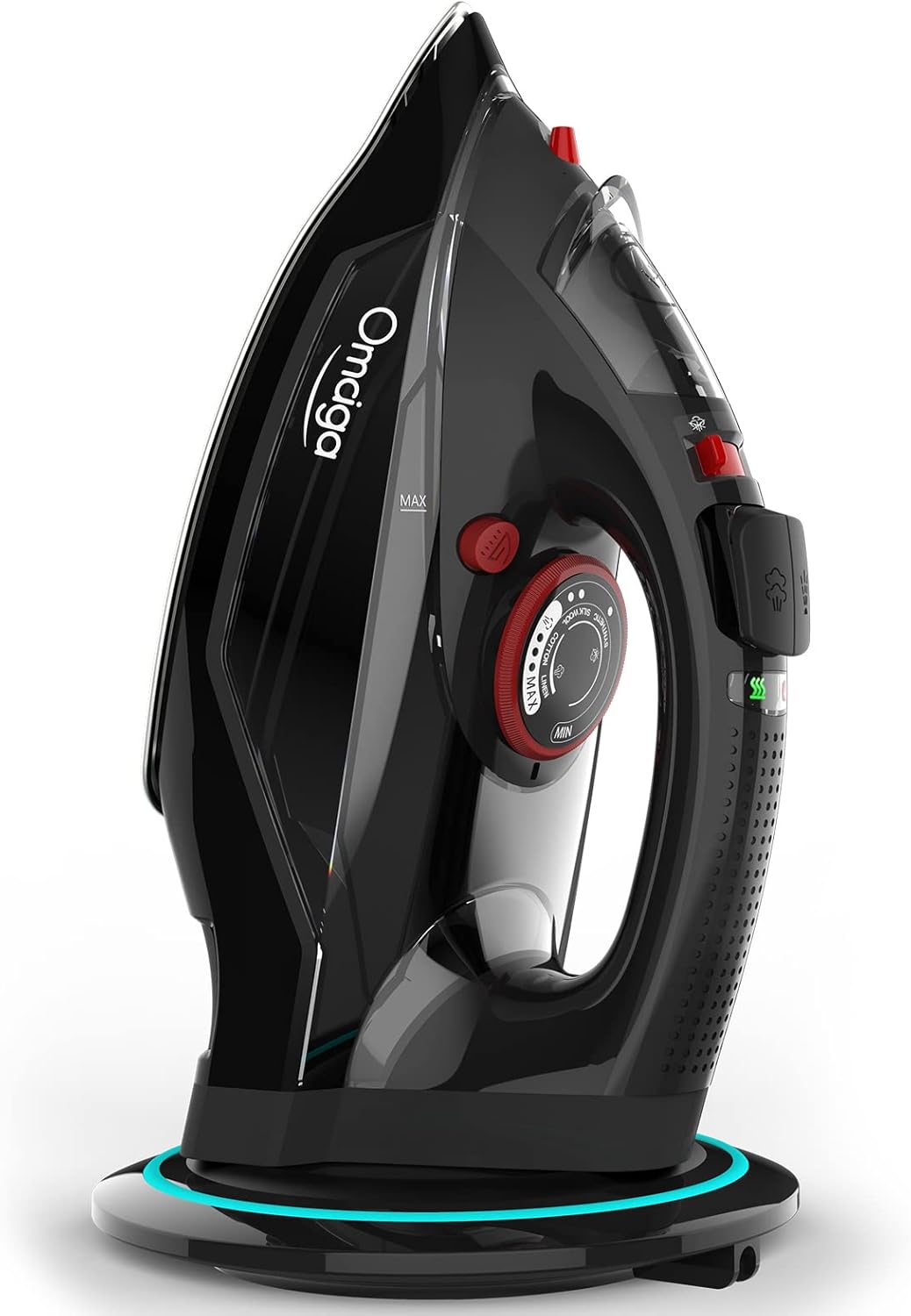
Figure 3: Iron on charging base.
- Initial Heating: Wait until the iron reaches the desired temperature before starting to iron. The temperature indicator light will glow red while heating and turn green when ready. Allow the light to cycle red and green twice before starting.
Setup and Usage Demonstration
Video 1: This video demonstrates the initial setup, including filling the water tank, placing the iron on its base, and preparing it for use. It also shows the iron in action, highlighting its cordless functionality and steam capabilities.
5. Operating Instructions
Temperature Settings
The OMAIGA Cordless Iron features 3 temperature settings, providing optimal heat for a variety of fabrics. Adjust the temperature dial to the desired level according to the fabric type:
- Low: For delicate fabrics like silk and synthetics.
- Medium: For wool and cotton.
- High: For linen and tougher fabrics.

Figure 4: Temperature dial with fabric settings.
Steam and Spray Functions
- Continuous Steam: If needed, switch on the steam using the steam switch. The iron automatically adjusts the steam amount to the selected temperature. The iron provides up to 60 seconds of continuous steam.

Figure 5: Steam and spray functions.
- Steam Boost / Water Spray: For stubborn creases or heavy fabrics, press the steam boost button sparingly (not more than three times in succession for optimal steam quality). For a fine mist, use the water spray button, pressing several times initially to draw water.
- Cordless Operation: Throughout your ironing session, return the iron to the base every few seconds or whenever adjusting garments to maintain heat. The iron reheats in under 25 seconds.
Ironing in Action
Video 2: This video showcases the OMAIGA cordless iron in use, demonstrating its powerful steam and smooth gliding over various fabrics. It highlights the ease of use without a cord.
Video 3: A short demonstration of the OMAIGA cordless iron's functionality, emphasizing its quick heating and steam output.
6. Maintenance
- Self-Clean Function: The iron is equipped with a self-clean function to remove limescale and maintain performance. Regularly use this feature to prevent mineral buildup.

Figure 6: Benefits of Anti-Calc & Self-Clean features.
- Anti-Calc Function: This feature helps prevent limescale build-up, protecting your clothes from staining and ensuring consistent steam output.
- Storage: Always store the iron upright on its charging base in a cool, dry place when not in use.
7. Troubleshooting
If you encounter issues with your OMAIGA Cordless Iron, please refer to the common problems and solutions below:
| Problem | Possible Cause | Solution |
|---|---|---|
| Water leaks from the iron. | Water tank overfilled; temperature too low for steam; water inlet cap not sealed. | Do not overfill the water tank. Ensure the temperature is set correctly for steam. Check that the water inlet cap is securely closed. The auto-shut-off system prevents drips when temperature is insufficient for steam. |
| Iron does not heat up or cools quickly. | Not properly docked on the charging base; insufficient reheating time. | Ensure the iron is correctly placed on the 360° Power+ Base and the indicator light is on. Allow 25 seconds for reheating between uses. |
| No steam or insufficient steam. | Water tank empty; temperature too low; limescale buildup. | Refill the water tank. Increase the temperature setting. Use the self-clean function to remove limescale. |
Customer Experience with Leaking Iron
Video 4: This video shows a customer's experience with water leaking from the iron. While this is a common concern, the manual's troubleshooting section provides solutions, such as ensuring proper water tank filling and temperature settings.
8. Specifications
| Feature | Detail |
|---|---|
| Brand | OMAIGA |
| Model Name | Cordless Iron (KB-950RV-BLACK) |
| Power | 1500W |
| Water Tank Capacity | 11.84oz (300ml) |
| Soleplate Material | Ceramic |
| Special Features | Self-Cleaning, Anti-Calc, Adjustable Thermostat, Cordless Design, 360° Power+ Base |
| Item Weight | 3.65 pounds |
| Product Dimensions | 12.4"L x 6.93"W |
| Manufacture Year | 2024 |
9. Warranty and Support
Your OMAIGA Cordless Iron is backed by a one-year warranty. If you have any questions or require support, please feel free to contact OMAIGA customer service.
For a comprehensive user guide, you can download the PDF version: Download User Guide (PDF)

