1. Introduction
This manual provides essential information for the installation, operation, and maintenance of the TITISKIN 1/5HP Compressor Thermal Overload Protector and 15 Ohm Start Relay. These components are designed as replacement parts for various portable freezers, car refrigerators, beverage coolers, wine coolers, and beer coolers that utilize a 1/5HP compressor.
Proper installation and understanding of these components are crucial for the safe and efficient operation of your appliance. Please read this manual thoroughly before proceeding with any installation or repair.
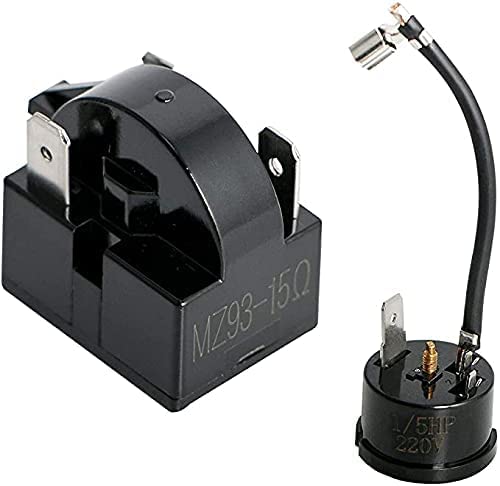
Image 1.1: The TITISKIN 1/5HP Compressor Thermal Overload Protector and 15 Ohm Start Relay kit.
2. Safety Information
Always prioritize safety when working with electrical appliances and components. Failure to follow these safety guidelines may result in electric shock, injury, or damage to the appliance.
- Disconnect Power: Always ensure the appliance is completely disconnected from its power source before attempting any installation, repair, or maintenance.
- Qualified Personnel: Installation and repair should ideally be performed by a qualified technician. If you are not experienced with electrical repairs, seek professional assistance.
- Component Compatibility: Verify that these replacement parts are compatible with your specific appliance model and compressor rating (1/5HP).
- Handle with Care: Electrical components can be delicate. Handle them carefully to avoid damage.
- Keep Dry: Ensure all components and connections remain dry. Moisture can cause electrical shorts and hazards.
3. Product Overview
This kit includes two essential components for your compressor system:
3.1. Compressor Thermal Overload Protector
The thermal overload protector is a safety device designed to prevent the compressor from overheating. If the compressor draws too much current or operates at an excessively high temperature, this protector will temporarily shut down the compressor to prevent damage. It automatically resets once the temperature returns to a safe level.
- Power Rating: 1/5HP (150W)
- Dimensions (approx.): 28mm x 26mm (1.10" x 1.0")
Image 3.1: Close-up view of the Compressor Thermal Overload Protector.
3.2. Compressor Start Relay
The start relay is responsible for providing a temporary boost of power to the compressor's start winding, allowing it to begin its operation. Once the compressor reaches a certain speed, the relay disengages the start winding, and the compressor continues to run on its main winding. A faulty start relay can prevent the compressor from starting or cause it to cycle on and off rapidly.
- Resistance: 15 Ohm
- Pin Number: 3 Pin
- Dimensions (approx.): 29mm x 21mm x 28mm (1.14" x 0.83" x 1.10")

Image 3.2: Close-up view of the Compressor Start Relay.
4. Installation Instructions
This section outlines the general steps for installing the replacement thermal overload protector and start relay. Specific procedures may vary depending on your appliance model. Always refer to your appliance's service manual if available.
- Disconnect Power: Before beginning, ensure the appliance is unplugged from the wall outlet to prevent electric shock.
- Access Compressor: Locate and access the compressor unit, typically found at the back or bottom of the appliance. You may need to remove a cover panel.
- Identify Existing Components: Observe how the old thermal overload protector and start relay are connected to the compressor. Take photos for reference if necessary.
- Remove Old Components: Carefully disconnect the wiring from the old components and then remove them from the compressor terminals. Note the orientation and connection points.
- Install New Thermal Overload Protector: Attach the new 1/5HP thermal overload protector to the appropriate terminal on the compressor. Ensure it fits securely.
- Install New Start Relay: Connect the new 15 Ohm, 3-pin start relay to the corresponding terminals on the compressor. Ensure all pins align correctly and the relay is firmly seated.
- Reconnect Wiring: Reconnect the electrical wiring to the new components exactly as they were connected to the old ones. Double-check all connections for tightness and proper insulation.
- Secure Panels: Replace any cover panels removed during the process.
- Restore Power: Plug the appliance back into the power outlet.
- Test Operation: Monitor the appliance to ensure the compressor starts and operates correctly, and that cooling is restored.

Image 4.1: Dimensional view of the thermal overload protector and start relay for fitment verification.
5. Operating Principles
Once installed, these components function automatically as part of your appliance's refrigeration system:
- The Start Relay engages when the thermostat calls for cooling, providing the initial surge of power needed to start the compressor motor. Once the compressor is running, the relay disengages.
- The Thermal Overload Protector continuously monitors the compressor's current draw and temperature. If the compressor begins to overheat or draw excessive current, the protector will trip, temporarily shutting down the compressor to prevent damage. It will automatically reset and allow the compressor to restart once it has cooled sufficiently.
These components work in conjunction to ensure the compressor starts reliably and operates safely within its design parameters.
6. Maintenance
The TITISKIN Thermal Overload Protector and Start Relay are designed to be maintenance-free under normal operating conditions. However, periodic inspection can help ensure their longevity and proper function:
- Visual Inspection: During any other appliance maintenance, visually inspect the components for signs of physical damage, corrosion, or loose connections.
- Cleanliness: Ensure the area around the compressor and these components remains free of dust and debris, which can impede heat dissipation.
- Environmental Conditions: Operate the appliance within its recommended environmental conditions to prevent undue stress on the compressor and its components.
If any damage or excessive wear is observed, consider replacing the affected component.
7. Troubleshooting
If your appliance is not cooling or the compressor is not starting, these components may be a factor. Use the following information to assist in troubleshooting:
- Compressor Not Starting / Clicking Sound: If the compressor attempts to start but only makes a clicking sound and then shuts off, or does not start at all, the start relay may be faulty. A clicking sound often indicates the thermal overload protector tripping due to the compressor failing to start.
- No Cooling, Compressor Hot: If the compressor is running but the appliance is not cooling, or the compressor is excessively hot, the thermal overload protector might be tripping due to an underlying issue with the compressor itself, or the protector itself could be faulty.
- Appliance Not Turning On: Ensure the appliance is receiving power. Check the power cord, outlet, and any circuit breakers.
Important Note:
If these components are installed correctly and the appliance still does not function as expected, it is likely that the problem lies with another part of the refrigeration system, such as the compressor itself, the thermostat, or a refrigerant leak. These components are designed to address specific electrical starting and overheating issues. They will not resolve mechanical failures or refrigerant system problems.
8. Specifications
| Feature | Specification |
|---|---|
| Brand | TITISKIN |
| Model Number | 1/5 HP |
| Thermal Overload Protector Power | 1/5HP (150W) |
| Thermal Overload Protector Dimensions | 28mm x 26mm (1.10" x 1.0") |
| Start Relay Resistance | 15 Ohm |
| Start Relay Pin Number | 3 Pin |
| Start Relay Dimensions | 29mm x 21mm x 28mm (1.14" x 0.83" x 1.10") |
| Package Dimensions | 2.09 x 1.65 x 1.57 inches |
| Item Weight | 0.88 ounces |
| Connector Type | Through Hole |
| Contact Material | Silver |
| Contact Type | Normally Open |
| Mounting Type | PCB Mount |
| Manufacturer | KUANG |
9. Warranty Information
Specific warranty details for this product are not provided in the available information. Please refer to the retailer or manufacturer's website for any applicable warranty terms and conditions.
10. Customer Support
For technical assistance or inquiries regarding this product, please contact the seller or manufacturer through the platform where the purchase was made. Provide your purchase details and product model number (1/5 HP) for efficient support.