
Introduction
Thank you for choosing EZVALO Under Cabinet Lighting. This manual provides detailed instructions for the setup, operation, and maintenance of your new motion sensor lights. Please read this manual thoroughly before use to ensure proper functionality and longevity of the product.

Image: EZVALO Under Cabinet Lighting showing the two light bars, a detachable battery, and charging cables. Insets demonstrate the three available color temperatures: warm, natural, and cool white.

Image: Examples of EZVALO lights installed in different household areas, including under kitchen cabinets, inside a closet, on stair risers, and under a bed, demonstrating their versatility.
Package Contents
- 2 x EZVALO Under Cabinet Lights
- 3 x Detachable Batteries (2 in use + 1 spare)
- 2 x Mounting Hardware (Magnetic adhesive pads)
- 1 x Charging Cable
- 1 x User Manual (This document)
Setup and Installation
The EZVALO Under Cabinet Lights are designed for easy, tool-free installation using magnetic mounting.
-
Battery Installation: Ensure the detachable batteries are securely fastened into the light fixture. Slide the side switch to the "ON" position to activate the light.
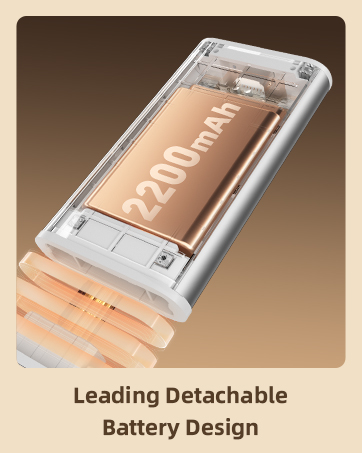
Image: A close-up view illustrating the insertion of the detachable battery into the light fixture.
-
Magnetic Mounting:
- For metal surfaces, the lights have built-in magnets and can be directly attached.
- For non-metal surfaces (e.g., wood cabinets), use the included magnetic adhesive pads.
- Clean the surface where the light will be installed to ensure it is dry and free of dust.
- Peel off the protective film from one side of the magnetic adhesive pad.
- Attach the adhesive side firmly to the desired installation location.
- Attach the light fixture to the magnetic side of the pad.

Image: Visual guide demonstrating the simple installation process using magnetic adhesive pads for non-metal surfaces.
Operating Instructions
Your EZVALO Under Cabinet Light features multiple modes and adjustable settings for optimal lighting.
1. Motion Sensor Modes
The light offers three operating modes, selectable via a switch on the unit:
- Always On Mode: Provides continuous lighting, suitable for tasks requiring constant illumination.
- Auto Day/Night Mode: The light detects movement within a 10ft & 120° range and automatically turns on. It will turn off after 20 seconds of inactivity. This mode is energy-saving.
- Smart Night Mode: Similar to Auto Day/Night Mode, but the light only activates in darkness when motion is detected, preventing false triggers during daylight hours.

Image: A visual representation of the motion sensor's 10-foot detection range and 120-degree wide angle, showing how it detects movement.
2. Dimmable Functionality
The light supports smooth dimming from 10% to 100% brightness. It also features a memory function that saves your preferred brightness setting.
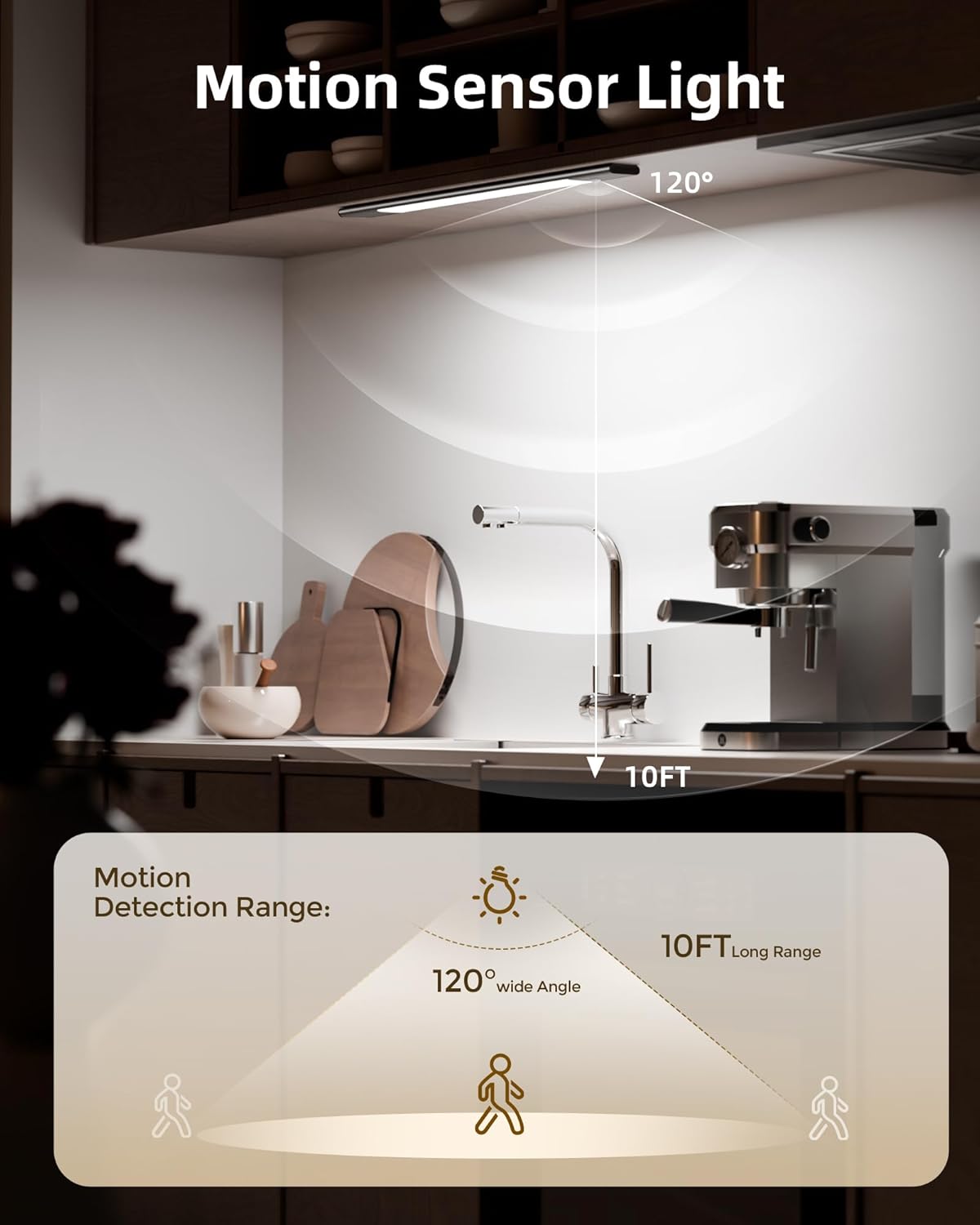
Image: A graphic demonstrating the stepless dimming feature, allowing adjustment of light intensity from 5% to 100%.
3. Color Temperature Adjustment
Choose from three distinct color temperatures to suit your environment or mood:
- Warm White (3500K): For a cozy and inviting atmosphere.
- Natural White (4200K): A balanced light, ideal for general tasks.
- Daylight (5700K): Bright and crisp, perfect for detailed work or high visibility areas.

Image: Three distinct scenes showcasing the light's ability to switch between Cool White (5700K), Natural White (4200K), and Warm White (3000K) color temperatures.
4. Brightness and LED Quality
The EZVALO lights are equipped with 76 high-efficiency LEDs, providing 100 lumens of glare-free, eye-comfortable lighting. This design ensures wide-area illumination.

Image: A comparative graphic highlighting the superior features of EZVALO lights, such as higher LED count and lumens, eye-caring design, and multiple color temperatures, compared to other lights.
Battery and Charging
Your EZVALO lights come with 2200mAh detachable batteries, designed for convenience and long-lasting performance.
- Each battery provides approximately 6 hours of illumination at maximum brightness.
- In auto motion sensor mode, a battery can last between 7 to 22 days depending on usage frequency.
- To charge, simply detach the battery and connect it to the provided charging cable. The battery can be charged independently without removing the light fixture.
- A full charge typically takes a few hours. The charging indicator will change when fully charged.
Image: A close-up view illustrating the insertion of the detachable battery into the light fixture.

Image: A visual representation of the detachable battery's features, including its 2200mAh capacity and estimated usage times for max brightness, min brightness, and auto mode.
Maintenance
To ensure the longevity and optimal performance of your EZVALO Under Cabinet Lights, follow these simple maintenance guidelines:
- Cleaning: Gently wipe the light fixture with a soft, dry cloth. Avoid using abrasive cleaners or solvents, as they may damage the finish or electronic components.
- Battery Care: For best battery life, avoid fully discharging the battery frequently. Charge the battery when the light output noticeably diminishes. Store the battery in a cool, dry place if not in use for extended periods.
- Storage: If storing the lights for a long time, ensure the batteries are partially charged (around 50%) and remove them from the light fixture.
Troubleshooting
If you encounter any issues with your EZVALO Under Cabinet Lights, please refer to the following common solutions:
| Problem | Possible Cause | Solution |
|---|---|---|
| Light does not turn on. | Battery is depleted or not properly inserted. Side switch is OFF. | Charge the battery and ensure it is securely inserted. Slide the side switch to the "ON" position. |
| Motion sensor not working. | Incorrect mode selected. Obstruction blocking sensor. | Ensure "Auto Day/Night Mode" or "Smart Night Mode" is selected. Clear any obstructions from the sensor. Verify the light is in a dark enough environment for "Smart Night Mode". |
| Light dims unexpectedly or battery life is short. | Battery is low. Frequent activation in high traffic areas. | Recharge the battery. Consider using "Always On Mode" for areas with constant activity to avoid frequent sensor triggers, or adjust placement. |
| Cannot change color temperature or dimming. | Incorrect operation. | Refer to the operating instructions for proper control methods (push button/touch). |
Specifications
| Feature | Detail |
|---|---|
| Brand | EZVALO |
| Model Name | EZVALO LED Closet Light |
| Model Number | LY-52 |
| Color | Space Gray |
| Material | Aluminum, Acrylonitrile Butadiene Styrene |
| Product Dimensions (L x W x H) | 19.69" x 1.65" x 0.6" |
| Item Weight | 10.6 ounces (0.3 Kilograms) |
| Power Source | Battery Powered |
| Battery Type | Lithium Ion (2200mAh) |
| Light Source Type | LED (76 LEDs) |
| Brightness | 100 Lumen (Max) |
| Color Temperatures | 3500K (Warm White), 4200K (Natural White), 5700K (Daylight) |
| Special Features | Adjustable Color Temperature, Cordless, Dimmable, Motion Sensor, Rechargeable |
| Control Method | Push Button, Touch |
| Installation Type | Magnetic Mount, Surface |
| Indoor/Outdoor Usage | Indoor |
| Voltage | 5 Volts |
| Wattage | 1 watts |
Warranty and Support
Warranty Type: Lifetime
EZVALO is committed to providing excellent customer service. If you have any questions, concerns, or require assistance with your EZVALO Under Cabinet Lighting, please do not hesitate to contact us. We are dedicated to ensuring your satisfaction.
For support, please visit the official EZVALO store or contact customer service through your purchase platform.
Note: Please retain your purchase receipt for warranty claims.