
1. Introduction
Thank you for purchasing the GOWENIC Mini MP3 Player. This compact and portable digital music player is designed to provide high-fidelity lossless sound, making it ideal for various activities such as running, business, and travel. Please read this manual carefully to ensure proper use and to maximize your enjoyment of the device.
Package Contents
- GOWENIC Mini MP3 Player
- USB Charging Cable
- User Manual
- Note: Memory card and headphones are not included.
2. Safety Information
- Do not expose the device to extreme temperatures, direct sunlight, or high humidity.
- Avoid dropping or subjecting the device to strong impacts.
- Keep the device away from water and other liquids.
- Do not attempt to disassemble or repair the device yourself. Contact customer support if issues arise.
- Use only the provided USB cable for charging.
- Listen at moderate volume levels to prevent hearing damage.
3. Product Overview
Familiarize yourself with the components and controls of your MP3 player.

Image 3.1: Side view of the GOWENIC Mini MP3 Player, showing the headphone jack at the top, the micro USB charging/data port, and the microSD card slot on the side.
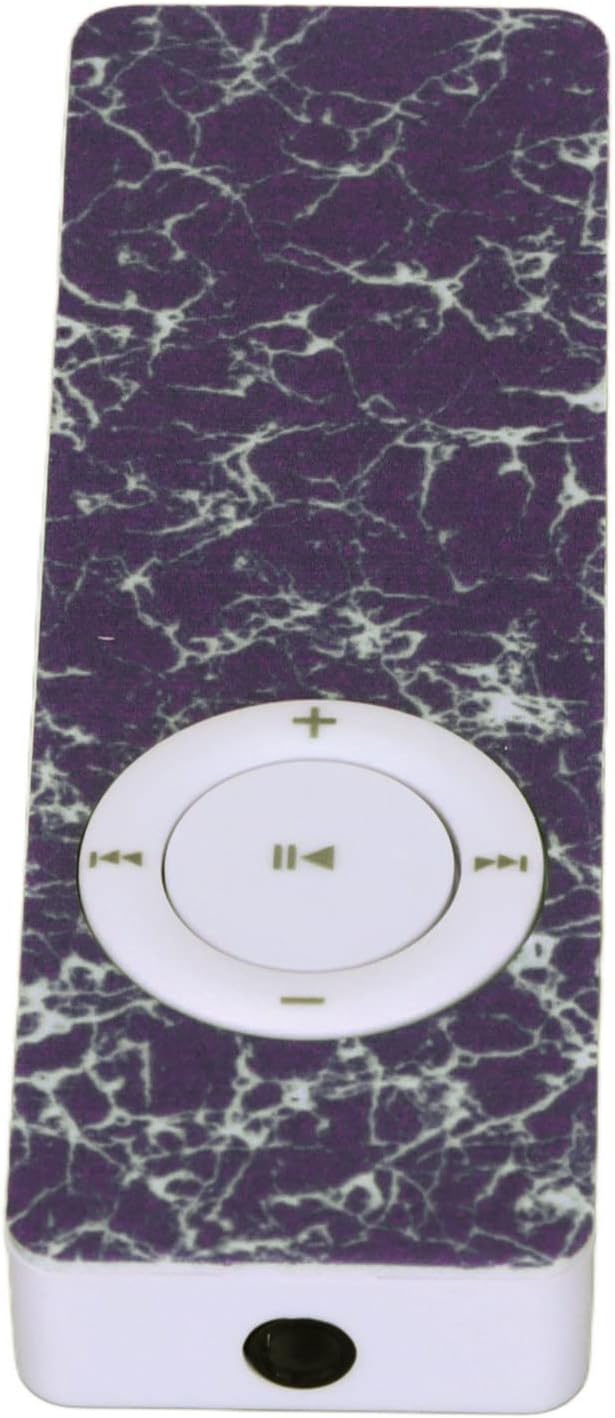
Image 3.2: Top view of the GOWENIC Mini MP3 Player, highlighting the 3.5mm headphone jack.

Image 3.3: Bottom view of the GOWENIC Mini MP3 Player, showing the microSD card slot and the micro USB port.
Controls:

Image 3.4: Front view of the GOWENIC Mini MP3 Player, displaying the central circular control pad.
- Central Button (Play/Pause): Press to play or pause music.
- Left/Right Buttons (Previous/Next Track): Press to skip to the previous or next song.
- Up/Down Buttons (Volume +/-): Press to increase or decrease the volume.
- Power Switch: Located on the side (not visible in all images, but implied by typical MP3 player design). Slide to turn the device on or off.
4. Setup
4.1 Charging the Device
- Connect the small end of the USB charging cable to the micro USB port on the MP3 player.
- Connect the larger end of the USB cable to a USB power adapter (not included) or a computer's USB port.
- The device will begin charging. A full charge typically takes a few hours.
- Disconnect the cable once fully charged.
4.2 Inserting a Memory Card
The GOWENIC Mini MP3 Player supports microSD cards up to 64GB (not included).
- Locate the microSD card slot on the side/bottom of the player (refer to Image 3.3).
- Gently insert the microSD card into the slot with the gold contacts facing down until it clicks into place.
- To remove the card, push it in slightly until it springs out.
4.3 Transferring Music Files
- Ensure a microSD card is inserted into the MP3 player.
- Connect the MP3 player to your computer using the USB cable.
- The computer should recognize the MP3 player as a removable disk.
- Open the removable disk folder.
- Drag and drop your desired music files (e.g., MP3, WAV, FLAC) into the player's storage.
- Once files are transferred, safely eject the removable disk from your computer before disconnecting the USB cable.
5. Operating Instructions
5.1 Powering On/Off
- To Power On: Slide the power switch to the "ON" position.
- To Power Off: Slide the power switch to the "OFF" position.
5.2 Basic Music Playback
- Ensure headphones are connected to the 3.5mm audio jack.
- Power on the device.
- Press the Central Button to start playing music.
- Press the Central Button again to pause playback.
- Use the Left/Right Buttons to navigate between tracks.
- Adjust the volume using the Up/Down Buttons.

Image 5.1: The GOWENIC Mini MP3 Player in use, surrounded by musical notes, illustrating its primary function.
6. Maintenance
- Cleaning: Use a soft, dry cloth to wipe the device. Do not use liquid cleaners or aerosols.
- Storage: Store the MP3 player in a cool, dry place when not in use. Avoid extreme temperatures.
- Battery Care: To prolong battery life, avoid fully discharging the battery frequently. Charge the device regularly, even if not in constant use.
7. Troubleshooting
| Problem | Possible Cause | Solution |
|---|---|---|
| Device does not turn on. | Battery is depleted. Power switch is off. | Charge the device. Ensure the power switch is in the "ON" position. |
| No sound. | Headphones not connected properly. Volume is too low. Corrupt music file. | Ensure headphones are fully plugged in. Increase volume. Try playing a different music file. |
| Computer does not recognize the device. | Loose USB connection. Driver issue. | Reconnect the USB cable. Try a different USB port or computer. Ensure the device is powered on. |
| Music files not playing. | Unsupported file format. No memory card inserted. | Ensure files are in a supported format (e.g., MP3, WAV, FLAC). Insert a formatted microSD card with music. |
8. Specifications
- Model: GOWENICuzhgqv83iw3060-12
- Material: ABS
- Battery: Built-in 180 mAh Polymer Lithium Battery
- Memory Card Support: Up to 64GB microSD card (not included)
- Connectivity: Auxiliary (3.5mm headphone jack), USB (for data transfer and charging)
- Screen Size: 1.44 inches
- Sound Quality: Hi-Fi Lossless Decoding
9. Warranty and Support
For warranty information or technical support, please refer to the retailer's policy or contact GOWENIC customer service through their official channels. Keep your purchase receipt for warranty claims.