
TAVICE NANOE-G
Panasonic Compatible Air Conditioner Remote User Manual
Model: NANOE-G | Brand: TAVICE
1. Introduction and Overview
This manual provides comprehensive instructions for the TAVICE Panasonic Compatible Air Conditioner Remote. Designed for seamless operation with various Panasonic ECONAVI Inverter and NANOE-G air conditioner models, this remote offers full functionality for controlling your unit's temperature, fan speed, modes, and timer settings. It is a direct replacement, requiring no complex programming.

Figure 1: Front view of the TAVICE Panasonic Compatible Air Conditioner Remote, showing the display and all control buttons.
2. Setup and Initial Use
2.1 Battery Installation
The remote requires batteries for operation (batteries are not included). Follow these steps to install them:
- Locate the battery compartment cover on the back of the remote control.
- Slide the cover downwards or press the latch to open the compartment.
- Insert two new AAA batteries, ensuring the positive (+) and negative (-) terminals align correctly with the markings inside the compartment.
- Close the battery compartment cover by sliding it back into place until it clicks securely.
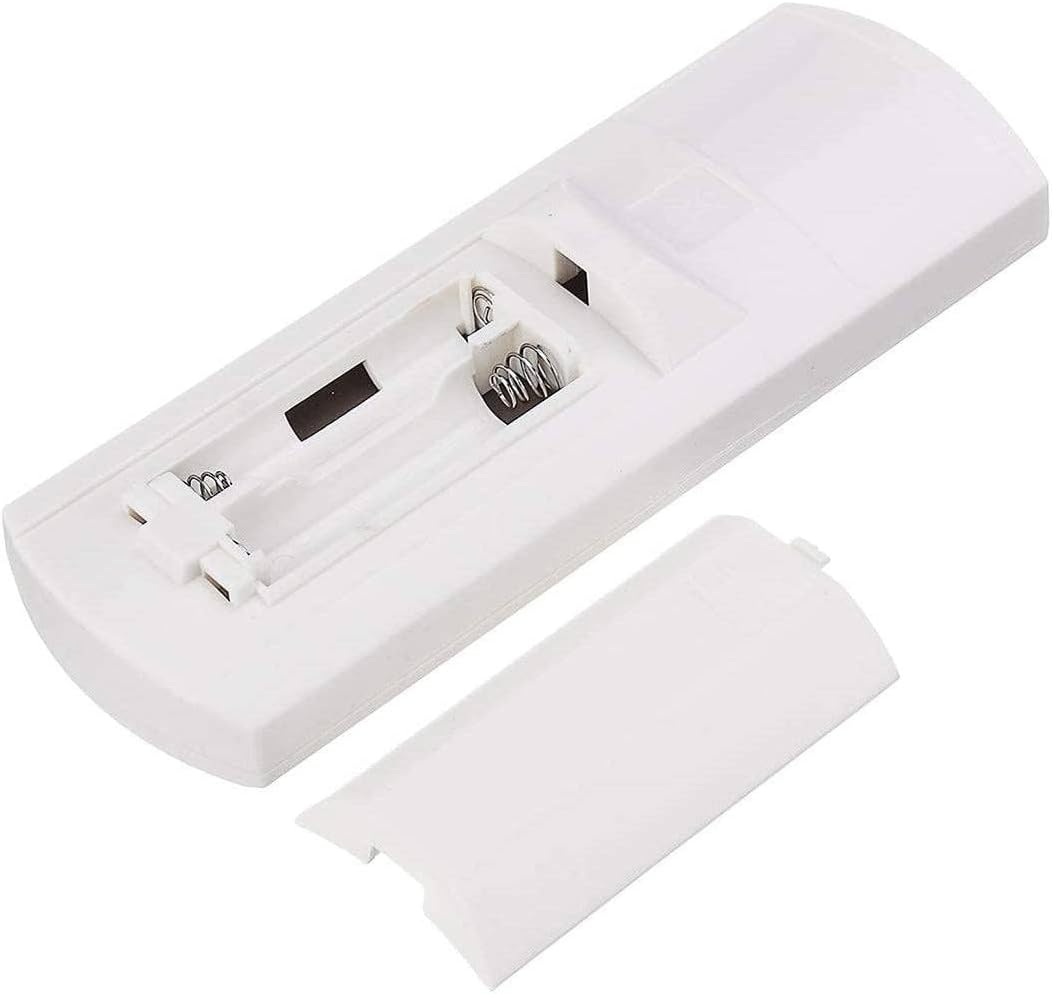
Figure 2: Rear view of the remote control with the battery compartment open, illustrating proper battery insertion.
2.2 Initial Operation
This remote is pre-programmed and ready to use with compatible Panasonic air conditioner models. No complex setup or pairing process is required. Simply point the remote towards your air conditioner unit and press the desired function button.
3. Operating Instructions
Familiarize yourself with the buttons and their functions for optimal control of your air conditioner.
| Button Name | Function |
|---|---|
| OFF/ON | Powers the air conditioner on or off. |
| MODE | Cycles through operating modes: AUTO, COOL, DRY, HEAT, MILD DRY. |
| TEMP ▲ / ▼ | Adjusts the desired temperature setting. |
| FAN SPEED | Changes the fan speed (e.g., Auto, Low, Medium, High). |
| AIR SWING | Controls the vertical airflow direction (louver swing). |
| ECONAVI | Activates or deactivates the ECONAVI energy-saving function. |
| NANOE-G | Activates or deactivates the NANOE-G air purification function. |
| AUTO COMFORT | Engages an automatic comfort setting. |
| POWERFUL/QUIET | Toggles between powerful cooling/heating and quiet operation modes. |
| TIMER ON / OFF | Sets the timer for the air conditioner to turn on or off automatically. |
| SET / CANCEL | Used to confirm or cancel timer settings. |
| CHECK / CLOCK / RESET | Multi-function buttons for checking status, setting clock, or resetting the remote. |
4. Key Features
- ECONAVI Technology: This feature intelligently monitors room conditions and optimizes energy usage, reducing power consumption while maintaining optimal comfort. It detects human activity and sunlight intensity to adjust cooling/heating power.
- NANOE-G Air Purification: Equipped with NANOE-G technology, the remote allows you to activate a system that helps purify the air by eliminating dust, pollen, and airborne bacteria, contributing to a cleaner and healthier indoor environment.
- Full Functionality: Access all essential controls including temperature adjustment, fan speed settings, mode switching (Auto, Cool, Dry, Heat, Mild Dry), and timer functions for complete customization of your air conditioning experience.
- Easy to Use & No Setup Required: The remote is pre-programmed for immediate use. Simply insert batteries, and it's ready to operate your compatible Panasonic air conditioner without any complicated pairing or programming.
- Reliable Performance: Designed to meet the performance standards of original Panasonic remotes, ensuring consistent and dependable operation of your air conditioning unit.
- Lightweight and Compact Design: Its ergonomic and slim design makes it comfortable to hold and easy to store, providing convenient access from anywhere in your room.
5. Compatibility
This TAVICE remote is compatible with a wide range of Panasonic ECONAVI Inverter and NANOE-G air conditioner models. Specifically, it is designed to work with the following models:
- A75C3300
- A75C3706
- A75C3208
- A75C3708
- A75C2821
- A75C2988
- A75C2989
- A75C2994
- A75C2998
- A75C3167
- A75C3169
- A75C3558
- A75C3564
- A75C3701
- A75C3702
- A75C3714
- A75C3865
- A75C3871
- A75C3883
- A75C3935
- A75C4185
If your air conditioner model is not listed, please refer to the product listing or contact TAVICE customer support for compatibility verification.

Figure 3: The remote control, indicating its compatibility with Panasonic air conditioning units.
6. Maintenance
Proper care and maintenance will ensure the longevity and optimal performance of your remote control.
- Cleaning: Wipe the remote control regularly with a soft, dry cloth. Do not use liquid cleaners, abrasive materials, or chemical solvents, as these may damage the surface or internal components.
- Battery Replacement: Replace batteries promptly when the remote's response becomes sluggish or the display dims. Always replace both batteries at the same time with new ones of the same type. Remove batteries if the remote will not be used for an extended period to prevent leakage.
- Storage: Store the remote in a cool, dry place, away from direct sunlight, high temperatures, and excessive humidity. Avoid dropping the remote or exposing it to strong impacts.
7. Troubleshooting
If you encounter issues with your remote control, refer to the following common problems and solutions:
| Problem | Possible Cause / Solution |
|---|---|
| Remote not responding to button presses. |
|
| Display is dim or blank. |
|
| Specific functions (e.g., HEAT, FAN mode) do not work. |
|
| Buttons are hard to press or feel sticky. |
|
If the problem persists after trying these solutions, please contact TAVICE customer support for further assistance.
8. Specifications
- Brand: TAVICE
- Model: NANOE-G (Compatible Remote)
- Compatible Devices: Panasonic Air Conditioners (specific models listed in Section 5)
- Special Features: No Programming Required, ECONAVI, NANOE-G
- Number of Items: 1 (Remote Control)
- Batteries Required: Yes (2 x AAA, not included)
- Batteries Included: No
- Connector Type: Infrared
- Item Weight: Approximately 500 g (as per product data, though this seems high for a remote)
- Package Dimensions: Approximately 14.3 x 6.2 x 4.3 cm
9. Warranty and Support
TAVICE is committed to providing high-quality products and excellent customer service. Your satisfaction is our top priority.
9.1 Warranty Information
We offer hassle-free returns and instant replacements if your item is faulty or not as expected. Please refer to the retailer's return policy for specific details regarding the return window and process.
9.2 Customer Support
For any questions, technical assistance, or troubleshooting not covered in this manual, please do not hesitate to contact our dedicated support team. You can typically find contact information on the product packaging or through the retailer's website where you purchased the remote.
When contacting support, please have your product model (NANOE-G) and a description of the issue ready to help us assist you more efficiently.
Ask a question about this manual
Ask about setup, troubleshooting, compatibility, parts, safety, or missing instructions. Manuals+ will review the question and use this page’s manual context to help answer it.