
AERO MOBILITY A200
AERO MOBILITY A200 Kick Scooter Instruction Manual
Comprehensive guide for assembly, operation, and maintenance of your AERO MOBILITY A200 Kick Scooter.
1. Introduction
Thank you for choosing the AERO MOBILITY A200 Kick Scooter. This manual provides essential information for the safe assembly, operation, and maintenance of your scooter. Please read it thoroughly before first use and retain it for future reference.
The AERO MOBILITY A200 is designed for individuals aged 8 and above, with a maximum weight capacity of 220 lbs (100 kg). It features 8-inch PU wheels, front shock absorption, a dual braking system (hand and foot brake), and an adjustable handlebar for a comfortable riding experience.
2. Safety Warnings
WARNING: Failure to follow these safety instructions may result in serious injury or death.
- Always wear a helmet and appropriate safety gear (knee pads, elbow pads, wrist guards) when riding.
- Ensure all clamps, bolts, and quick-release mechanisms are securely fastened before each ride.
- Do not ride in traffic, on wet surfaces, or at night.
- Avoid steep inclines and uneven terrain.
- Maintain a safe distance from pedestrians and other vehicles.
- The maximum weight capacity is 220 lbs (100 kg). Do not exceed this limit.
- This scooter is intended for one rider only.
- Adult supervision is recommended for younger riders.
- Regularly inspect the scooter for wear and tear, especially brakes, wheels, and folding mechanisms.
3. Package Contents
Verify that all components are present and undamaged upon opening the package.
- AERO MOBILITY A200 Kick Scooter (main body)
- Handlebar assembly
- Instruction Manual
- Tools (if included for assembly)
4. Setup and Assembly
The AERO MOBILITY A200 scooter comes partially assembled. Follow these steps to complete the setup:
4.1 Unfolding the Scooter
- Place the scooter on a flat, stable surface.
- Locate the folding mechanism lever near the front wheel.
- Press the release button or pull the lever to unlock the folding mechanism.
- Carefully lift the handlebar stem until it clicks into the upright, locked position. Ensure it is fully engaged and stable.

Image: The AERO MOBILITY A200 scooter shown in both its unfolded, ready-to-ride state and its compact, folded state for storage or transport.
4.2 Attaching the Handlebar
- Insert the handlebar assembly into the top of the handlebar stem.
- Align the handlebar with the front wheel.
- Tighten the quick-release clamp or bolts on the handlebar stem to secure the handlebar firmly in place. Ensure there is no wobble.
4.3 Adjusting Handlebar Height
The handlebar height can be adjusted to suit the rider's preference. The A200 offers 3 height options (approximately 33", 36", 39").
- Open the quick-release clamp on the handlebar stem.
- Press the spring-loaded pin and slide the handlebar up or down to the desired height.
- Ensure the pin locks into one of the adjustment holes.
- Close the quick-release clamp securely. Verify that the handlebar is stable and does not move.

Image: Visual guide demonstrating the adjustment of the handlebar height for different rider preferences.
5. Operating Instructions
5.1 Riding the Scooter
- Place one foot firmly on the deck of the scooter.
- Use the other foot to push off the ground, generating momentum.
- Once moving, place both feet on the deck, one behind the other, or side-by-side if comfortable, utilizing the wide deck.
- Steer by gently leaning and turning the handlebars.

Image: A rider demonstrating proper stance and use of the AERO MOBILITY A200 scooter on a paved surface.
5.2 Braking System
The AERO MOBILITY A200 is equipped with a dual braking system for enhanced control:
- Hand Brake: Located on the handlebar, this lever activates the front brake. Squeeze gently to slow down or stop.
- Foot Brake: Located over the rear wheel, press down on the fender with your heel to activate the rear brake.
Practice braking at low speeds in a safe area before riding in more challenging environments. Use both brakes for optimal stopping power and control.
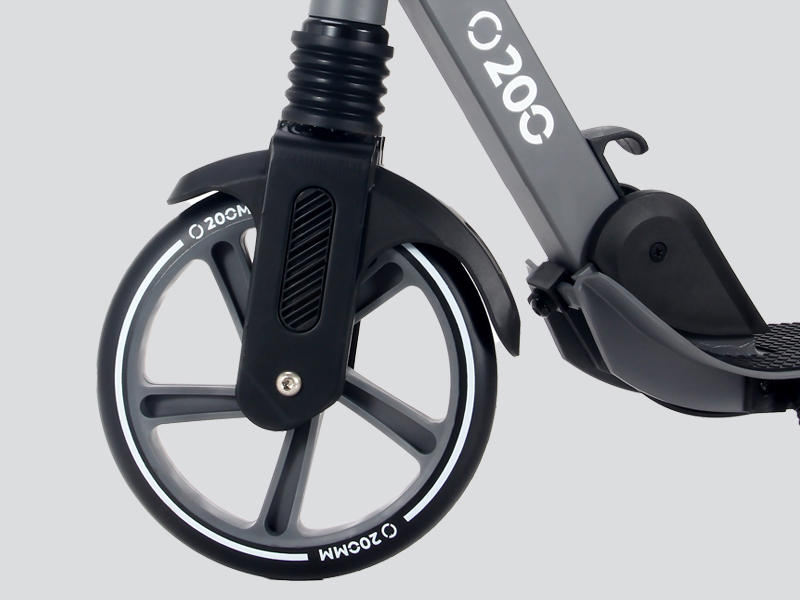
Image: A close-up view of a hand engaging the hand brake lever, illustrating the responsive braking mechanism.
5.3 Folding for Storage/Transport
- Ensure the scooter is stationary and on a flat surface.
- Lower the handlebar to its lowest position (refer to Section 4.3).
- Locate the folding mechanism lever and release it as described in Section 4.1.
- Gently fold the handlebar stem down towards the deck until it locks into the folded position.

Image: The AERO MOBILITY A200 scooter in its folded configuration, highlighting its portability and ease of storage.
6. Maintenance
Regular maintenance ensures the longevity and safe operation of your AERO MOBILITY A200 scooter.
6.1 Cleaning
- Wipe the scooter with a damp cloth after each use to remove dirt and debris.
- Avoid using harsh chemicals or abrasive cleaners, which can damage the finish.
- Do not use high-pressure water jets, as this can force water into bearings and other components.
6.2 Inspections
Perform the following checks before each ride:
- Brakes: Test both hand and foot brakes to ensure they are responsive and effectively stop the scooter. Adjust if necessary.
- Wheels: Check for any damage, cracks, or excessive wear on the wheels. Ensure they spin freely.
- Bearings: Listen for any unusual noises from the wheels or steering column, which may indicate worn bearings.
- Fasteners: Verify that all bolts, nuts, and quick-release clamps are tight and secure.
- Folding Mechanism: Ensure the folding mechanism locks securely in both the open and closed positions.
- Deck Mat: Inspect the anti-slip rubber mat for wear or damage.
6.3 Storage
- Store the scooter in a dry, cool place away from direct sunlight and moisture.
- If storing for an extended period, clean the scooter thoroughly and ensure all moving parts are lightly lubricated.
7. Troubleshooting
This section addresses common issues you might encounter with your AERO MOBILITY A200 scooter.
| Problem | Possible Cause | Solution |
|---|---|---|
| Handlebar wobbles or is loose. | Quick-release clamp is not tight enough; handlebar not fully inserted. | Ensure handlebar is fully inserted and the quick-release clamp is securely tightened. |
| Brakes are not effective. | Brake cable loose; brake pads worn; foot brake mechanism obstructed. | Check brake cable tension and adjust if necessary. Inspect brake pads for wear and replace if needed. Clear any obstructions from the foot brake. |
| Wheels do not spin freely or make noise. | Dirt in bearings; worn bearings; axle bolt too tight. | Clean wheels and bearings. If noise persists, bearings may need replacement. Check axle bolt tightness. |
| Folding mechanism is stiff or won't lock. | Dirt or debris in mechanism; lack of lubrication; misaligned components. | Clean the mechanism and apply a light lubricant. Ensure components are correctly aligned before attempting to fold/unfold. |
If you encounter issues not listed here or require further assistance, please contact AERO MOBILITY customer support.
8. Specifications
| Feature | Detail |
|---|---|
| Model | A200 |
| Brand | AERO MOBILITY |
| Recommended Age | 8+ years |
| Maximum Weight Capacity | 220 lbs (100 kg) |
| Wheel Size | 8 inches (200mm) |
| Wheel Material | Polyurethane (PU) |
| Frame Material | Aluminum |
| Braking System | Dual (Hand Brake, Foot Brake) |
| Suspension | Front Suspension |
| Handlebar Height Adjustment | Adjustable (approx. 33", 36", 39") |
| Deck Width | 5.5 inches |
| Product Dimensions (Unfolded) | 93.5 x 41 x 105 cm (approx. 36.8 x 16.1 x 41.3 inches) |
| Item Weight | 5.3 kg (approx. 11.7 lbs) |
9. Warranty Information
AERO MOBILITY products are manufactured to high-quality standards. For specific warranty details, including coverage period and terms, please refer to the warranty card included with your purchase or visit the official AERO MOBILITY website. Keep your proof of purchase for warranty claims.
The warranty typically covers manufacturing defects but does not cover damage resulting from misuse, neglect, accidents, unauthorized modifications, or normal wear and tear.
10. Customer Support
For technical assistance, parts replacement, or any questions regarding your AERO MOBILITY A200 Kick Scooter, please contact our customer support team:
- Website: AERO MOBILITY Official Page (for general inquiries and product information)
- Email: Refer to your product packaging or warranty card for direct support email.
- Phone: Refer to your product packaging or warranty card for direct support phone number.
When contacting support, please have your model number (A200) and proof of purchase readily available.
Related documentsA200

Ask a question about this manual
Ask about setup, troubleshooting, compatibility, parts, safety, or missing instructions. Manuals+ will review the question and use this page’s manual context to help answer it.