
1. Product Overview
The Philips DreamStation Automatic CPAP Machine with integrated humidifier is designed to enhance the therapy experience for patients with obstructive sleep apnea, offering maximum operating efficiency. This device provides advanced features for comfortable and effective sleep therapy.
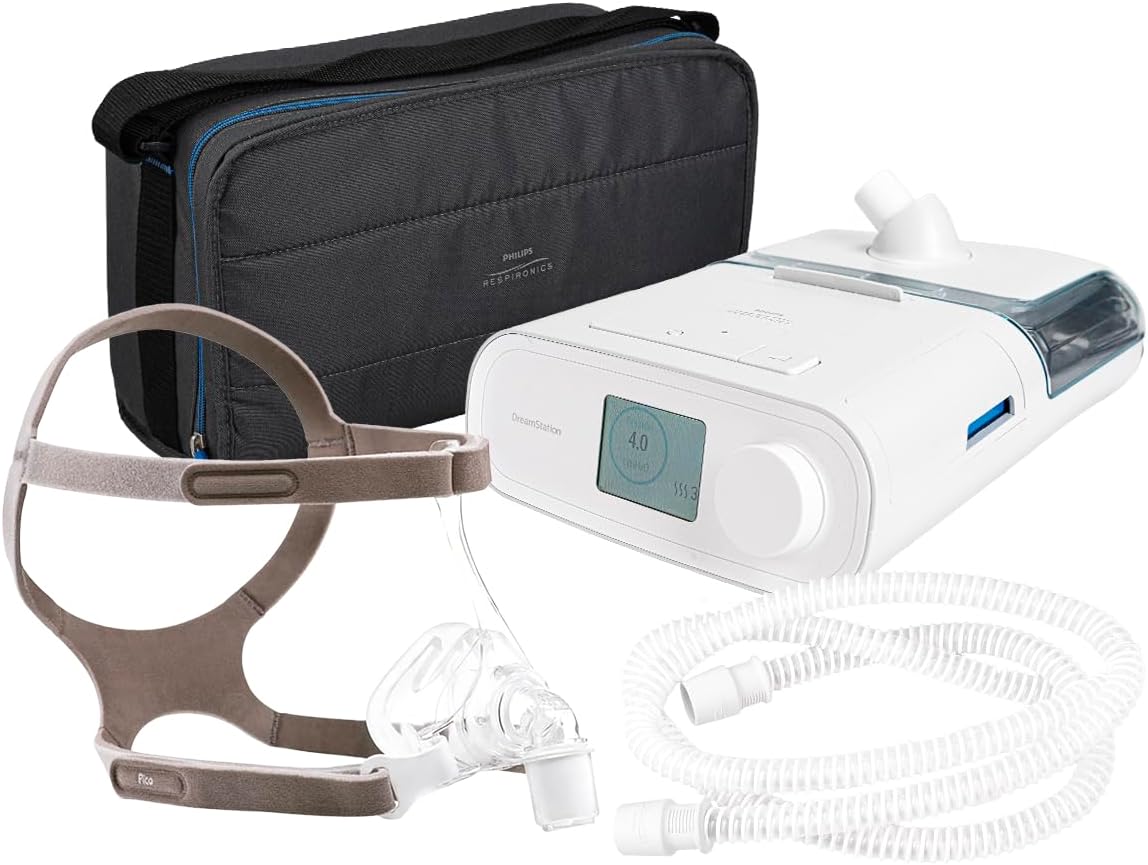
Figure 1.1: Complete Philips DreamStation CPAP system including the main unit, humidifier, nasal mask, tubing, and travel case.
Key Features:
- Automatic Pressure Adjustment: Automatically adjusts therapy pressure to meet individual patient needs throughout the night.
- Integrated Humidifier: Provides heated humidification to prevent dryness and enhance comfort during therapy.
- Patient-Focused Design: Simple and intuitive design for ease of use.
- Color Display: Features a color screen with an icon-based navigation system, displaying sleep duration and progress.
- Advanced Air Filtration: An ultra-fine filter provides additional filtration of very fine particles, ensuring clean air delivery.
- Wireless Connectivity: Supports Bluetooth, cellular, and Wi-Fi for remote monitoring and data management.
- SD Card Slot: For data storage and transfer.

Figure 1.2: The DreamStation's color screen with icon-based navigation and the Pico nasal mask, highlighting the simple and patient-focused design.

Figure 1.3: User interacting with the DreamStation's intuitive interface, demonstrating its simple and patient-focused design.

Figure 1.4: Detailed view of the DreamStation highlighting the SD card slot, reusable and disposable filters, and the easy-to-clean water tank, along with wireless connectivity options.
Nasal Mask (Model R-M1104916):
The included nasal mask features a "nose tip" pad design for minimal contact with the face, offering simplicity, comfort, and an effective seal. Its traditional yet attractive design ensures patient comfort without altering lifestyle.
- Minimal Contact Design: "Nose tip" pad minimizes facial contact.
- Comfort and Seal: Offers a comfortable fit and reliable seal.
- Adjustable Harness: Fine harness with Velcro straps for secure fitting.
- Quick Disconnection: Swivel disconnection for easy removal.

Figure 1.5: A user demonstrating the comfort and minimal contact of the Pico nasal mask, designed for simplicity, comfort, and a secure seal.
2. What's Included
Your Philips DreamStation Automatic CPAP system package includes the following components:
- Philips DreamStation Automatic CPAP Machine (Model LAX500H15)
- Integrated Humidifier
- Pico Nasal Mask (Model R-M1104916)
- Flexible CPAP Tubing
- Reusable Filter
- Disposable Ultra-Fine Filter
- SD Card for Data Storage
- Power Supply (80 W/12 V/6.67 A charger)
- Travel Case
- User Manual (this document)

Figure 2.1: All items included in the DreamStation Automatic CPAP kit: CPAP machine, nasal mask, SD card, filters, hose, water tank, power supply, and travel case.
3. Setup Guide
Follow these steps to set up your DreamStation CPAP machine for the first time:
- Place the Device: Place the DreamStation machine on a stable, flat surface near your bed, ensuring it is below your sleeping position to allow for proper humidification.
- Connect Power: Connect the power cord to the back of the DreamStation machine and then plug it into a wall outlet.
- Install Filters: Ensure both the reusable and disposable ultra-fine filters are correctly installed in their designated slots. Refer to Figure 1.4 for filter location.
- Fill Humidifier (Optional): If using the humidifier, open the water tank and fill it with distilled water up to the maximum fill line. Close the tank securely and insert it into the humidifier chamber on the CPAP machine.
- Connect Tubing: Attach one end of the flexible CPAP tubing to the air outlet port on the DreamStation machine.
- Connect Mask: Connect the other end of the tubing to your Pico nasal mask.
- Insert SD Card: Insert the provided SD card into the SD card slot on the side of the device for data recording.
4. Operating Instructions
Once set up, operating your DreamStation CPAP machine is straightforward:
- Put on the Mask: Place the Pico nasal mask on your face and adjust the headgear straps to achieve a comfortable and secure seal. The mask should be snug but not overly tight.
- Start Therapy: Press the therapy button (usually a large button on the top or front of the device) to begin air pressure delivery. The screen will display therapy information.
- Adjust Settings (if needed): Use the navigation dial and color screen to access and adjust settings such as ramp time, humidification level, and comfort features. Refer to the on-screen icons for guidance.
- Monitor Progress: The color screen will display your sleep duration and therapy progress.
- Stop Therapy: When you wake up or wish to stop therapy, press the therapy button again. The device will power down.

Figure 4.1: The DreamStation's screen displaying "My Configuration" options, indicating readiness for therapy or settings adjustment.
5. Maintenance and Care
Regular cleaning and maintenance are crucial for the longevity and effective operation of your DreamStation CPAP machine and mask.
Daily Cleaning:
- Mask: Disassemble the mask components (cushion, frame, headgear). Wash the cushion and frame daily with mild soap and warm water. Rinse thoroughly and air dry away from direct sunlight.
- Humidifier Water Tank: Empty any remaining water from the tank daily. Wash the tank with mild soap and warm water, rinse thoroughly, and allow it to air dry completely before refilling.
- Tubing: Rinse the inside of the tubing with warm water daily. Hang to air dry completely.
Weekly Cleaning:
- Reusable Filter: Remove the reusable filter and rinse it under warm running water. Allow it to air dry completely before reinserting. Do not wash the disposable ultra-fine filter.
- Device Exterior: Wipe the exterior of the DreamStation machine with a damp cloth. Do not immerse the device in water.

Figure 5.1: The air filtration system of the DreamStation, showing the compartment for the ultra-fine filter, which requires regular inspection and replacement.
Filter Replacement:
- Disposable Ultra-Fine Filter: Replace every 30 days or sooner if it appears dirty or clogged.
- Reusable Filter: Replace every 6 months or sooner if it shows signs of wear or damage.
6. Troubleshooting
This section provides solutions to common issues you might encounter with your DreamStation CPAP machine.
| Problem | Possible Cause | Solution |
|---|---|---|
| No air pressure or low pressure. |
|
|
| Dry mouth or nasal passages. |
|
|
| Mask discomfort or skin irritation. |
|
|
| Device not turning on. |
|
|
If the problem persists after attempting these solutions, please contact Philips Respironics customer support or your healthcare provider.
7. Specifications
| Feature | Detail |
|---|---|
| Model Number (CPAP) | LAX500H15 |
| Model Number (Mask) | R-M1104916 |
| Therapy Modes | CPAP, Auto-CPAP |
| Pressure Range | (Typical range for CPAP, e.g., 4-20 cm H2O - specific value not provided in input, so keep general) |
| Humidifier | Integrated Heated Humidifier |
| Data Storage | SD Card, Wireless Connectivity (Bluetooth, Cellular, Wi-Fi) |
| Filters | Reusable Pollen Filter, Disposable Ultra-Fine Filter |
| Power Supply | 80 W / 12 V / 6.67 A |
| Display | Color LCD with Icon-based Navigation |
| Dimensions (Approx.) | (Specific dimensions not provided in input, omit or state "Refer to product packaging") |
| Weight (Approx.) | (Specific weight not provided in input, omit or state "Refer to product packaging") |
8. Important Safety Information and Warnings
Please read and understand all safety information before using the Philips DreamStation CPAP system. Failure to do so may result in injury or damage to the device.
- Pre-Use Inspection: Before each use, ensure all components (CPAP machine, humidifier, mask, tubing, filters) are in good working condition and free from damage. Do not use if any part is damaged.
- Distilled Water Only: Use only distilled water in the humidifier water tank to prevent mineral buildup and ensure proper operation.
- Proper Storage: Store the product in a clean, dust-free, and dry environment when not in use.
- Electrical Safety: Do not immerse the CPAP machine in water. Keep the device away from liquids. Always unplug the device before cleaning or performing maintenance.
- Medical Device: This is a medical device. Use only as prescribed by a healthcare professional. Do not alter settings without medical guidance.
- Filter Maintenance: Regularly clean and replace filters as instructed to maintain air quality and device performance.
- Children and Pets: Keep the device out of reach of children and pets.
- Flammable Materials: Do not use the device near flammable gases or materials.
9. Warranty and Support
For warranty information, product support, or service inquiries, please refer to the warranty card included with your product or visit the official Philips Respironics website. Keep your purchase receipt as proof of purchase for warranty claims.
For technical assistance or to report issues not covered in the troubleshooting section, please contact Philips Respironics customer service.